EMQX Neuron 3.8.0 Released: New SNMP & GE Historian Drivers and AI-Powered Rule Creation

We are pleased to announce the official release of EMQX Neuron 3.8.0!
This version's core highlights include three new drivers: SNMP, GE Historian, and OPC AE, enabling EMQX Neuron to cover full-scenario requirements from network device monitoring, historical data access, to alarm and event management. Additionally, features such as Northbound Application Import/Export, Tag Management, AI-Powered Rule Writing, and Built-in Modbus TCP Simulator significantly enhance configuration efficiency and intelligence.
Furthermore, version 3.8.0 includes functional enhancements in driver optimization, Dashboard UI, and other areas, further improving usability, completeness, and stability.
New Drivers: SNMP, GE Historian, and OPC AE
1. SNMP Driver: Standard Protocol for Network Device Monitoring
SNMP (Simple Network Management Protocol) is the de facto standard for network device monitoring and management. Through the SNMP protocol, you can monitor the status and performance metrics of routers, switches, servers, UPS, and other network devices in real-time.
Core Capabilities:
- Supports SNMP v2c version
- Monitors key metrics such as CPU, memory, bandwidth, and port status of network devices
- Retrieves device uptime, system information, interface traffic, and other data
- Applicable to data centers, factory networks, building automation, and other scenarios
Typical Application Scenarios:
- Data Center Monitoring: Real-time monitoring of CPU, memory, and disk usage of server clusters
- Factory Network Management: Monitoring port status and traffic load of industrial switches
- Building Automation: Monitoring operational status of UPS power supplies and air conditioning systems
- AI Data Center Construction Monitoring: Rapid AI growth is driving data center expansion. Using the SNMP driver to monitor critical infrastructure, including GPU clusters, high-speed switches (InfiniBand/RoCE), intelligent PDUs (Power Distribution Units), and precision air conditioning, ensures platform stability. Integrating this data into MQTT via EMQX Neuron enables centralized monitoring, intelligent alerting, and energy optimization across data centers.
2. GE Historian Driver: Accessing Industrial Historical Databases
GE Historian is an industrial historical database launched by General Electric (GE), widely used in energy, chemical, manufacturing, and other industries for storing and retrieving long-term industrial process data. Access GE Historian servers running on Windows operating systems through NeuronHUB:
- Read historical trend data, real-time data, and statistical data
- Support time range queries and aggregation calculations
- Integrate historical data with real-time data to support advanced analysis scenarios
3. OPC AE Driver: Industrial Alarm and Event Management
OPC AE (OPC Alarms and Events) is an alarm and event management standard defined by the OPC Foundation, specifically designed to retrieve alarm, event, and status change information from devices.
Core Capabilities:
- Access OPC AE servers running on Windows operating systems through NeuronHUB to receive alarm information in real-time.
- Support three event types:
- Simple Events: Basic status change notifications
- Conditional Events: Alarms with conditional judgments (e.g., temperature exceeding limits)
- Tracking Events: Operator action tracking (e.g., acknowledging alarms, adding comments)
Typical Application Scenarios:
- Centralized Alarm Management: Aggregate alarms from multiple PLCs and SCADA systems to the cloud
- Alarm Analysis: Analyze alarm frequency and response time to optimize alarm strategies
- Compliance Auditing: Record operator acknowledgment and handling of alarms
Comprehensive Upgrade of Data Collection Management
1. Northbound Application Import/Export
New one-click import and export functionality for northbound application configurations simplifies multi-instance deployment and configuration migration.
- Batch Replication: Quickly replicate northbound configurations from one project to others
- Configuration Backup: Regularly export configuration files to ensure configuration security
- Standardized Deployment: Reuse standardized northbound application configurations across multiple edge nodes
2. Tag Management System
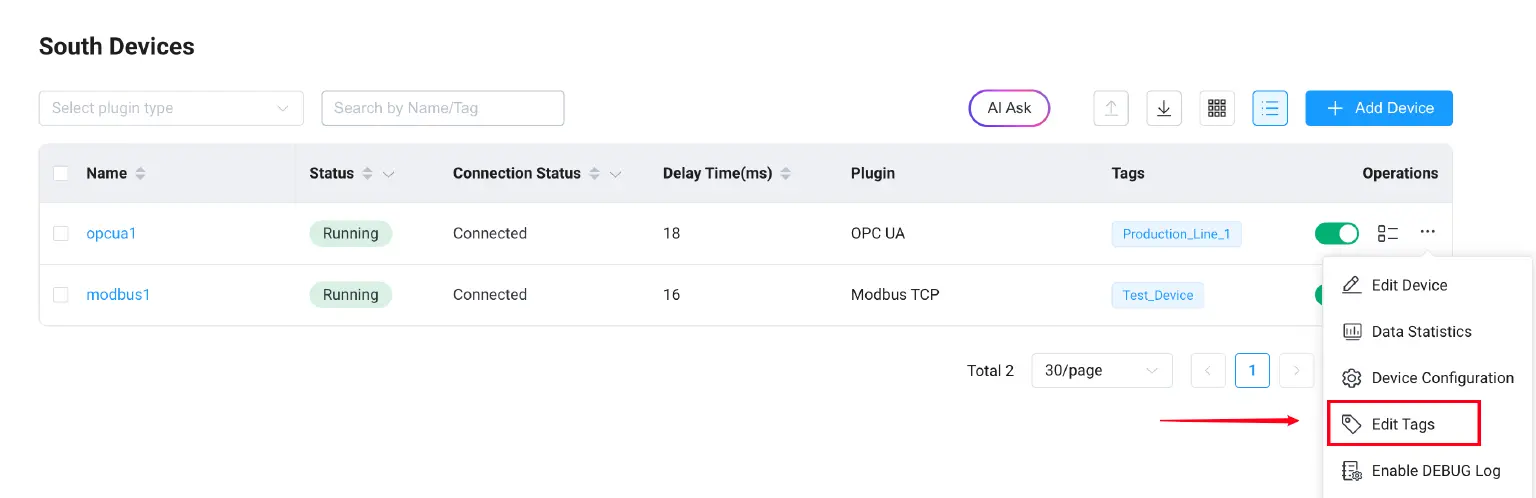
Southbound drivers and northbound applications now support adding "Tags" and support searching and filtering based on tags.
- Add custom tags to devices (e.g.,
Production_Line_1,Critical_Equipment,Test_Device) - Quickly filter and search devices based on tags
- Support multi-tag combination searches
3. Cross-Page Filtering for Southbound Drivers
The southbound driver list page now supports cross-page filtering:
- Filter by "Status" (Running/Stopped)
- Filter by "Connection Status" (Connected/Disconnected)
- Filter results include matching devices across all pages, no longer limited to the current page
Deep AI Integration: Intelligent Rule Writing
EMQX Neuron 3.8.0 deeply integrates AI capabilities into the data processing workflow, significantly lowering the technical barrier for industrial data analysis.
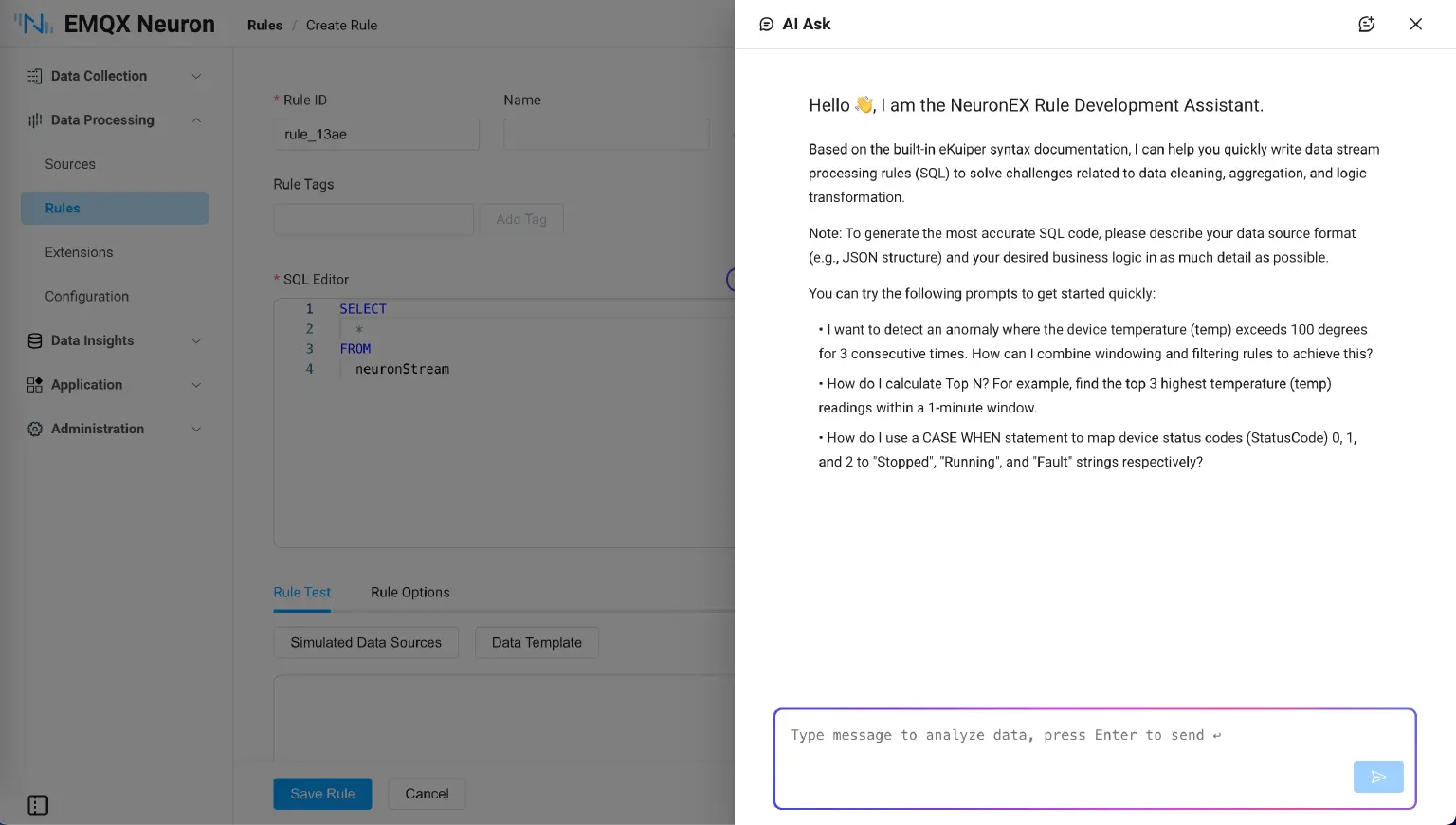
The AI Assistant now integrates the knowledge base of data processing module, allowing users to consult on SQL rules and data processing using natural language. You can ask questions directly to generate code. For example:
- "How do I use windows and filters to detect when temperature exceeds 100 for three consecutive readings?"
- "How can I map StatusCodes 0, 1, and 2 to 'Stopped', 'Running', and 'Fault'?"
- "How do I round fluctuating temperature readings to 2 decimal places?"
Built-in Modbus TCP Simulator
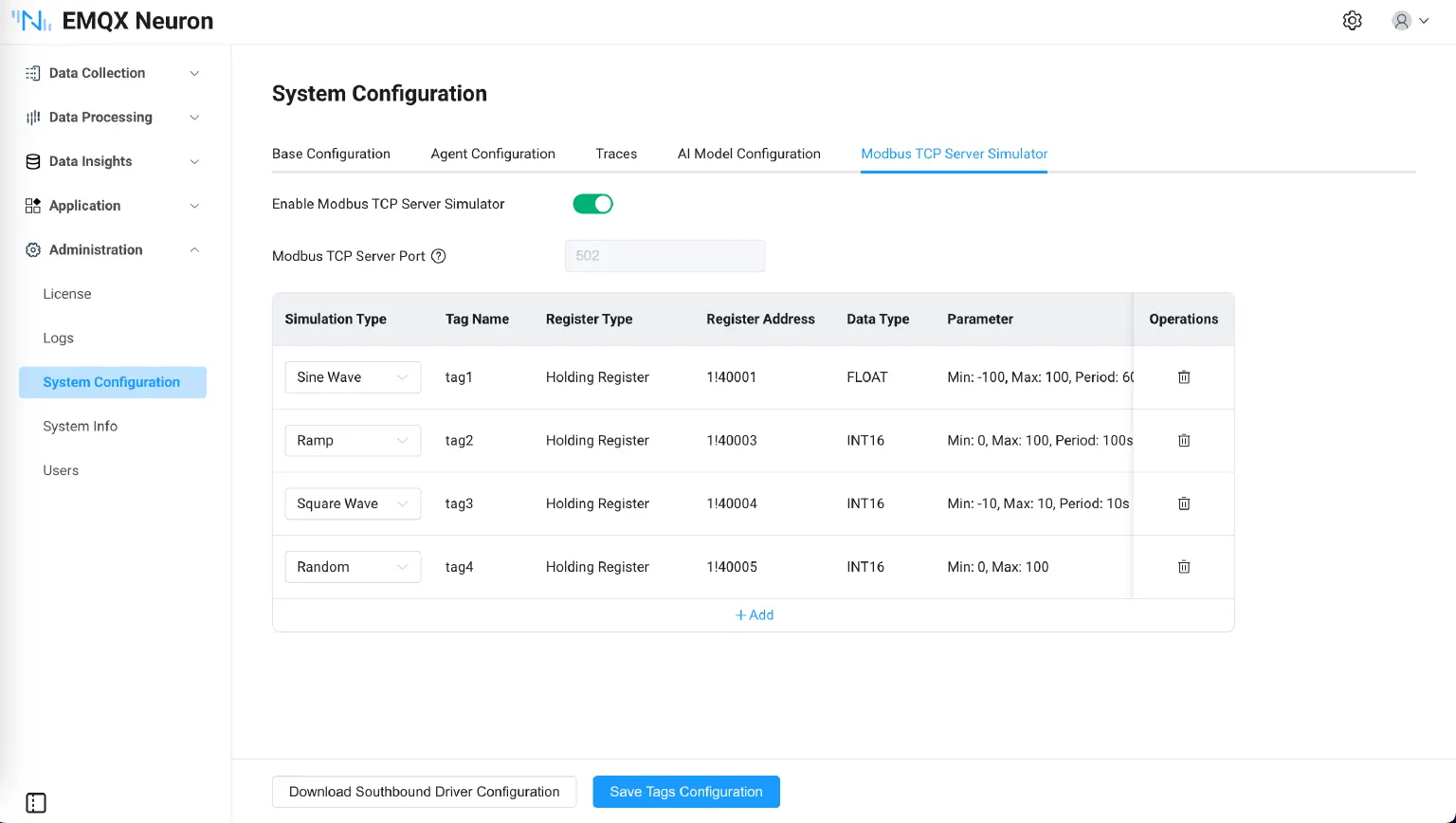
To facilitate user development and testing in hardware-free environments, version 3.8.0 includes a built-in Modbus TCP simulator.
Core Capabilities:
- One-click launch of the Modbus TCP simulator, no need to install third-party software
- Tags can be configured with various types of dynamic simulation data
- One-click export of simulator configurations; importing the configuration into southbound devices enables automatic data collection functionality
Typical Application Scenarios:
- Development Testing: Quickly verify data collection logic without real PLCs
- Training Demonstrations: Demonstrate complete EMQX Neuron functionality without hardware devices
- CI/CD Integration: Use simulators for regression testing in automated testing workflows
Additional Enhancements
In addition to the above highlights, version 3.8.0 includes the following important updates:
1. Driver Capability Enhancements
- Modbus Driver Enhancement: Added mandatory validation for Modbus address range (0~65535) when configuring tags, ensuring configuration accuracy and avoiding collection failures due to address errors.
- CODESYS V3 Driver Enhancement: Codesys protocol now supports Chinese tags, facilitating use by Chinese users.
- OPC UA Driver Enhancement: Added support for String Array data type, further improving OPC UA data type coverage.
- OPC UA Driver Tag Browsing Functionality
- Page Layout Adjustment: Expanded OPC UA namespace node display for clearer presentation of node hierarchy
- Selected Tag Count: Real-time display of selected tag count for convenient batch operations
- Batch Export and Add: Support one-time export or addition of 10,000 tags to collection groups
- Driver Tag Write Log Enhancement: When executing tag write operations via MQTT or HTTP API, the following information is now added to logs, improving diagnostic efficiency in remote control scenarios.
- Interface Execution Status: Success / Failure
- Error Details: If failed, provides detailed error reasons (e.g., address range error, data type mismatch)
- Log Level: INFO log for success, ERROR log for failure
2. Other Optimizations
- RBAC Functionality Improvement: Improved permission control for Viewer role in data analysis, dashboard, and application pages to ensure data security.
- Rule Debugging Functionality: Backend communication protocol for rule debugging optimized from WebSocket to SSE (Server-Sent Events), improving debugging stability and real-time performance.
- UI Style Adjustment: Adjusted and optimized Dashboard page layout and UI style.
- Built-in AI Functionality: Added support for Qwen large model, providing users with more AI model choices.
- Built-in Time-Series Database: Built-in time-series database Datalayers version updated to 2.3.16, further improving performance and stability.
Conclusion
The release of EMQX Neuron 3.8.0 further enhances its protocol coverage and large-scale data collection capabilities as industrial edge gateway software.
We invite you to download and try the new version to experience more powerful and intelligent industrial data connectivity.
Download EMQX Neuron 3.8.0 now: Download EMQX Neuron
For a complete feature list, please refer to: Product Overview | EMQX Neuron Documentation