Bridging the Gap Between OT and IT: 15-Minute Integration of EMQX Neuron and Azure Fabric

In the wave of Industry 4.0, the greatest challenge often isn't a lack of data, but rather data that is "incomprehensible." Fragmented PLC protocols and inconsistent formats make it difficult for workshop data to reach the cloud for analysis. This article demonstrates how to use EMQX Neuron (an industrial edge connectivity gateway) and Microsoft Fabric (a next-generation unified data analysis platform) to build a complete data pipeline from equipment collection and edge processing to cloud storage within 15 minutes.
Why EMQX Neuron + Microsoft Fabric?
What is Microsoft Fabric?
Microsoft Fabric is a unified SaaS-level big data analytics platform that seamlessly integrates data integration, data engineering, real-time analytics, and visualization through OneLake (a unified data lake).
For industrial scenarios, its core component, Eventstream, provides:
- Native Kafka Compatibility: Supports standard Kafka protocol access without complex SDK development.
- Millisecond-level Streaming Ingestion: Real-time processing of industrial equipment sampling data.
- Serverless Elastic Scaling: Automatically handles burst traffic from tens of thousands of data points.
- Real-time Data Transformation Engine: Filters, aggregates, and maps data before it "lands."
EMQX Neuron: The "Translator" of Industrial Protocols
EMQX Neuron is an industrial edge Connectivity gateway designed for the industrial field. Its core advantages include:
- 100+ Industrial Protocol Support: Includes Modbus, OPC UA, Siemens S7, Mitsubishi, Omron, etc.
- Lightweight Deployment: Supports X86/ARM architectures and Docker/Kubernetes containerized deployment.
- Edge Streaming Computing: Features a built-in SQL engine for data filtering, aggregation, and transformation at the edge.
- High Performance and Low Latency: Easily handles 10,000+ data points with millisecond-level response.
Why is This Combination Ideal for Industrial Digitalization?
The link between EMQX Neuron and Microsoft Fabric perfectly combines "last mile" industrial data collection with cloud-based "infinite computing power."
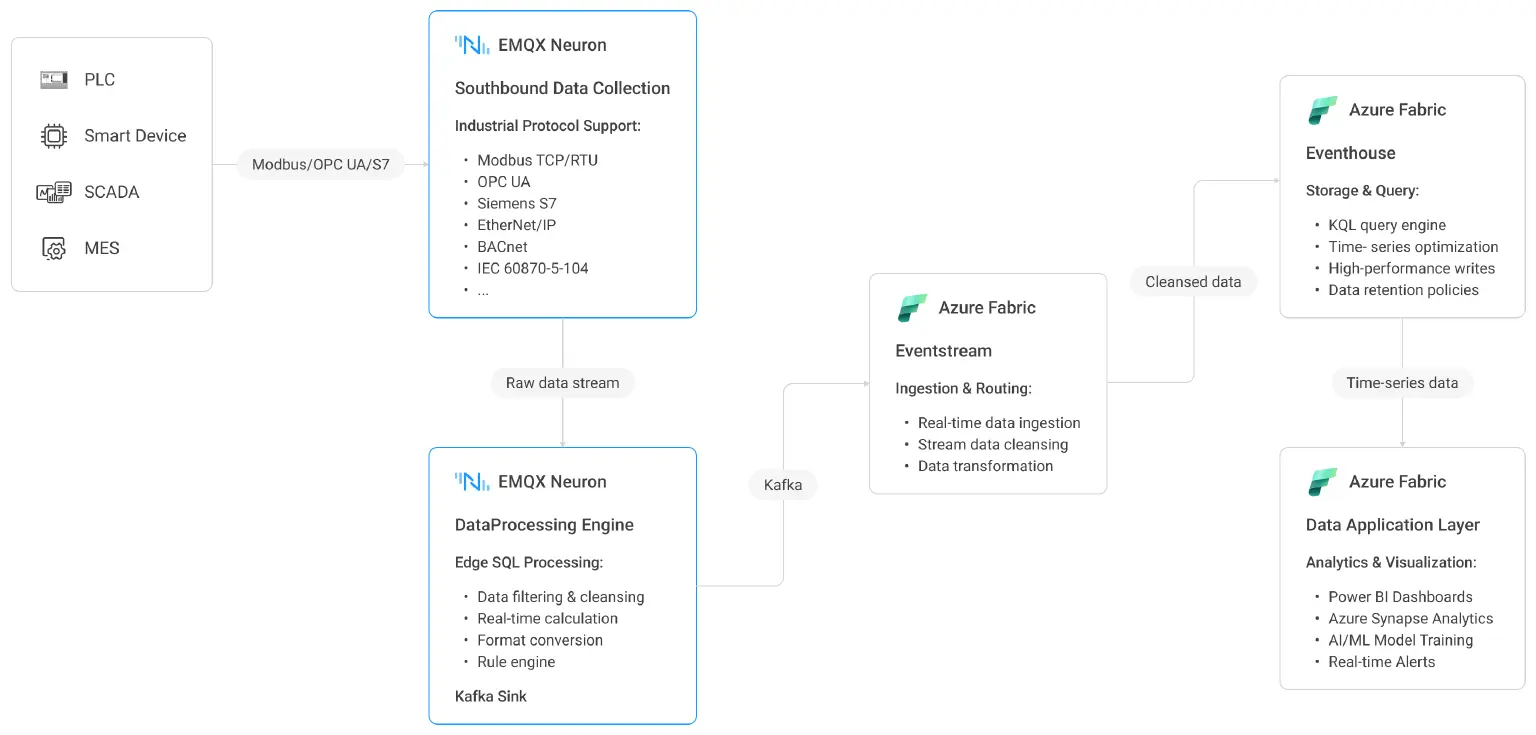
At the edge, EMQX Neuron converts 100+ fragmented protocols into standard Kafka format. Its built-in SQL engine cleans and aggregates data before it leaves the factory, ensuring only high-value data is uploaded.
In the cloud, Fabric provides a full-stack analysis platform. Once data enters Fabric's Eventhouse, enterprises can use Synapse Data Warehouse for historical correlation (e.g., linking equipment logs with ERP orders), Synapse Data Science for predictive maintenance models, and Power BI Direct Lake for real-time monitoring—all based on OneLake without data movement.
This enables data to drive AI predictions, optimize production scheduling, and support supply chain decisions.
15-Minute Hands-on: Building a Data Pipeline from Edge to Cloud
Data Flow Architecture Overview
Step 1: Configure Southbound Data Collection in EMQX Neuron
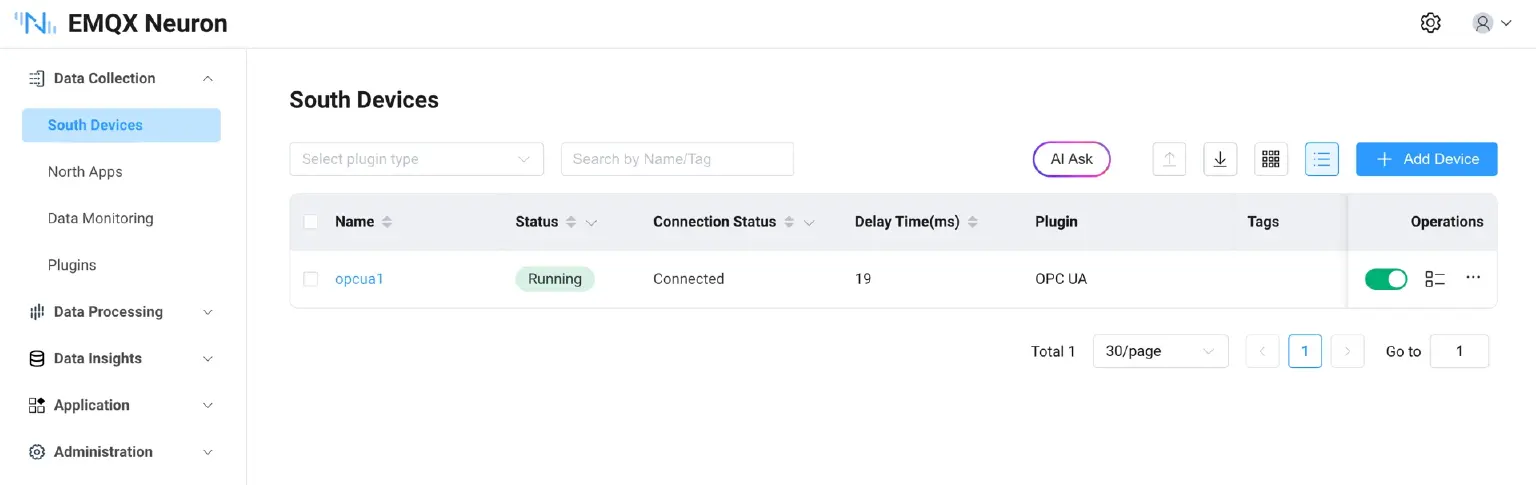
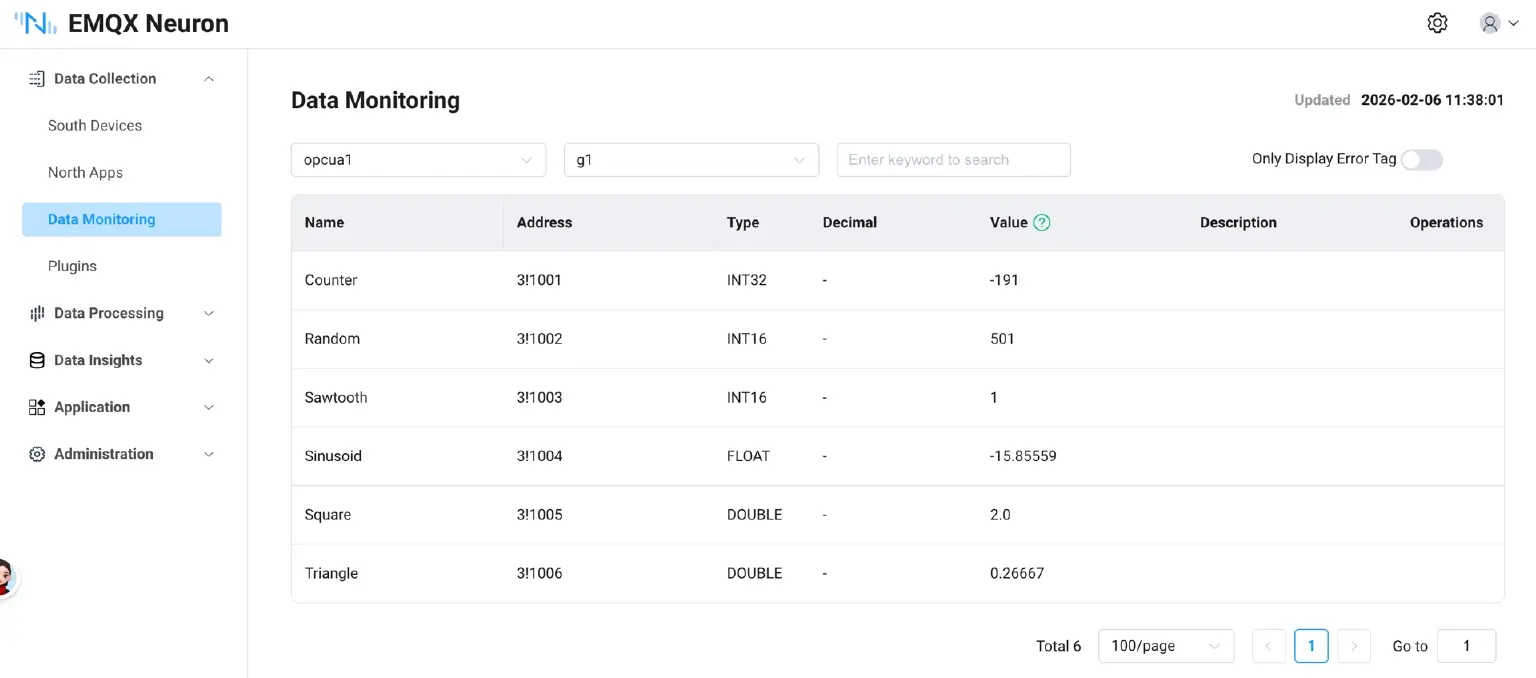
This example uses an OPC UA Server Simulator as the data source. Create an OPC UA southbound driver to connect to the simulator and obtain real-time data.
- Quick Start Tip 1: Use the built-in Modbus simulator. EMQX Neuron provides a built-in Modbus TCP Server simulator for rapid testing without external hardware.Built-in Modbus TCP Server Simulator | EMQX Neuron Docs
- Quick Start Tip 2: Connect to real PLC devices. Supports mainstream PLCs such as Siemens, Mitsubishi, and Omron. How to Connect Any PLC to MQTT in 10 Minutes | EMQX Neuron Docs
Step 2: Push Data to Fabric via Data Processing Module
1. Subscribe Collected Data to Data Processing Nodes
Configure the subscription in the EMQX Neuron interface under Northbound Applications.
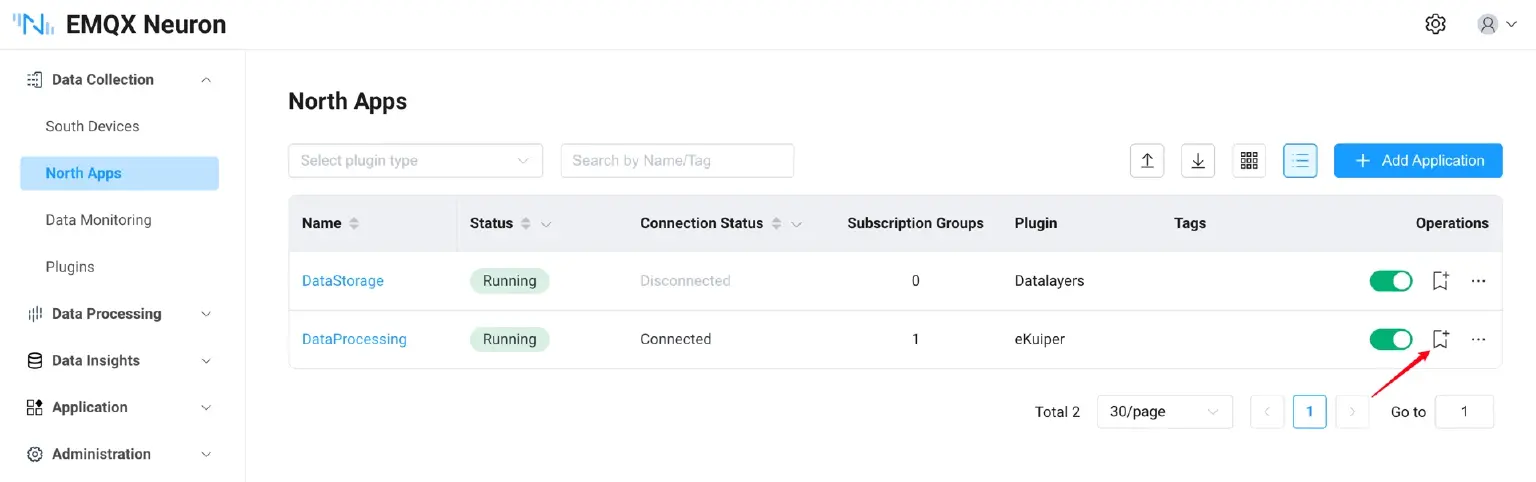
2. Create Data Processing Rules
Use a default SQL example: SELECT * FROM neuronStream. While this forwards all JSON data, it is recommended to use WHERE conditions in production to filter high-value data.
2.3.3 Configure Kafka Sink (Connecting to Fabric)
| Configuration Item | Description | Example Value |
|---|---|---|
| Broker | Fabric Eventstream Bootstrap server | neuron-eventstream.servicebus.windows.net:9093 |
| Topic | Topic name in Fabric | neuron-topic |
| SASL Username | Fixed string | $ConnectionString |
| SASL Password | Fabric Connection string-primary key | Endpoint=sb://... |
| SASL Auth Type | Authentication method | plain |
| Verification | Skip TLS certificate verification (Dev environment) | True |
For how to obtain the above Fabric information, please refer to Chapter below.
Click "Test Connection"; a "Success" message indicates normal communication between EMQX Neuron and Fabric.
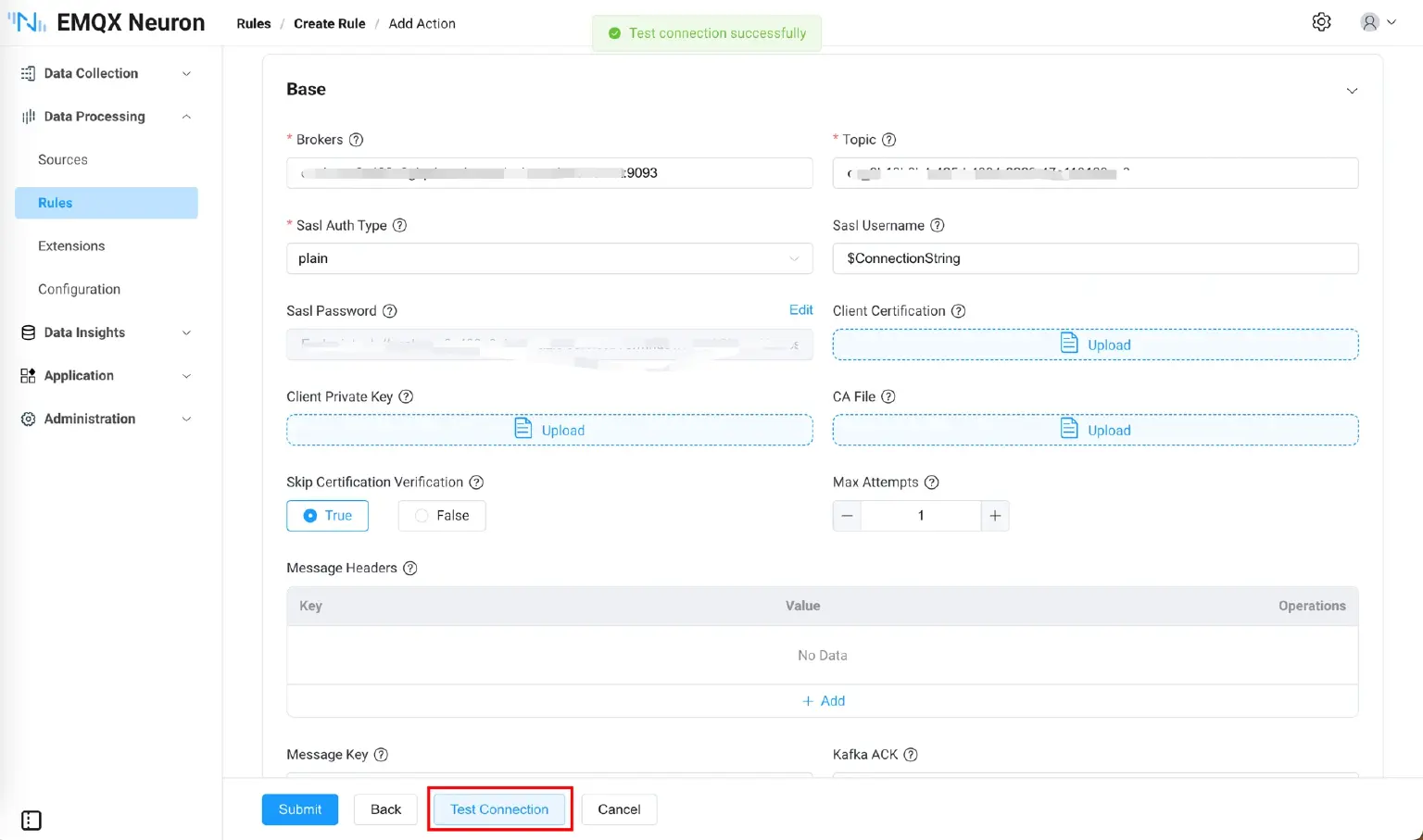
Save the rule, and the EMQX Neuron side configuration is completed.
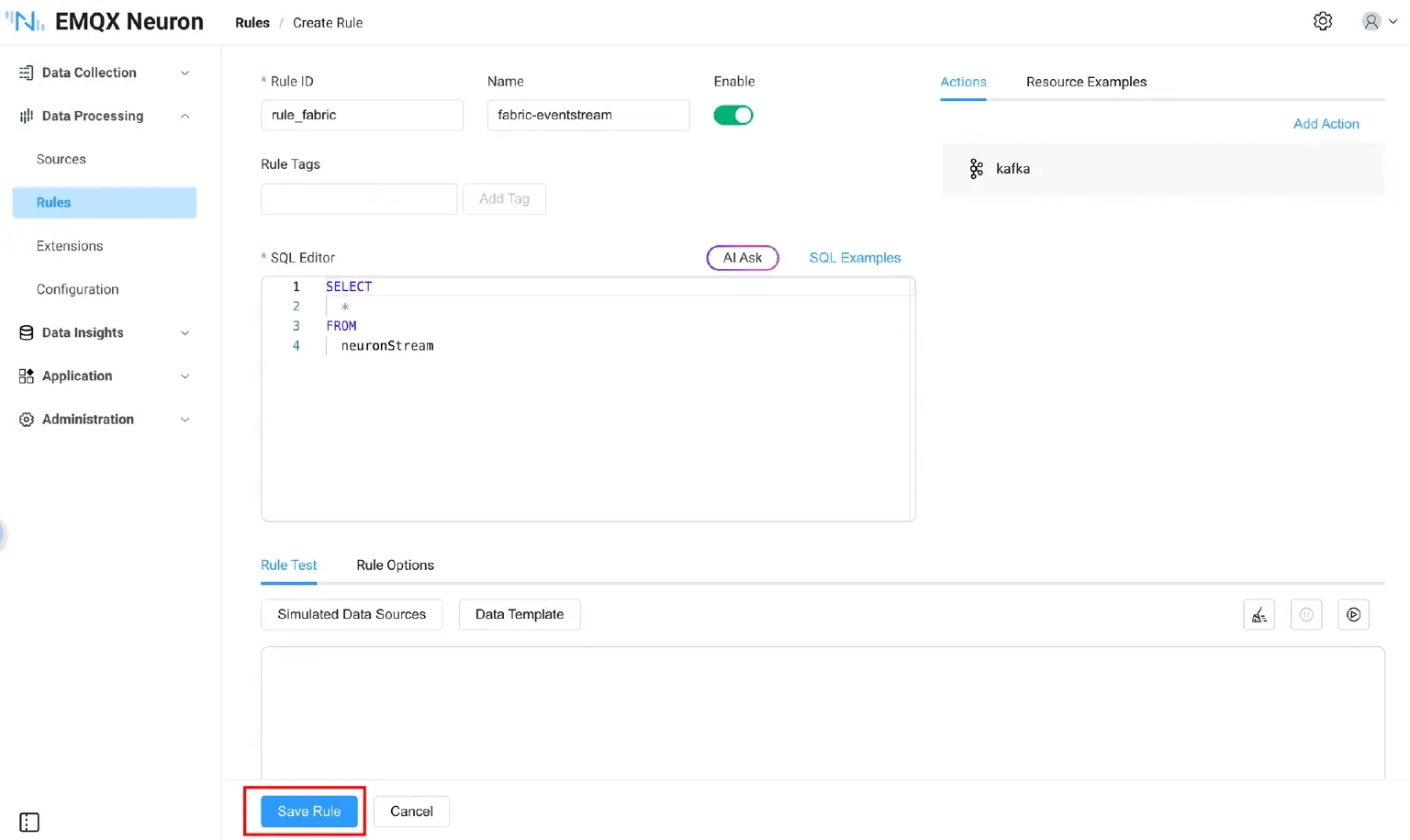
Step 3: Configure Eventstream in Fabric
Why is Eventstream preferred for industrial scenarios?
While Fabric offers various paths (Data Factory for batch, Warehouse for structured), Eventstream is the true "real-time data hub" for IIoT equipment sampling.
Four Advantages of Eventstream:
- Native Kafka Compatibility: EMQX Neuron can connect "seamlessly" without SDK development.
- Ultra-low Latency: Achieves true streaming ingestion from device to cloud in seconds.
- Serverless Elasticity: Automatically scales for thousands of points without managing Kafka clusters.
- Real-time Transformation: Filters and aggregates data before landing in the lake.
Create Eventstream
- Create a new Eventstream in the Fabric workspace.
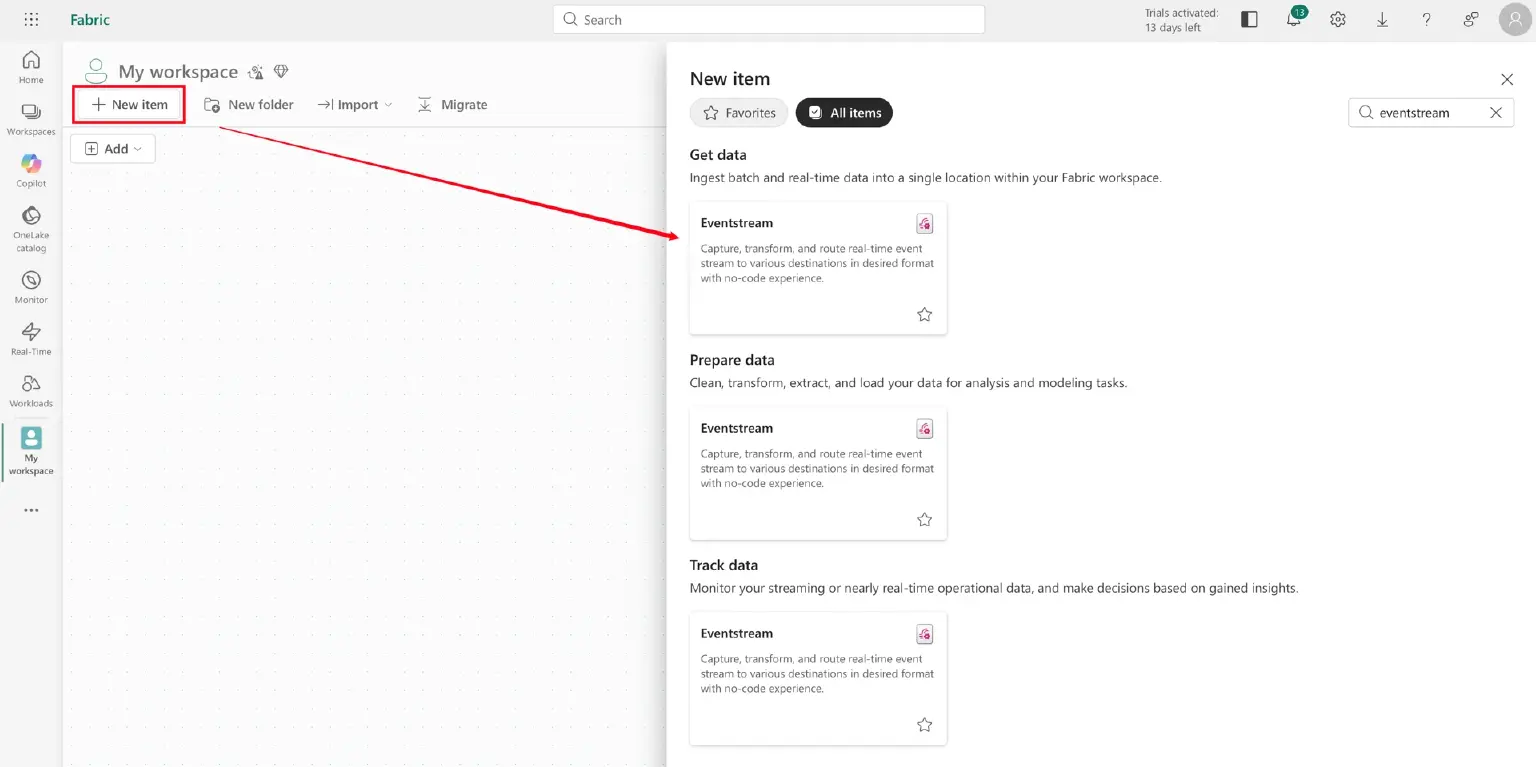
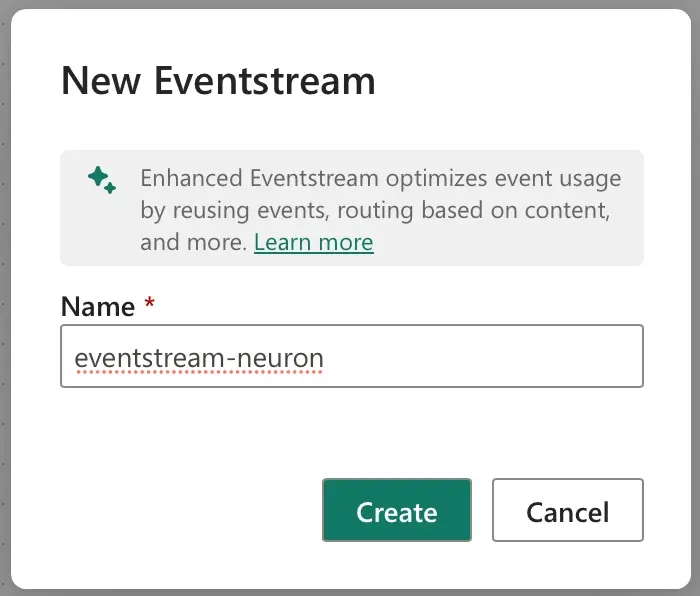
- Choose the data source: Use a custom endpoint.
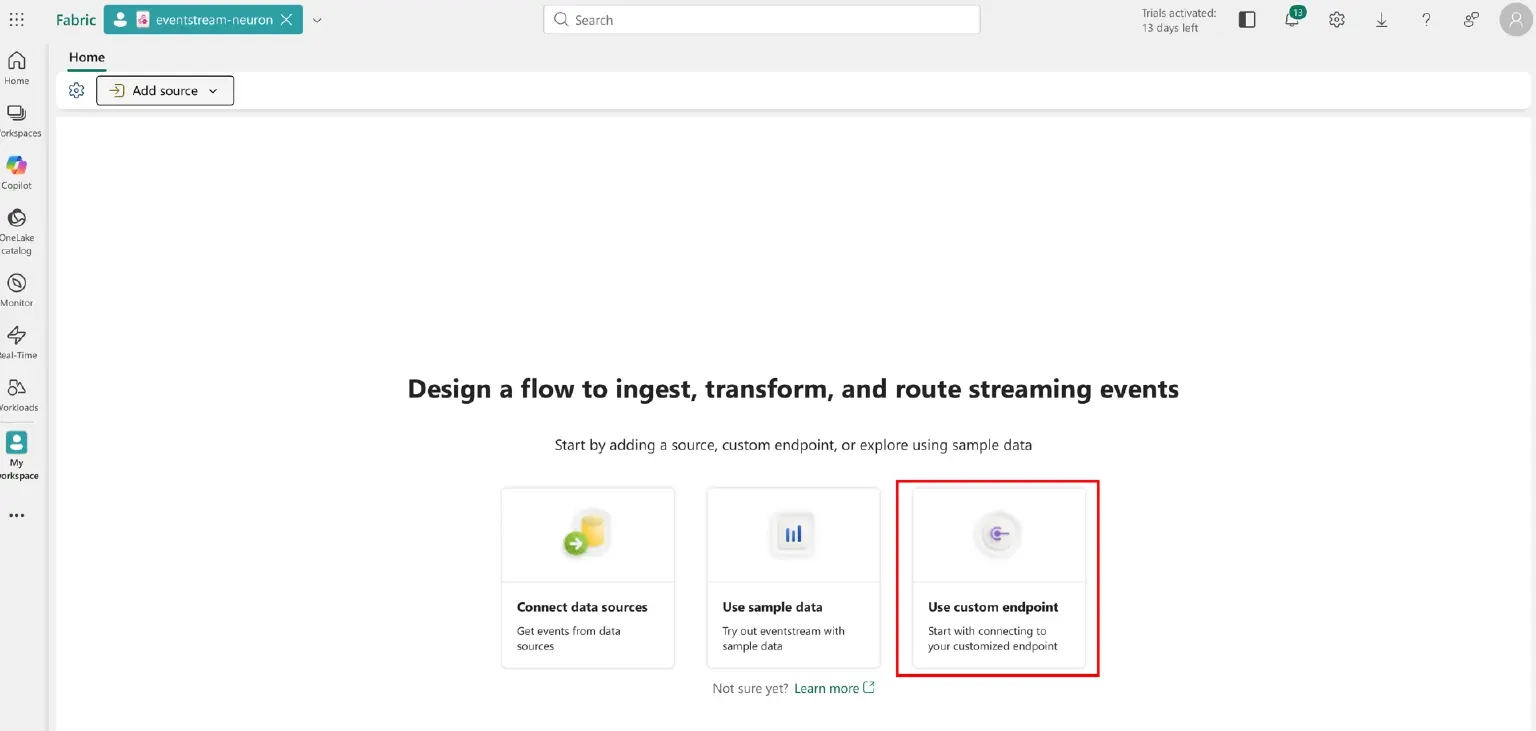
- Configure the data destination: Eventhouse.
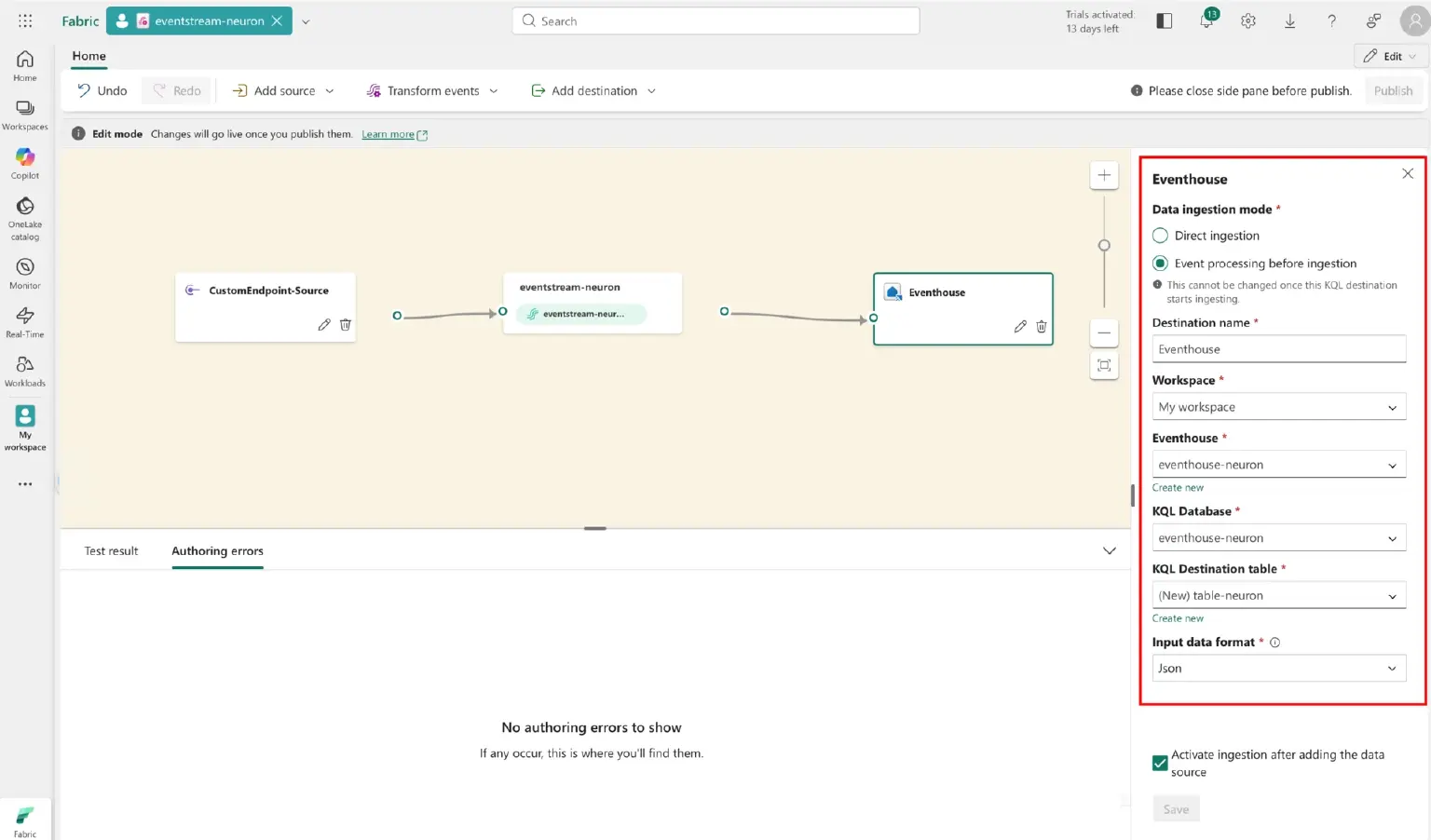
- Configure Eventhouse storage
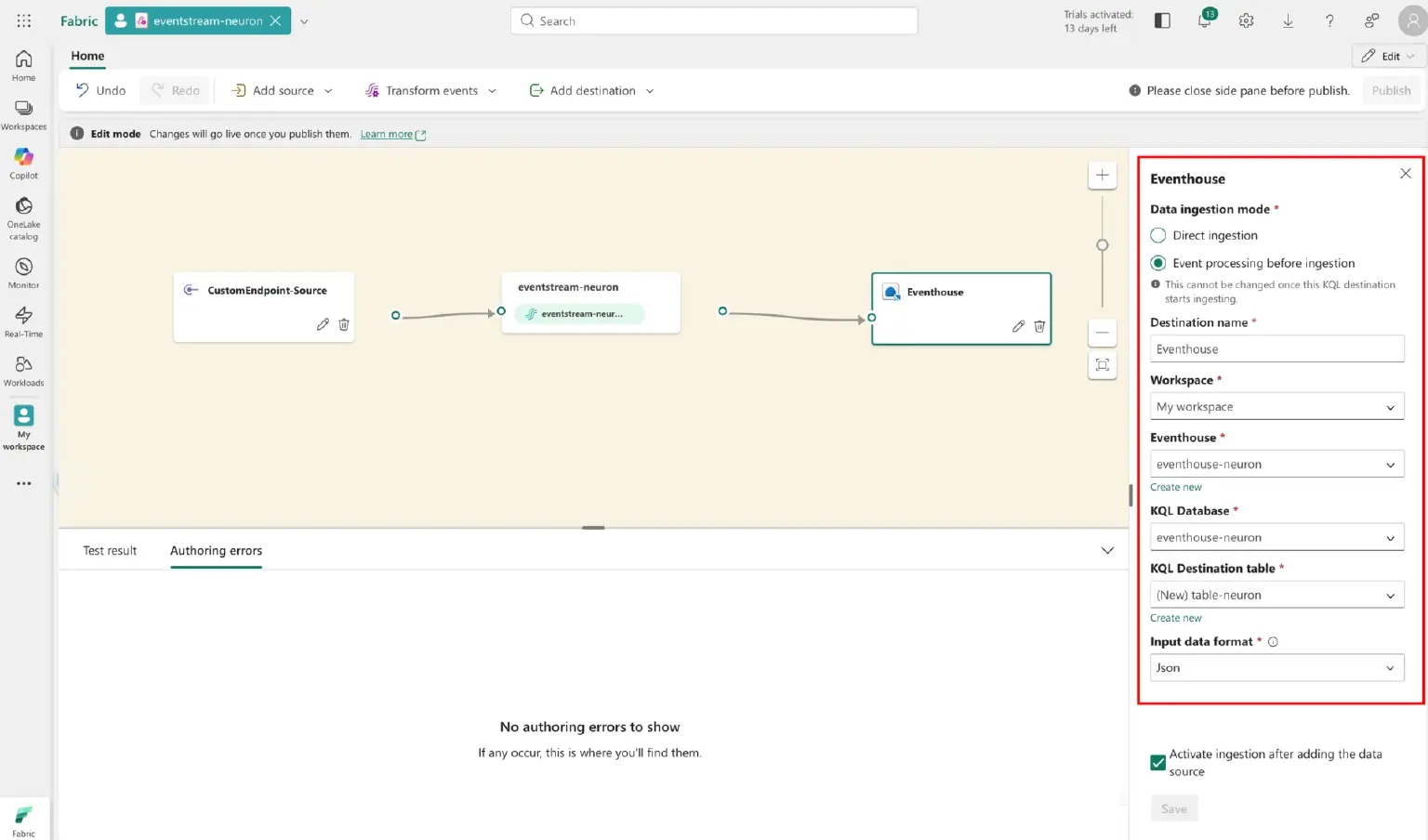
- Publish Eventstream
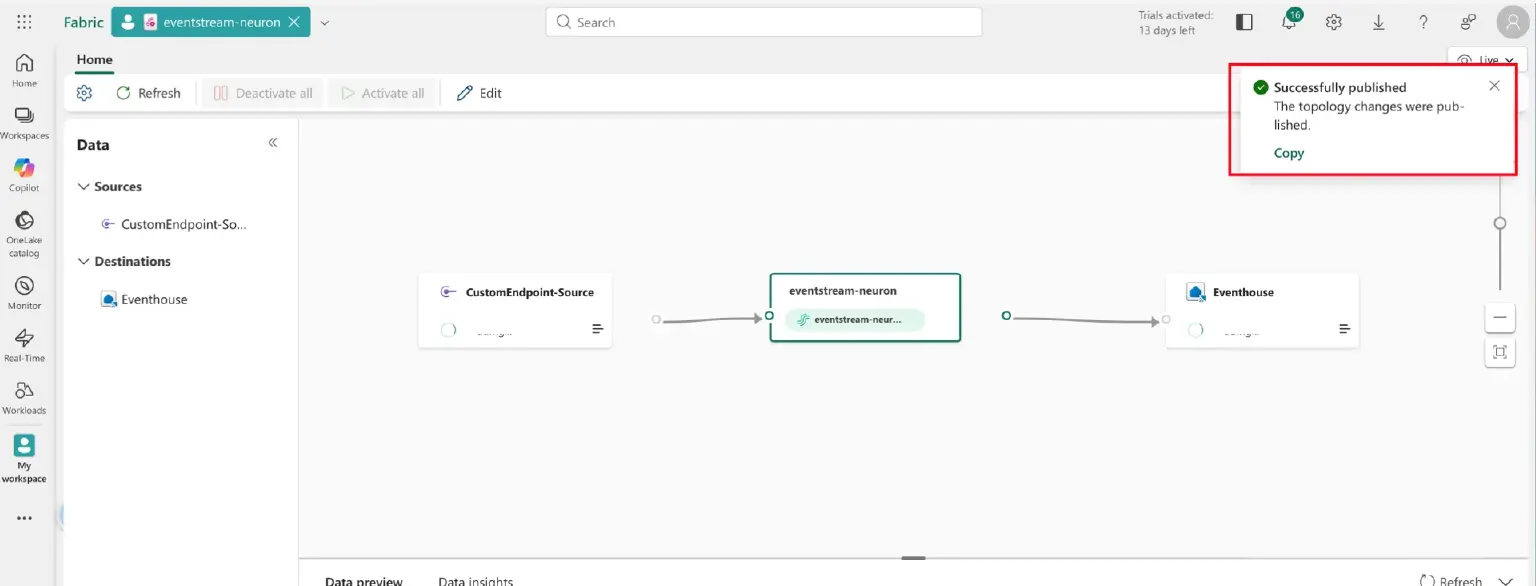
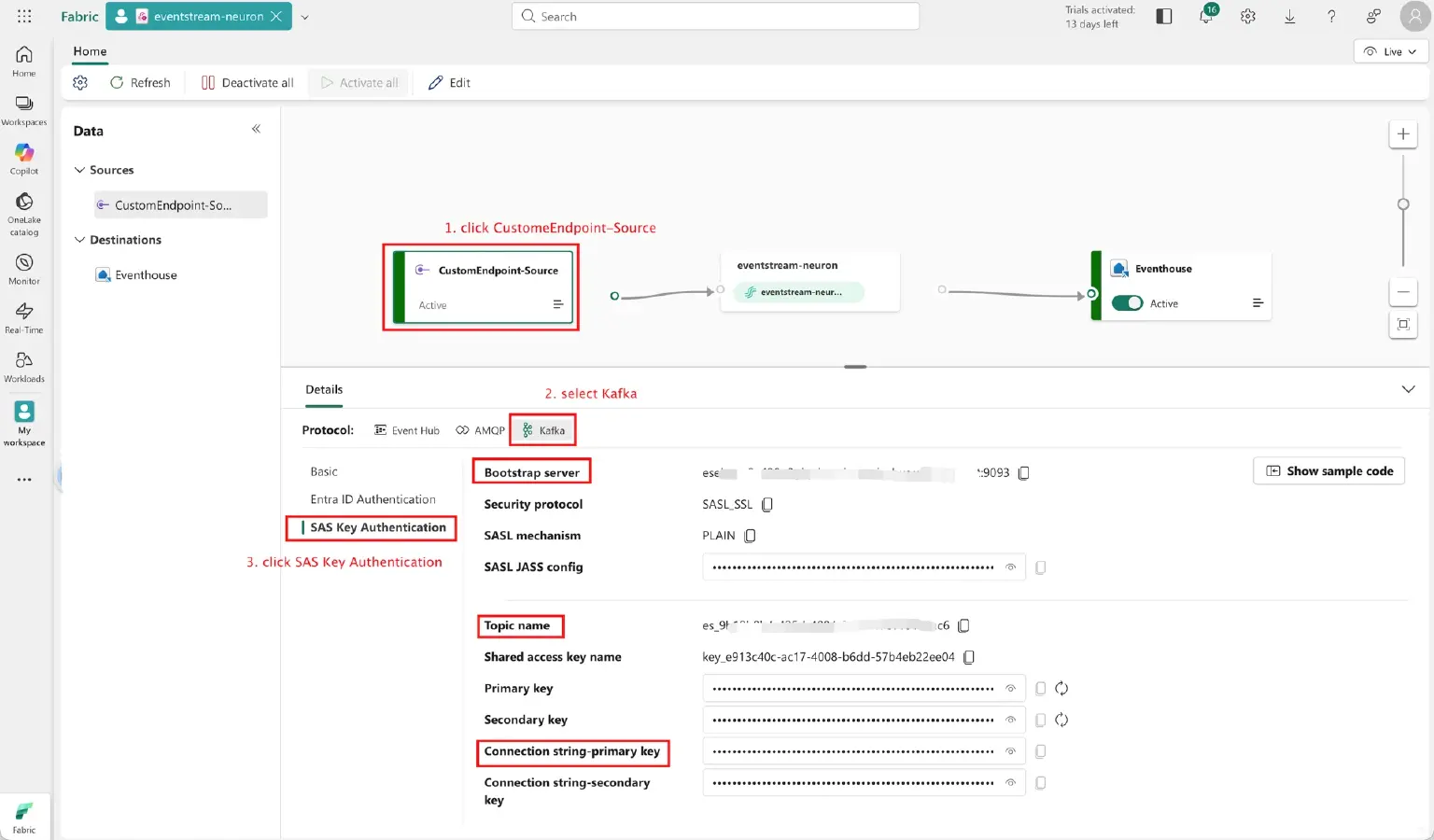
Step 4: Obtain Eventstream Connection Information
From the Fabric Eventstream page, retrieve the Bootstrap server, Topic name, and Connection string-primary key and enter them into the EMQX Neuron configuration page.
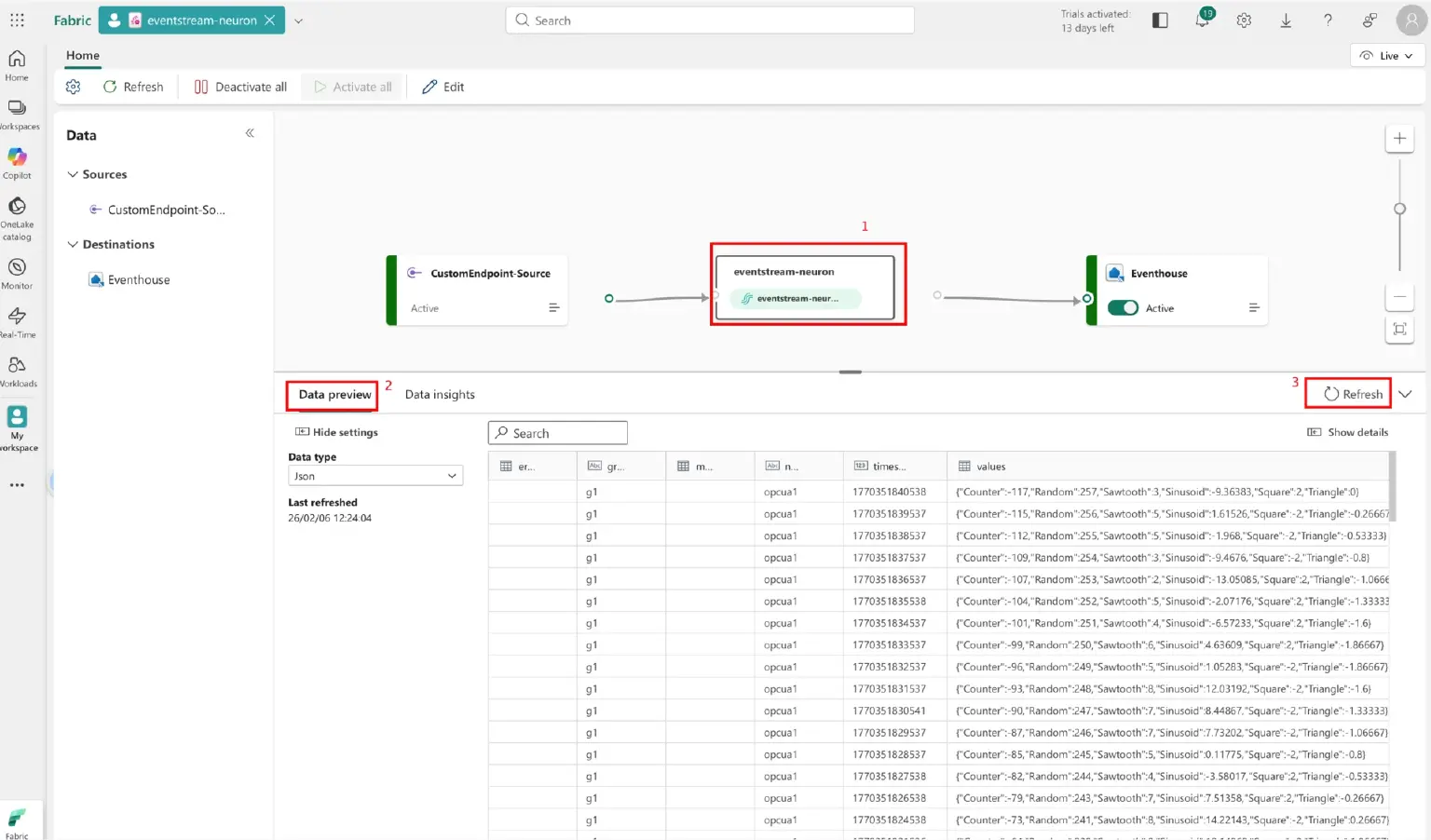
Step 5: Data Validation and Ingestion
Eventstream Data Preview
Click the eventstream-neuron node in the Fabric canvas and switch to Data preview. Seeing the JSON messages update in real time confirms that data is successfully reaching the cloud.
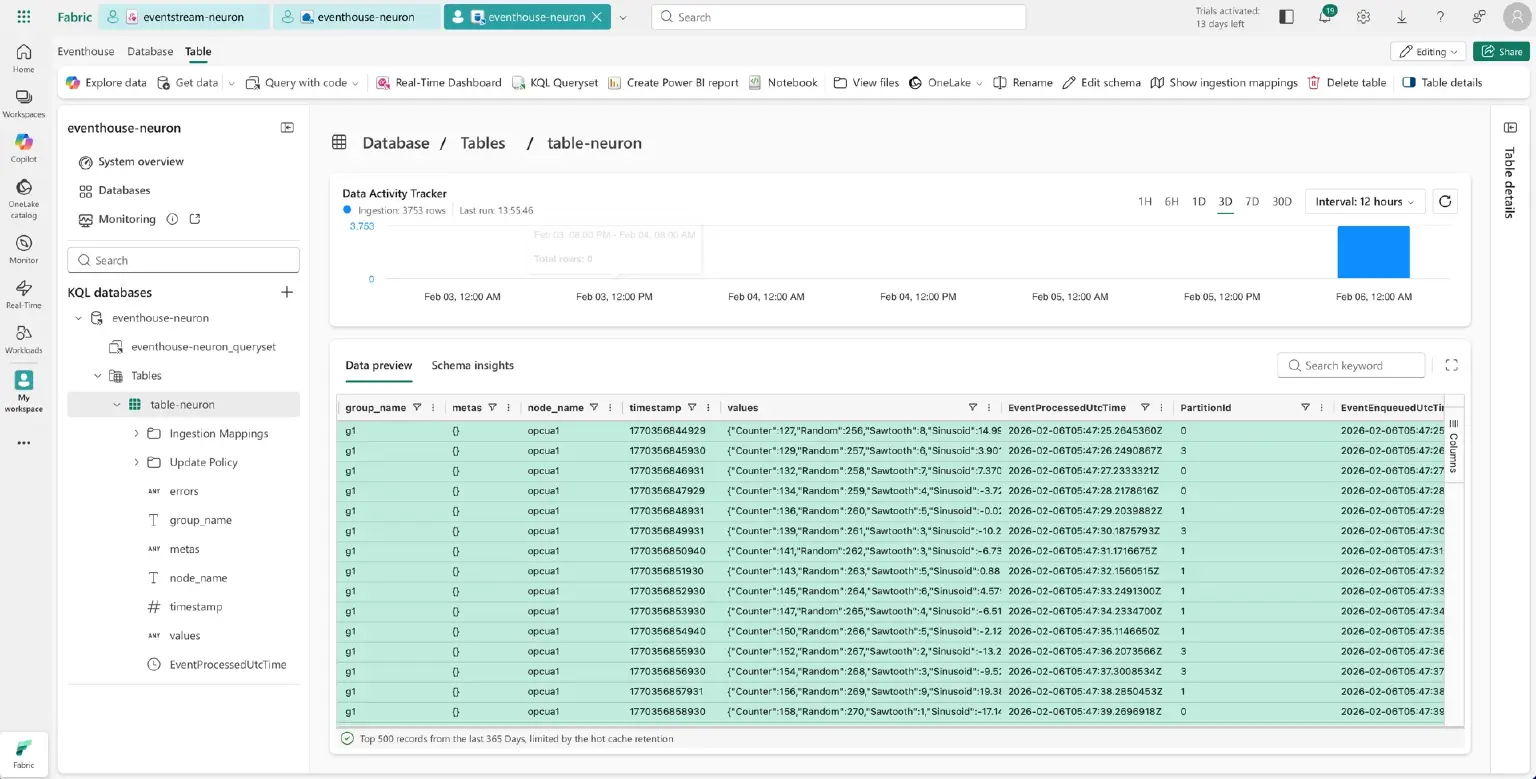
Eventhouse Data Query
Once data flows into Eventhouse, detailed data can be viewed in the table-neuron under the eventhouse-neuron page.
The pipeline from PLC to cloud is now fully operational!
Beyond Data Moving: The Powerful Capabilities of Eventstream and Fabric
Eventstream acts as a "smart filter," not just a mover. Industrial sites often generate redundant data (e.g., unchanged temperature readings) that can drive up storage costs if not filtered.
Eventstream Real-time Data Processing
In Eventstream, you can accomplish the following tasks through built-in data transformation operations :
| Capability | Application Scenario |
|---|---|
| Filter | Only upload data where temperature $> 80^{\circ}C$ to remove redundant records. |
| Manage fields | Rename PLC tag001 to temperature_celsius for better semantics. |
| Aggregate | Calculate average, max, and min values every 1 minute. |
| Route | Distribute data to different Eventhouse tables based on Device ID. |
Fabric Platform Full-stack Data Analysis
After data enters Fabric, you can leverage its full-stack capabilities to build a complete closed loop from data to insights:
- Data Factory: Enterprise-grade ETL/ELT to correlate real-time data with ERP/MES history using 100+ connectors.
- Synapse Data Warehouse: Lakehouse analysis running T-SQL queries directly on Delta Parquet files in OneLake.
- Synapse Data Science: Train predictive maintenance models using MLflow; write results back to OneLake.
- Power BI Direct Lake: Real-time visualization with sub-second interactive analysis directly on OneLake.
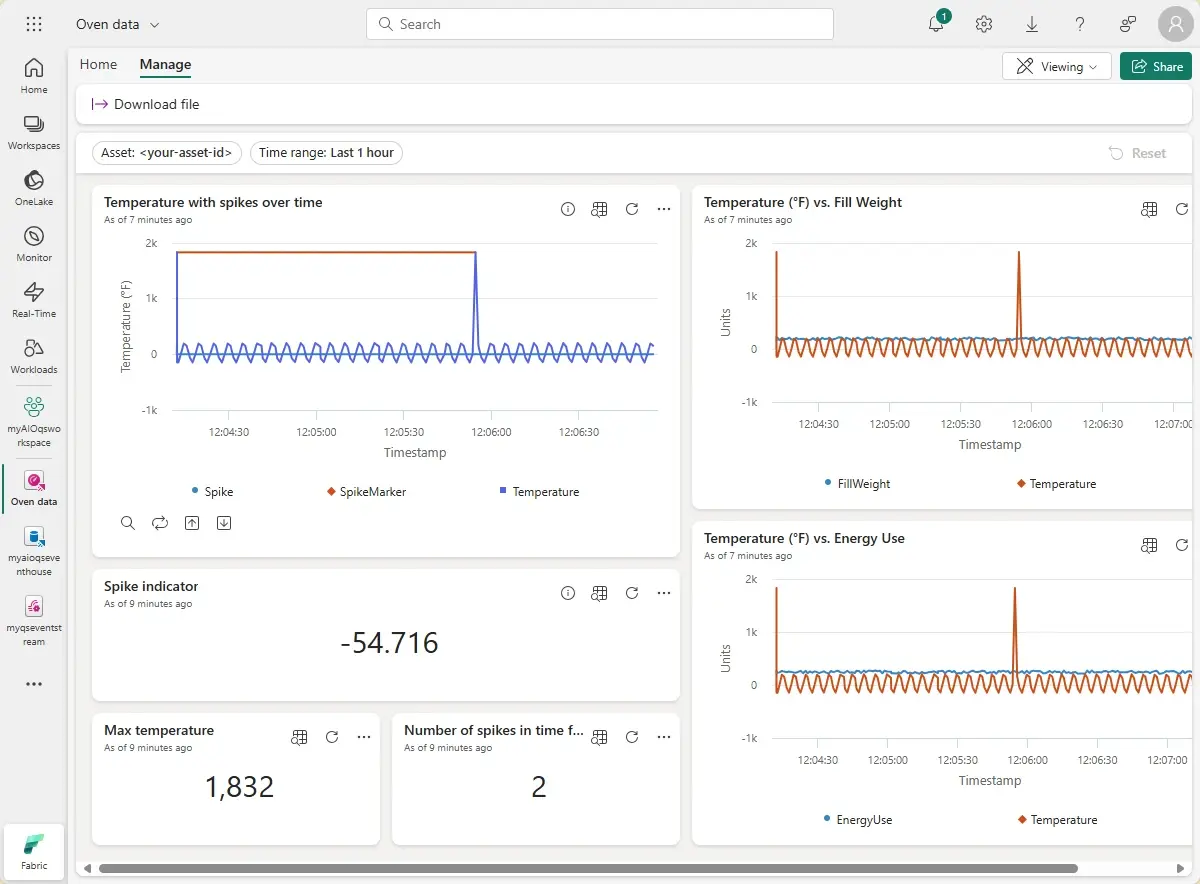
To fully understand the functions of Fabric, please read the official Fabric documentation: Microsoft Fabric documentation - Microsoft Fabric
EMQX Neuron’s Enhanced Capabilities for Industrial Intelligence
Multi-source Integration: Breaking "Information Silos"
Traditional production data is often scattered across PLC, MES, ERP, and video systems. EMQX Neuron integrates these heterogeneous sources into a single platform. Its processing engine can associate PLC data with MES work order information at the edge, creating a business-contextualized data stream for Fabric.
Recommended Reading: EMQX Neuron Best Practices: Integrating MySQL Data into IIoT Platforms
Edge Preprocessing: Uploading Only "High-Value" Data
Uploading raw high-frequency data consumes massive bandwidth and storage costs. Using EMQX Neuron's SQL engine, you can implement threshold filtering, change-rate detection, and anomaly detection. These strategies can reduce cloud data volume by over 90%, significantly lowering costs while increasing analysis efficiency.
Edge AI + Cloud Analysis: Predictive Maintenance Loop
Transition from "reactive" to "predictive" maintenance. EMQX Neuron can load Python or ONNX AI models at the edge for millisecond-level anomaly detection (e.g., vibration alerts sent to MES via REST Sink). Meanwhile, historical data in Fabric trains long-term models (e.g., LSTM) to predict failure probabilities over 7 days, displayed on Power BI. This loop can reduce unplanned downtime by 30-50%.
Recommended Reading: EMQX Neuron Best Practices: Integrating MySQL Data into IIoT Platforms
Summary
The integration of EMQX Neuron and Microsoft Fabric realizes a seamless transition from industrial "collection" to "insight." By performing protocol conversion and intelligent filtering at the edge, enterprises can drastically reduce cloud costs while unlocking the full value of their data through Fabric's processing and visualization tools.
Whether you hope to quickly verify an industrial data cloud migration solution or build an enterprise-level intelligent operation and maintenance platform, this combination can provide you with a complete solution from edge to cloud.
Take action now and let your industrial data realize its true value.
- Experience it today: Download EMQX Neuron
- Dive deeper: Product Overview | EMQX Neuron Docs