EMQX Edge 1.3.0 Released: MQTT over QUIC Bridge and Updated License Policy

We are excited to announce the release of EMQX Edge 1.3.0. This version introduces powerful new bridging capabilities, a more intuitive management experience through Dashboard updates, and important changes to our license policy and installation process.
MQTT over QUIC Bridge
The standout feature of EMQX Edge 1.3.0 is the support for MQTT over QUIC bridge. This allows EMQX Edge to establish an MQTT channel with an upstream EMQX node using QUIC as the transport layer.
Compared to traditional TLS/TCP-based bridging, MQTT over QUIC offers:
- Faster Connection Establishment: Significant reduction in handshake overhead.
- Enhanced Stability: Superior performance in weak or unstable network environments.
- Lower Latency: Optimized delay characteristics for real-time edge-to-cloud communication.
Configuration
You can set up a QUIC bridge via the Dashboard:
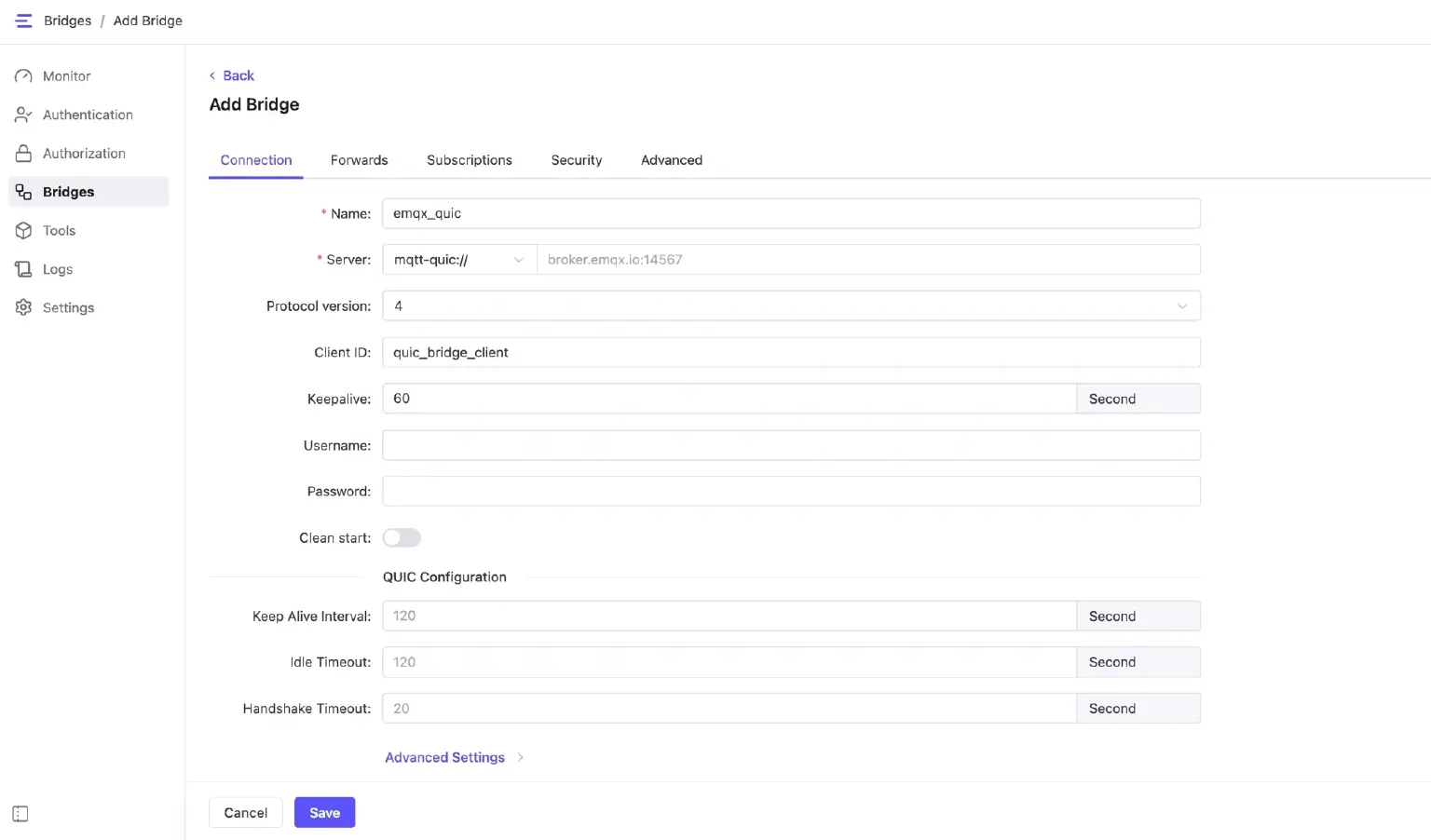
Or the configuration file:
bridges.mqtt.emqx_quic {
    server = "mqtt-quic://broker.emqx.io:14567"
    clientid="quic_bridge_client"
    keepalive = 60s
    #ssl {
    #    key_password = "yourpass"
    #    keyfile = "./etc/certs/client-key.pem"
    #    certfile = "./etc/certs/client-cert.pem"
    #    cacertfile = "./etc/certs/cacert.pem"
    #}
    forwards = [
        {
            remote_topic = "fwd/topic1"
            local_topic = "topic1"
        }
    ]
    subscription = [
        {
            remote_topic = "cmd/topic3"
            local_topic = "topic3"
        }
    ]
    quic_idle_timeout = 120s
    quic_keepalive = 120s
    quic_multi_stream = false
    quic_qos_priority = false
    quic_0rtt = true
}
Key Configuration Highlights:
- Server Address: Uses the
mqtt-quic://protocol. - Security: Configure encryption certificates via
keyfile,certfile, andcacertfile. - Heartbeat Mechanism:
quic_keepalivedefines the interval for transport-layer heartbeats, whilequic_idle_timeoutdetermines when the connection is disconnected. - Performance Toggles: *
quic_qos_priority: When enabled, MQTT QoS 1 and QoS 2 messages are prioritized.quic_0rtt: Enables 0-RTT for faster reconnection.quic_multi_stream: Toggle for multi-stream support.
For more details, please refer to: MQTT over QUIC Bridge | EMQX Edge 1.3 Docs
Important Update: License Policy Changes
Version 1.3.0 introduces a new License Policy. Please take note of how expiration affects your running instances:
- Ongoing Connections: If a license expires while EMQX Edge is running, existing MQTT connections will remain active as long as the service is not restarted.
- New Connections: Once the license is expired, the system will stop accepting new MQTT connections.
- Restarts: If you attempt to restart EMQX Edge with an expired license, the service will fail to start.
- Alerts: Expiration warnings will now appear prominently in the Dashboard and will be recorded in the system logs.
For more information, please refer to: License Policy | EMQX Edge 1.3 Docs
Dashboard Improvement: Better Visualization and Security
The EMQX Edge Dashboard has been updated to version 0.0.6, bringing several user-experience improvements:
- Optimized Bridge Interaction: Setting up and managing MQTT over QUIC bridges is now more intuitive.
- Subscription Topic Tree View: A new visual tool that allows you to see clients subscribed to specific topics. For instance, if
test_client_1subscribes totest/topic1, it will be clearly mapped in the tree view.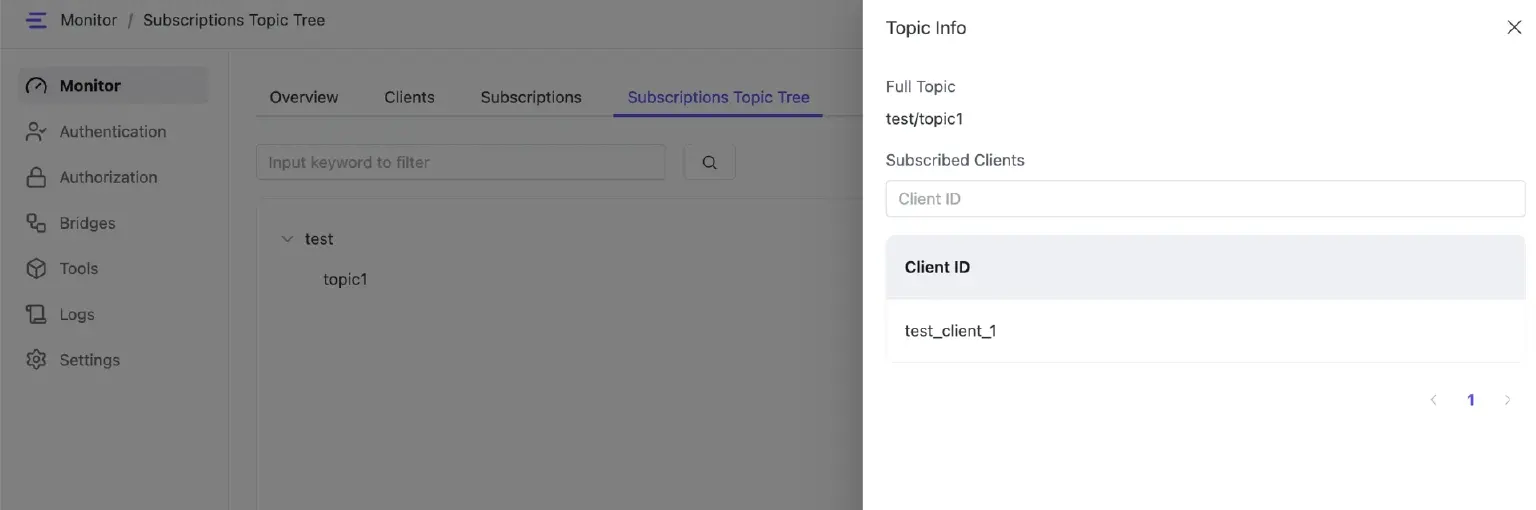
- Enhanced Security: Bridge passwords are now encrypted to improve overall system security.
- License Alerts: New pop-up notifications will alert you when a license has expired.
Simplified Docker Installation
We have streamlined the Docker installation process. Starting with 1.3.0, the installation command no longer requires you to distinguish between different Instruction Set Architectures (ISA).
You can now use a unified command to pull and run EMQX Edge:
docker pull emqx/emqx-edge:<version>
docker run -d -it --name emqx-edge \
  -p 1883:1883 \
  -p 8081:8081 \
  -p 8083:8083 \
  -p 8086:8086 \
  -p 8883:8883 \
  emqx/emqx-edge:<version>
Other Updates and Bug Fixes
- Optimized the process of message resend.
- Optimized the GitHub workflow.
- Fixed missing UTF-8 string length validation when handling MQTT v3.1.1 SUBSCRIBE packets.
- Updated the configuration file path in Docker image.
- Fixed configuration errors related to SNI and SQLite.
- Fixed memory address security issues in the WebSocket layer and Rule Engine.
- Fixed an issue where QUIC bridge metrics did not work correctly.
- Fixed an issue where the built-in MQTT client hook trigger kept reconnecting when ACL was enabled.
- Fixed an error where Dashboard could not retrieve the QUIC bridge status after reloading.
- Fixed an error when reading configuration items with millisecond (
ms) units. - Fixed an issue where a null QUIC connection was closed during QUIC bridge reload.
- Reset
max_ack_delayto the default maximum value when an invalid value was configured. - Fixed incorrect QUIC bridge behavior when certificates were set to null.
- Fixed an issue where the Dashboard failed to access
quic_handshake_timeout. - Fixed an error when parsing a null encrypted password.
- Fixed incorrect default values for some QUIC options.