EMQX Edge 1.2.0 Released: Docker Support and New Dashboard

We are thrilled to announce the official release of EMQX Edge 1.2.0!
This release focuses on significantly enhancing the deployment experience, improving the user interface for edge management, and reinforcing core stability. The standout feature is the introduction of Docker image support for seamless, cross-platform deployment. Additionally, the EMQX Edge Dashboard has received a fresh design update (v0.0.5), making monitoring and configuration more intuitive than ever. This update also includes several important feature enhancements and essential bug fixes to ensure a robust edge platform.
EMQX Edge Deployment via Docker
To simplify the deployment process for our users in diverse edge computing environments, EMQX Edge now supports Docker images for both arm64 and amd64 architectures. This standardization allows for quick and consistent setup across different hardware platforms.
You can deploy it using the following command:
docker run -d -it --name emqx-edge \
  -p 1883:1883 \
  -p 8081:8081 \
  -p 8083:8083 \
  -p 8086:8086 \
  -p 8883:8883 \
  emqx/emqx-edge:<version>
Replace <version> with the specific EMQX Edge version number.
For example, to install EMQX Edge version 1.2.0:
docker run -d -it --name emqx-edge \
  -p 1883:1883 \
  -p 8081:8081 \
  -p 8083:8083 \
  -p 8086:8086 \
  -p 8883:8883 \
  emqx/emqx-edge:1.2.0
Running the above command will start a container instance of EMQX Edge.
If you need to update the configuration or start with a specific config file, use the following command:
docker run -d -it --name emqx-edge \
  -v ./nanomq.conf:/opt/emqx-edge/nanomq.conf \
  -p 1883:1883 \
  -p 8081:8081 \
  -p 8083:8083 \
  -p 8086:8086 \
  -p 8883:8883 \
  emqx/emqx-edge:<version>
The default configuration path for EMQX Edge is /opt/emqx-edge/nanomq.conf. The Docker command above mounts the local ./nanomq.conf file to the EMQX Edge instance upon startup.
Newly Designed Dashboard
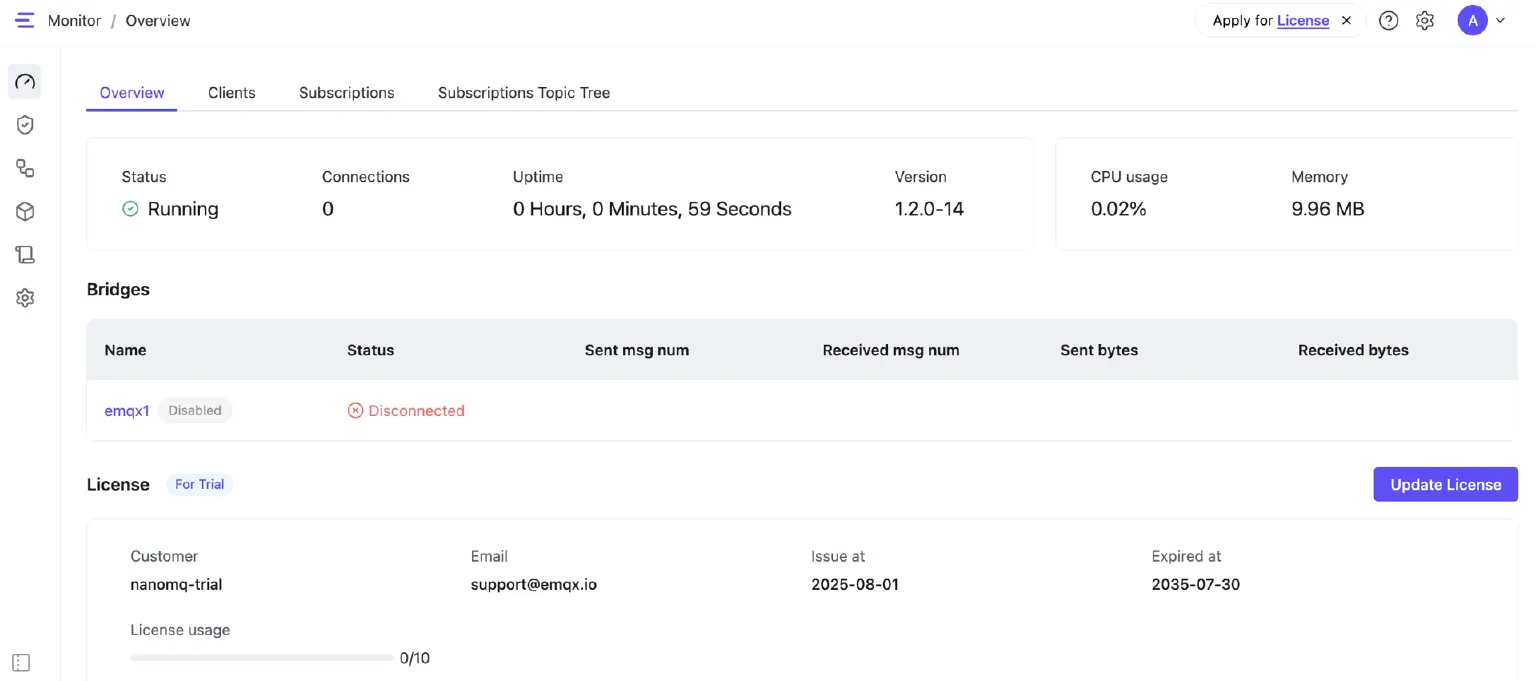
The EMQX Edge Dashboard has been updated and features a significant UI redesign. The new interface has been streamlined and optimized specifically for commonly used settings, resulting in a much cleaner and more efficient user experience for managing your edge broker.
More Enhancements
In addition to the major updates above, this release includes several important functional improvements.
SNI Support for Bridges
You can now manually set the SNI (Server Name Indication) for TLS MQTT Bridges via the configuration file.
Example:
bridges.mqtt.emqx1 {
  server = "mqtt-tcp://broker.emqx.io:1883"
  proto_ver = 4
  ssl {
    enable = true
    cacertfile = "/etc/cacert.pem"
    sni = "broker.emqx.io"
  }
}
Download All Logs on Windows
Resolved an issue from the previous version where downloading the complete log files was not possible on Windows platforms.
Publishing Base64 Decoded MQTT Payloads via HTTP API
This feature addresses the limitation where the built-in HTTP API could not send binary data. You can now send base64 encoded strings and have them decoded before delivery.
Usage:
# Encode your binary data
$ base64 ./foo.bin
MTIzCg==

# Publish via HTTP API with decoding set to base64
$ curl -i --basic -u admin:public -X POST "http://localhost:8081/api/v4/mqtt/publish" -d \
'{"payload":"MTIzCg==", "decoding":"base64", "topic":"test"}'
Clients subscribed to the MQTT topic test will receive the decoded binary result of the MTIzCg== string.
Fixed Known Issues
- Fixed an issue where the Windows Release Package failed to update correctly to the official website.
- Fixed the naming inconsistencies in Release Packages.
- Fixed a potential Heap-use-after-free issue occurring during bridge reloads.
- Updated and clarified several ambiguous log messages.
Conclusion and Next Steps
The release of EMQX Edge 1.2.0 marks another significant step forward in making your edge MQTT deployment simpler, more manageable, and robust. With the introduction of Docker support, the intuitive new Dashboard, and critical stability fixes, EMQX Edge is better equipped than ever to serve as your reliable edge messaging backbone.
We encourage you to update to EMQX Edge 1.2.0 today to take advantage of these new features and improvements.
Please visit the official EMQX Edge Documentation for deployment and configuration guides.
Thank you for your continued support! If you have any questions or feedback, please reach out to our team.