Getting Started with MQTT on Zephyr RTOS: From TCP Quickstart to mTLS with EMQX

I. Introduction
1.1 Project Overview
This post demonstrates how to connect an embedded device running Zephyr RTOS to an EMQX message broker via the MQTT protocol, and gradually upgrade the connection from plaintext TCP to secure communication using mutual TLS (mTLS) authentication. All code has been verified on the native_sim/native/64 simulation platform, allowing you to replicate the entire workflow within a Linux container without requiring actual hardware.
This sample project offers two optional operational modes to suit your needs:
| Mode | Network Model | Security Capabilities | Best Suited For |
|---|---|---|---|
| NSOS / TCP-only | native_sim offloaded sockets (reuses host network stack) | Plaintext MQTT; does not support Zephyr socket TLS | Quick connectivity verification, unencrypted intranet devices |
| TAP + TLS | Zephyr independent network stack (via virtual NIC zeth) | TLS 1.2 encryption + mutual TLS (mTLS) authentication | High-security scenarios, certificate-based authentication |
Mode Selection Recommendation:
- If you only want to quickly experience MQTT publish/subscribe, choose NSOS/TCP-only (no
sudoor certificates required). - If you need to evaluate the feasibility of TLS/mTLS on Zephyr, choose TAP+TLS (requires a Linux host/container with
NET_ADMINprivileges and/dev/net/tun).
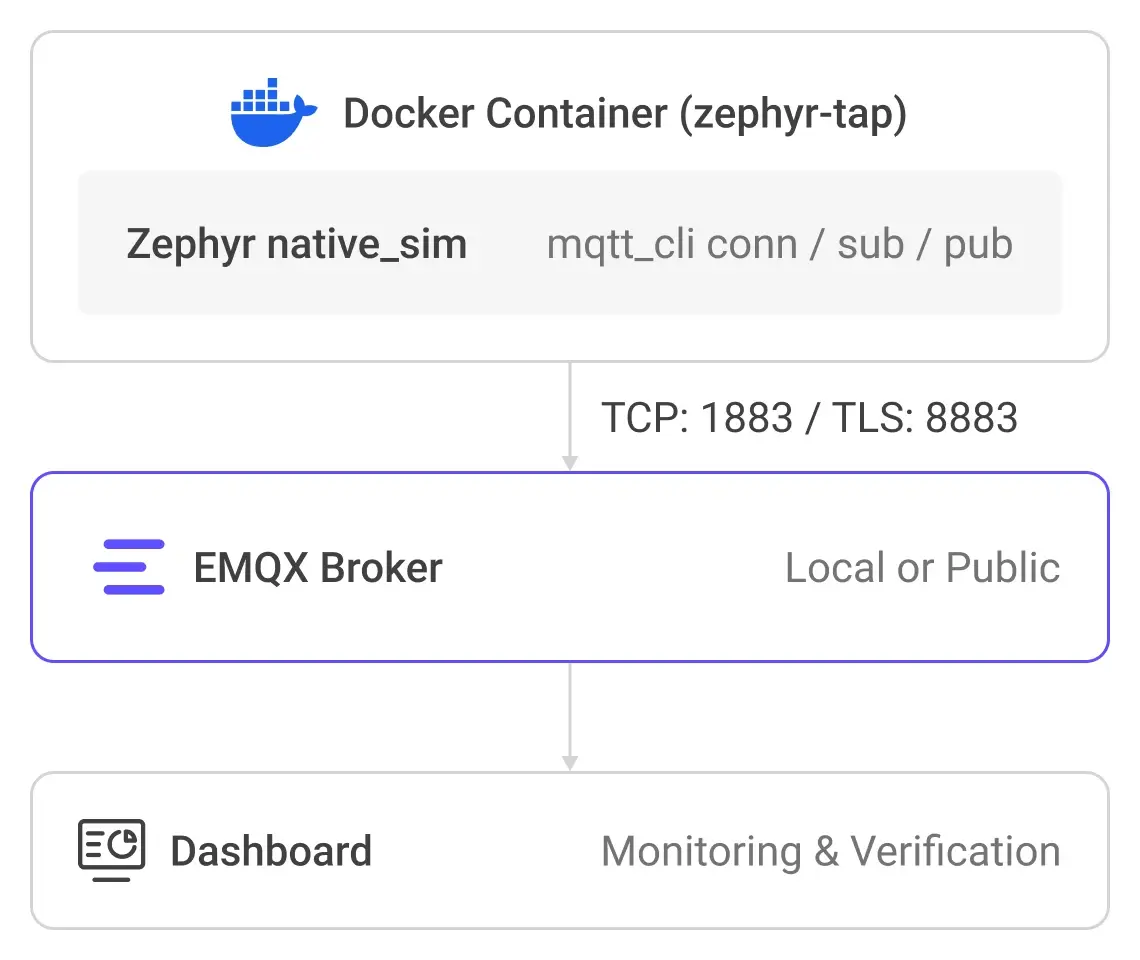
The system architecture is illustrated below:
1.2 EMQX: A Cloud-Native MQTT Broker for Modern IoT
EMQX is a massive-scale, distributed IoT connectivity platform. A single node can stably support 1.5 million concurrent MQTT connections, while a cluster can scale horizontally to 100 million concurrent connections, delivering million-level message throughput per second with millisecond-level latency.
Key Features:
- MQTT over QUIC: EMQX pioneered in introducing QUIC into the MQTT protocol, significantly improving connection stability and message throughput under weak networks or frequent topology changes (e.g., Connected Vehicles).
- Multi-Protocol Gateway: Beyond MQTT, it natively supports HTTP, WebSocket, LwM2M/CoAP, and other protocols, providing a unified device access entry.
- Message Queues (EMQX 6.x): Supports named persistent queues to decouple publishing and subscribing. Messages are automatically buffered when consumers are offline and replayed upon reconnection, ideal for intermittent connection scenarios typical of Zephyr IoT edge devices.
- MQTT Streams (EMQX 6.x): A persistent, replayable message stream model that supports replaying historical data by timestamp or offset, removing the need for external streaming systems like Kafka.
- Data Integration and Processing: The built-in rule engine extracts, filters, and transforms MQTT messages in real-time using SQL syntax. It provides out-of-the-box integration with mainstream systems such as Kafka, PostgreSQL, TimescaleDB, InfluxDB, MongoDB, AWS S3, and Google BigQuery.
1.3 Zephyr RTOS: A High-Performance Real-Time Operating System for IoT
Zephyr RTOS is an open-source, Apache 2.0-licensed real-time operating system hosted by the Linux Foundation, specifically engineered for resource-constrained embedded systems. It scales seamlessly from simple environmental sensors and wearable LEDs to complex embedded controllers, smartwatches, and wireless IoT applications.
Zephyr supports over a dozen CPU architectures, including ARM Cortex-M/A/R, RISC-V (32/64-bit), x86 (32/64-bit), ARC, MIPS, Xtensa, and SPARC, and is compatible with hundreds of development boards. This article utilizes the native_sim platform to simulate execution on x86, enabling complete development and debugging without physical hardware.
Core Technical Highlights:
- Native Network Stack: Zephyr features a robust, fully-featured network stack supporting LwM2M, BSD sockets, TCP/UDP/IPv4/IPv6, DNS, TLS/mbedTLS, HTTP, MQTT, CoAP, and optional OpenThread mesh networking. The stack is highly tailorable, compiling only the specific protocol modules your application requires.
- Modular Configuration & Static Allocation: Applications use Kconfig to include only necessary features and define resource limits. Hardware is described via Devicetree, enabling static allocation of system resources at compile time, which significantly reduces code size and optimizes performance.
- Built-in Security and Reliability: Features highly configurable stack overflow protection, kernel object and driver permission tracking, thread-level memory isolation, and a comprehensive security vulnerability reporting and CVE tracking mechanism.
- Rich OS Services: Includes a full Bluetooth 5.0 Low Energy stack (with Mesh support), virtual file systems (ext2, FatFS, LittleFS), persistent storage (NVS/Settings), a multi-backend logging system, and an interactive full-featured Shell.
native_simSimulation Platform: Compiles Zephyr directly into a native Linux executable, simulating subsystems like networking, file systems, and Bluetooth. This capability drastically accelerates development and testing iterations, serving as the core engine for thenative_sim/native/64platform used in this guide.
Key Zephyr Components in This Project:
| Component | Purpose |
|---|---|
CONFIG_MQTT_LIB | Zephyr's native MQTT 3.1.1 client library. |
CONFIG_MQTT_LIB_TLS | Enables the MQTT over TLS transport layer. |
| mbedTLS | An embedded TLS library that supports PEM certificate parsing and ECDHE-RSA key exchange. |
native_sim platform | An x86 simulation environment for hardware-free development and debugging. |
| Shell / getopt | Interactive command-line interface supporting GNU-style argument parsing and auto-completion. |
II. Environment Setup
2.1 EMQX Installation and Rapid Deployment
EMQX supports various installation methods. This section introduces four methods in order of recommendation; you can choose the one that best fits your workflow.
Method 1: Docker Containerized Deployment (Recommended)
Containerization is the fastest way to experience EMQX and is the preferred choice in the official Quick Start Guide. Ensure that Docker is installed and running before executing the command.
# Download and start the latest EMQX Enterprise edition
docker run -d --name emqx \
  -p 1883:1883 \
  -p 8083:8083 \
  -p 8084:8084 \
  -p 8883:8883 \
  -p 18083:18083 \
  emqx/emqx-enterprise:latest
Once started, access the Dashboard via your browser at http://localhost:18083 (replace localhost with your actual server IP). Log in using the default credentials: Username admin, Password public.
Quick Verification with MQTTX (Optional): MQTTX is an official open-source, cross-platform MQTT 5.0 client tool developed by EMQ, available as a Web version (no installation required) and a Desktop application. You can visit MQTTX Web, create a new connection pointing to ws://localhost:8083, and quickly subscribe to or publish messages to verify broker connectivity.
Method 2: Package Deployment (macOS / Linux)
If you need to deploy EMQX directly on a physical or virtual machine for subsequent performance tuning, you can use the official operating system installation packages. Supported platforms include RedHat, CentOS, RockyLinux, Ubuntu, Debian, macOS, and more.
Taking macOS as an example:
# 1. Obtain the latest installation package from the official download page:
#    https://www.emqx.com/en/downloads-and-install/enterprise?os=macOS

# 2. Extract and start EMQX in the foreground to monitor logs easily
./emqx/bin/emqx foreground

# 3. Access Dashboard:http://localhost:18083(admin / public)

# 4. Stop EMQX when finished
./emqx/bin/emqx stop
Note: For installation commands corresponding to other Linux distributions, please refer to the EMQX Official Installation Guide.
Method 3: EMQX Cloud Fully Managed Service
In addition to self-hosted deployment, EMQX offers a fully managed cloud service called EMQX Cloud. With a few simple registration steps, you can spin up a fully managed, maintenance-free MQTT message broker without the hassle of setting up and managing your own infrastructure. This is ideal for rapid staging or production-scale deployments.
You can visit the EMQX Cloud Registration Page for a free trial. For a detailed primer, see the EMQX Cloud Quick Start Guide.
Method 4: Public Test Broker (Alternative for Quick Testing)
If you cannot install Docker or set up a local deployment immediately, EMQX provides a free public broker for quick connectivity testing:
| Port | Protocol | Address |
|---|---|---|
| 1883 | MQTT TCP | broker.emqx.io |
| 8883 | MQTT TLS | broker.emqx.i |
# Quickly verify connectivity within your container
mqtt_cli conn -h broker.emqx.io -p 1883
Warning: The public broker is a shared public environment. It does not guarantee stability, data persistence, or message privacy. It is strictly for quick evaluation and should not be used for formal development or production tasks.
2.2 Docker-Based Zephyr Environment Setup and West Toolchain Preparation
Requirements
- Linux host (Kernel $\ge$ 5.x)
- Docker installed and running
TUNmodule loaded
Step 1: Verify the TUN Module
lsmod | grep tun
# If not loaded, run:
sudo modprobe tun
Step 2: Run the Docker Container
The official Zephyr build image (ghcr.io/zephyrproject-rtos/zephyr-build) comes pre-configured with west, CMake, Python venv, Zephyr SDK, and GCC toolchains, eliminating manual setup.
# Pull the official image
docker pull ghcr.io/zephyrproject-rtos/zephyr-build:main

# Start the container(--cap-add=NET_ADMIN and --device=/dev/net/tun are required for TAP mode)
docker run -d \
    --name zephyr-tap \
    --cap-add=NET_ADMIN \
    --device=/dev/net/tun \
    -p 2222:22 \
    -v ~/Projects/EMQ/ZephyrProject:/workdir \
    ghcr.io/zephyrproject-rtos/zephyr-build:main \
    sleep infinity

# Enter the container
docker exec -it zephyr-tap bash
Step 3: Initialize the Zephyr Workspace
# Create workspace
mkdir -p /workdir && cd /workdir

# Initialize Zephyr repository
west init -m https://github.com/zephyrproject-rtos/zephyr --mr v4.1-branch
west update

# Export Zephyr CMake package
west zephyr-export

# Activate Python virtual environment
source /var/lib/zephyr/venv/bin/activate
echo 'source /var/lib/zephyr/venv/bin/activate' >> ~/.bashrc
Step 4: Install iptables (required for TAP mode network forwarding)
apt-get update && apt-get install -y --no-install-recommends \
    iptables \
    && rm -rf /var/lib/apt/lists/*
Note for macOS / Docker Desktop Users: TAP mode is restrictive on macOS Docker Desktop. Use NSOS/TCP-only mode instead, or switch to a Linux host/WSL2 environment.
III. Zephyr MQTT Demo Walkthrough
3.1 Project Structure and Core Logic
The repository follows a standard Zephyr application layout. The core client logic resides in src/main.c (~650 lines), while the remaining files handle mode configuration and automated startup scripts:
mqtt-client-C-Zephyr/
├── src/main.c                  # MQTT client core logic
├── prj.conf                    # Shared base Kconfig (Networking/DNS/Shell/MQTT)
├── prj-nsos.conf               # NSOS/TCP-only mode Kconfig overlay
├── prj-tap-tls.conf            # TAP+TLS mode Kconfig overlay
├── run-zephyr-nsos.sh          # One-click startup script for NSOS mode
└── run-zephyr-tap.sh           # One-click startup script for TAP mode (includes network setup)
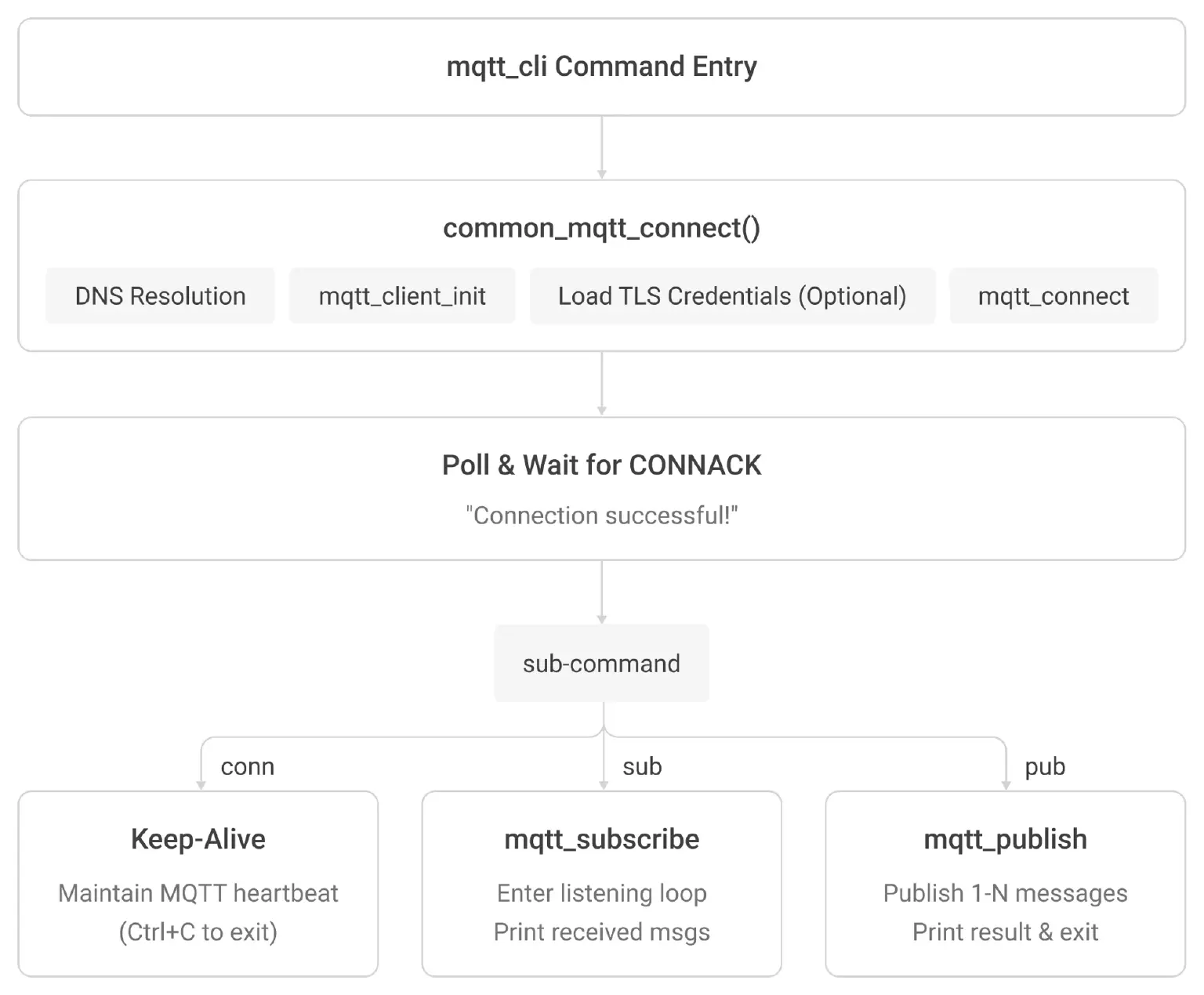
The execution flow within src/main.c operates as follows:
3.2 Command-Line Arguments and Core Kconfig Options
The mqtt_cli command provides three sub-commands sharing a unified set of connection and TLS arguments:
General Connection Arguments (All Sub-commands)
| Argument | Description | Default |
|---|---|---|
-h, --host | Broker IP or hostname | 100.108.113.19 |
-p, --port | Broker port | 1883 |
-i, --client_id | MQTT Client ID | Randomly generated |
-k, --keepalive | Heartbeat interval (seconds) | 60 |
--no_clean | Disable Clean Session | false |
-u, --username | Authentication username | — |
-P, --password | Authentication password | — |
TLS Arguments (TAP+TLS Mode Only; requires CONFIG_MQTT_LIB_TLS=y)
| Argument | Description |
|---|---|
--ca <PATH> | Path to the Root CA certificate file |
--cert <PATH> | Path to the Client certificate file |
--key <PATH> | Path to the Client private key file |
--insecure | Skip server certificate verification |
--key_password <PASS> | Password for encrypted private keys |
Sub-commands and Specific Arguments
| Command | Purpose | Specific Arguments |
|---|---|---|
mqtt_cli conn | Test connectivity | None |
mqtt_cli sub | Subscribe and listen | -t <TOPIC> -q <QOS> |
mqtt_cli pub | Publish and exit | -t <TOPIC> -m <MSG> -q <QOS> -L <COUNT> -I <INTERVAL_MS> -r (Retain) -d (Dup) |
Two-Tier Kconfig Structure
Base configurations (Network stack, IPv4, TCP, DNS, MQTT, Shell, etc.) are defined in prj.conf. Mode-specific optimizations are injected via overlay files:
- NSOS/TCP-only (
prj-nsos.conf): EnablesCONFIG_NET_SOCKETS_OFFLOAD=yandCONFIG_NET_NATIVE_OFFLOADED_SOCKETS=y. Zephyr socket calls bypass the internal stack and forward directly to the host POSIX sockets. TLS is not supported here, asSO_TLS setsockoptis unavailable on offloaded sockets. - TAP+TLS (
prj-tap-tls.conf): Spins up the complete mbedTLS stack (allocated with a 30KB heap,ECDHE-RSA-AES-128-GCMcipher suites, PEM parsing, and PSA key types). Zephyr assigns itself a dedicated IP (192.0.2.1) and accesses external networks using NAT through the host via thezethvirtual interface.
3.3 Core Code Breakdown
This section dissects the three most critical components within src/main.c: the Event Callback, the Connection Engine, and TLS Credential Lifecycle Management.
Code Block 1: MQTT Event Callback
void mqtt_evt_handler(struct mqtt_client *client, const struct mqtt_evt *evt)
{
    switch (evt->type) {
    case MQTT_EVT_CONNACK:
        if (evt->result == 0) {
            is_connected = true;                   // ① Connection success flag
        } else {
            LOG_ERR("MQTT connection refused: %d", evt->result);
        }
        break;
    case MQTT_EVT_DISCONNECT:
        is_connected = false;
        break;
    case MQTT_EVT_PUBLISH: {
        const struct mqtt_publish_param *pub = &evt->param.publish;
        // ② Auto-acknowledge QoS 1/2 messages to prevent broker retransmission
        if (pub->message.topic.qos == MQTT_QOS_1_AT_LEAST_ONCE) {
            const struct mqtt_puback_param ack = { .message_id = pub->message_id };
            mqtt_publish_qos1_ack(client, &ack);
        } else if (pub->message.topic.qos == MQTT_QOS_2_EXACTLY_ONCE) {
            const struct mqtt_pubrec_param rec = { .message_id = pub->message_id };
            mqtt_publish_qos2_receive(client, &rec);
        }
        uint8_t payload_buf[128];
        int len = MIN(pub->message.payload.len, sizeof(payload_buf) - 1);
        int rc = mqtt_read_publish_payload(client, payload_buf, len);
        if (rc >= 0) {
            payload_buf[rc] = '\0';
            // ③ Use shell_print via global shell pointer to output data.
            //   Using LOG_INF on native_sim causes duplicate prints due to dual-channel routing.
            shell_print(mqtt_evt_shell,
                "[Received Msg] Topic: %.*s | Payload: %s",
                pub->message.topic.topic.size,
                pub->message.topic.topic.utf8, payload_buf);
        }
        break;
    }
    }
}
Analysis:
- When the Zephyr MQTT library receives a
CONNACKpacket with aresult == 0(indicating the broker accepted the connection), the global flagis_connectedis set totrue. - For QoS 1 and QoS 2 messages, you must explicitly invoke
mqtt_publish_qos1_ack()ormqtt_publish_qos2_receive()to acknowledge receipt. Failing to do so causes the broker to repeatedly retransmit messages (modeled after Zephyr's officialsecure_mqtt_sensor_actuatorsample). - Upon receiving a message, output is handled via
shell_printusing the global shell pointermqtt_evt_shell. On thenative_simplatform, standard logging functions likeLOG_INFandprintkoutput through both the native UART PTY channel and the log backend, causing duplicate stdout entries.shell_printtargets a single UART channel, eliminating duplication.
Code Block 2: Unified Connection Engine common_mqtt_connect()
static int common_mqtt_connect(const struct shell *sh, struct mqtt_conn_params *p)
{
    is_connected = false;
    mqtt_evt_shell = sh;  // Store the shell pointer for event callback use
    // ① DNS Resolution: Hostname -> IP Address
    struct zsock_addrinfo hints = { .ai_family = AF_INET, .ai_socktype = SOCK_STREAM };
    struct zsock_addrinfo *res = NULL;
    char port_str[6];
    snprintf(port_str, sizeof(port_str), "%d", p->port);
    int rc = zsock_getaddrinfo(p->host, port_str, &hints, &res);
    if (rc != 0) { /* error */ return rc; }
    memcpy(&broker_addr, res->ai_addr, res->ai_addrlen);
    zsock_freeaddrinfo(res);
    // ② Initialize the MQTT client struct
    mqtt_client_init(&client_ctx);
    client_ctx.broker = &broker_addr;
    client_ctx.evt_cb = mqtt_evt_handler;
    client_ctx.client_id.utf8 = (uint8_t *)client_id_global;
    client_ctx.client_id.size = strlen(client_id_global);
    client_ctx.protocol_version = MQTT_VERSION_3_1_1;
    client_ctx.rx_buf = rx_buffer;
    client_ctx.rx_buf_size = sizeof(rx_buffer);
    client_ctx.tx_buf = tx_buffer;
    client_ctx.tx_buf_size = sizeof(tx_buffer);
    client_ctx.keepalive = p->keepalive;
    // ③ TLS Credential Loading (TLS mode only, see Code Block 3)
    if (p->use_tls) {
#ifdef CONFIG_MQTT_LIB_TLS
        /* ... TLS credential loading and transport config ... */
        client_ctx.transport.type = MQTT_TRANSPORT_SECURE;
#else
        shell_error(sh, "Error: TLS options provided but TLS support is disabled");
        return -ENOTSUP;
#endif
    } else {
        client_ctx.transport.type = MQTT_TRANSPORT_NON_SECURE;
    }
    // ④ Initiate MQTT CONNECT
    rc = mqtt_connect(&client_ctx);
    if (rc != 0) { /* error */ return rc; }
    // ⑤ Poll and wait for CONNACK (5-second timeout)
    uint32_t timeout = 0;
    while (!is_connected && timeout < 5000) {
        struct zsock_pollfd fds[1] = {
            { .fd = get_client_fd(&client_ctx), .events = ZSOCK_POLLIN }
        };
        if (zsock_poll(fds, 1, 100) > 0) {
            mqtt_input(&client_ctx);  // Drives the event callback
        }
        k_msleep(100);
        timeout += 100;
    }
    if (!is_connected) { /* timeout error */ return -ETIMEDOUT; }
    shell_print(sh, "Connection successful!");
    return 0;
}
Analysis:
common_mqtt_connect() serves as the shared entry point for the conn, sub, and pub sub-commands.
- Invokes
zsock_getaddrinfo()for DNS resolution. Under NSOS mode, this relies directly on the host'sglibc. Under TAP mode, it utilizes Zephyr's built-in DNS stack querying8.8.8.8. - Populates the
mqtt_clientstructure, mapping memory buffers, event callbacks, Client ID, and the MQTT protocol version. - Loads TLS credentials conditionally based on configuration.
- Calls
mqtt_connect()to dispatch the MQTTCONNECTpacket. - Polls the socket at 100ms intervals. Upon capturing an
MQTT_EVT_CONNACK, the callback setsis_connectedtotrue, breaking the loop and printing a success confirmation.
Code Block 3: TLS Credential Loading and Lifecycle Management
// Clear stale credentials before reconnecting (avoids cross-connection sec_tag remnants)
static void clear_registered_credential(enum tls_credential_type type)
{
    tls_credential_delete(101, type);       // ① Delete from the Zephyr credential cache
    struct credential_slot *slot = credential_slot_for_type(type);
    if (slot && slot->buf) {
        free(slot->buf);                    // ② Free the stale buffer
        slot->buf = NULL;
    }
}
static int load_and_register_credential(const struct shell *sh,
                                         const char *path,
                                         enum tls_credential_type type)
{
    // ③ Malloc separate buffers for each credential type (do not share a static buffer)
    uint8_t *file_buf = malloc(3073);  // 3072 + 1 null terminator
    size_t br = fread(file_buf, 1, 3072, f);
    fclose(f);
    file_buf[br] = '\0';               // ④ NUL terminate (required by crt_is_pem())
    clear_registered_credential(type); // ⑤ Clear before loading
    int rc = tls_credential_add(101, type, file_buf, br + 1);
    // ...
    slot->buf = file_buf;              // ⑥ Keep track of the pointer for future free calls
    return 0;
}
// Execution sequence within common_mqtt_connect():
clear_registered_credential(TLS_CREDENTIAL_CA_CERTIFICATE);
clear_registered_credential(TLS_CREDENTIAL_PUBLIC_CERTIFICATE);
clear_registered_credential(TLS_CREDENTIAL_PRIVATE_KEY);
load_and_register_credential(sh, p->ca_path,   TLS_CREDENTIAL_CA_CERTIFICATE);
load_and_register_credential(sh, p->cert_path, TLS_CREDENTIAL_PUBLIC_CERTIFICATE);
load_and_register_credential(sh, p->key_path,  TLS_CREDENTIAL_PRIVATE_KEY);
client_ctx.transport.tls.config.sec_tag_list = sec_tag_list;  // {101}
client_ctx.transport.tls.config.peer_verify = p->insecure
    ? TLS_PEER_VERIFY_NONE : TLS_PEER_VERIFY_REQUIRED;
client_ctx.transport.tls.config.hostname = p->host;
Analysis:
Zephyr's tls_credential_add() requires the passed buffer to remain valid throughout the credential's active lifecycle. Consequently, you cannot use stack-allocated or shared static buffers, as subsequent calls will corrupt previously loaded assets.
This implementation handles this constraint by allocating (malloc) individual, independent buffers for the CA, Certificate, and Key components. Stale allocations are purged via tls_credential_delete() and free() prior to any new connection attempt. This pattern is a verified best practice: if old credential data is not purged, certificate leftovers between sessions will cause the mTLS handshake to fail with error code -0x4e / -103.
IV. Hands-on: Connecting Zephyr to EMQX via Plaintext TCP
This chapter utilizes the NSOS/TCP-only mode. It requires no sudo privileges or certificates, making it the simplest configuration to build and launch.
4.1 Minimal Project Configuration
Execute the following commands inside the container to build the application:
cd /workdir/mqtt-client-C-Zephyr
# NSOS Build for NSOS mode
west build -d build-nsos -p always -b native_sim/native/64 . \
    -- -DOVERLAY_CONFIG=prj-nsos.conf
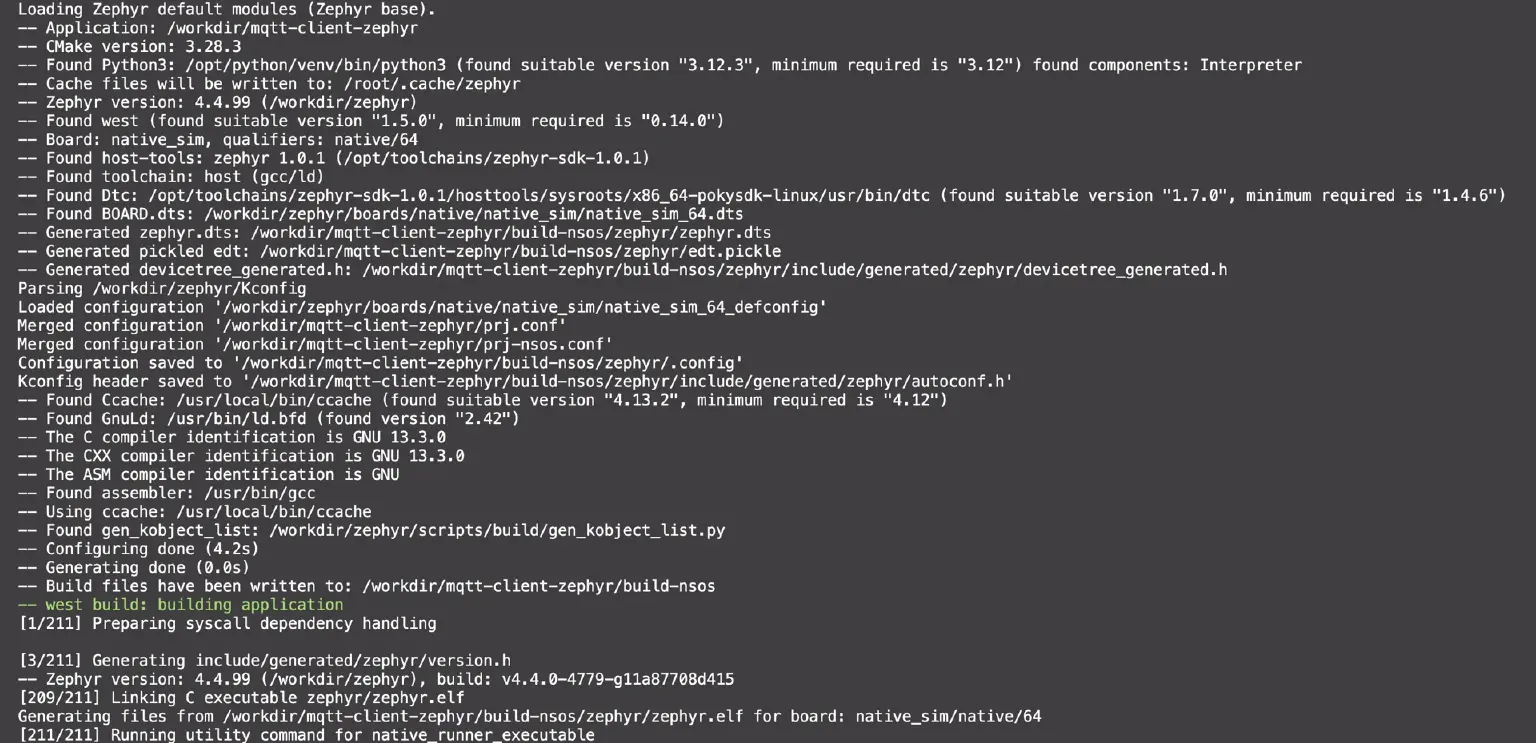
Upon a successful build, the terminal will output: [211/211] Running utility command for native_runner_executable.
The Zephyr build system automatically merges prj.conf (base configurations) and prj-nsos.conf (NSOS overlay). The critical Kconfig options are as follows:
# prj-nsos.conf — Enable NSOS networking in three lines
CONFIG_NET_DRIVERS=y
CONFIG_NET_SOCKETS_OFFLOAD=y
CONFIG_NET_NATIVE_OFFLOADED_SOCKETS=y
# CONFIG_ETH_NATIVE_TAP is not set
# Shared network/DNS/MQTT configurations in prj.conf remain unchanged
CONFIG_NETWORKING=y
CONFIG_NET_IPV4=y
CONFIG_NET_TCP=y
CONFIG_NET_SOCKETS=y
CONFIG_DNS_SERVER1="8.8.8.8"
CONFIG_MQTT_LIB=y
4.2 Startup and Connectivity Verification
# Start Zephyr with an interactive shell
./run-zephyr-nsos.sh
# Once the uart:~$ prompt appears, test the connection
uart:~$ mqtt_cli conn -h 100.108.113.19 -p 1883
Expected Output:
Connecting to 100.108.113.19:1883 (ID: zephyr-emqx-123456, Keepalive: 60) ...
[TLS] Calling mqtt_connect (transport.type=0)...
Connection successful!
Entered conn blocking maintenance mode. Press Ctrl+C to terminate simulation process.
Verification Results:

- The Zephyr shell prints
Connection successful!upon completing the handshake. - Navigating to the Connections page on the EMQX Dashboard will display the new connection (e.g.,
zephyr-emqx-679688with a randomized Client ID) showing a status ofConnected, protocolMQTT, and version3.1.1.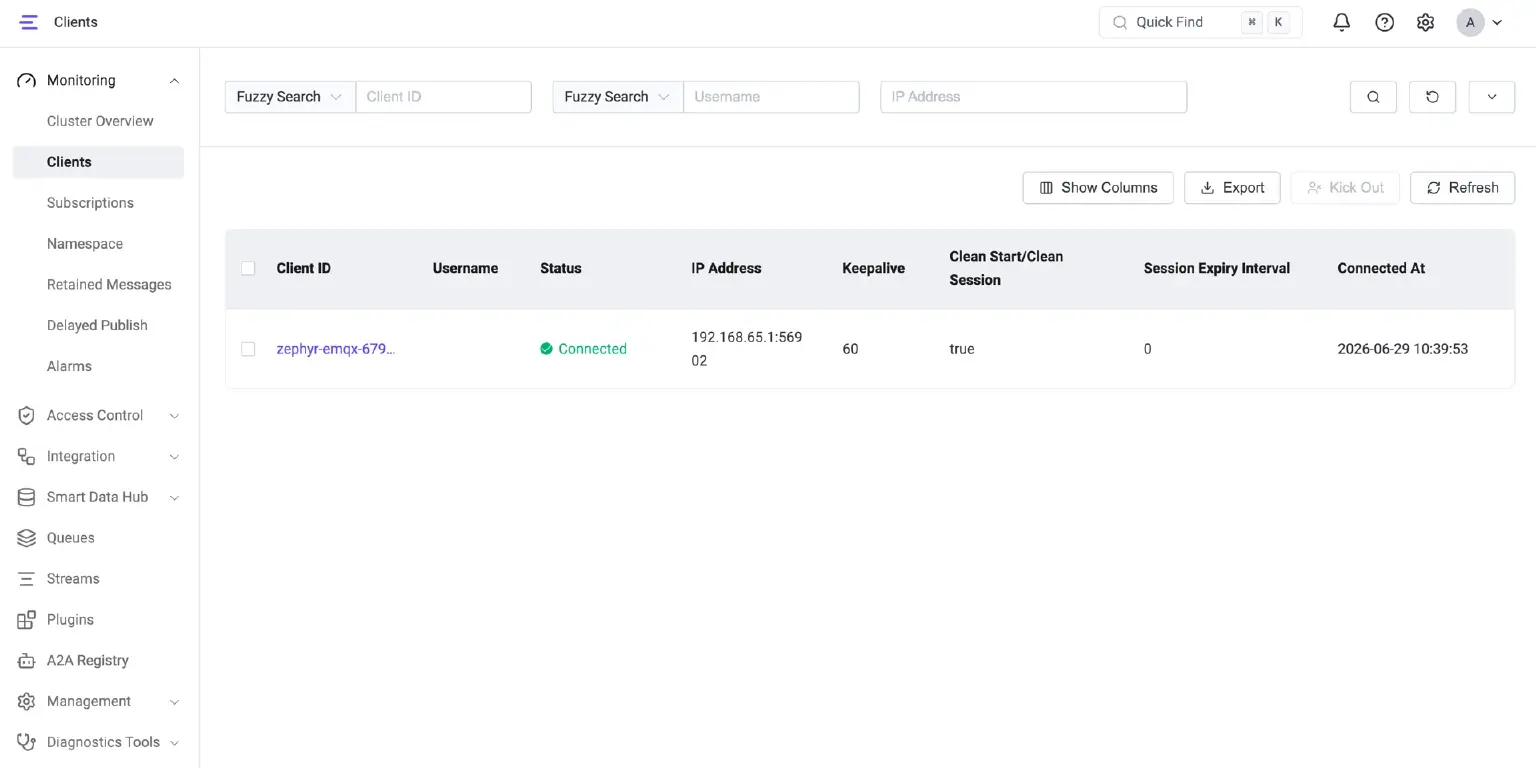
4.3 Implementation Highlights
The core workflow within common_mqtt_connect() (src/main.c) executes as follows:
- DNS Resolution: Invokes
zsock_getaddrinfo()to resolve hostnames into IP addresses. In NSOS mode, this call maps directly to the host'sglibcimplementation ofgetaddrinfo(), automatically utilizing the host's DNS configuration. - MQTT Client Initialization: Calls
mqtt_client_init(&client_ctx)and binds the event callback handlermqtt_evt_handler. - Establishing Connection: Invokes
mqtt_connect(&client_ctx)to dispatch the TCP handshake and subsequent MQTTCONNECTpacket. - Awaiting CONNACK: Polls the socket file descriptor. Upon receiving
MQTT_EVT_CONNACK, the globalis_connectedflag is set totrue, andConnection successful!is printed. - Event Dispatching: The
connsub-command enters a heartbeat maintenance loop;subcallsmqtt_subscribe()and transitions into a long-polling listening loop;pubtriggersmqtt_publish()and gracefully disconnects.
4.4 Message Publishing and Subscription Demo
Once the connection is established, you can experience MQTT's core publish/subscribe model. We recommend opening two terminals: one running the Zephyr shell as the subscriber, and another using mqtt_cli pub or the EMQX Dashboard's built-in WebSocket client as the publisher.
Scenario 1: Subscribing and Receiving Messages
Subscribe to the topic test/zephyr/demo with QoS 1 in the Zephyr shell:
uart:~$ mqtt_cli sub -h 100.108.113.19 -t test/zephyr/demo -q 1
Expected output:
Connecting to 100.108.113.19:1883 (ID: zephyr-emqx-654321, Keepalive: 60) ...
Connection successful!
Subscribing to topic: 'test/zephyr/demo' (QoS 1) ...
Entered sub listening state. Waiting for messages... (Press Ctrl+C to exit)
Zephyr is now in a continuous listening loop. Open a separate terminal inside the container and use mqtt_cli pub to send a message to the same topic:
# Execute in a separate terminal on the host or within the container
mqtt_cli pub -h 100.108.113.19 -t test/zephyr/demo -m "Hello Zephyr" -q 1
The Zephyr shell will instantly display the received message:
[Received Msg] Topic: test/zephyr/demo | Payload: Hello Zephyr
Verification Results:
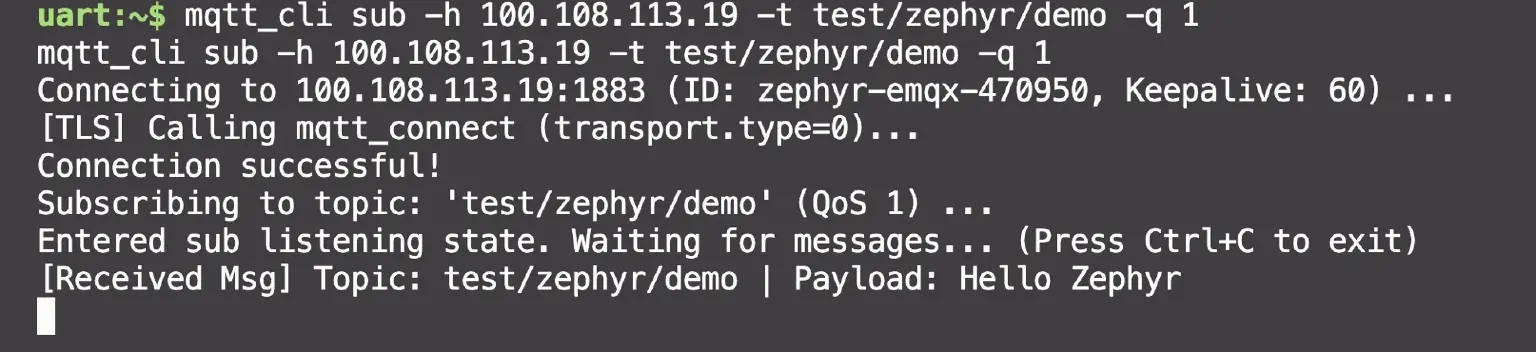
The terminal logs will show a side-by-side or sequential confirmation: the mqtt_cli pub command successfully dispatches the message on one side, while the Zephyr subscriber shell immediately prints the received payload log on the other.
Scenario 2: Publishing Messages
Zephyr can also act as a message producer, publishing a payload and automatically disconnecting upon completion:
uart:~$ mqtt_cli pub -h 100.108.113.19 -t test/zephyr/demo -m "Hello from Zephyr!" -q 1
Expected output:
Connecting to 100.108.113.19:1883 (ID: zephyr-emqx-789012, Keepalive: 60) ...
Connection successful!
[Published 1/1] Topic='test/zephyr/demo' | Payload='Hello from Zephyr!'
Publish finished, gracefully disconnecting and exiting...
Scenario 3: Batch and Interval Publishing
Simulate periodic telemetry reporting by using the -L (count) and -I (interval in milliseconds) arguments:
uart:~$ mqtt_cli pub -h 100.108.113.19 -t test/zephyr/demo -m "Batch msg" -q 0 -L 3 -I 500
Expected output:
Connection successful!
[Published 1/3] Topic='test/zephyr/demo' | Payload='Batch msg'
[Published 2/3] Topic='test/zephyr/demo' | Payload='Batch msg'
[Published 3/3] Topic='test/zephyr/demo' | Payload='Batch msg'
Publish finished, gracefully disconnecting and exiting...
The terminal will print three consecutive [Published N/3] entries spaced exactly 500ms apart.
Verification
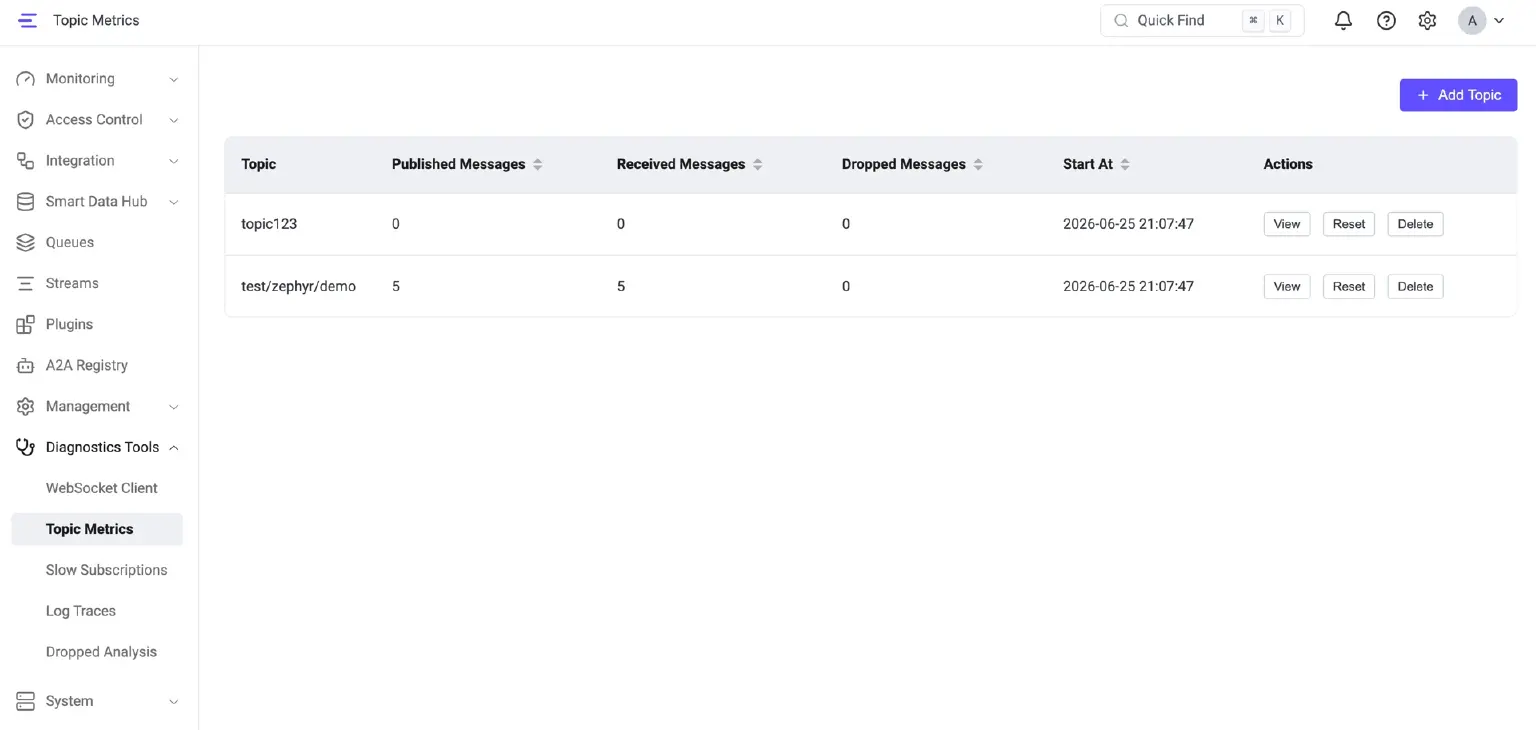
After executing any of the scenarios above, open the EMQX Dashboard (http://localhost:18083). You can track the zephyr-emqx-xxxxxx client state under the Connections tab, and monitor message inbound/outbound statistics for test/zephyr/demo via Topics.
V. Advanced: Connecting Zephyr to EMQX via Secure TLS
This chapter utilizes the TAP+TLS mode. It requires a Linux host, a container with NET_ADMIN privileges and /dev/net/tun, and the preparation of TLS certificate materials.
5.1 Security Prerequisites: Obtaining SSL/TLS Certificates
According to the official EMQX TLS certificate documentation, there are three primary ways to acquire SSL/TLS certificates:
- Self-Signed Certificates: Generated independently by creating your own Root CA. This method poses security risks and is strictly recommended for local testing or controlled environments.
- Trusted CA Certificates: Issued by recognized Certificate Authorities (e.g., Let's Encrypt, DigiCert), which is mandatory for production environments.
- Cloud Provider Certificates: Managed certificates provisioned via cloud platforms (e.g., AWS, Google Cloud).
⚠️ Important: This guide utilizes self-signed certificates for development and testing purposes only. Deployments in production environments must use certificates issued by a trusted public CA.
Certificate Generation via OpenSSL (aligned with the official EMQX documentation):
# 1. Generate a self-signed Root CA
openssl genrsa -out rootCA.key 2048
openssl req -x509 -new -nodes -key rootCA.key -sha256 -days 3650 -out rootCA.crt
# 2. Issue the Server Certificate (serverAuth) — used by EMQX
openssl genrsa -out mqtt-server.key 2048
openssl req -new -key mqtt-server.key -out mqtt-server.csr
openssl x509 -req -in mqtt-server.csr -CA rootCA.crt -CAkey rootCA.key \
    -CAcreateserial -out mqtt-server.crt -days 365 \
    -extfile server-ext.cnf
# 3. Issue the Client Certificate (clientAuth) — used by Zephyr
openssl genrsa -out mqtt-client.key 2048
openssl req -new -key mqtt-client.key -out mqtt-client.csr
openssl x509 -req -in mqtt-client.csr -CA rootCA.crt -CAkey rootCA.key \
    -CAcreateserial -out mqtt-client.crt -days 365 \
    -extfile client-ext.cnf
5.2 Embedded Setup: Zephyr Credential Loading
The credential loading mechanism within src/main.c manages the active lifecycle of TLS certificates as follows:
// Clear residual credentials from the previous session and free allocations
clear_registered_credential(TLS_CREDENTIAL_CA_CERTIFICATE);
clear_registered_credential(TLS_CREDENTIAL_PUBLIC_CERTIFICATE);
clear_registered_credential(TLS_CREDENTIAL_PRIVATE_KEY);
// Read certificates from storage, malloc separate buffers, and map to sec_tag 101
load_and_register_credential(sh, p->ca_path,   TLS_CREDENTIAL_CA_CERTIFICATE);
load_and_register_credential(sh, p->cert_path, TLS_CREDENTIAL_PUBLIC_CERTIFICATE);
load_and_register_credential(sh, p->key_path,  TLS_CREDENTIAL_PRIVATE_KEY);
// Configure TLS transport parameters
client_ctx.transport.type = MQTT_TRANSPORT_SECURE;
client_ctx.transport.tls.config.sec_tag_list = sec_tag_list;    // {101}
client_ctx.transport.tls.config.peer_verify = p->insecure
    ? TLS_PEER_VERIFY_NONE : TLS_PEER_VERIFY_REQUIRED;
client_ctx.transport.tls.config.hostname = p->host;
Note: Every invocation of
mqtt_cli(conn/sub/pub) reloads credentials into the same security tag (sec_tag=101). If stale certificates from previous sessions are not purged, cross-connection pollution will cause the mTLS handshake to fail with error code-0x4e/-103. This cleanup requirement is whyload_and_register_credentialexecutestls_credential_delete(101, type)before committing any new buffers.
5.3 TLS Project Configuration and Compilation
Execute the following commands inside the container to build the application:
cd /workdir/mqtt-client-C-Zephyr
# Build for TAP + TLS mode (automatically merges prj.conf + prj-tap-tls.conf)
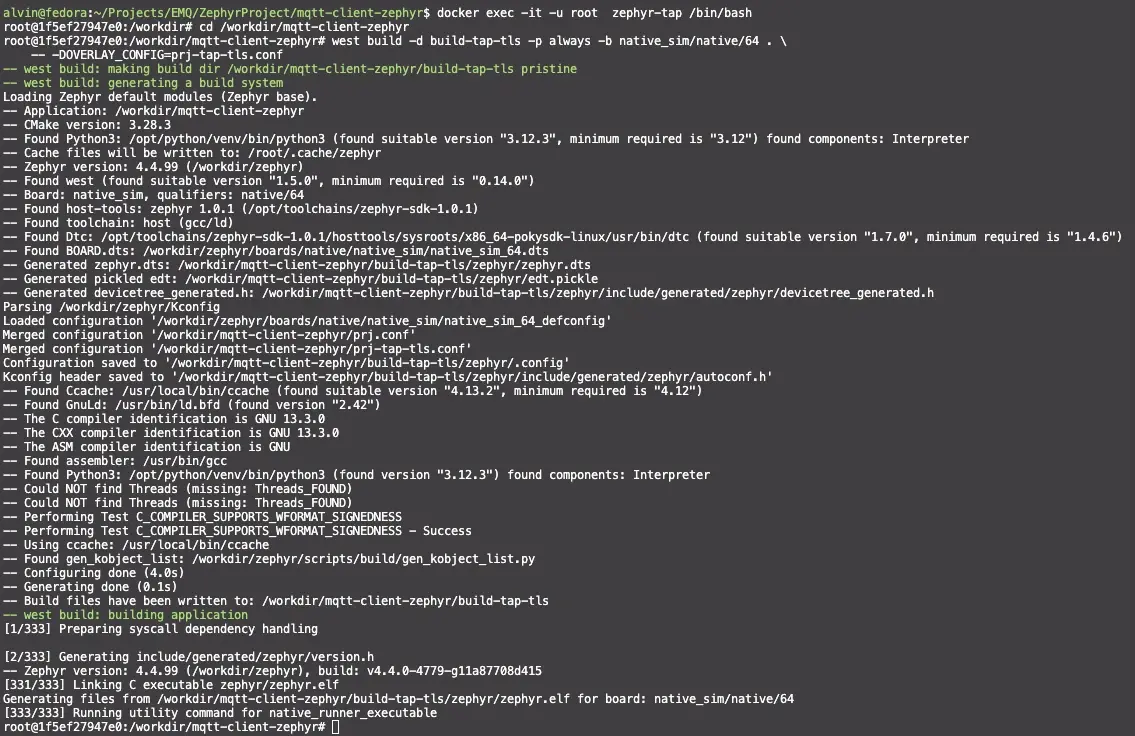
west build -d build-tap-tls -p always -b native_sim/native/64 . \
    -- -DOVERLAY_CONFIG=prj-tap-tls.conf
Upon a successful build, the terminal will output: [333/333] Running utility command for native_runner_executable.
The critical TLS-related Kconfig options within prj-tap-tls.conf are as follows:
# MQTT TLS Transport Layer
CONFIG_MQTT_LIB_TLS=y
CONFIG_NET_SOCKETS_SOCKOPT_TLS=y
# mbedTLS Stack Configuration
CONFIG_MBEDTLS=y
CONFIG_MBEDTLS_ENABLE_HEAP=y
CONFIG_MBEDTLS_HEAP_SIZE=30000
CONFIG_MBEDTLS_SSL_IN_CONTENT_LEN=2048
CONFIG_MBEDTLS_SSL_OUT_CONTENT_LEN=2048
# Cipher Suite: ECDHE-RSA Key Exchange + AES-128-GCM (verified compatible with EMQX)
CONFIG_MBEDTLS_CIPHERSUITE_TLS_ECDHE_RSA_WITH_AES_128_GCM_SHA256=y
# PEM Certificate Parsing Support
CONFIG_MBEDTLS_PEM_PARSE_C=y
CONFIG_MBEDTLS_PEM_WRITE_C=y
# PSA Key Types (required for TLS handshake)
CONFIG_PSA_WANT_KEY_TYPE_RSA_PUBLIC_KEY=y
CONFIG_PSA_WANT_KEY_TYPE_ECC_PUBLIC_KEY=y
# TAP Networking Configuration
CONFIG_NET_CONFIG_SETTINGS=y
CONFIG_NET_CONFIG_MY_IPV4_ADDR="192.0.2.1"
CONFIG_NET_CONFIG_MY_IPV4_GW="192.0.2.2"
CONFIG_NET_CONFIG_PEER_IPV4_ADDR="192.0.2.2"
5.4 Startup and TLS Connection Verification
# Execute with sudo to configure iptables and the zeth interface
sudo ./run-zephyr-tap.sh
The script automatically handles the following sequence:
Launches Zephyr -> waits for the zeth virtual network interface -> assigns IP 192.0.2.2/24 -> enables IP forwarding -> configures iptables NAT/FORWARD rules -> drops into the foreground interactive shell.
Network Ready Hint: ✅ Network Ready | Zephyr: 192.0.2.1 | Host: 192.0.2.2
Run the TLS connection test (targeting your local EMQX TLS listener, e.g., port 8084):
uart:~$ mqtt_cli conn -h 100.108.113.19 -p 8084 \
    --ca certs/self_certs/rootCA.crt \
    --cert certs/self_certs/mqtt-client.crt \
    --key certs/self_certs/mqtt-client.key \
    --insecure
Expected output:
[TLS] CA certificate loaded OK (tag 101)
[TLS] Config: peer_verify=0, sec_tag_count=1, hostname=100.108.113.19
Connecting to 100.108.113.19:8084 (ID: zephyr-emqx-345678, Keepalive: 60) ...
[TLS] Calling mqtt_connect (transport.type=1)...
Connection successful!
Entered conn blocking maintenance mode. Press Ctrl+C to terminate simulation process.
Verification results:
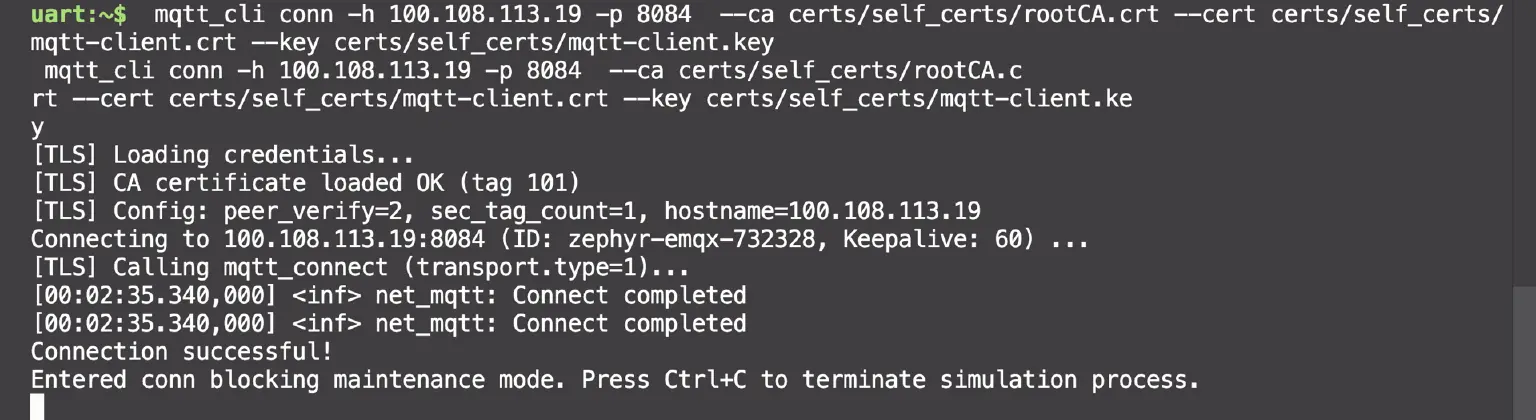
The Zephyr shell outputs the complete TLS connection sequence log, including explicit confirmations for CA certificate loaded OK, peer_verify, hostname, and ultimately Connection successful!.
5.5 TLS Encrypted Message Publishing and Subscription Demo
Similar to the TCP mode, the Zephyr TLS client fully supports standard MQTT publishing and subscription. This demo targets the local EMQX TLS listener (100.108.113.19:8084).
Scenario 1: TLS Subscription and Encrypted Message Receipt
uart:~$ mqtt_cli sub -h 100.108.113.19 -p 8084 \
    --ca certs/self_certs/rootCA.crt \
    --cert certs/self_certs/mqtt-client.crt \
    --key certs/self_certs/mqtt-client.key \
    --insecure \
    -t test/tls/demo -q 1
Expected output:
[TLS] CA certificate loaded OK (tag 101)
Connecting to 100.108.113.19:8084 (ID: zephyr-emqx-... ) ...
Connection successful!
Subscribing to topic: 'test/tls/demo' (QoS 1) ...
Entered sub listening state. Waiting for messages... (Press Ctrl+C to exit)
Publish an encrypted message to the same TLS port from the host or another terminal (client certificates are required for mTLS verification):
mqtt_cli pub -h 100.108.113.19 -p 8084 \
    --ca certs/self_certs/rootCA.crt \
    --cert certs/self_certs/mqtt-client.crt \
    --key certs/self_certs/mqtt-client.key \
    -t test/tls/demo -m "Hello via TLS!" -q 1
The Zephyr subscriber shell will instantly output:
[Received Msg] Topic: test/tls/demo | Payload: Hello via TLS!
Scenario 2: TLS Encrypted Publishing
uart:~$ mqtt_cli pub -h 100.108.113.19 -p 8084 \
    --ca certs/self_certs/rootCA.crt \
    --cert certs/self_certs/mqtt-client.crt \
    --key certs/self_certs/mqtt-client.key \
    -t test/tls/demo -m "Hello from Zephyr via TLS!" -q 1
Expected output:
[TLS] CA certificate loaded OK (tag 101)
Connection successful!
[Published 1/1] Topic='test/tls/demo' | Payload='Hello from Zephyr via TLS!'
Publish finished, gracefully disconnecting and exiting...
Verification results:
The terminal displays the complete confirmation flow, finalized by the [Published 1/1] log on the Zephyr TLS publisher side.
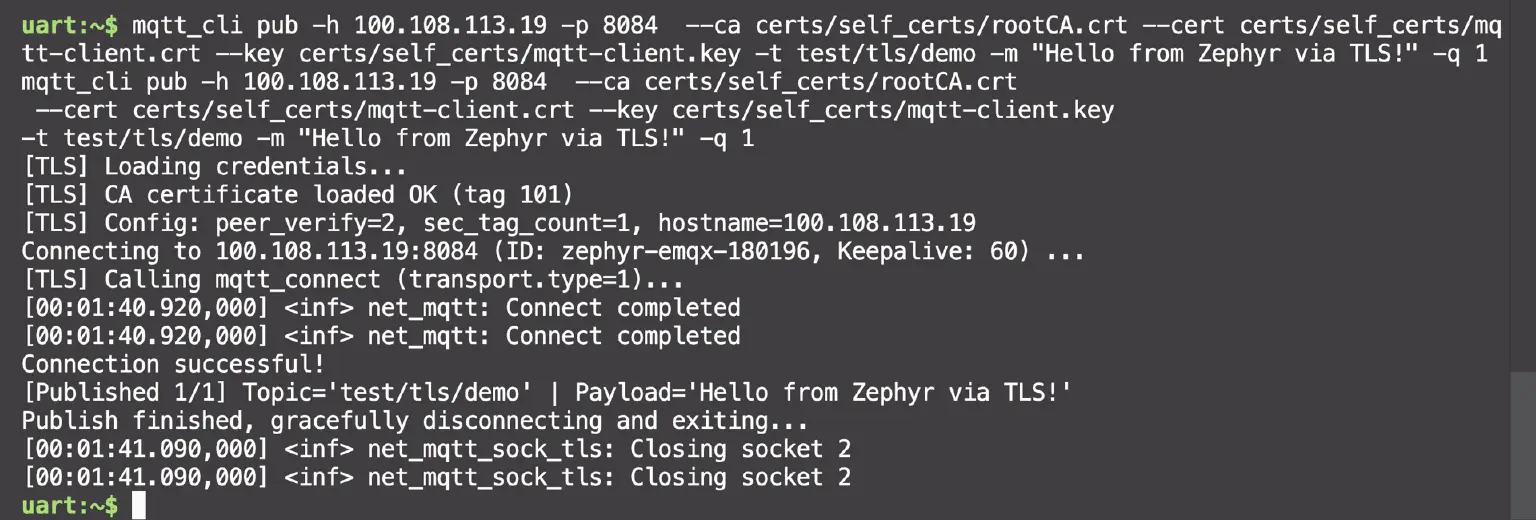
VI. Project Configuration and Execution Environment Comparison
6.1 Dual-Mode Comprehensive Comparison
| Dimension | NSOS / TCP-only | TAP + TLS |
|---|---|---|
| Network Model | native_sim offloaded sockets (reuses host network stack) | Zephyr independent network stack (via virtual NIC zeth) |
| Overlay Configuration | prj-nsos.conf (3 lines) | prj-tap-tls.conf (~35 lines) |
| Build Directory | build-nsos | build-tap-tls |
| Startup Script | ./run-zephyr-nsos.sh (No sudo required) | sudo ./run-zephyr-tap.sh (Requires sudo) |
| TLS Support | ❌ Unsupported (SO_TLS unavailable on offloaded sockets) | ✅ TLS 1.2 + mutual TLS (mTLS) |
| Certificate Requirements | None | Root CA + Client Certificate + Client Private Key |
| TUN/TAP Dependency | None | Requires /dev/net/tun and NET_ADMIN privileges |
| Host Requirements | Any (including macOS Docker Desktop) | Linux host or WSL2 |
| Connection Example | mqtt_cli conn -h 100.108.113.19 | mqtt_cli conn -h 100.108.113.19 -p 8084 --ca ... --cert ... --key ... [--insecure] |
| Subscription Example | mqtt_cli sub -t test/demo | mqtt_cli sub --ca ... --cert ... --key ... [--insecure] -t test/demo |
| Publishing Example | mqtt_cli pub -t test/demo -m "Hi" | mqtt_cli pub --ca ... --cert ... --key ... [--insecure] -t test/demo -m "Hi" |
| Best Suited For | Quick verification, unencrypted intranet devices, CI automation | Security evaluation, TLS/mTLS feasibility validation, certificate integration testing |
| Limitations | Not suitable for scenarios requiring encryption or certificate-based identity authentication | Higher deployment complexity; incompatible with macOS Docker Desktop |
6.2 Build Command Comparison
# NSOS / TCP-only
west build -d build-nsos -p always -b native_sim/native/64 . \
    -- -DOVERLAY_CONFIG=prj-nsos.conf
# TAP + TLS
west build -d build-tap-tls -p always -b native_sim/native/64 . \
    -- -DOVERLAY_CONFIG=prj-tap-tls.conf
Both targets utilize prj.conf as their shared foundation. By modifying only the overlay file designated via -DOVERLAY_CONFIG, the Zephyr build system automatically merges the underlying Kconfig definitions.
VII. Troubleshooting and FAQ
Q1: Why do I get an error when passing TLS arguments (like --ca) in NSOS mode?
- Root Cause: NSOS mode does not enable
CONFIG_MQTT_LIB_TLS. Consequently, the TLS code block is compiled out via#ifdefdirectives. - Solution: Switch to the TAP+TLS mode, or stick to plaintext MQTT on port 1883.
Q2: Why does run-zephyr-tap.sh throw a "zeth interface timeout" error in TAP mode?
- Root Cause: The Docker container lacks
NET_ADMINprivileges or access to the/dev/net/tundevice. - Solution: Recreate the container using the
--cap-add=NET_ADMIN --device=/dev/net/tunflags, and verify thatlsmod | grep tunreturns an active module on the host.
Q3: What causes TLS connection failures with error code -0x4e or Underlying connection failed: -103?
- Root Cause: Error
-0x4emaps toMBEDTLS_ERR_NET_SEND_FAILED. This typically stems from mixed-up certificate roles (e.g., using a server certificate as a client certificate), residual stale credentials in thesec_tagcache, or mismatched broker-side configurations. - Solution: 1. Ensure the client uses a certificate generated with the
clientAuthExtended Key Usage (EKU). 2. Verify that client certificate authentication is correctly enabled on the broker. 3. Ensure old TLS credentials are explicitly purged before every connection attempt (this logic is built into this demo project).
Q4: Why is TAP mode unavailable on macOS Docker Desktop?
- Root Cause: The underlying
LinuxKitsubsystem used by Docker Desktop for Mac imposes network virtualization restrictions that break full TCP forwarding over TAP/TUN devices. - Solution: Use NSOS/TCP-only mode for local Mac development, or switch to a native Linux host or WSL2 environment.
Q5: Can I use self-signed certificates in a production environment?
- No. Self-signed certificates are strictly for local evaluation or controlled intranet environments. For production deployments, always use certificates issued by a publicly trusted CA (e.g., Let's Encrypt, DigiCert), remove the
--insecureflag, and enable strict full-chain certificate verification.
VIII. Summary and Outlook
This guide demonstrated how to build an MQTT client from scratch on Zephyr RTOS and connect it to an EMQX Broker using two distinct modes:
- NSOS/TCP-only Mode: Get up and running in just three steps:
west build$\rightarrow$./run-zephyr-nsos.sh$\rightarrow$mqtt_cli conn. This mode is perfect for quickly validating the entire MQTT publish/subscribe workflow without requiring elevated host privileges or certificate overhead. - TAP+TLS Mode: Enables robust TLS 1.2 encryption and mutual authentication (mTLS) on Zephyr's independent native network stack. It routes traffic through the
zethvirtual interface and utilizes host-sideiptablesNAT for internet access, fulfilling security evaluations for embedded device communications.
Using the mqtt_cli sub and mqtt_cli pub commands, you can easily verify message mechanics directly from the Zephyr shell, while leveraging the EMQX Dashboard to observe real-time device connection states and data traffic metrics.
Next Steps and Future Extensions:
- Data Integration: Leverage the EMQX Rule Engine to bridge Zephyr edge data to external storage platforms like Kafka, PostgreSQL, or TimescaleDB in real-time.
- Command Downlink: Implement reliable device control mechanisms utilizing the Request-Response pattern native to MQTT 5.0.
- Over-the-Air (OTA) Updates: Use EMQX's File Transfer capability to orchestrate secure firmware OTA updates on Zephyr endpoints.
- Hardware Deployment: Port this implementation to physical hardware (e.g., nRF52840, ESP32) to evaluate real-world power consumption and connection stability.