Introducing EMQX Agents: Build AI Automation Where Your IoT Data Lives

EMQX Agents: Agent Runtime for the Physical World
IoT systems already collect massive amounts of device data through MQTT. The harder part is turning those live signals into timely decisions and actions.
For many teams, the answer still depends on custom code. A device sends an MQTT message. A rule forwards it somewhere else. A service reads it, checks recent history, applies business logic, and publishes an alert or command. That approach works, but it also creates extra services to build, deploy, monitor, and maintain.
EMQX Agents is a hosted AI agent runtime in EMQX Cloud for building event-driven agents on top of MQTT and time-series data. Instead of starting with a blank service, you describe the automation you want in plain language. EMQX Agents helps generate the agent definition, connects it to your MQTT and time-series infrastructure, and runs it as a long-lived agent that reacts to real events.
With EMQX Agents, MQTT events can trigger AI-assisted workflows without leaving EMQX Cloud.
Built for Event-Driven IoT Automation
Unlike general-purpose AI tools, EMQX Agents is designed around how IoT systems actually work: MQTT topics, message payloads, event timing, historical telemetry, and controlled action paths.
An agent can start from an MQTT message, use the topic and payload as context, query EMQX Tables for recent or historical data, and publish a result back through EMQX Broker. The agent does not run as a one-off chat response. After deployment, it keeps listening for matching events and starts a new run for each trigger.
This design also makes the automation easier to inspect. Each run records the trigger event, tool calls, LLM calls, response, status, duration, and token usage, so teams can understand what happened before they refine or redeploy the agent.
EMQX Agents in the EMQX Cloud Architecture
EMQX Cloud is becoming a unified platform for connected-device applications. Each service plays a different role in the journey from device data to business value:
- EMQX Broker connects devices. It is the real-time MQTT messaging layer where devices, applications, and cloud services exchange data.
- EMQX Tables stores device history. It keeps MQTT telemetry as time-series data so teams can query trends, baselines, and past events.
- EMQX Fleets manages device state. It helps teams organize devices, synchronize state, send commands, and manage fleet-level operations.
- EMQX Agents automates decisions and actions. It sits on top of MQTT messages and time-series data, turning live events and historical context into AI-assisted workflows.
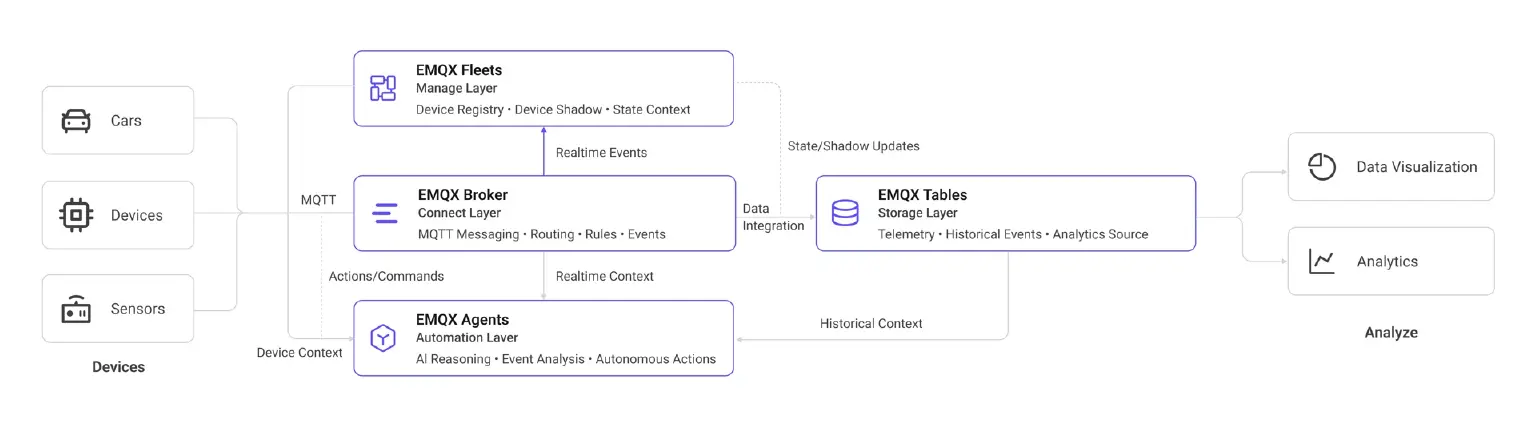
In this architecture, EMQX Agents is not another data pipeline or another device registry. It is the automation layer of EMQX Cloud. Broker handles communication, Tables provides historical context, Fleets manages device operations, and Agents decides what should happen next.
Many IoT workflows need more than a single message. A single temperature reading may not be enough to trigger maintenance, and a missing heartbeat may only matter if the device is expected to be active. When a device event arrives, an agent can evaluate the message, query recent history, apply the instructions generated from your chat, and publish the next action back through EMQX Cloud.
How Teams Build and Run Agents
Creating an agent starts with a chat.
For example, you might say:
Monitor MQTT temperature events on factory/+/+/temperature.
Each payload includes device_id and temp.
Track the last 3 readings per device.
If the rolling average exceeds 70, publish an alert to alerts/anomaly.
EMQX Agents can turn that request into a deployable agent definition. You can then ask follow-up questions, change the threshold, adjust the topic, make the alert condition more conservative, or review the generated behavior before deployment.
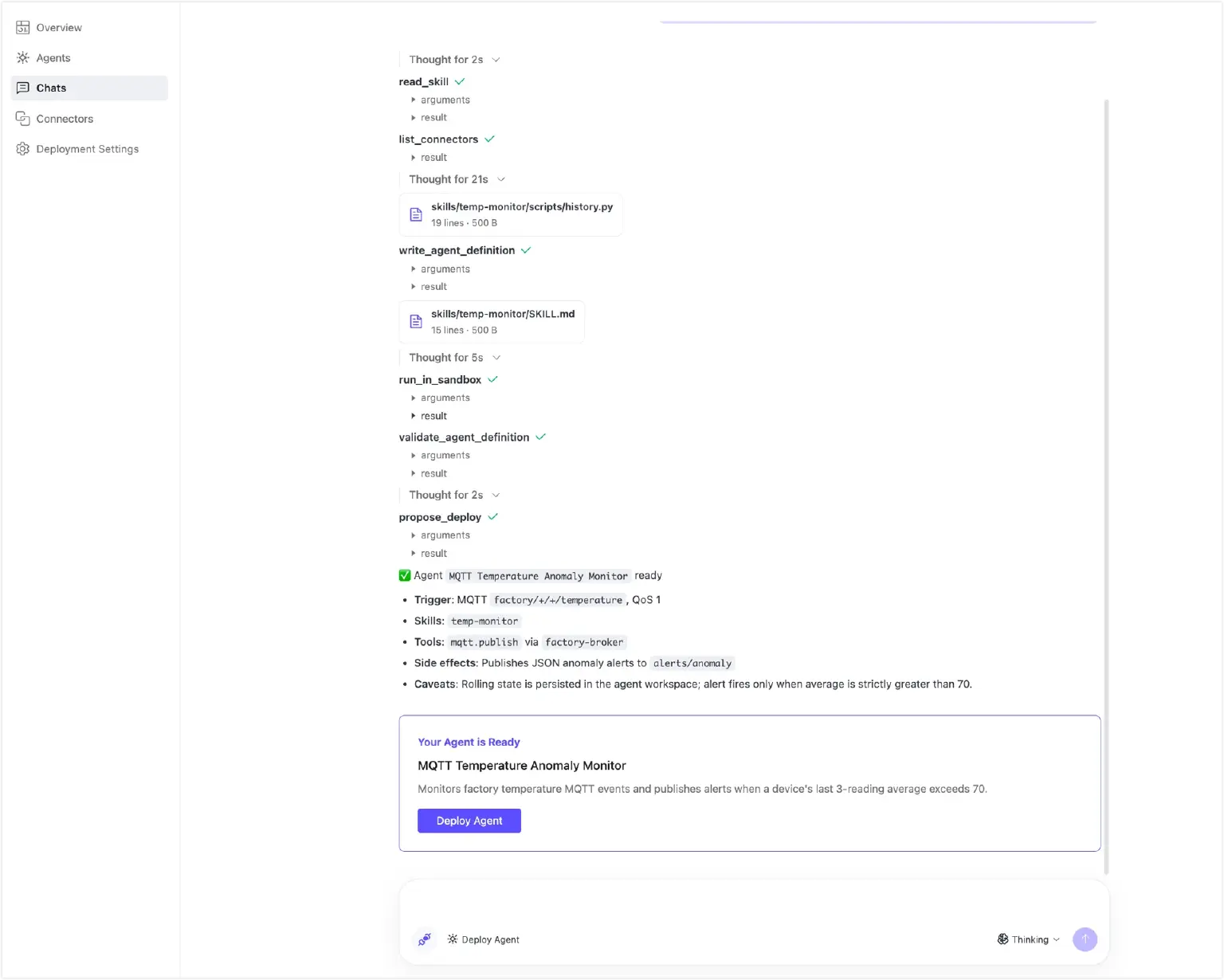
Once deployed, the agent runs independently. Each matching MQTT message starts a new run, and each run records the trigger event, tool calls, LLM calls, response, status, duration, and token usage.
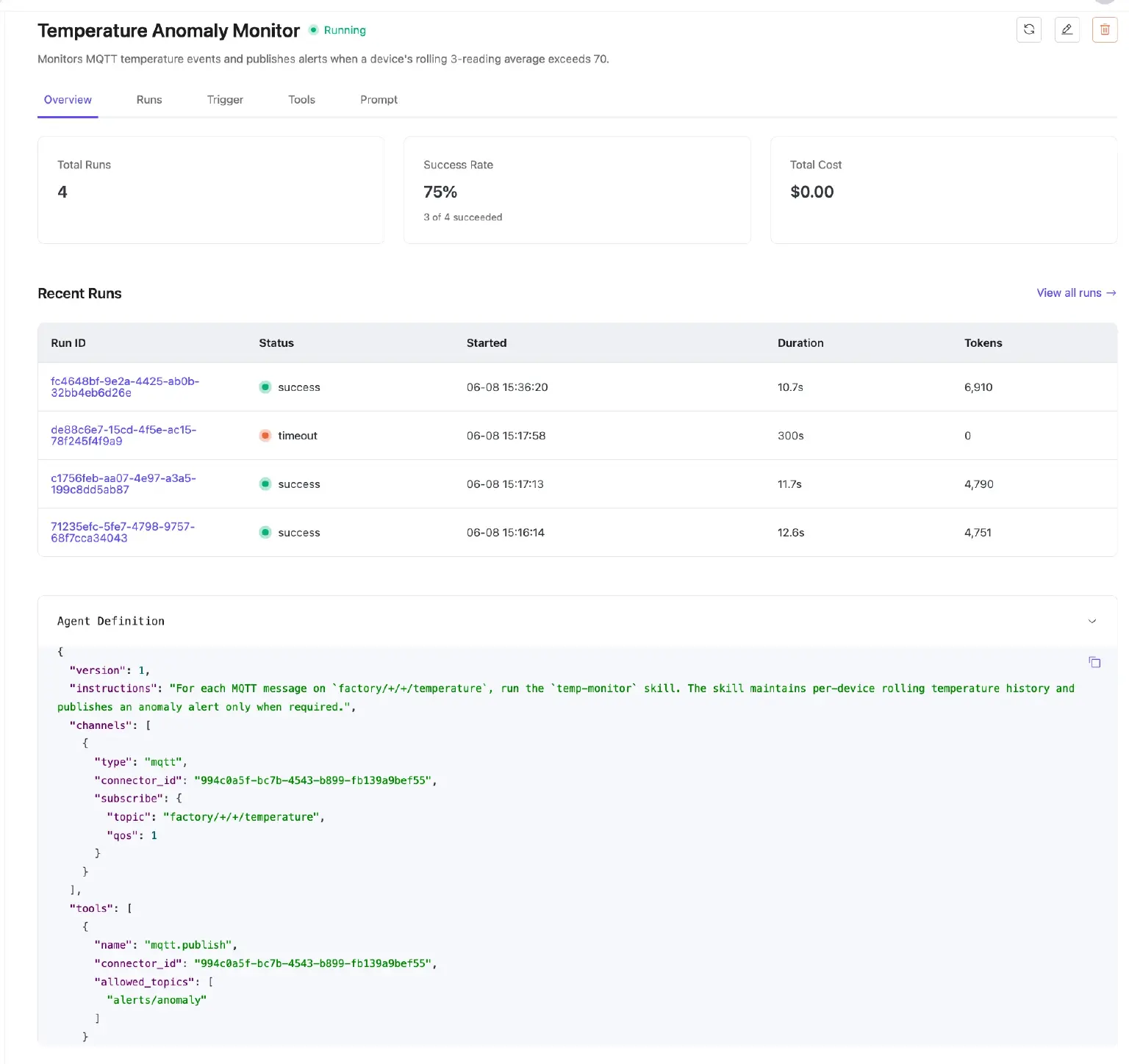
Teams can start with a plain-language request, review the generated behavior, deploy the agent, and then use run history to refine it over time.
This workflow is especially useful for teams that know the operational goal but do not want every change to become a new development project. A maintenance engineer can describe the condition, while a platform engineer can review the generated configuration and run history.
A Practical Example: Smarter Equipment Monitoring
Consider a hydraulic cooling system in a factory. Temperature sensors publish readings through MQTT. In the past, building an AI-assisted monitoring flow might have required several moving parts: MQTT ingestion, rule forwarding, a separate web service, model or logic code, and a path for alerts.
An agent can monitor temperature topics such as:
factory/plant-a/+/cooler/temperature
For each incoming reading, it can check recent values for the same device, compare the current trend against a rolling baseline, and publish an alert when the pattern suggests abnormal cooling behavior.
The alert can be sent to a topic such as:
factory/plant-a/maintenance/alerts
Downstream systems can then subscribe to that topic to create a work order, notify an operator, update a dashboard, or trigger a human review workflow.
Why It Matters for IoT Teams
For IoT teams, the next step after collecting telemetry is making that data operational: detecting conditions, deciding what to do, and triggering the right action.
In practice, many projects slow down because teams must connect messaging, storage, analytics, inference, alerting, and operations tooling before they can deliver value.
EMQX Agents reduces that friction by bringing AI automation closer to MQTT messages and time-series data. The result is a more complete IoT platform: connect devices, store telemetry, manage fleets, and automate actions within EMQX Cloud.
Getting Started
EMQX Agents is currently available in beta on EMQX Cloud. To try it, start from an EMQX Cloud project that already has both an EMQX Broker deployment and an EMQX Tables deployment in the same region. From the project home page, use the EMQX Agents beta entry to submit a support ticket. The EMQX team will provision the deployment and notify you when it is ready.
Once provisioned, you can add connectors, start a chat, describe your first agent, deploy it, and test it with MQTT messages.
If your team is already using MQTT to collect device data, EMQX Agents gives you a shorter path from MQTT events to automated operational response.