Introducing EMQX Tables Pro: High-Availability Time-Series Storage for Production IoT

EMQX Tables Pro is now available, giving production IoT applications a more resilient data foundation without the complexity of managing database infrastructure. EMQX Tables is the fully managed time series database built into EMQX Cloud, storing MQTT telemetry directly from your topics with no ETL layer in between. Pro is the second of its two plans, alongside Starter.
As MQTT telemetry moves from development into production, Tables Pro provides the availability and support required for operational monitoring, analytics, and day-to-day decision-making.
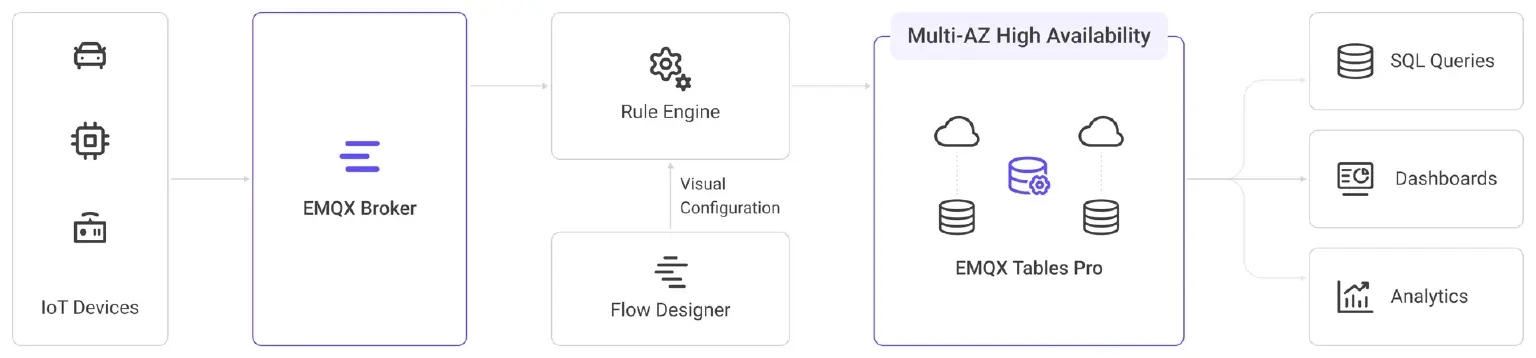
MQTT data flow through EMQX Broker to multi-AZ EMQX Tables Pro
Built for Production Availability
Starter provides a single-node deployment in one availability zone for development, proofs of concept, and lightweight production workloads. Pro adds multi-AZ high availability and stronger service commitments for production systems that depend on continuous access to telemetry data.
- Multi-AZ resilience: Distributes the deployment across availability zones to reduce reliance on a single zone.
- 99.9% SLA: Provides a higher availability commitment than Starter’s 99.5% SLA.
- 24/7 expert support: Extends technical assistance beyond Starter’s 8x5 basic support.
Use Pro when EMQX Tables serves as the production time-series data layer for your MQTT applications, supporting SQL queries, operational dashboards, monitoring, and historical analysis.
Telemetry lands in Tables straight off your MQTT topics through the Rule Engine, with schema inference handling the structure, so there is no pipeline to build or maintain between the broker and storage. Queries run in SQL, and Grafana and Metabase connect natively. Because Tables runs inside EMQX Cloud, it stays one vendor, one control plane, and one bill.
See the EMQX Tables plan comparison for details.
High Availability Without a Large Starting Footprint
You do not need a large deployment to start using Pro. Self-service tiers range from 2 vCPU / 8 GB RAM to 16 vCPU / 64 GB RAM, allowing you to select resources for your ingestion and query needs.
The entry tier includes 100 GB of compressed storage and 100 GB of monthly egress traffic. Larger self-service tiers include up to 1 TB of storage and 1 TB of monthly egress traffic.
For workloads requiring a larger configuration, contact support to discuss sizing.
Usage-Based Pricing With High Availability Included
EMQX Tables Pro starts at $0.69 per hour for the 2 vCPU / 8 GB RAM tier. High availability is included in the deployment price, with no separate high-availability charge.
Billing combines the selected deployment tier with any storage and egress usage beyond its included quotas. Storage over quota is $0.04 per GB compressed, and egress over quota is $0.09 per GB. There are no per-message ingestion fees or per-query charges, and Tables usage appears alongside your other EMQX Cloud services on a consolidated bill.
Pro uses hourly, pay-as-you-go billing. Review the pricing details and the Console pricing summary before deploying.
What to Know Before You Deploy
Three things about this first release are worth knowing up front:
- One region to start. Pro runs on Google Cloud in Iowa (us-central1), with more regions to follow.
- Tier changes are not self-service yet. Resizing a deployment in the Console is not available in this release, so pick the tier that fits your ingestion and query load, and contact support if you need to move.
- Hourly billing only. There are no free trials or annual subscriptions in this release. If an annual term matters to you, talk to your account team.
Get Started With EMQX Tables Pro
You can create a Tables Pro deployment on its own, or associate it with an existing EMQX Broker network in the same cloud provider and region so the two share a VPC and talk over private connectivity. If you want that private link, create the broker deployment first. A Tables deployment created without one gets its own separate network.
To get started, open the EMQX Cloud Console and create an EMQX Tables deployment. Select Pro, choose the supported region and a suitable tier, review the configuration, and click Deploy.
Once the deployment is ready, create a Tables user with the required permissions, configure your EMQX Broker integration, and start querying your telemetry.
EMQX Tables Pro adds high-availability time-series storage to your MQTT applications. Two ways to start:
- New to EMQX Cloud? Start with the deployment guide.
- Already on EMQX Cloud? Create your Tables Pro deployment in the Console.