Leveraging EMQX Cluster Linking for a Smooth Hybrid Cloud Migration

Introduction
EMQX open source edition empowers enterprises with a powerful MQTT broker, delivering flexibility and cost-effective private deployment. However, as organizations grow, they often face challenges like limited scalability, rising maintenance costs, and complex resource management.
Moving to the cloud is a key strategy to resolve these issues. EMQX Dedicated edition, a fully managed MQTT service, serves as a better choice with simplified maintenance, elastic scalability, and high availability. The smooth transition from on-premises to cloud environments can be achieved with EMQX Cluster Linking feature. This blog will provide a step-by-step guide to help you migrate seamlessly with minimal disruption.
Learn more about Cluster Linking: Cluster Linking Deep Dive: Unlock Global Scale & Resilience on EMQX Cloud
Why Cluster Linking is Essential for Hybrid Cloud Migration
- Enables Effortless Zero-Downtime Migration: It facilitates a "zero-downtime" migration by continuously synchronizing MQTT messages and session states between your on-premises and EMQX Cloud clusters. This ensures a consistent MQTT service experience for clients and simplifies the migration process with encapsulated data synchronization and routing capabilities.
- Ensures Business Continuity and Data Integrity: Cluster Linking provides the underlying data synchronization and routing to ensure a seamless client experience during connection switches, preventing service interruptions. It also prevents data silos by effectively integrating historical and real-time data, guaranteeing consistency and integrity.
- Offers Flexible Traffic Management and Disaster Recovery: It allows for flexible traffic distribution, enabling gradual shifts to the cloud for testing and validation. Even post-migration, Cluster Linking serves as a vital disaster recovery solution, allowing rapid failover back to on-premises systems if cloud issues arise, ensuring operational resilience.
Hybrid Cloud Migration with Cluster Linking: A Hands-On Example
In this example, we will demonstrate how to connect a self-hosted EMQX broker to an EMQX Dedicated deployment using Cluster Linking. The local deployment runs EMQX Broker 5.9.1 on a cloud-based server.
Prerequisites
- Set up a self-hosted EMQX deployment:
deployment-local. Refer to the EMQX documentation for step-by-step instructions. Get Started with EMQX | EMQX 5.9 Docs - Create a Dedicated cloud deployment:
deployment-cloud. Refer to the EMQX Dedicated documentation for step-by-step instructions. - Establish network connectivity between your local and cloud deployments using one of the following methods:
- VPC Peering (Recommended): Provides a secure, low-latency private connection by directly linking the two VPCs. Follow this guide to create VPC Peering.
- NAT Gateway: Enables public network access for deployments. Easier to configure, but may introduce additional latency, cost, and security considerations. Learn more in the official documentation.
Create Cluster Linking
Upstream Link: Local EMQX to EMQX Dedicated
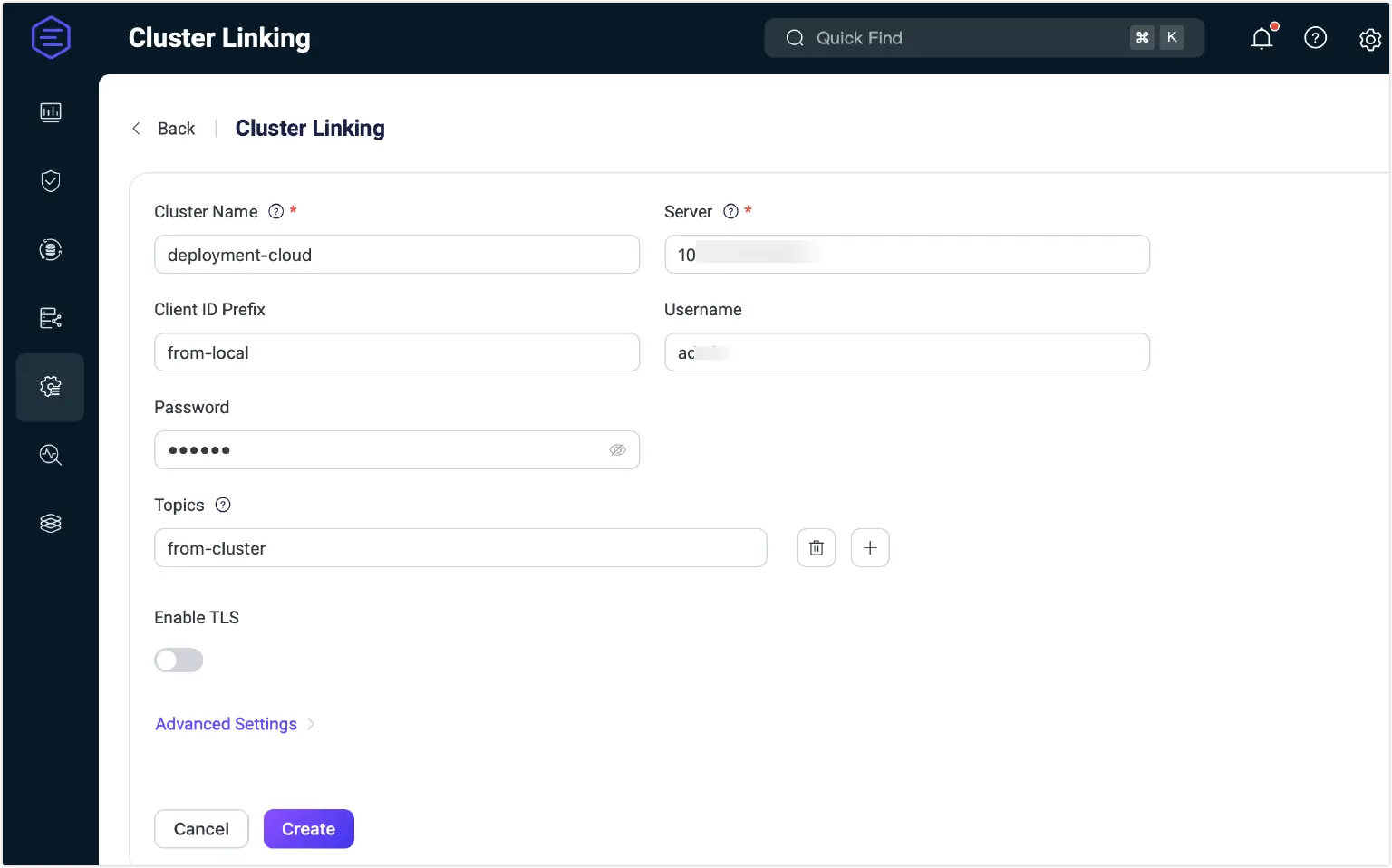
- Log in to the EMQX Dashboard, select Management > Cluster Linking in the left navigation menu, and click Create in the top-right corner to start creating a new cluster link.
- On the configuration page, specify the following settings:
- Cluster Name: Enter the name of the remote cluster:
deployment-cloud. - Server: Provide the MQTT host and port of
deployment-cloud. - Client ID Prefix: Define a prefix for ClientIDs used by MQTT connections to the remote cluster. For example,
from-local. - Username / Password: Provide the username and password that the remote deployment accepts for connections.
- Topics: List of MQTT topic filters that specify which messages the current deployment will receive from the remote deployment, for example,
from-cluster. - Enable TLS: Enable this option if communication between clusters requires TLS encryption. Configure the settings, such as SSL certificates.
- Advanced Settings: Configure additional settings such as MQTT protocol parameters.
- Cluster Name: Enter the name of the remote cluster:
- Click Create after you complete the settings. The new entry will appear on the Cluster Linking page and be enabled by default.
Downstream Link: EMQX Dedicated to Local EMQX
- In the EMQX Dedicated dashboard of
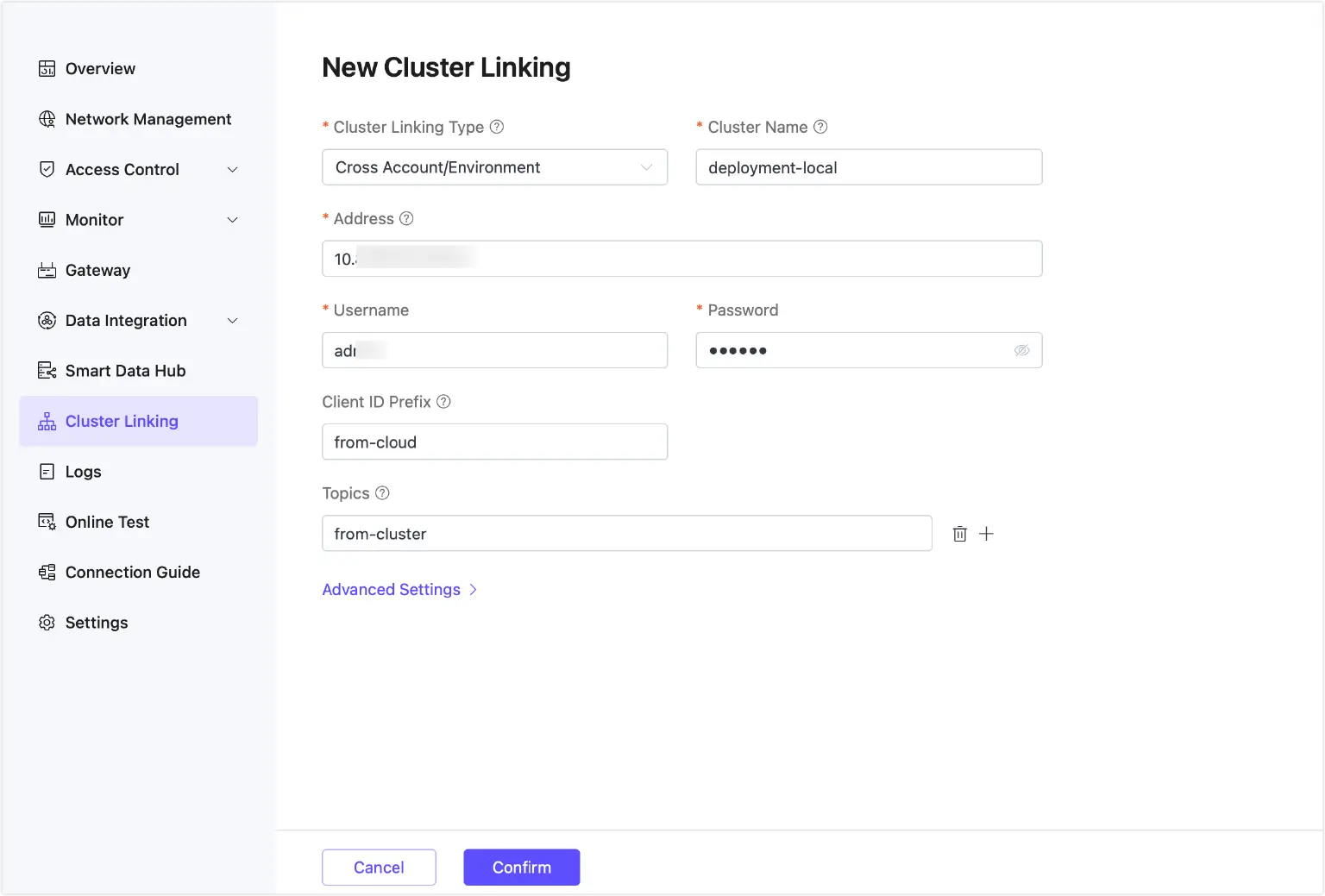
deployment-cloud, go to Cluster Linking and click New. - On the New Cluster Linking page, configure the following options:
- Cluster Name: Enter the name of the local cluster:
deployment-local. You can find the value ofcluster.namein the local EMQX configuration file. - Address: Enter the address and port of the local EMQX instance (e.g.,
<your-host>:8883). - Username / Password: Provide the username and password that the local deployment accepts for connections.
- Client ID Prefix: Define a prefix for ClientIDs used by MQTT connections to the local cluster. For example,
from-cloud. - Topics: List of MQTT topic filters that specify which messages the current deployment will receive from the local deployment, for example,
from-cluster. - Advanced Settings: Configure additional settings such as MQTT protocol parameters.
- Cluster Name: Enter the name of the local cluster:
- Click Confirm. You will be redirected to the Cluster Linking page, where the new entry will appear and be enabled by default.
Verify Hybrid Cloud Cluster Connectivity
To confirm successful Cluster Linking, use MQTTX, a free MQTT client tool for testing connections (download at MQTTX: Your All-in-one MQTT Client Toolbox):
- Create a connection named
local-connectionin MQTTX, connecting todeployment-localusing its MQTT host and credentials. - Create a second connection named
cloud-connection, connecting todeployment-cloud. - Subscribe both clients to the
from-clustertopic configured during Cluster Linking. - Using
cloud-connection, publish a test message to thefrom-cluster(e.g., “Hello from EMQX Dedicated”). - Verify that both
local-connectionandcloud-connectionreceive the message, confirming bidirectional message routing across clouds.
DNS Weight-Based Migration Strategy
Moving client traffic from a local EMQX deployment to EMQX Dedicated can be tricky without a well-planned migration strategy, potentially leading to disruptions or inconsistent experiences. An effective approach to mitigate these risks is by configuring weighted DNS records. This method allows you to distribute traffic between multiple endpoints based on assigned weights, enabling a controlled and phased migration process.
Phased Migration Advantages
By adjusting DNS weights incrementally, you can shift client connections to the cloud deployment step by step. This minimizes migration risks, avoids service disruption, and allows for real-time monitoring and validation—ensuring a seamless transition with little to no impact on clients.
Rollback Considerations
Should any issues arise during migration, you can quickly revert traffic back to the local deployment by readjusting DNS weights. This built-in rollback mechanism provides a safe fallback without requiring changes on the client side.
Conclusion
Migrating from open-source EMQX to EMQX Dedicated doesn't have to be disruptive or complex. With Cluster Linking, organizations can achieve a seamless, phased migration that ensures business continuity, minimizes risk, and avoids service downtime. By maintaining synchronization between local and cloud deployments, and enabling flexible traffic routing and rollback strategies, EMQX empowers businesses to embrace the cloud with confidence—unlocking scalability, resilience, and operational efficiency without sacrificing control.