MQTT Agent: Turning MQTT Infrastructure into an AI Orchestration Platform

Introduction: Challenges of AI Agents in IoT
EMQX is a high-performance, distributed MQTT broker and event streaming platform designed for low-latency data exchange across devices, applications, and cloud services. Serving as the backbone between the physical world and enterprise backend systems, EMQX routes telemetry and handles real-time device events at scale.
Beyond core IoT messaging, EMQX can also function as an integration layer for AI agents and workflows. However, embedding AI agents into IoT environments presents two major challenges:
- Deployment & Scalability: Running parallel agents and connecting them with legacy infrastructure requires complex cloud setup, specialized tooling, and deep domain expertise.
- Security & Access Control: Unrestricted system access poses severe risk such as prompt injection attacks or unauthorized privilege escalation (e.g., granting full system privileges to an autonomous instance like ClawBot).
MQTT Agent: Build Autonomous AI Workflows Directly Within EMQX
MQTT Agent turns EMQX into a native AI execution runtime, allowing you to build, deploy, and secure autonomous agents directly inside your MQTT broker using nothing more than an LLM API key.
By providing built-in, MQTT-native primitives, EMQX eliminates the need for external agent frameworks, complex orchestration services, or third-party infrastructure.
Specifically, MQTT Agent is purpose-built for:
- Autonomous AI Workflows: Fully automated execution without human-in-the-loop intervention.
- Massive Concurrency: High-throughput management of thousands of active devices and agents simultaneously.
- Zero-Trust Access Control: Enforced granular permissions, strict execution boundaries, and full auditability for external system interactions.
MQTT Agent Architecture: Core Building Blocks
MQTT Agent introduces three MQTT-native primitives — Tools, Sessions, and Pipelines — that run directly within EMQX. Exposed as MQTT resources via dedicated topics, these building blocks allow developers to assemble agentic workflows without relying on external orchestration layers.
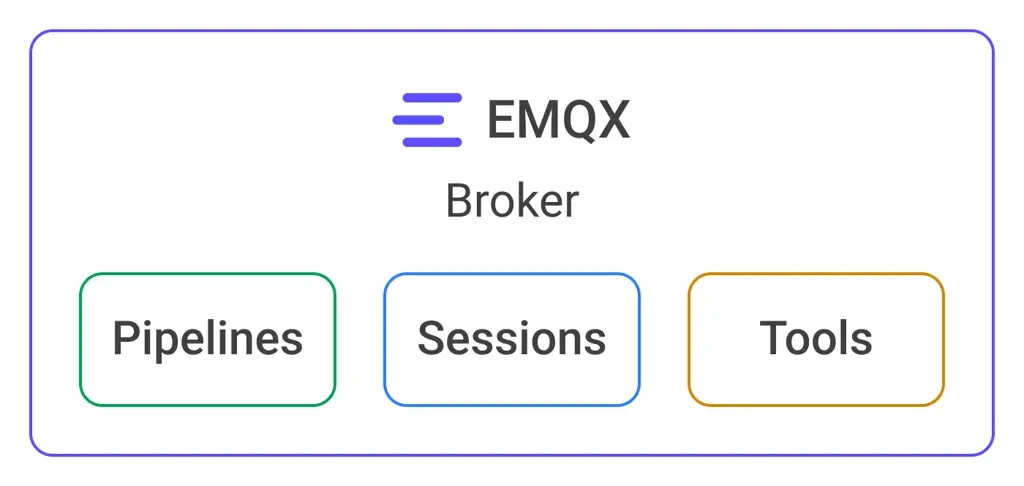
- Tools: Reusable capabilities (DB, HTTP, external APIs, external agents).
- Sessions: Stateful LLM conversations.
- Pipelines: Event-driven orchestration.
Let's dive into the primitives in detail and see how they work together.
Tools
Tools are reusable capabilities. A tool can publish an MQTT message, send an MQTT request/reply interaction, call an HTTP endpoint, execute a parameterized PostgreSQL query, etc.
Each tool has a type, ID, description and parameters. To invoke a tool, we publish a request message to the appropriate topic. Then we receive a response from the tool via the corresponding response topic.

Type identifies what a tool can do (e.g., query a PostgreSQL database), while the ID is a unique identifier for the tool instance bound to concrete parameters.
Parameters restrict the tool to specific inputs.
Let's see how that works for the PostgreSQL query tool.
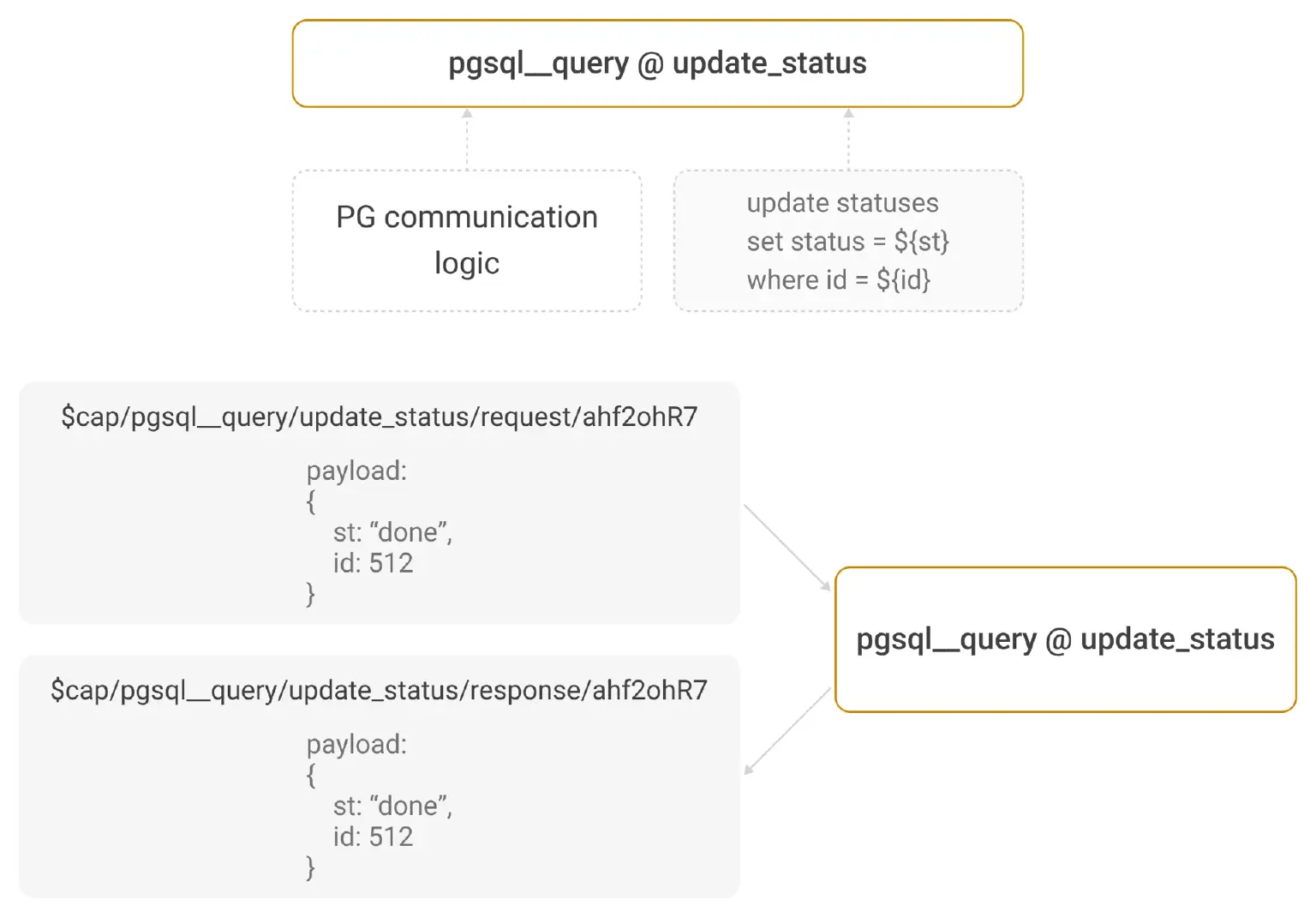
The type for the PostgreSQL query tool is postgresql__query. We can create any number of instances of this tool, querying different PostgreSQL databases with different queries.
The arguments for the tool are:
- Configured connection to use.
- Template of SQL query to execute (
update statuses set status = ${st} where id = ${id}).
In the example, we created a tool with the ID update_status.
Now, to invoke the tool, we can publish a request message to the $cap/postgresql__query/update_status/request/<req_id> topic. We generate req_id to be unique. We also pass a map of variable values as the request payload, e.g.
{
  "id": 123,
  "st": "create"
}
To receive the response, we subscribe to the $cap/postgresql__query/update_status/response/<req_id> topic and wait for the response message to arrive.
This demonstrates the approach used for securing agents: the tools provided by EMQX are allowed to execute only a concrete query with placeholders. This tool cannot read arbitrary tables or mutate data. Similarly, e.g. the message__publish tool for sending MQTT messages is instantiated with:
- topic prefix to publish messages under;
- OpenAPI schema to validate message payloads. An agent using the tools cannot send arbitrary MQTT messages, messages to wrong topics or with invalid payloads will be rejected.
Obviously, the tools provided by EMQX can be used by any agent that supports MQTT. Importantly, regular ACL rules may naturally restrict access to certain tools or tool types, since type and ID are part of the topic used for invocation.
Sessions
Sessions are stateful LLM conversations also addressed through MQTT topics.
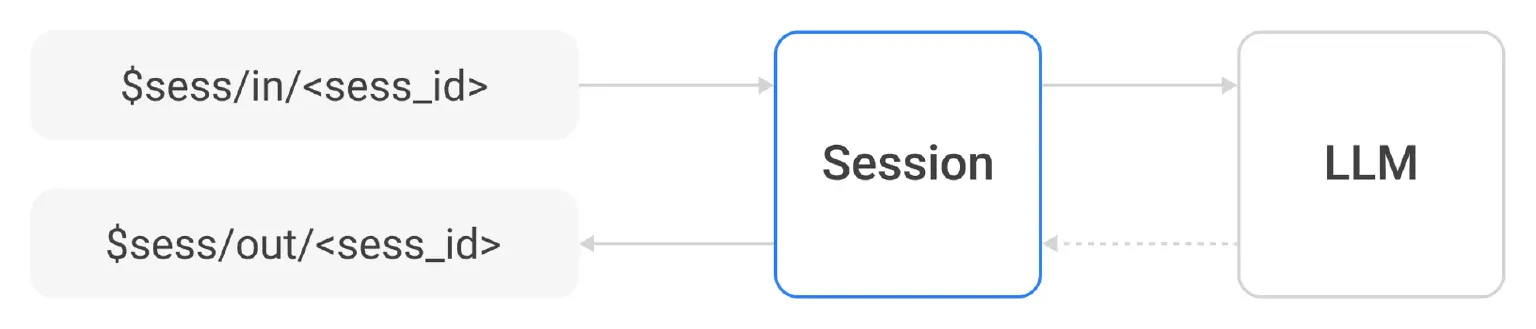
Sessions are identified by a unique session_id and automatically created by EMQX on the first request.
The first request must provide some parameters; the most important ones are:
- Used provider (a configured endpoint with credentials).
- Model to use.
- List of available tools.
- Persistence mode (one-shot or persistent).
- System prompt.
- Initial context.
After receiving the initial request, the session is created and the LLM model is invoked. Then, the session starts to switch between two states: talking to the LLM model and waiting for new events or tool responses.
Note the persistence flag. If set to true, the session will not exit after the initial request is fulfilled. It will wait for new events, adding them to the context and continuing reasoning.
The session receives new context from the same topic as the initial request. It sends responses, requests for tool invocations, and thinking data to the out topic.
Sessions support basic self-compaction to avoid context growth to unsupportable levels.
Again, sessions may be used independently as a building block for custom agents. E.g. one may implement an agent on a diskless IoT device which does not have the capability to store context persistently or communicate with a cloud service, but can interact with a user.
Pipelines
Pipelines tie MQTT events, tools, and LLM sessions together.
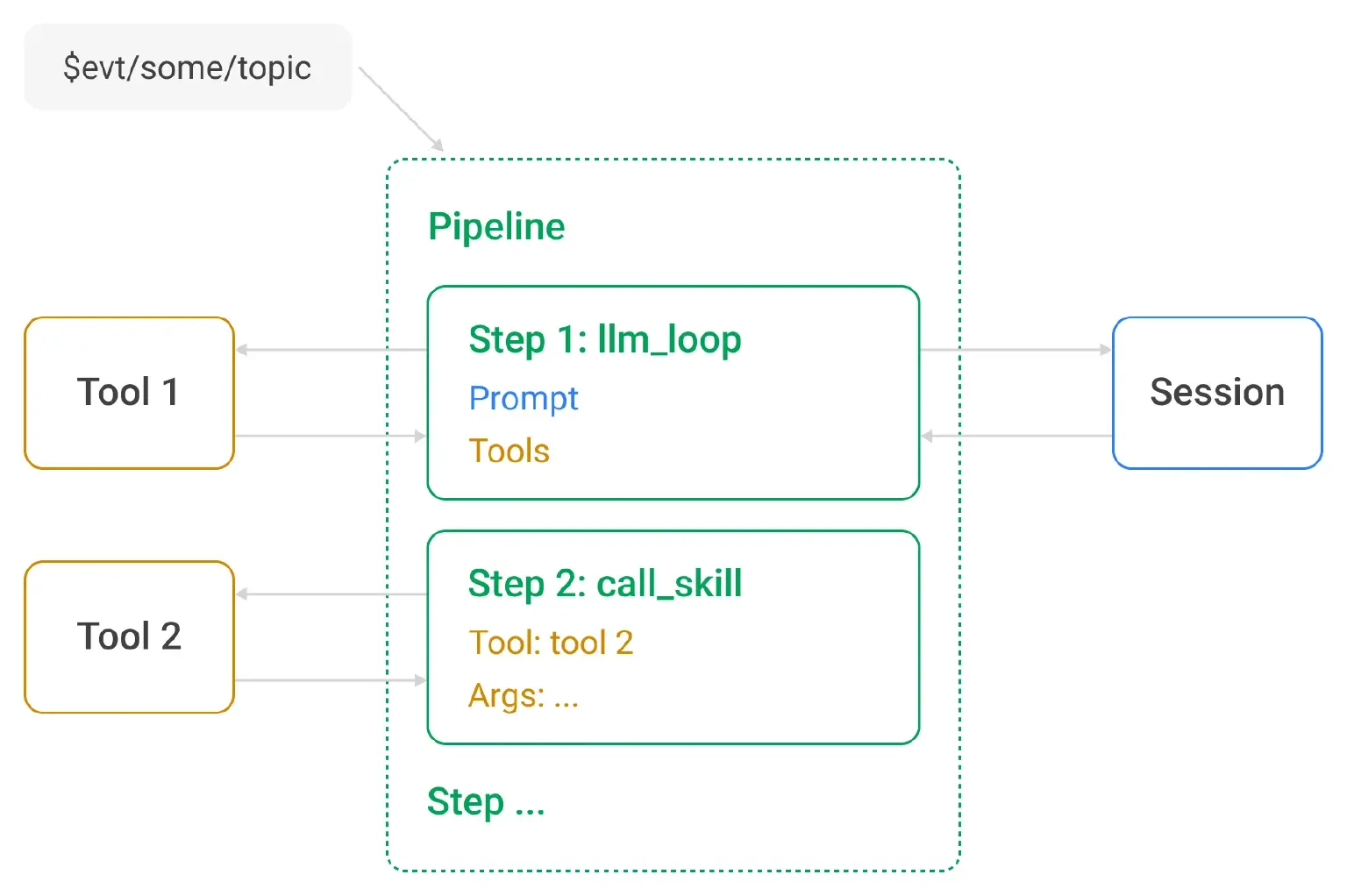
Pipelines are event-driven workflow instances that are spawned when messages are received on configured MQTT topics. Each pipeline instance is a one-shot coordinator for that event; when it needs iterative LLM/tool behavior, it delegates the stateful context to a session.
The most important pipeline parameters are:
- Name.
- Topic filter whose matching messages trigger the pipeline activation.
- Pipeline steps. Each step receives the pipeline context map and updates it. The initial context is formed from the triggering message. The types are:
- LLM step. It spawns or connects to an LLM session with step-specific instructions and step-specific available tools, passes the context to the LLM session and executes its tool requests. For persistent steps, a
key_expressionevaluated on the triggering MQTT message decides which session is reused. - Tool call step. It unconditionally invokes a tool with values from the pipeline context.
- Break step. It stops the pipeline execution depending on some expression from the pipeline context.
- LLM step. It spawns or connects to an LLM session with step-specific instructions and step-specific available tools, passes the context to the LLM session and executes its tool requests. For persistent steps, a
Key expression is a per-LLM-step field. It is evaluated against the triggering MQTT message metadata. For example, message.from groups all messages from the same client into one ongoing conversation, while concat([pipeline.id, step.id, message.from]) isolates sessions per pipeline and step.
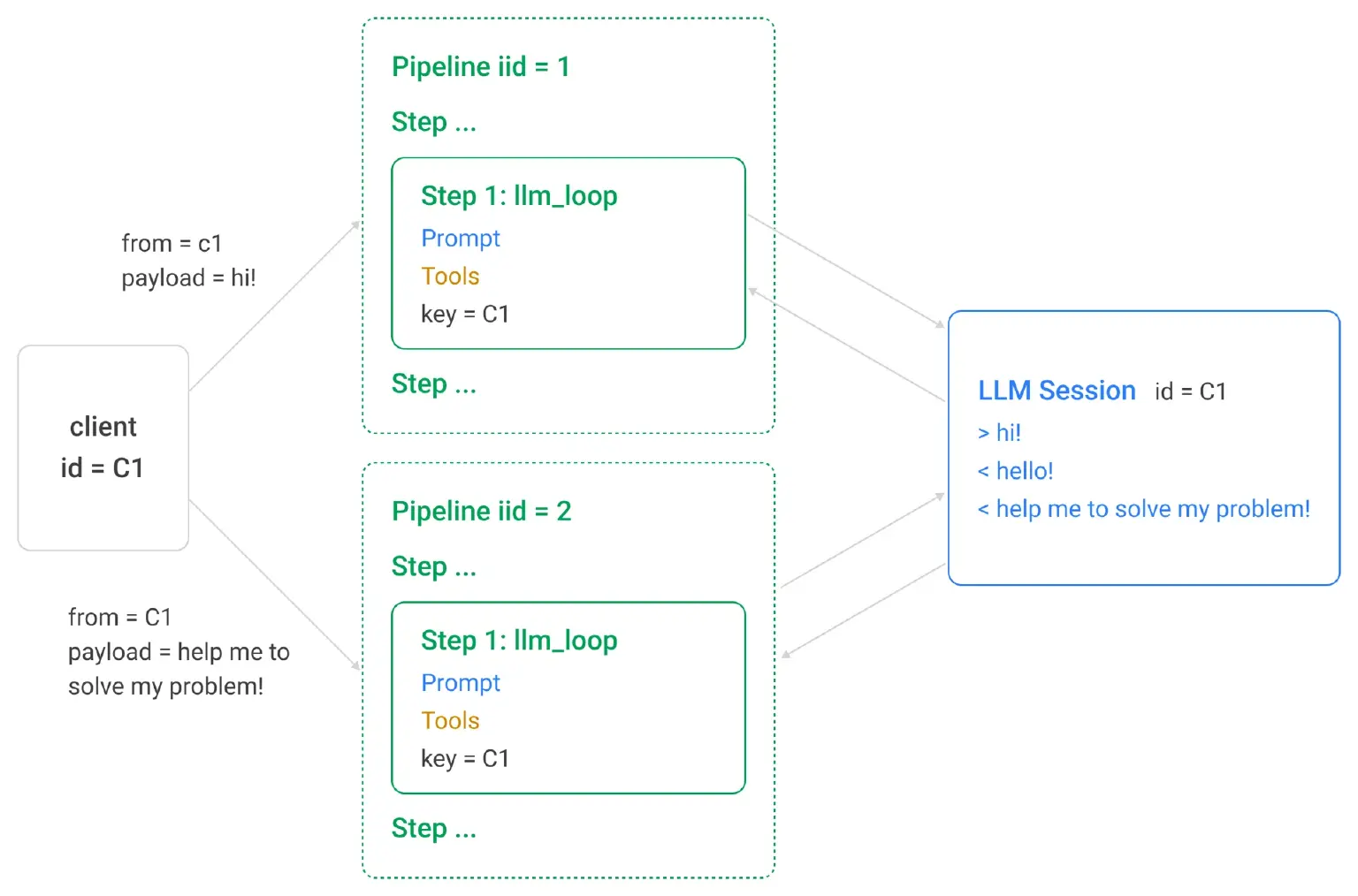
It's easy to see that with pipelines, we can flexibly create agents that react to incoming messages. Since an agent's work result may be sending other messages, we can also naturally create intercommunicating agents.
Example 1: AI-Powered Quality Inspection
Let's demonstrate an example of an agent built with MQTT Agent.
Assume we have a conveyor line, on which boxes with apples are placed. Once a box is placed, we want to automatically inspect it for quality.
We want:
- A box to be visually inspected by an AI model.
- If the box is defective, an alert should be triggered.
- Any (positive or negative) inspection report should be unconditionally saved into the database.
- The saved inspection report should also be unconditionally published as an MQTT message to the specified topic.
We model the physical realm in the following way:
- The conveyor line is modeled as an SPA application talking to the EMQX broker over MQTT.
- When a box is placed, we press the "Done" button which publishes an MQTT message to the
$evt/conveyor/<conveyor_id>/box/donetopic. - The SPA emulates an IoT "camera" bound to the conveyor line which listens on
box/shot/<box_id>topic and replies with a "photo" of the placed box to the response topic. - Also the SPA listens for
box/alert/+andbox/status/+topics for alerts and final statuses.
Let's first see how this works:
Now let's see how we configure EMQX to achieve this behavior.
Tools
We created four tools:
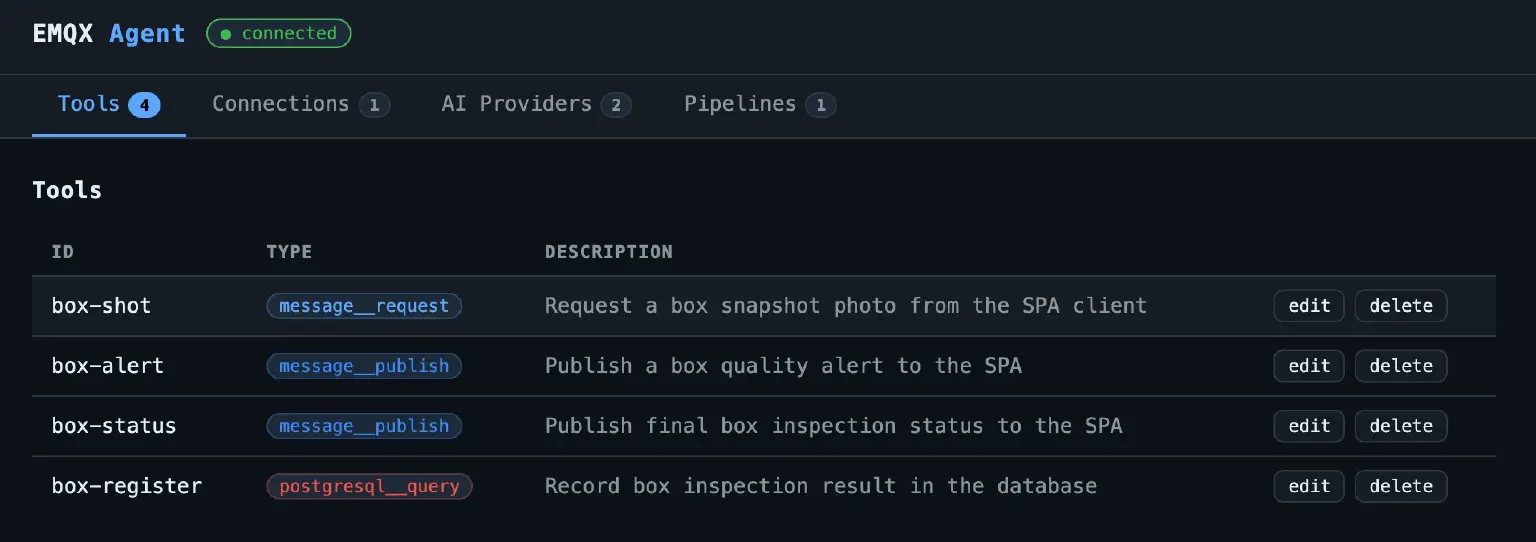
box-shot and box-alert tools are used by LLMs.
box-register and box-status are used for unconditional invocation by the pipeline.
Let's see how tools are set up and pay attention to the security part.
box-alert message publish tool called by the LLM is configured as follows:
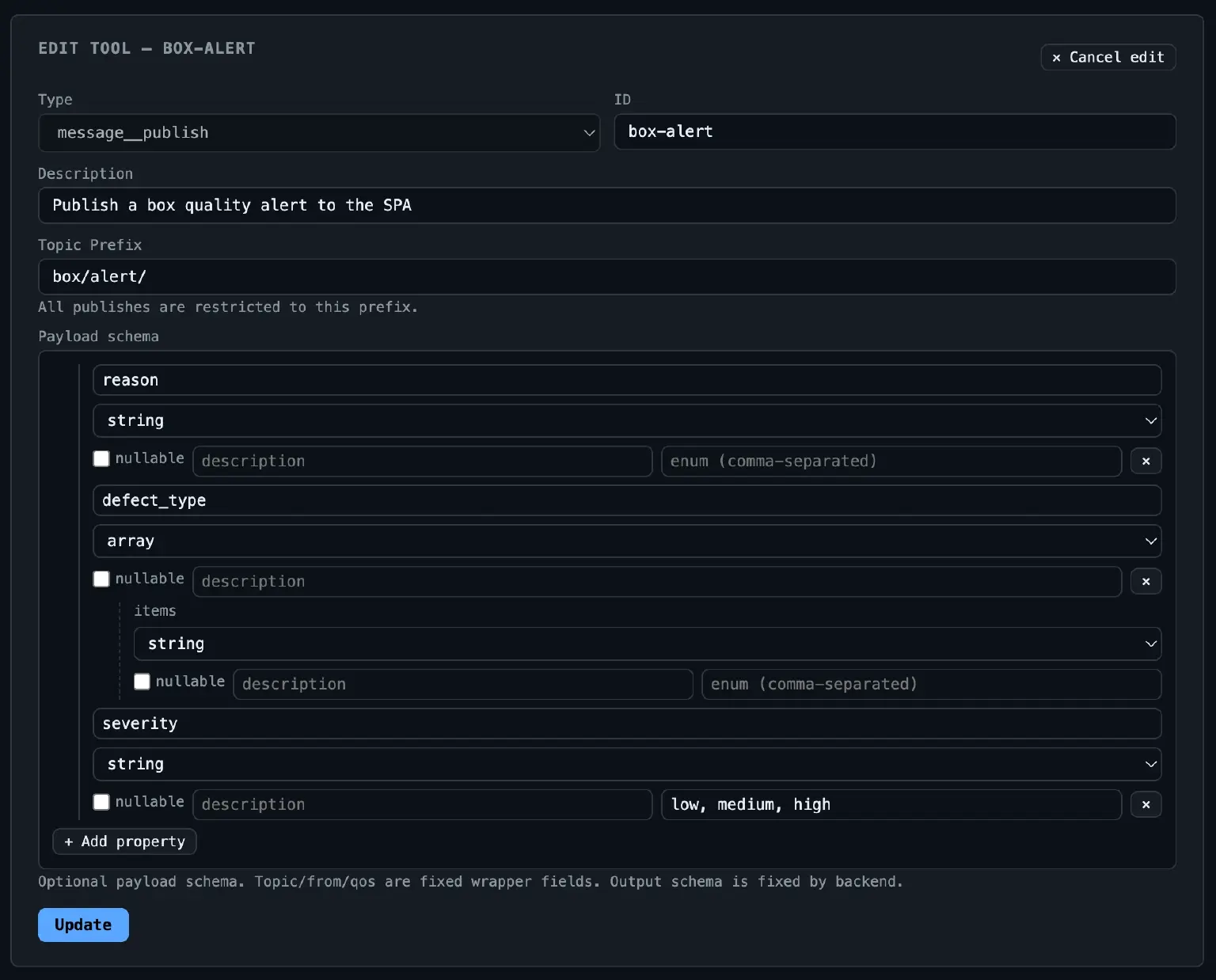
Note that we enforce topic prefix and enforce payload to be a JSON object with specified structure. LLM cannot hallucinate or be hijacked by malicious input to send arbitrary messages to arbitrary topics. Anything not conforming to this structure will be rejected.
The same applies to the box-register tool which inserts a row into the PostgreSQL database:
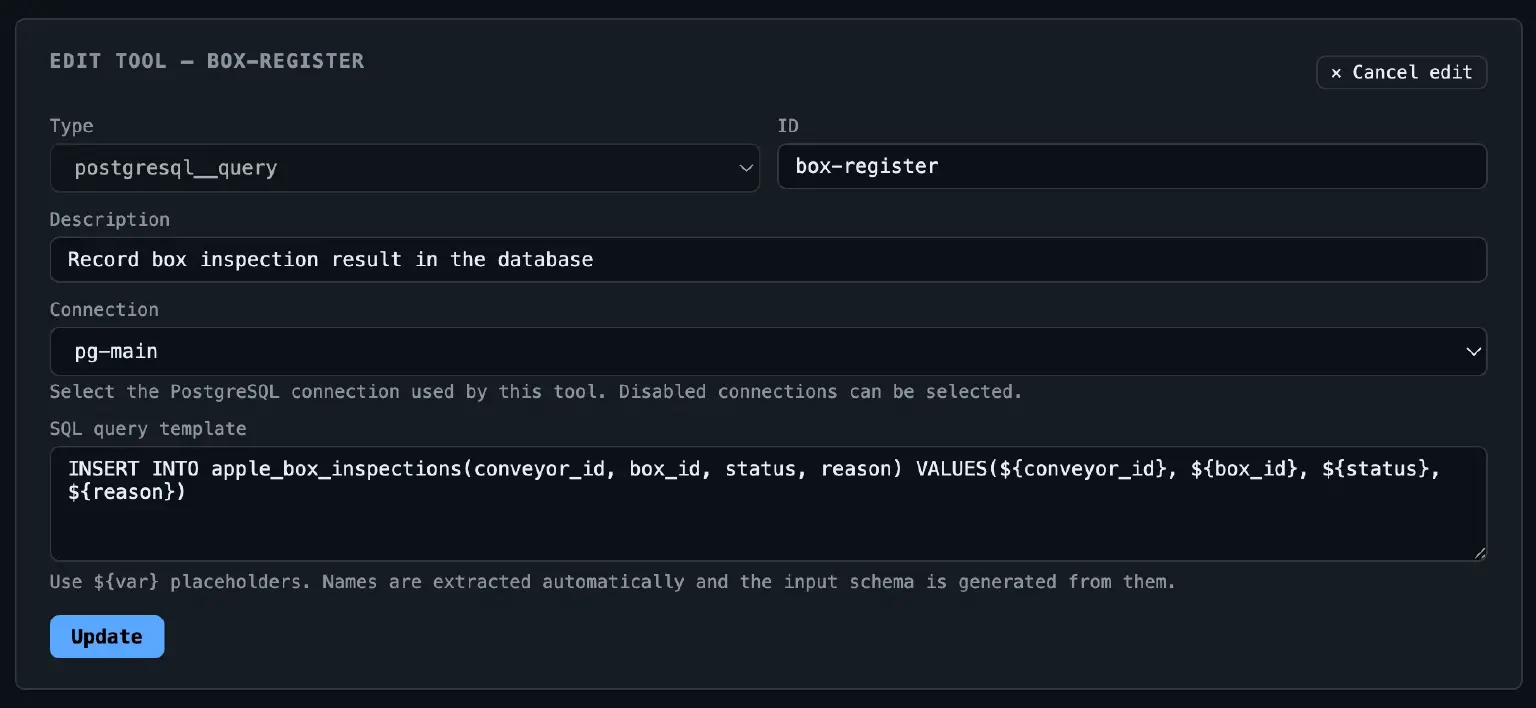
This is a specific request going to specific connection. The values from payload map get interpreted into the query through placeholders internally. Nothing unintended can be done with the database.
Pipeline
Let's go to the heart: the pipeline which describes the agent.
The full pipeline is shown below:
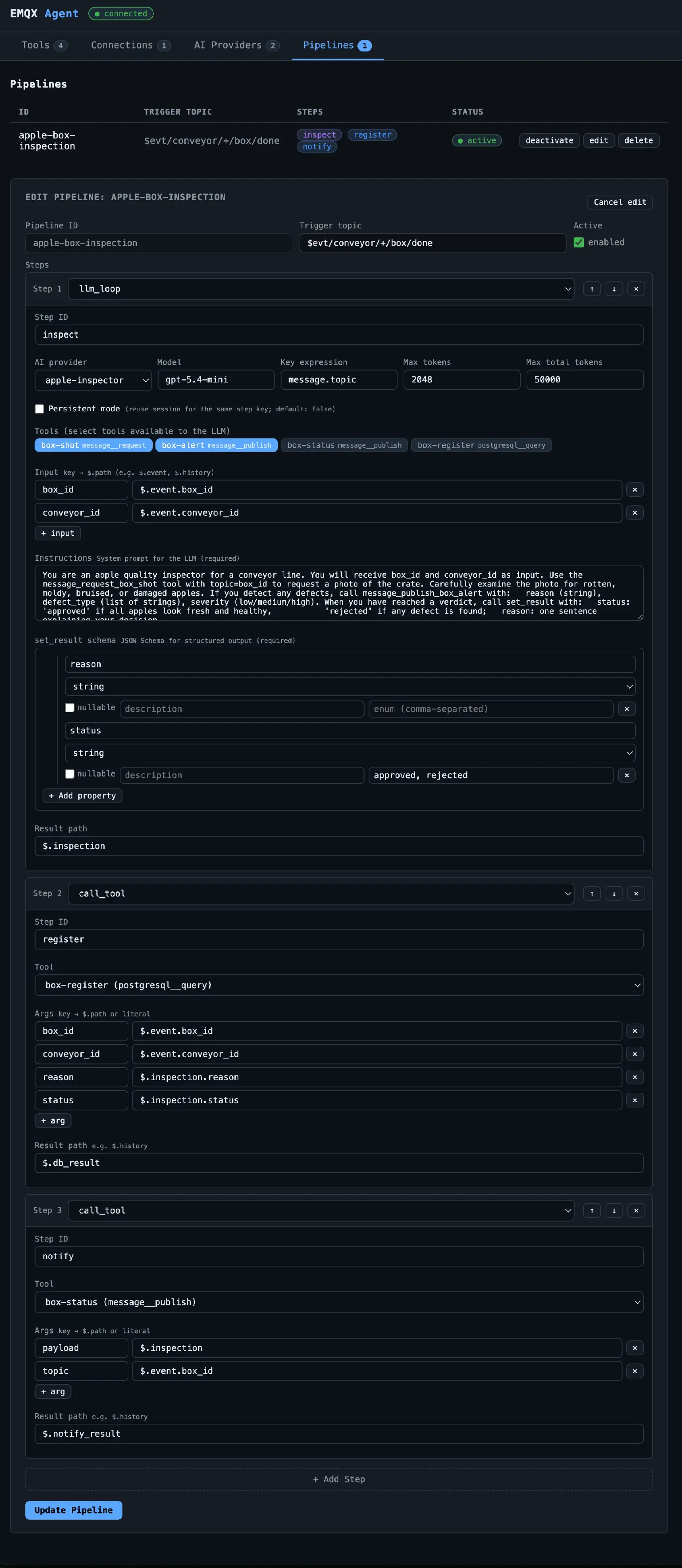
It is quite large, so let's break it down into smaller parts.
The pipeline consists of three steps. The first step does all the heavy lifting.
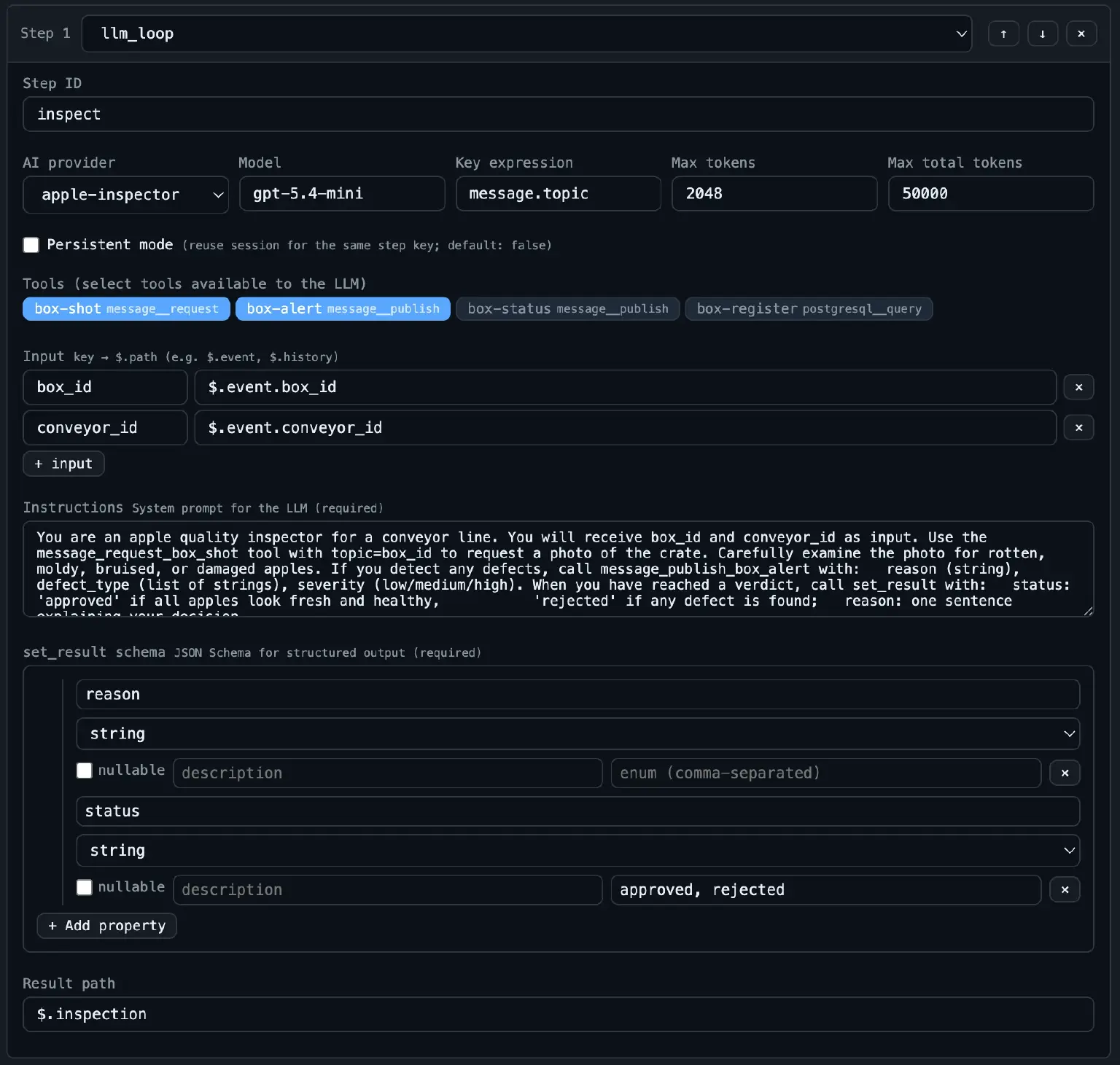
Things to note:
- We configure LLM session and token limits. The session is not persistent, since inspection is a one-shot task.
- We configure system prompt with instructions for the AI inspector.
- We select tools which are available to the AI inspector. Database and status publishing are not available to the session.
- We specify the result shape of the inspection and where to place it in the pipeline context.
After the step executes, the inspection result will be in the pipeline context as:
{
  "inspection": {
    "reason": "...",
    "status": "..."
  }
}
The second step is the registration step. It uses the box-register tool to record the inspection result in the PostgreSQL database.
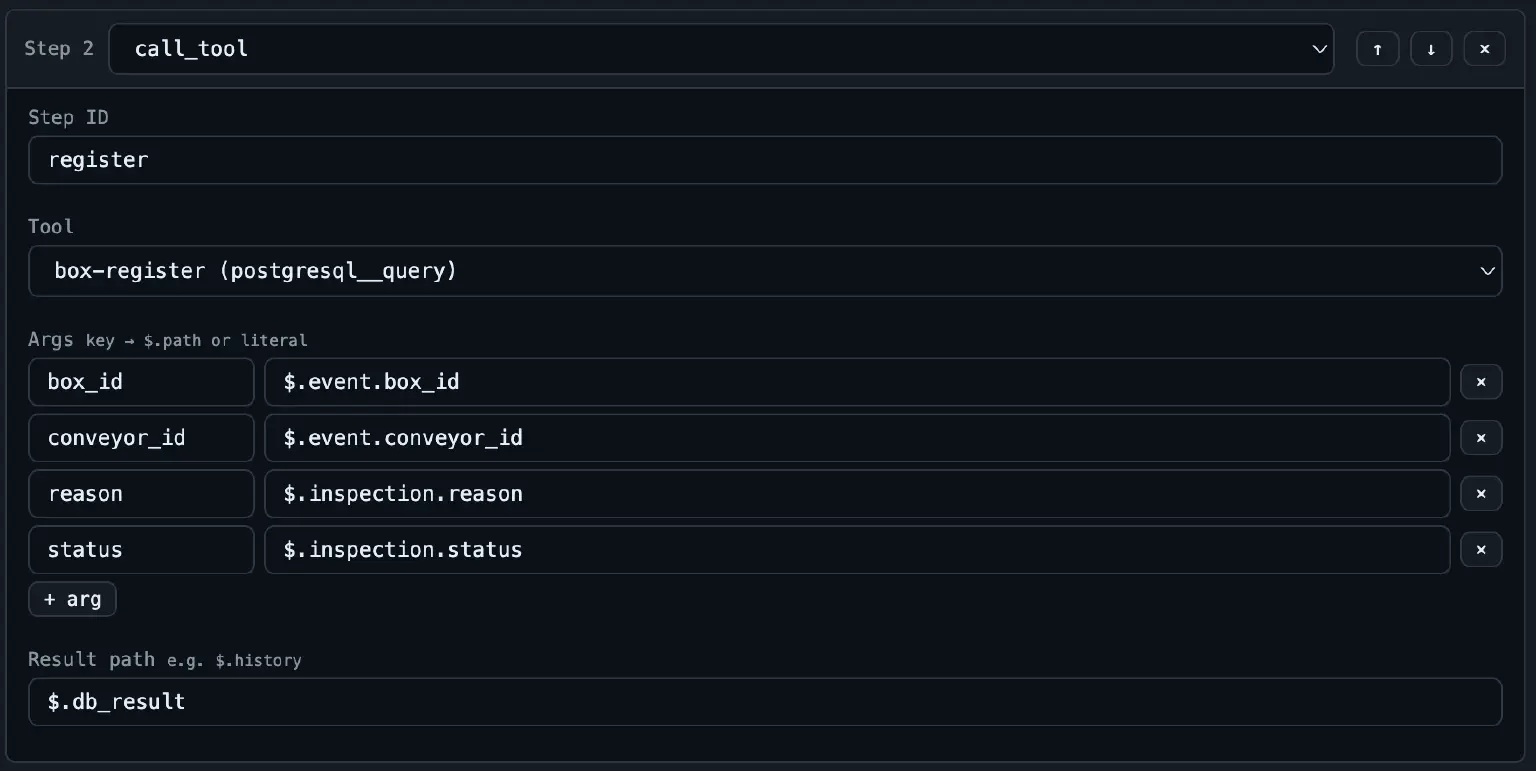
It is called after the inspection step and uses the inspection result from the pipeline context to provide values for the box-register tool variables in query templates.
Note that we could allow the LLM step to use this tool as well, but we preferred to run it unconditionally.
The last step is also unconditional.
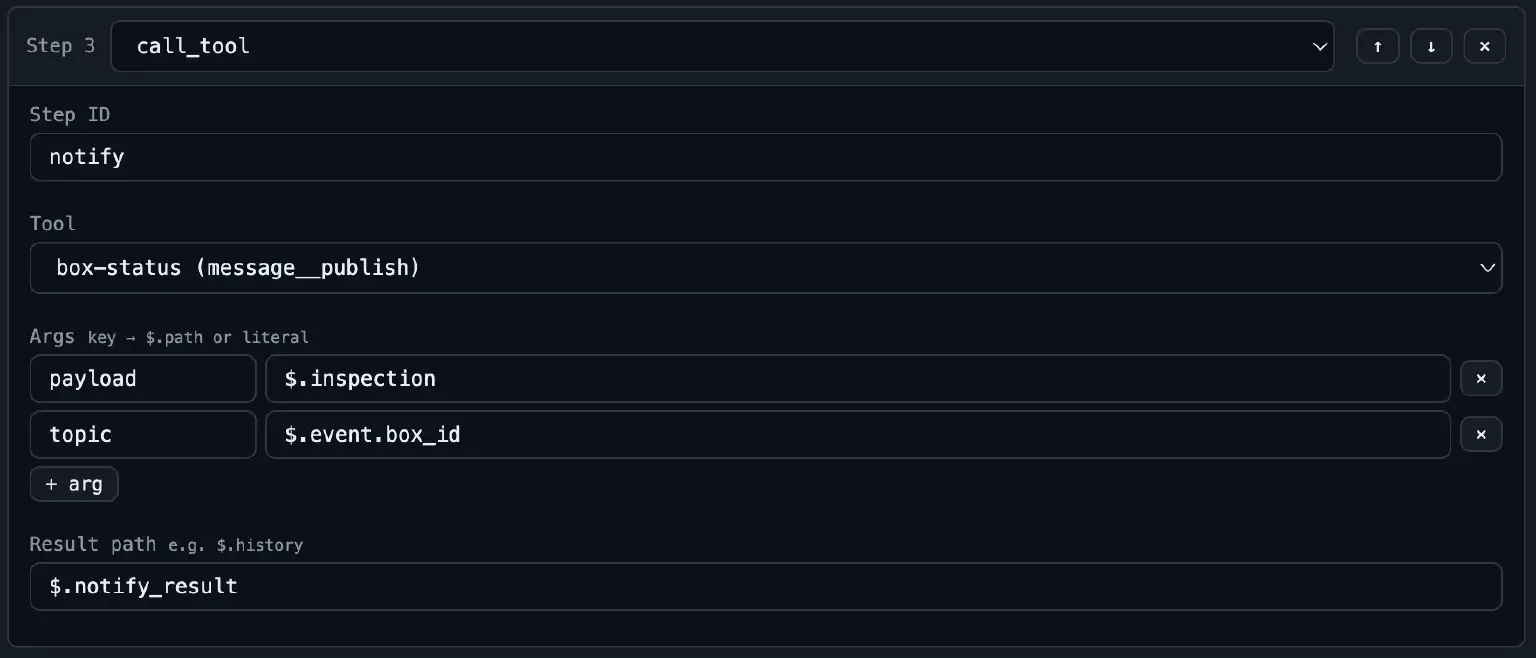
It sends a notification about the final inspection status.
Example 2: Interactive Pipeline Builder
Previously, we mentioned that MQTT Agent is mainly intended for human-less interaction: intelligent and scalable workflow automation.
However, nothing stops MQTT Agent from being used in a conversational manner. Moreover, MQTT Agent has meta-tools that can be used to create/introspect its tools, connections, and pipelines:
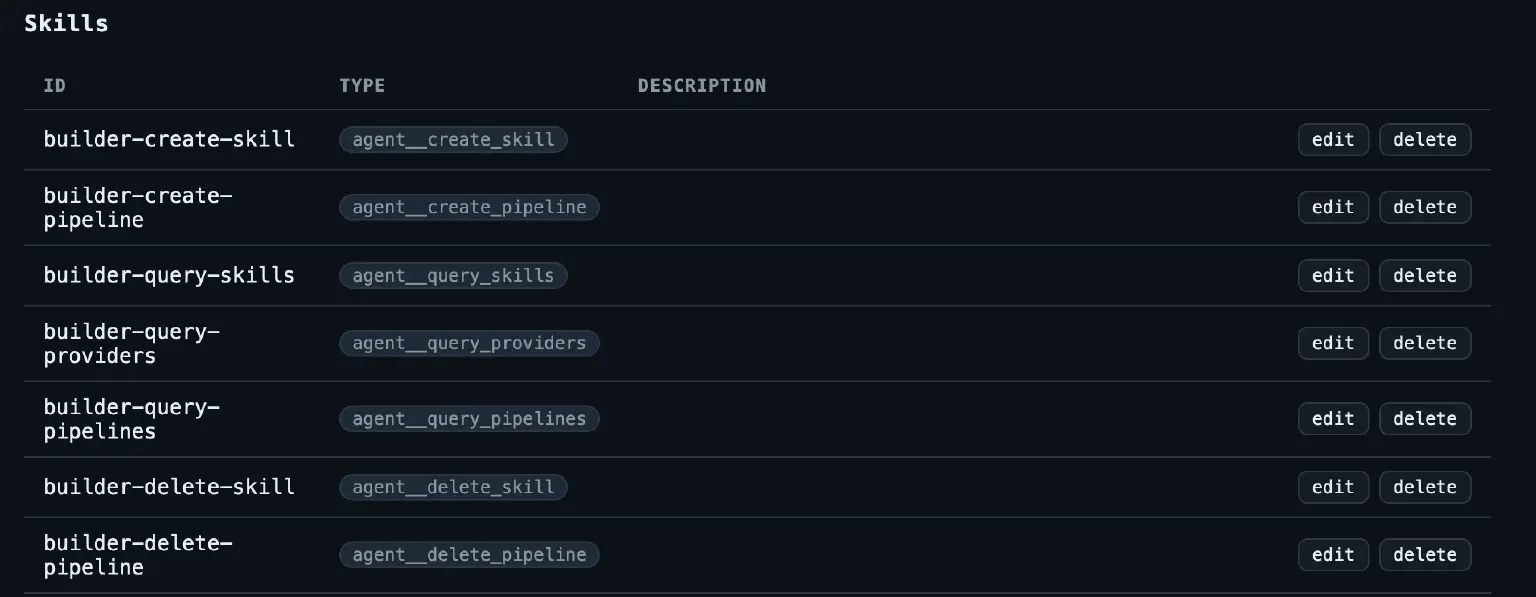
We may easily create a builder pipeline that, with the help of some UI, will be able to interactively build and manage other pipelines.
See how this works in action:
Future Work
MQTT Agent is at an early stage of development. We are excited to see where it can go.
Possible directions include:
- Supporting full diversity of EMQX integrations as tools.
- Supporting many LLM providers and models.
- Supporting not only "atomic and restricted" tools but also
.md-style skills widely known for usage in coding agents. - Providing wide capabilities for token budgeting, limiting, and usage tracking.
- Supporting lookup and invocation of agents from the EMQX A2A registry.
- Providing utility tools like vector memories.
How to try MQTT Agent
MQTT Agent has been released as a plugin in EMQX 6.3.0. You can download it at:
- https://www.emqx.com/downloads/emqx-plugins/6.3.0/emqx_agent-1.0.0.tar.gz
- https://www.emqx.com/downloads/emqx-plugins/6.3.0/emqx_agent-1.0.0.sha256
See documentation for instructions on installing and running plugins.
Conclusion
MQTT Agent transforms EMQX from a traditional message broker into an MQTT-native AI orchestration platform. By introducing three core primitives — Tools for bounded capabilities, Sessions for stateful LLM reasoning, and Pipelines for event-driven workflows — EMQX enables real-time device events to trigger autonomous AI operations directly within the broker layer.
Crucially, this architecture prioritizes security by design. By embedding granular access controls, strict execution boundaries, and native auditability directly into the MQTT layer, MQTT Agent allows enterprises to deploy autonomous AI workflows at scale without compromising system safety or operational control.