Real-Time IoT Data Visibility: Building Traffic Mirroring with EMQX Cluster Linking


Introduction
In the digital world, real-time visibility into your data flows is crucial for security and performance. But how do you monitor network traffic without disrupting your operations? Traffic mirroring offers a powerful solution, allowing you to non-intrusively replicate data for deep analysis. This blog explores traffic mirroring's role in ensuring data compliance, security audits, and troubleshooting, enhanced by EMQX Cluster Linking for efficient MQTT traffic replication. It covers the importance of traffic mirroring, the critical role of Cluster Linking in maintaining performance and integrity, best practices, and a hands-on example of using Cluster Linking for traffic mirroring.
Explore Cluster Linking to understand its capabilities: Cluster Linking Deep Dive: Unlock Global Scale & Resilience on EMQX Cloud
What is Traffic Mirroring and Why It's Important
Traffic mirroring duplicates network traffic in real-time for analysis in a separate monitoring system, enabling visibility into data flows without disrupting operations. It’s essential for data compliance, security audits, and rapid troubleshooting. By isolating resource-intensive tasks like deep packet inspection in a dedicated audit cluster, businesses ensure production performance remains unaffected while proactively monitoring for threats and ensuring regulatory adherence.
Best Practices of Traffic Mirroring
To maximize the effectiveness of traffic mirroring, consider the following best practices:
- Content Inspection: Use the audit cluster for real-time analysis and filtering of MQTT message content to ensure compliance with regulatory requirements.
- Threat Monitoring: Leverage mirrored traffic for anomaly detection and identification of malicious payloads to enhance IoT security defenses.
- Troubleshooting: Utilize the audit cluster as an independent data flow to enable rapid diagnostics and resolution of issues in the production environment.
- Big Data Analytics: Import mirrored traffic into big data platforms for offline analysis and comprehensive report generation.
Why EMQX Cluster Linking is Essential for Traffic Mirroring
EMQX Cluster Linking enhances traffic mirroring for MQTT traffic by providing a robust, non-intrusive, and efficient replication mechanism. Its key benefits include:
- Non-Intrusive Traffic Replication: Cluster Linking enables real-time replication of MQTT traffic from a production cluster to an audit cluster without impacting the performance or stability of the production environment.
- Data Consistency and Integrity: It ensures mirrored traffic retains its integrity and order, providing a reliable foundation for accurate and consistent monitoring and analysis.
- Flexible Filtering Capabilities: By configuring topic rules, Cluster Linking allows selective mirroring of traffic for specific topics, enabling tailored auditing and monitoring to improve the efficiency of security checks.
- Avoiding Production Cluster Load: Unlike traditional methods that rely on additional plugins, Cluster Linking eliminates added load and complexity on the production cluster, preserving its performance.
- Simplified Architecture: It offers a built-in replication mechanism, reducing the need for complex manual configurations of traffic forwarding or message queue solutions, resulting in a streamlined architecture.
- Meeting Real-Time Requirements: Cluster Linking supports low-latency traffic replication, meeting the stringent demands of real-time content inspection and threat monitoring for timely security and operational responses.
Traffic Mirroring with Cluster Linking: A Hands-On Example
This section provides a step-by-step guide to configuring one-way Cluster Linking to mirror MQTT traffic from a production cluster (EMQX Dedicated, deployment-prod)to an audit cluster (self-hosted EMQX Open Source v5.8.7 on a virtual machine in a cloud environment). The one-way link ensures the audit cluster is used solely for monitoring and analysis, reducing complexity and maintaining production performance.
Prerequisites
Before starting, ensure the following are in place:
- Self-Hosted EMQX Deployment: Configure a self-hosted EMQX instance on a virtual machine in a cloud environment running EMQX Open Source v5.8.7. Create a cluster in EMQX with the
cluster.nameasdeployment-audit. See Create a Cluster for details. - EMQX Dedicated Deployment: Set up an EMQX Dedicated deployment named
deployment-prod. Follow the step-by-step instructions in the EMQX Platform documentation. - Network Connectivity: Establish a connection between the self-hosted instance and Dedicated deployment using one of these methods:
- VPC Peering (Recommended): Provides a secure, low-latency private connection by directly linking the two VPCs. Refer to the VPC Peering guide for setup instructions.
- NAT Gateway: Enable public network access for deployments. This option is simpler to configure but may introduce higher latency, additional costs, and security considerations. See the EMQX cloud documentation for details.
Create Asymmetrical Cluster Linking
Asymmetrical Cluster Linking configures a one-way connection where the production cluster sends MQTT traffic to the audit cluster without receiving data back. This section guides you through setting up this link to enable traffic mirroring.
Configure Audit Cluster Linking to Receive from Production Cluster
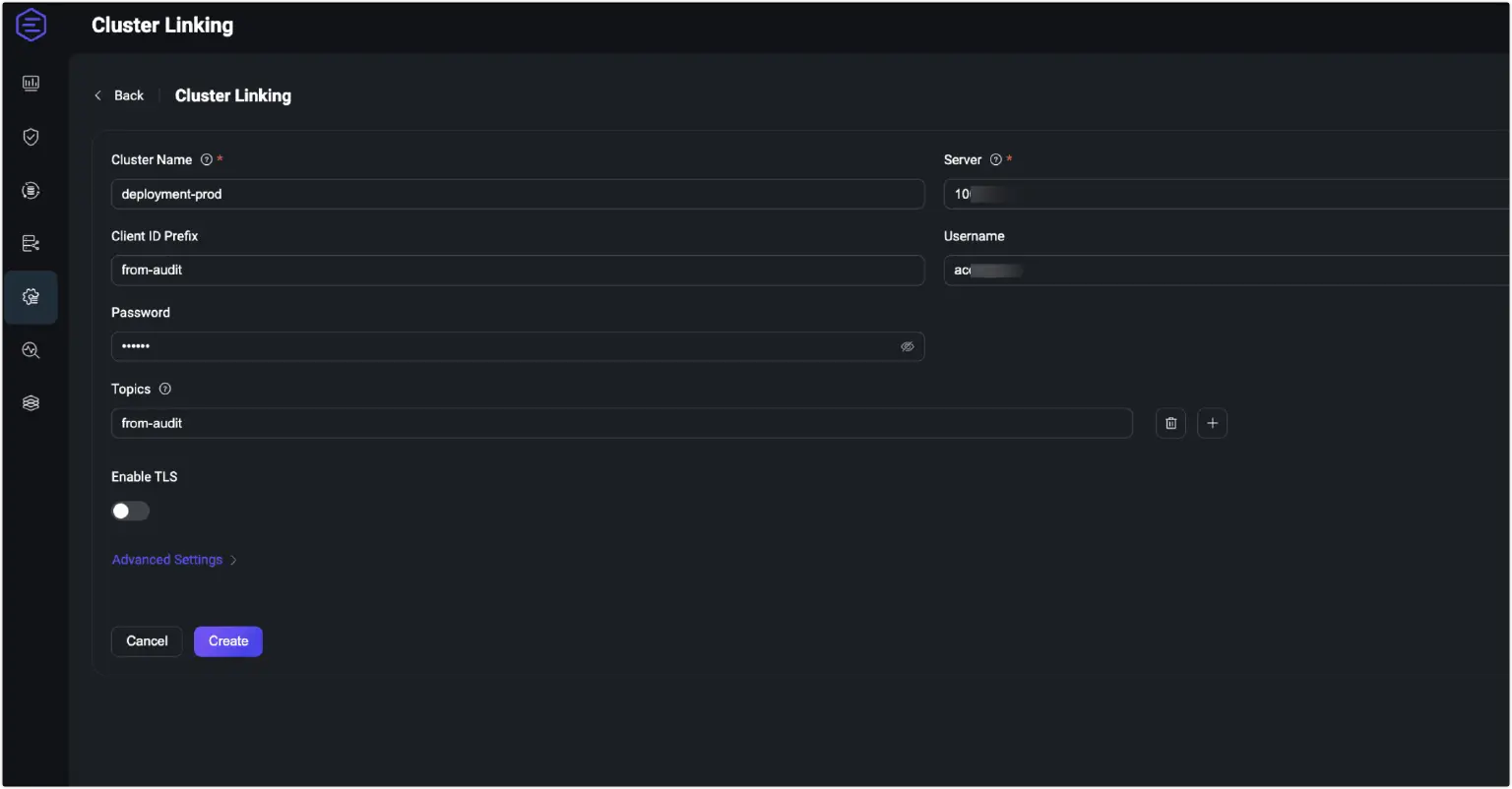
- Log in to the EMQX Dashboard, navigate to Management > Cluster Linking, and click Create in the top-right corner.
- On the configuration page, specify:
- Cluster Name: Enter the production cluster name:
deployment-prod. - Server: Provide the MQTT host and port of
deployment-proddeployment. - Client ID Prefix: Define a prefix for ClientIDs used by MQTT connections to the remote cluster. For example,
from-audit. - Username / Password: Provide the username and password that the remote deployment accepts for connections.
- Topics: List of MQTT topic filters that specify which messages the current deployment will receive from the remote deployment, for example,
from-prod. - Enable TLS: Enable this option if communication between clusters requires TLS encryption. Configure the settings, such as SSL certificates.
- Advanced Settings: Configure additional settings such as MQTT protocol parameters.
- Cluster Name: Enter the production cluster name:
- Click Create after you complete the settings. The new entry will appear on the Cluster Linking page and be enabled by default.
Configure Production Cluster Linking to Send to Audit Cluster
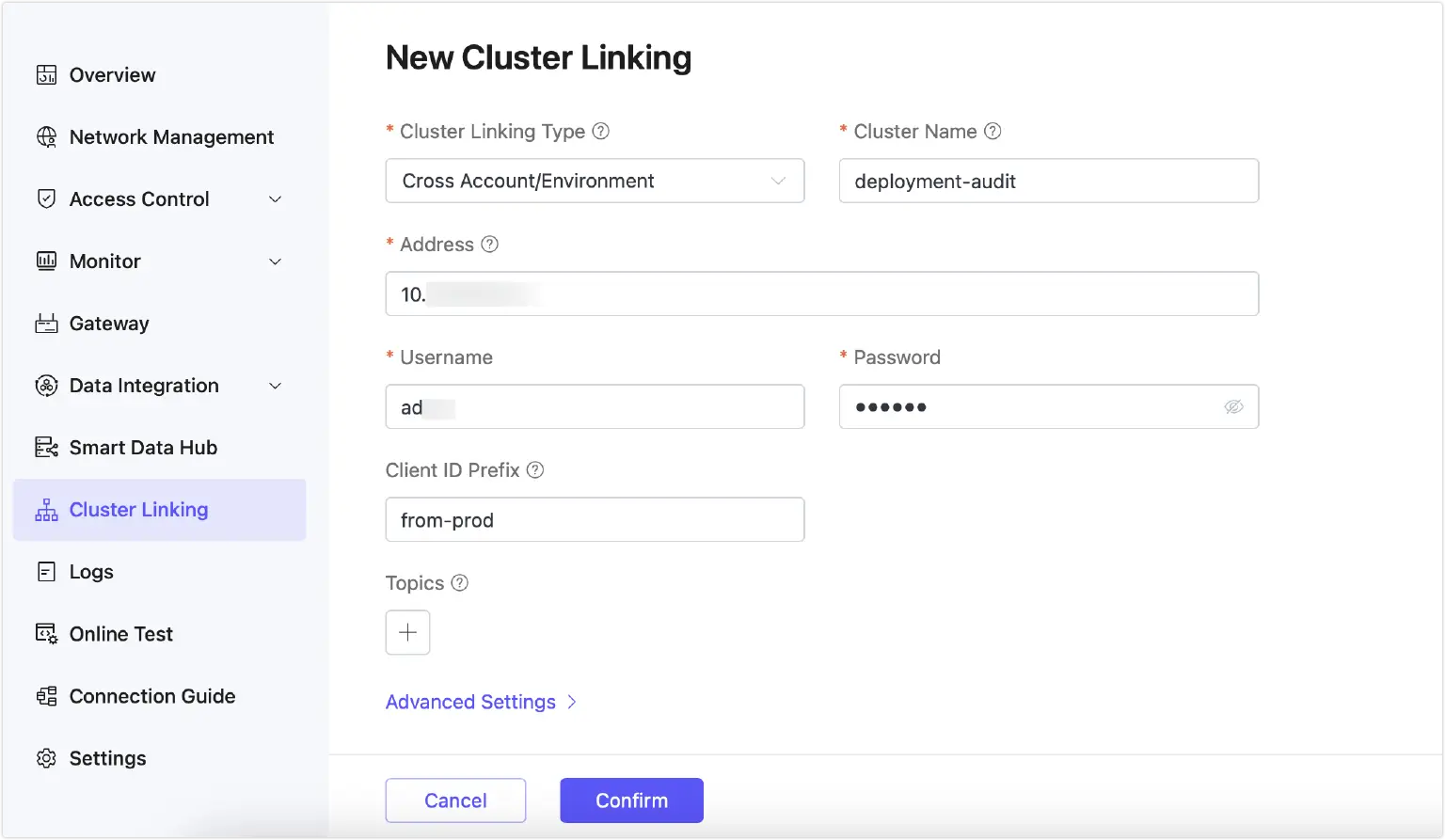
- In the EMQX Platform console, go to Dedicated deployment
deployment-prod. - Navigate to Cluster Linking and click New.
- On the New Cluster Linking page, configure:
- Cluster Name: Enter the name of the audit cluster:
deployment-audit. You can find the value ofcluster.namein the local EMQX configuration file. - Address: Enter the address and port of the audit EMQX instance (e.g.,
<your-host>:8883). - Username / Password: Provide the username and password that the audit deployment accepts for connections.
- Client ID Prefix: Define a prefix for ClientIDs used by MQTT connections to the audit cluster. For example,
from-prod. - Topics: Leave empty for one-way linking, as deployment-prod does not receive messages from
deployment-audit. - Advanced Settings: Configure additional settings such as MQTT protocol parameters.
- Cluster Name: Enter the name of the audit cluster:
- Click Confirm. You will be redirected to the Cluster Linking page, where the new entry will appear and be enabled by default.
Verify Cluster Connectivity
To confirm successful Cluster Linking, use MQTTX for testing connections (download at MQTTX: Your All-in-one MQTT Client Toolbox ):
- Create a connection named
audit-connectionin MQTTX, connecting todeployment-auditusing its MQTT host and credentials. - Create a second connection named
prod-connection, connecting todeployment-prod. - Subscribe both clients to the
from-prodtopic configured during Cluster Linking. - Using
prod-connection, publish a test message to thefrom-prod(e.g., “Test message from production”). - Verify that only
audit-connectionreceives the message, confirming one-way message routing from audit cluster to cloud cluster.
Conclusion
Traffic mirroring significantly enhances the visibility and security of IoT applications by enabling real-time, non-intrusive monitoring. With EMQX Cluster Linking, this process is optimized through low-latency, reliable traffic replication that preserves production cluster performance and data integrity. This makes it a powerful solution for building secure, scalable, and efficient IoT environments.