
Device Agent is an MQTT-powered AI agent platform developed by EMQ. Describe what a device can do in natural language, and the platform can generate a complete device agent in minutes, including its device specification, edge SDK, online simulator, and multiple interaction channels such as voice, vision, and instant messaging (IM).
Device Agent 0.5.0 is now available.
This release introduces IoT platform integration, enabling devices already managed by an IoT platform to be queried, controlled, and automated through natural language. Workflows now feature a visual editor and Jev decision nodes. Conversation features now include an agent configuration overview, long-term memory, voice feedback, and in-conversation A2A collaboration. The new enterprise platform adds runtime monitoring, device-level AI budgets, and license management.
IoT Platform Integration
Devices already managed by an IoT platform can gain natural language querying, control, and automation capabilities without migrating data or rewriting device models.
Version 0.5.0 introduces IoT platform integration, allowing both self-hosted and third-party IoT platforms to connect through adapters. Device Agent reuses each platform's native device model, device identity, and control interfaces. The device model defines available states, supported actions, and their parameters, while the platform connection handles data retrieval and command execution. Once integrated, the same device capabilities can be used across conversations, workflows, scheduled tasks, and A2A collaboration.
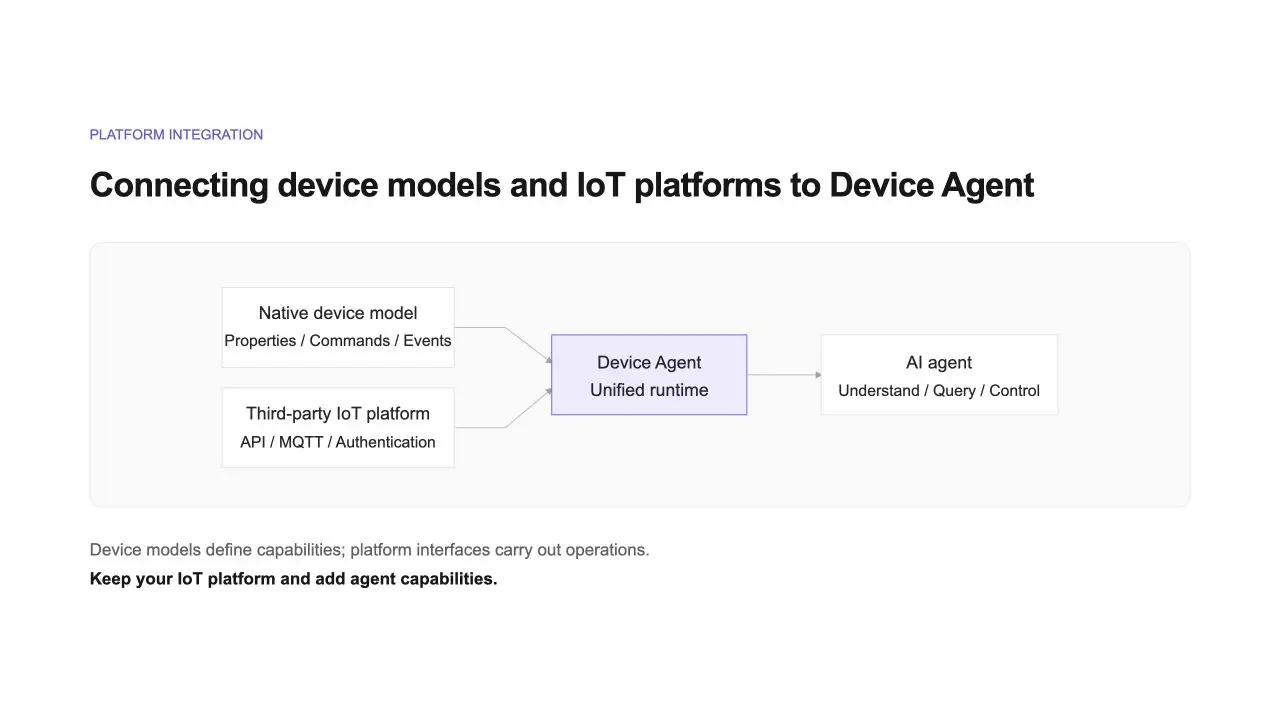
For example, if a device model exposes temperature and operating mode, you can simply ask:
Check the device's current temperature and operating mode, and identify any anomalies in its recent reports.
Different platforms may implement device control differently. To set a target temperature, one platform may invoke a service, while another may update the desired state. Device Agent calls the appropriate operation based on the integration. You can review the target device, operation parameters, platform response, and latest device state. The device status panel now also displays desired states, state differences, and descriptions of enumerated values, along with command history and device task records provided by the platform.
Device and state data continue to come from the connected platform, and available capabilities depend on the APIs it exposes. For example, the integration with ThingsNeural supports the following:
- Simplified authorization: Connection settings are populated automatically after login authorization. If credentials expire, users are prompted to reauthorize the connection.
- Product synchronization: Use Sync Products to generate or update device agents from native device models. Local configurations are preserved during synchronization, and failure reasons are displayed when synchronization fails.
- Historical data queries: Retrieve property and event history within a specified time range, with support for time-based aggregation of returned records.
New devices can still connect directly through the SDK or MQTT. This release also adds device modeling references for energy storage systems and photovoltaic inverters. The SDK and simulator now support native platform models and protocols. With behavior previews in the simulator, you can verify how a command changes the simulated device state before starting hardware development.
For integration instructions, see IoT Platform Integration.
Workflows and Jev Decision-Making
Automation workflows can now be edited visually, bringing deterministic rules and agent-based reasoning together in a single flow.
Version 0.5.0 introduces a visual workflow editor. After generating a workflow using natural language, you can add or remove nodes, modify properties, and adjust connections directly on the visual canvas. Agent nodes can be restricted to specific actions, tools, and skills. New action nodes support IM notifications, device state updates, device inspections, and platform device tasks.
Consider an energy storage scenario. Explicit conditions, such as anomalies, loss of grid connection, or low battery levels, can be handled through deterministic branches. When weather, electricity pricing, or dispatch calculation tools are integrated, an agent can use this information to determine the next course of action.
You can validate the workflow structure during creation and inspect the actual execution path, invocation parameters, and results of each step after execution.
Jev Decision Nodes
Some decisions, such as alert classification and routing, require understanding textual descriptions but produce only a small set of possible outcomes.
This release integrates TypeSafe's Jev decision model. Developers define a question and a set of candidate options. Jev evaluates the event content and selects the most appropriate option, after which Device Agent executes the corresponding branch. These decisions can run without a full agent execution cycle, making invocation overhead easier to manage for high-frequency decisions.
For example, consider two inspection reports:
- "The device has recovered, and three consecutive checks have passed."
- "The same fault keeps recurring and is still awaiting manual review."
These reports require different follow-up actions. You can describe the workflow in natural language:
When an inspection anomaly alert is received, determine whether the fault has been resolved. If the device has recovered and subsequent checks are normal, log the event only. If the fault persists or recurs, notify the operations team. If there is insufficient information, ask the agent to identify the missing details and recommend further checks.
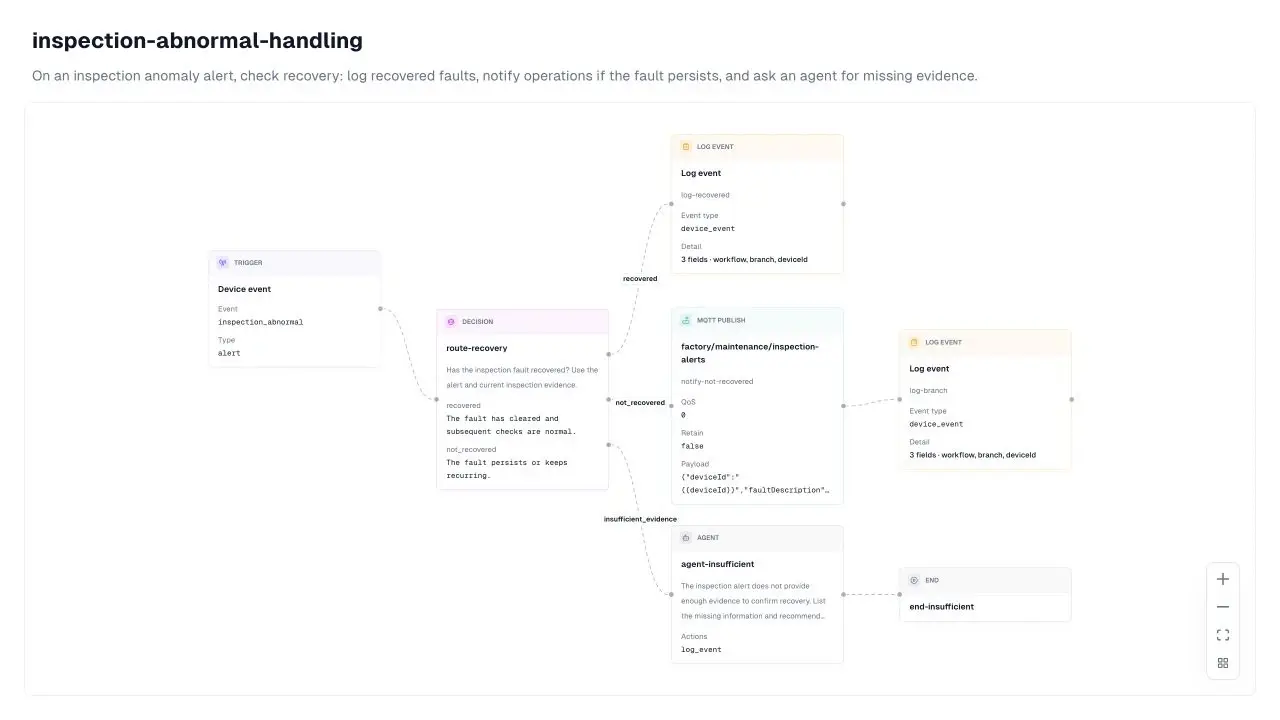
Decision nodes always include an Insufficient Evidence branch. Execution records show the selected option, confidence score, and probability assigned to each option.
Use conditional branches for explicit numerical thresholds. Delegate tasks to an agent when they require historical data queries, explanations, or multi-step processing. Jev is better suited to interpreting descriptions and choosing among predefined options.
| Scenario | Jev Decision Options | Why Jev Fits |
|---|---|---|
| Alert classification and noise reduction | Critical / Maintenance / False positive | High alert volumes and false positives make single-threshold rules prone to missed or incorrect classifications. |
| Initial fault diagnosis | Sensor failure / Network issue / Power supply issue / Actual anomaly | Options can be based on device manuals or operational experience, with each branch triggering a dedicated response procedure. |
| Event routing | Which team to notify / Whether to escalate to an agent | Events can be routed first, with only complex cases escalated to an agent. |
Local deployments also support Jev quick commands. After selecting a device, you can enter a straightforward request such as "Set the sampling interval to 2 seconds and enable diagnostic logging." Jev selects the appropriate command and parameters from the device model's existing definitions and dispatches the command.
Requests involving relative adjustments, free-text parameters, or greater complexity should still be handled through agent conversations.
For configuration details and supported use cases, see Jev Decision Model.
Conversations and Voice
Agent Configuration Overview
You can now configure how an agent responds, which domain-specific terms it recognizes, and which tools it can use in one place.
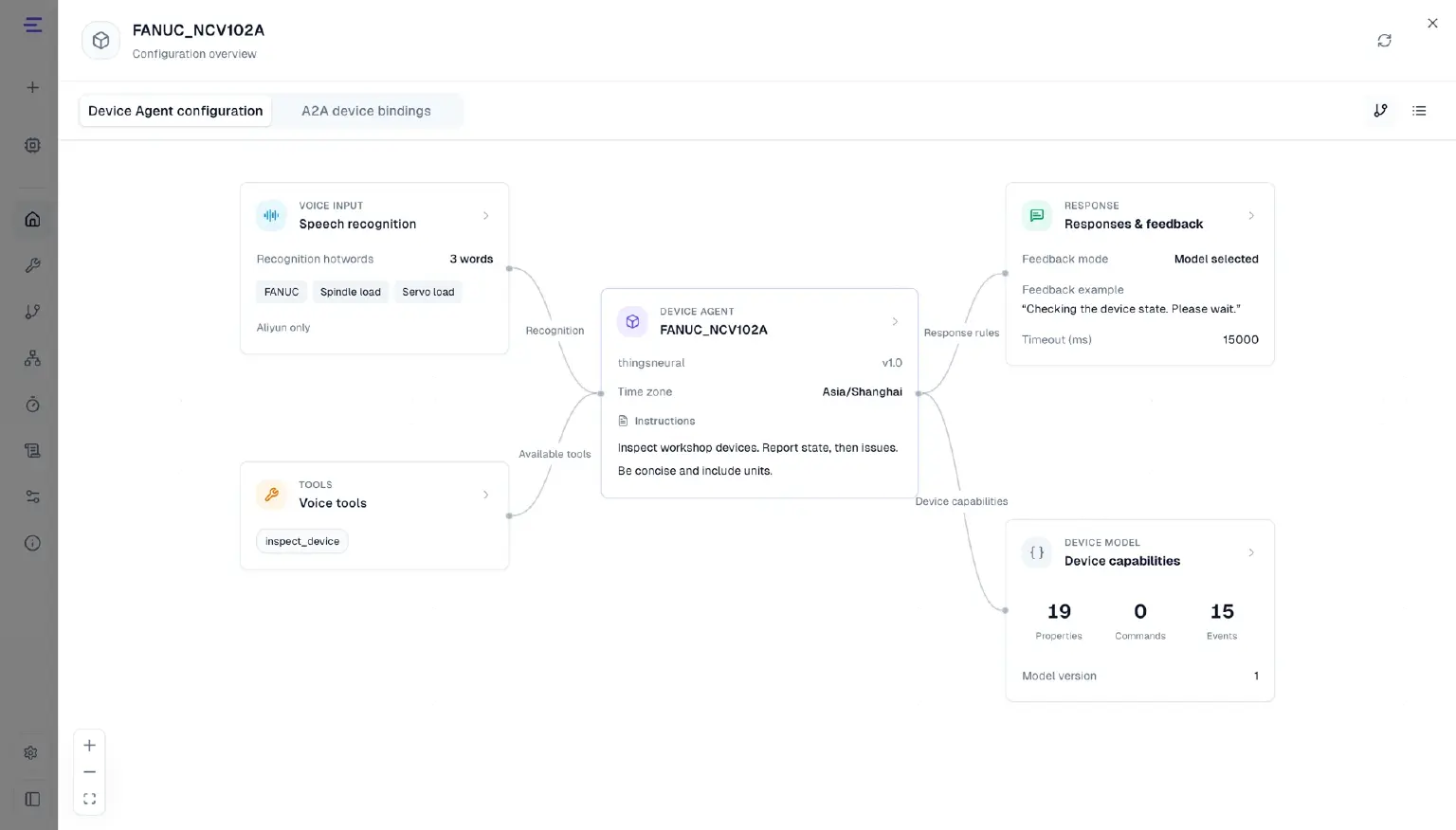
Device agents now feature a configuration overview that centralizes conversation rules, time zones, recognition keywords, voice tool permissions, response and feedback settings, device capabilities, and A2A device bindings. Configurations can be viewed in either a visual diagram or a list.
For example, a factory inspection assistant can be configured to "report the current status first, then describe any anomalies, and always include units with numerical values." You can add device names and domain-specific terminology as recognition keywords and enable only the voice tools required for inspections.
Conversation rules determine how the assistant processes and presents information. The capabilities it can query and execute are still defined by the device model.
Voice Feedback
Voice responses can now start sooner, with feedback provided while users wait for results.
An agent's initial response before invoking a tool is played immediately, rather than waiting for the tool to finish. Voice services that support streaming synthesis can also play responses as they are generated.
When a request takes time, you can configure waiting messages and response timeout prompts by request category. For example, the assistant can say, "I'm checking the device status. Please wait."
This release also introduces question matching and audio reuse. Repeated queries can be handled according to configured matching rules, while frequently used feedback audio can be reused. The enterprise platform also supports preloading results for approved read-only queries. Device control operations are still executed in response to actual requests.
Voice error recovery, conversation context, and interruption handling have also been improved, reducing interference from previous voice interactions in subsequent conversations.
For configuration details, see Device Agent Configuration.
Long-Term Memory, Context, and Model Reasoning
Device agents can now retain user preferences across conversations, while supporting longer and more continuous interactions.
Version 0.5.0 introduces support for saving, viewing, and deleting long-term memories. For example:
Remember: When reporting a device alert, explain the cause first, then provide recommended actions.
Once saved, this preference can be applied in subsequent conversations. You can also ask the agent to review or forget it at any time.
Long-term memory is shared across devices and sessions within the current deployment, making it suitable for stable preferences and confirmed facts. Real-time information, such as temperature and online status, is still retrieved from the device or IoT platform.
The conversation interface now displays context usage and provides notifications when automatic context compaction occurs. Longer conversations can continue while retaining recent messages and summarized context. Clearing a conversation archives its history without deleting long-term memories.
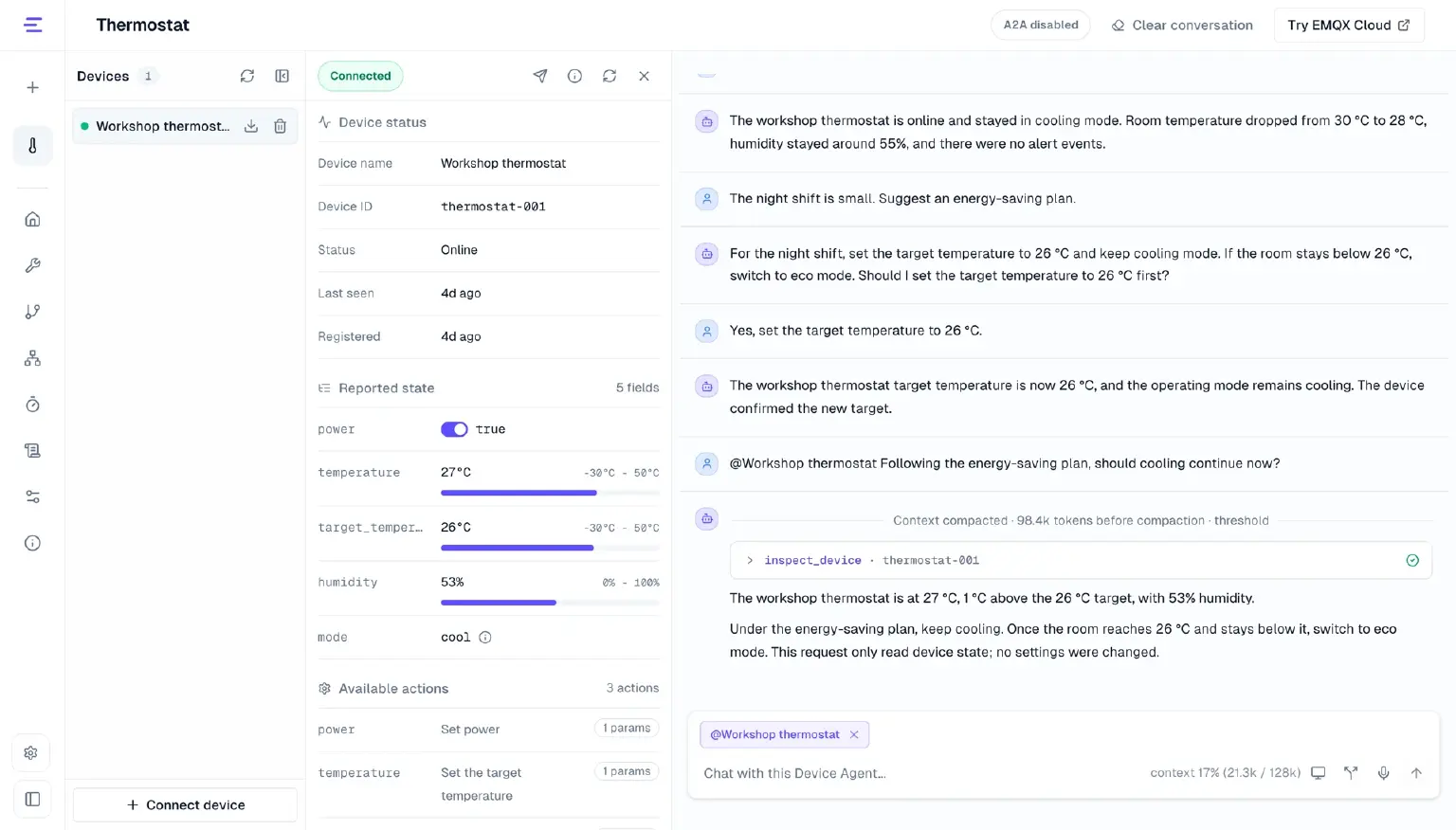
Model configuration now supports enabling reasoning and selecting the reasoning level supported by the current model. When a model returns reasoning content, it can be expanded and viewed directly in the conversation.
For more information, see Conversations and Memory and LLM Configuration.
A2A: Collaborate Across Devices Within Conversations
Cross-device queries and control no longer require switching to the A2A workspace. They can now be handled directly through text or voice conversations with a primary device.
Version 0.4.0 introduced A2A scenarios and tasks. Version 0.5.0 takes this further by allowing users to delegate tasks directly from a device's text or voice conversation to bound target device agents, with results returned to the original conversation.
Consider a smart home control scenario. Under Configuration Overview → A2A Device Bindings, you can associate a primary controller with the living room thermostat, bedroom thermostat, and bedroom fan. Bindings are stored separately for each primary device, so multiple devices running the same agent can have different associated devices.
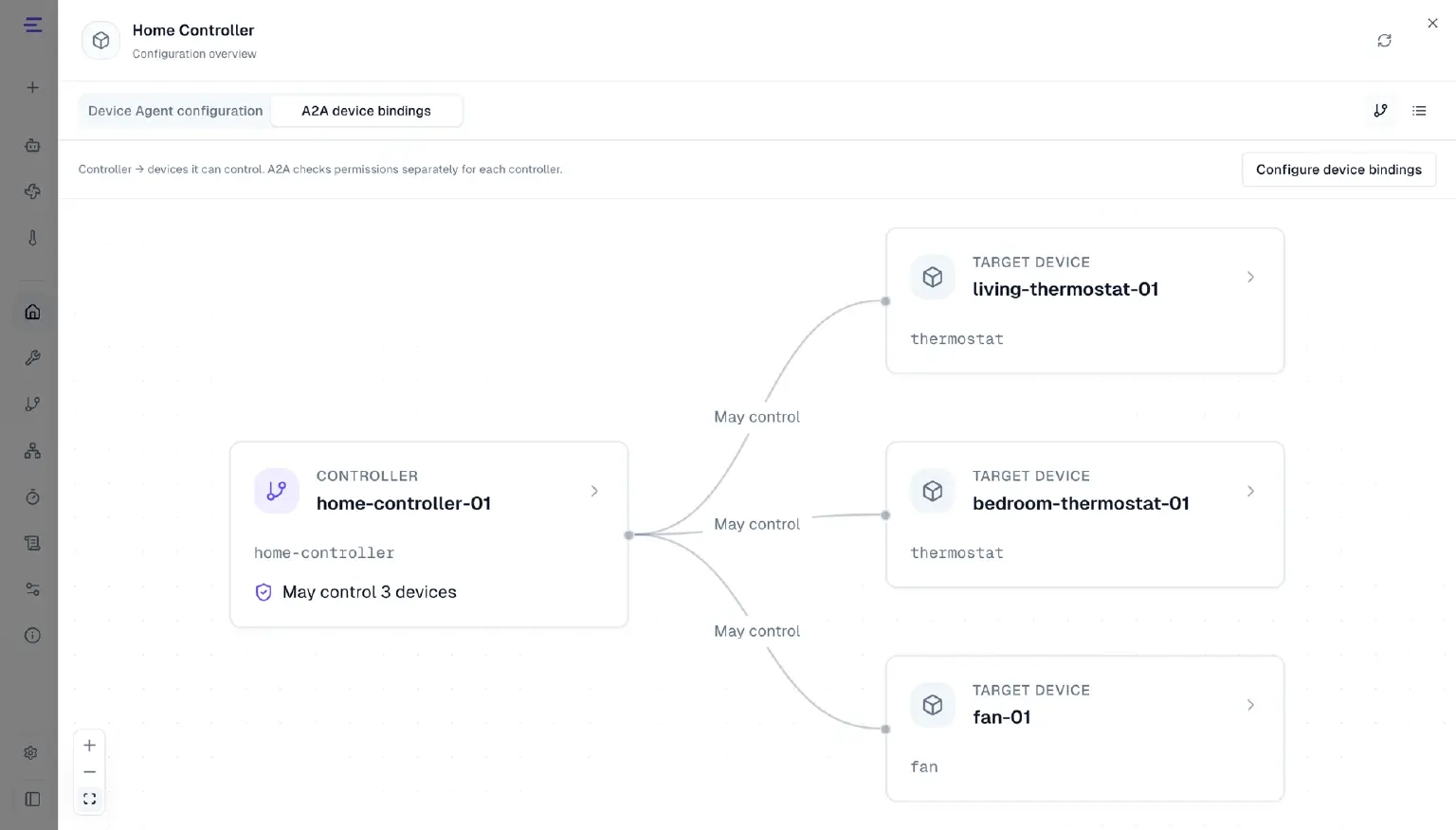
After selecting the primary controller, you can type or say:
Check the current temperatures of the living room and bedroom thermostats, and check the operating status of the bedroom fan.
The primary device locates the target devices within its configured bindings, queries each one, and consolidates the results.
A2A collaboration requires EMQX 6.2.0 or later with the A2A registry enabled. Voice-based collaboration additionally requires voice integration to be configured and the corresponding tools to be enabled.
Published capability cards are automatically updated when device models are saved or platform synchronization is completed.
For setup instructions, see A2A Multi-Agent Collaboration.
Device Agent Platform for Production Deployments
As deployments move from feature validation to production, runtime status, usage costs, and licensing capacity can all be managed centrally.
Previously, Device Agent supported local deployment only, making it more suitable for standalone and edge scenarios. Starting with version 0.5.0, we are introducing a commercial platform designed for production environments. It can be deployed on enterprise-owned infrastructure to centrally run and manage device agents.
The Device Agent platform provides persistent storage for tasks, conversations, and execution records. Request ingestion and agent execution can scale independently. If a service interruption occurs, operators can check existing execution results before deciding whether to resubmit a task, helping prevent duplicate device operations.
The platform can be deployed on dedicated Linux servers or existing Kubernetes environments, with support for deployment in isolated networks.
Runtime Monitoring
Runtime monitoring provides five views: platform overview, AI usage, cluster status, connections and sessions, and response latency.
Operations teams can inspect task results, queue status, model invocations, and service health. Usage can also be tracked by device, including token usage, voice usage, cumulative usage, and estimated costs.
For voice interactions, processing time is recorded for each stage of a conversation, making it easier to identify where delays occur.
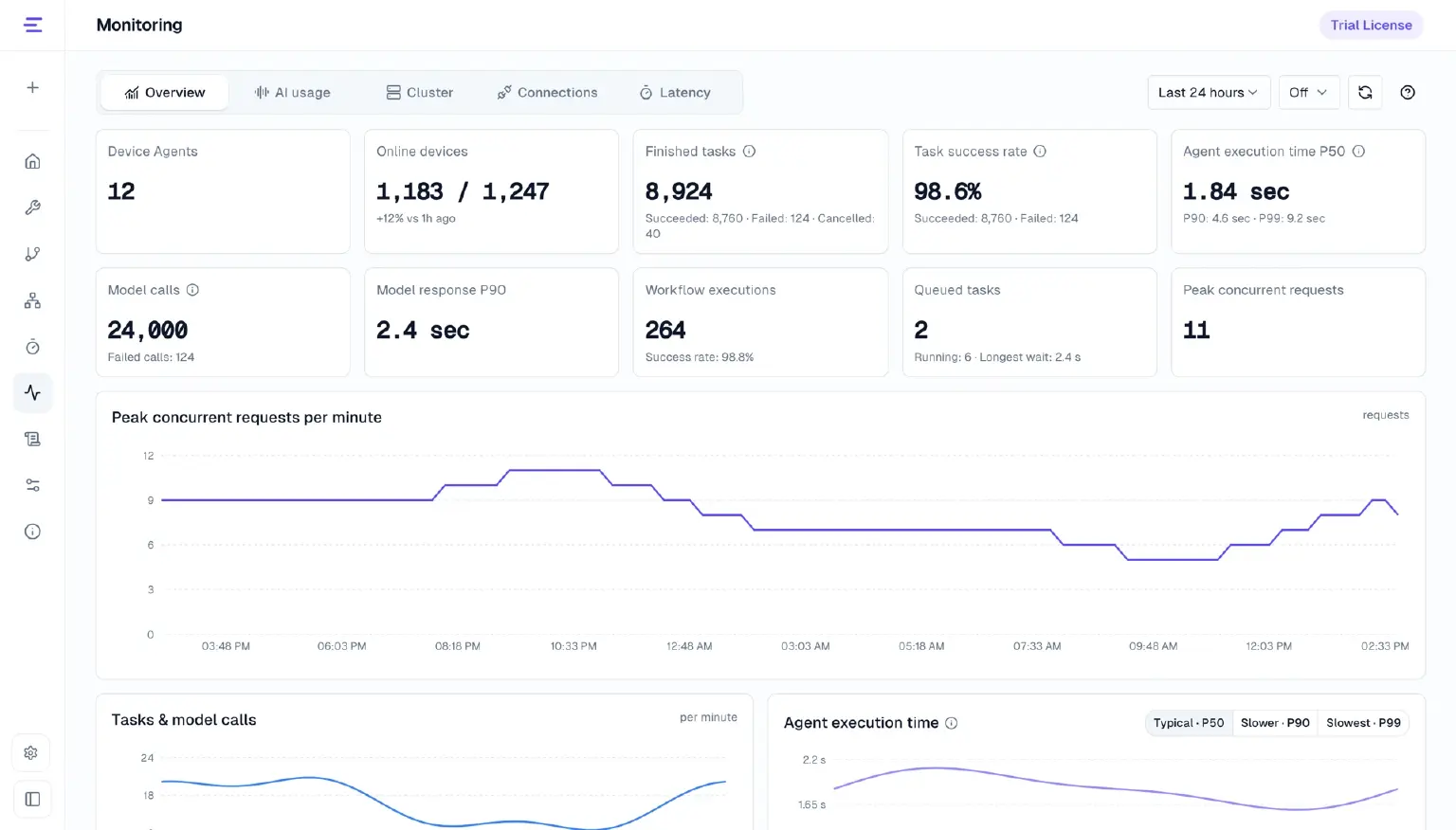
Illustrative interface; data shown is for demonstration only.
Device-Level AI Budgets
AI budgets can be denominated in CNY or USD. Each device can be assigned an independent budget, billing rules, and model multipliers. Administrators can view and adjust device balances.
Costs shown in monitoring are estimates. Actual charges are subject to the service provider's billing records, while device balances are deducted according to the configured billing rules.
License Management
Administrators can import signed license files to manage the entire deployment based on requests per minute (RPM) and license validity periods.
All devices and execution nodes share the same licensed capacity, which can be expanded or renewed as needed.
Platform licensing, device-level AI budgets, and quotas for third-party model and voice services are managed separately.
For private deployment and commercial licensing, see Platform Overview.
Improvements
- Added the Doubao Ark model provider, improved Cloudflare configuration, updated model selection and reasoning options for DeepSeek Flash and Kimi, and expanded Alibaba Cloud speech recognition and synthesis models and their available voices.
- Improved connection persistence, reconnection, and parameter mapping compatibility in the browser simulator for more stable continuous device behavior testing.
- Approval is no longer required when updating device states or invoking device tasks for devices connected through IoT platform integrations. Duplicate execution is still prevented.
- On the Device Agent platform, scheduled task notifications for bound devices are now sent to the devices via MQTT when tasks become due. They use the same channel as device conversation responses. In local deployments, scheduled task results continue to appear in the console.
- Improved the mobile workspace, chat layout, pagination for conversation history, and response language matching.
- Added validation error messages when importing skill archives, making it easier to identify invalid content.
- Added a Docker image installation option, with support for persistent data storage through Docker volumes.
Bug Fixes
- Fixed an issue that caused conversation history to be lost when services were started from different directories.
- Fixed time-related issues in device state and event queries. Times are now parsed according to the server time zone, complete UTC timestamps are returned, and queries for the latest events no longer result in empty time ranges.
Upgrade Instructions
Existing Installations
Back up your runtime data and configuration first. Stop the current service, then run:
device-agent update
device-agent --version
After confirming that the version is 0.5.0, start Device Agent again.
Fresh Installations
macOS and Linux:
curl -fsSL https://emqx.sh/device-agent | sh
device-agent --version
Windows PowerShell:
irm https://emqx.sh/device-agent.ps1 | iex
device-agent --version
Docker:
docker pull emqx/device-agent:0.5.0
docker run -d --name device-agent --restart unless-stopped \
  -p 127.0.0.1:3000:3000 -p 127.0.0.1:3001:3001 \
  -e AGENT_GATEWAY_HTTP_HOST=0.0.0.0 -e VOICE_HOST=0.0.0.0 \
  -v device-agent-data:/home/device-agent/.device_agent \
  emqx/device-agent:0.5.0
Once started, open http://127.0.0.1:3000 to access the console.
For model configuration, MQTT connections, and other setup instructions, see Installation Guide.
Administrators should schedule Device Agent platform upgrades according to their deployment plan, including the necessary backups and service updates.
For the complete changelog and installation packages for all platforms, see Device Agent 0.5.0 Release