
EMQX Agents has moved beyond beta and is now commercially available as part of the EMQX Cloud product portfolio, alongside EMQX Broker and EMQX Tables.
With the self-service Starter plan, eligible accounts can subscribe, deploy, and manage an Agents deployment directly in the EMQX Cloud Console. Eligible accounts start with a one-month free trial that includes 2,000 AI credits.
Turn MQTT Events into Automated Action
Turning an MQTT event into an operational response often means connecting MQTT consumption, application logic, historical data, model access, and an output path for alerts or commands.
EMQX Agents brings these capabilities together in EMQX Cloud. It also manages the underlying LLM, so model usage runs on your AI credits instead of a separate provider account. Teams can describe an automation in natural language or start from a built-in template, review the generated agent definition, and deploy it as a long-running agent.
With the required connectors, a deployed agent can:
- React to messages on selected MQTT topics.
- Use the topic and payload as context.
- Query historical telemetry in EMQX Tables.
- Publish results or commands to allowed MQTT topics through an EMQX Broker connector.
- Work with supported external services through MCP connectors. Work with external tools such as Slack, Microsoft Teams, Gmail, Notion, and Databricks through MCP connectors.
EMQX Cloud records each run, including its status, tool calls, token usage, and execution timeline.
Agents are fully managed on EMQX Cloud and run on Google Cloud. If your EMQX Broker, Tables, or Fleets deployment is on Google Cloud in the same region, you can deploy Agents into its VPC for private connectivity. Deployments on other clouds, including AWS and Azure, connect over public addresses.
For example, a factory operations team can build an agent that monitors equipment telemetry, queries recent readings, and publishes an alert when a rolling average exceeds a defined threshold. The run timeline then shows what data the agent used and which actions it took.
That replaces much of the glue code, AWS Lambda functions, and server infrastructure teams usually build to connect MQTT events, historical context, and operational actions.
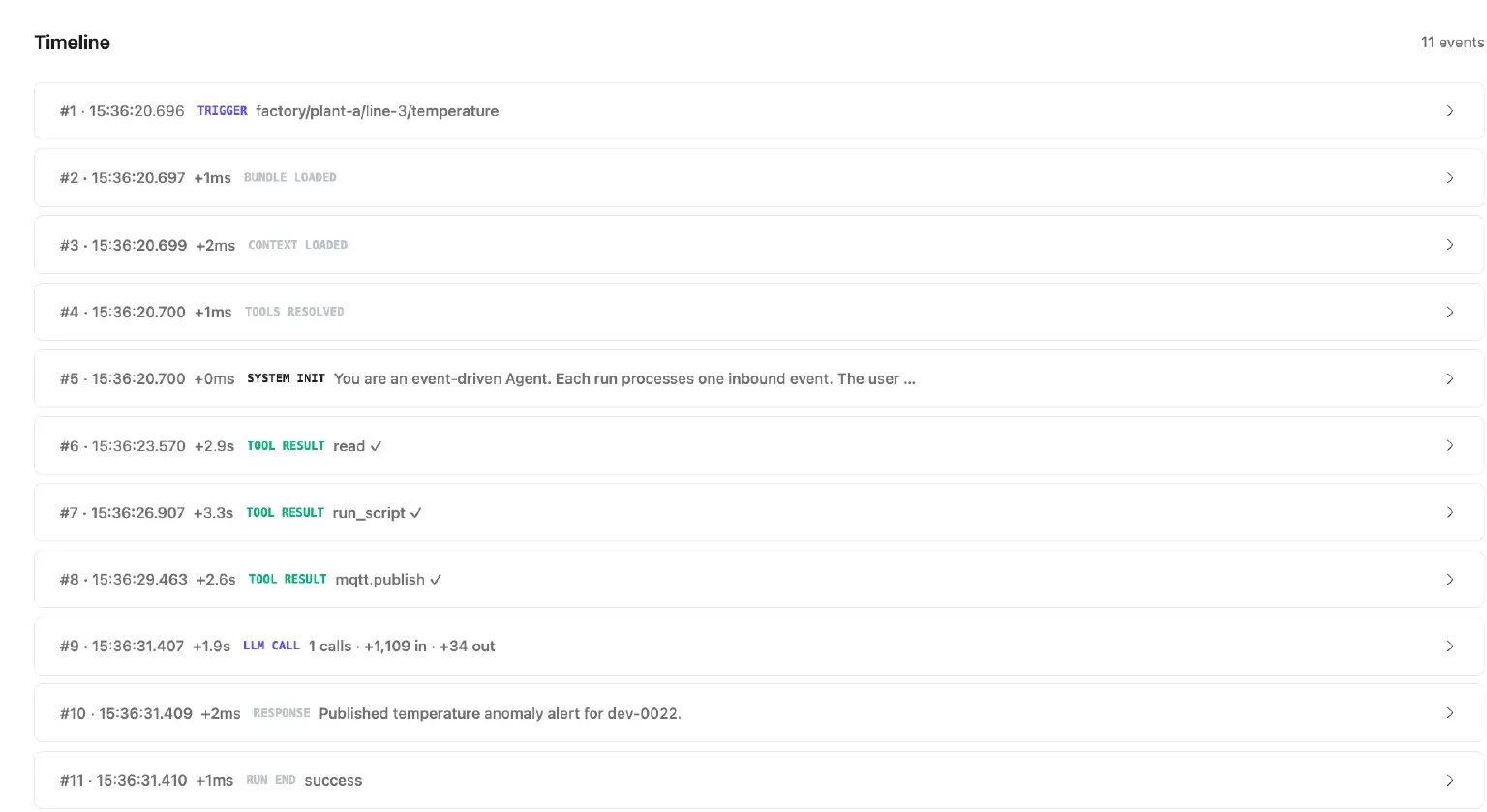
A successful run timeline showing the MQTT trigger, historical-data processing, and the published anomaly alert
Subscribe and Deploy in the Console
Eligible EMQX Cloud accounts can now link a credit card, review the subscription terms, and select Subscribe & Deploy without requesting manual provisioning through a support ticket.
The Starter plan includes:
- Each EMQX Agents deployment costs $30 per month, plus applicable taxes.
- 2,000 AI credits per subscription period for model usage in chats and agent runs.
- Deployment runtime is included, with no separate hourly deployment charge.
- A one-calendar-month free trial with 2,000 credits for eligible accounts.
Credit consumption varies by model and workflow. You can track usage in the EMQX Cloud Console as you build and run your agents. Unused included credits do not carry over to the next subscription period.
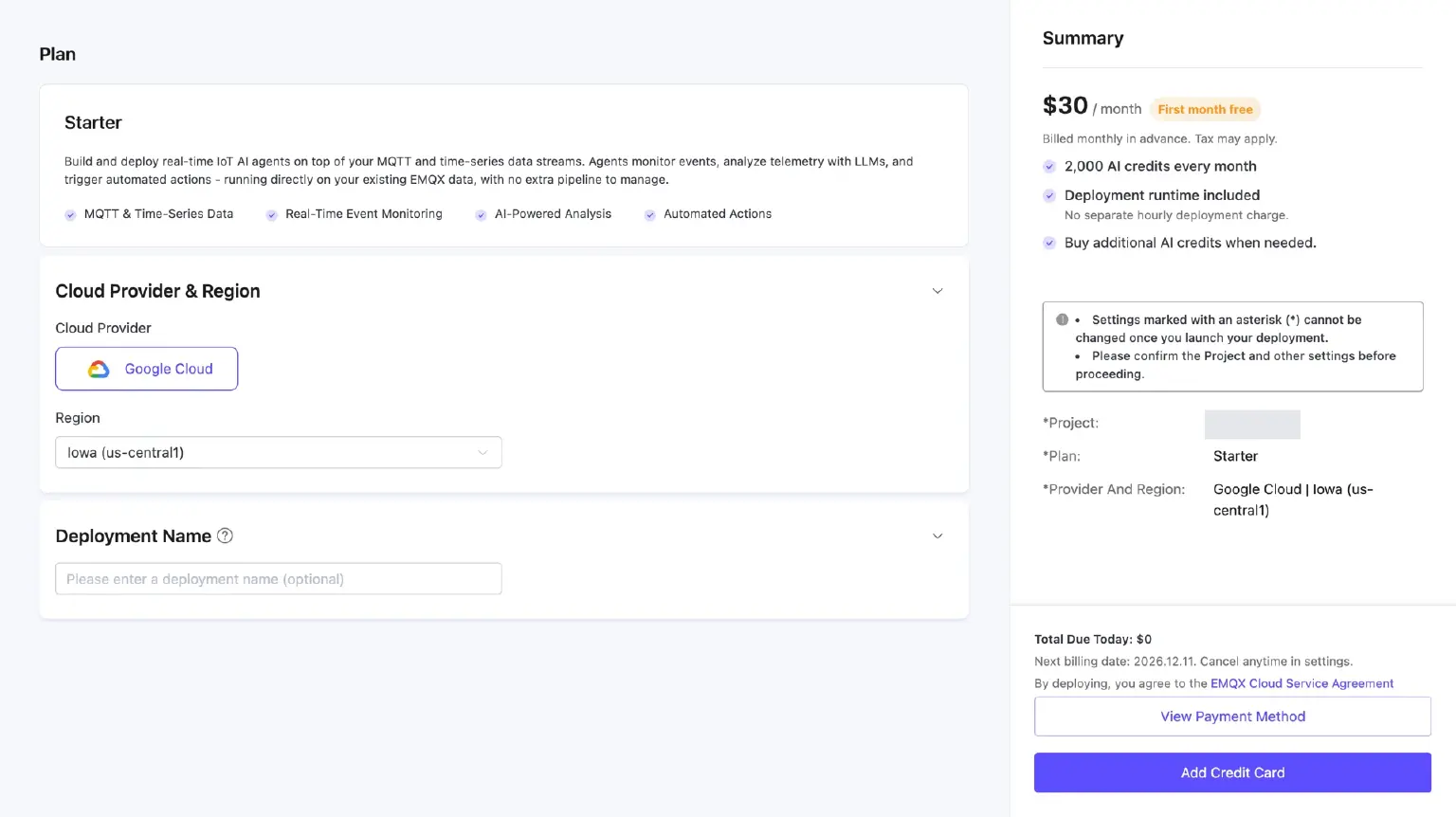
Review the Starter plan, free-trial terms, and payment setup in the EMQX Cloud Console
The subscription renews monthly. Eligible trials convert to paid subscriptions at the end of the trial unless canceled beforehand. You can manage the subscription and view invoices from Deployment Settings in the EMQX Cloud Console.
Already running an Agents deployment from the beta? Deployments created before subscription billing stay on a free trial until December 1, 2026, and they won't be converted to paid subscriptions or charged automatically.
Direct self-service subscription requires a linked credit card. Accounts using a US bank account or marketplace billing can contact EMQX for assistance. See the subscription and billing documentation for current pricing, trial eligibility, and payment details.
Start Building
If your team already uses MQTT, EMQX Agents can react to live messages, query telemetry in EMQX Tables, and publish results through EMQX Broker.
New to EMQX Cloud? Sign up and start your free month on the Starter plan.
Already on EMQX Cloud? Follow the Quick Start to build and deploy your first agent.
To see templates, connectors, and use cases, explore EMQX Agents.