EMQX Cloud Update: Custom Domain, EMQX Tables on Azure, and Tables Network Association

We're happy to share the latest updates to EMQX Cloud. This release brings Custom Domain support to Dedicated and Dedicated Flex deployments, expands EMQX Tables to Azure across three regions, and introduces private network connectivity between EMQX Broker and Tables deployments through network association and project-level network management.
Custom Domain
EMQX Cloud supports configuring a custom domain for your EMQX v5 Dedicated and v5 Dedicated Flex deployments, allowing MQTT clients to connect through a domain you own.
This is useful when you want a stable, branded endpoint, for example, mqtt.your-company.com, with EMQX Cloud managing TLS/SSL certificate provisioning and renewal automatically.
Requirements:
- Your deployment is EMQX v5 Dedicated or v5 Dedicated Flex (trial deployments are not supported)
- You own a domain and can manage its DNS records
- The domain must be a subdomain (e.g.,
mqtt.example.com); wildcard domains are not supported
If you have strict compliance requirements around certificate issuance or renewal, consider uploading your own certificate instead of using a managed certificate.
To configure a custom domain, log in to the EMQX Cloud console, go to your deployment's overview page, and click Custom Domain in the MQTT Connection Information section. Follow the steps to set up DNS records and TLS/SSL, then verify connectivity from your MQTT clients using the new domain.
For full setup instructions, see Configure a Custom Domain.
EMQX Tables: Now on Azure
EMQX Tables, our integrated managed time-series database powered by GreptimeDB, is now available on Azure, joining AWS and Google Cloud as a supported cloud provider.
New supported regions on Azure (Starter Plan):
| Region | Location |
|---|---|
| westus3 | West US 3 |
| germanywestcentral | Germany West Central |
| southeastasia | Southeast Asia |
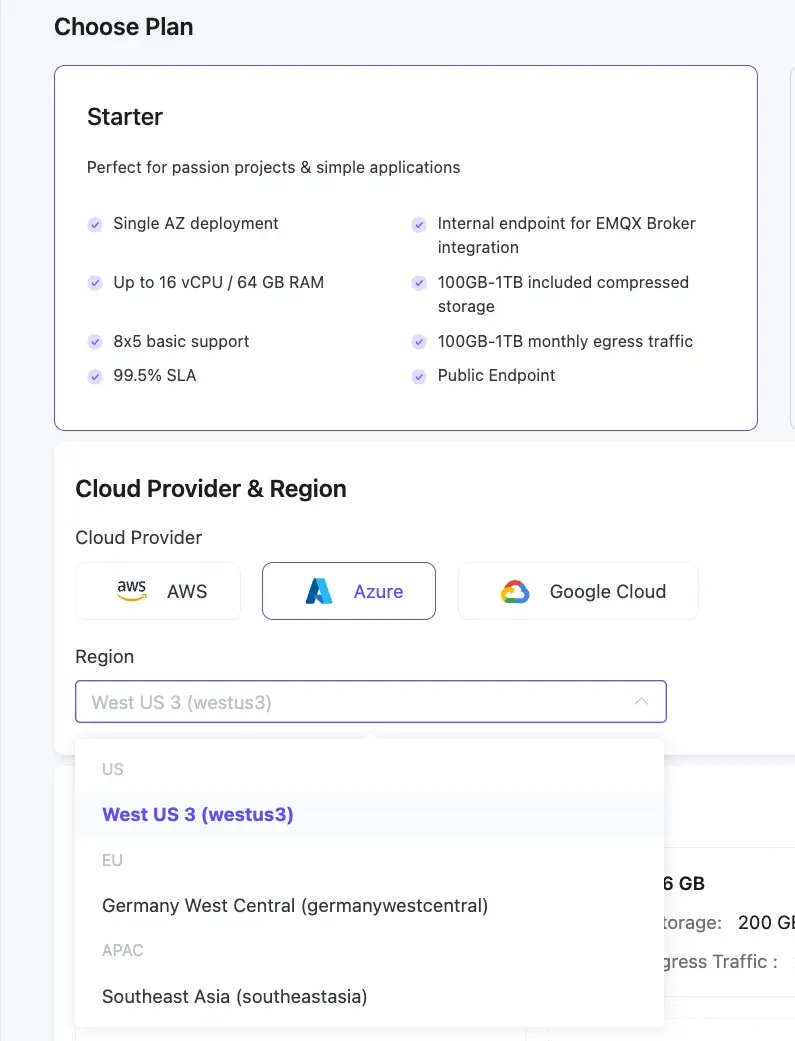
As with other cloud providers, we recommend co-locating your EMQX Tables instance in the same region as your EMQX Broker deployment.
For the full list of available regions across AWS, Azure, and Google Cloud, see EMQX Tables Product Plans.
Private Network Connectivity Between Broker and Tables
With this release, you can deploy EMQX Broker and EMQX Tables within a shared private network, enabling direct, secure communication between the two services — no NAT Gateway or public internet required.
Network Association at Deployment Time
When creating an EMQX Tables deployment, a new Network Association step lets you select an existing network from a Broker deployment in the same cloud platform and region. When you do this, the Tables deployment joins that network and private connectivity between the two services is established automatically.
If no network is selected, a separate network is created for the Tables deployment. You can still connect the two services later, but this requires enabling the NAT Gateway on the Broker to route traffic over the public internet.
Each network supports at most one EMQX Broker and one EMQX Tables deployment.
For full setup instructions, see Create an EMQX Tables Deployment.
Project-Level Network Management
A new Network Management section is now available in the project's left menu, giving you a consolidated view of all networks across your deployments in that project.
The Network Management page gives you a consolidated view of all networks in the project, including each network's status, cloud platform, region, and associated deployments.
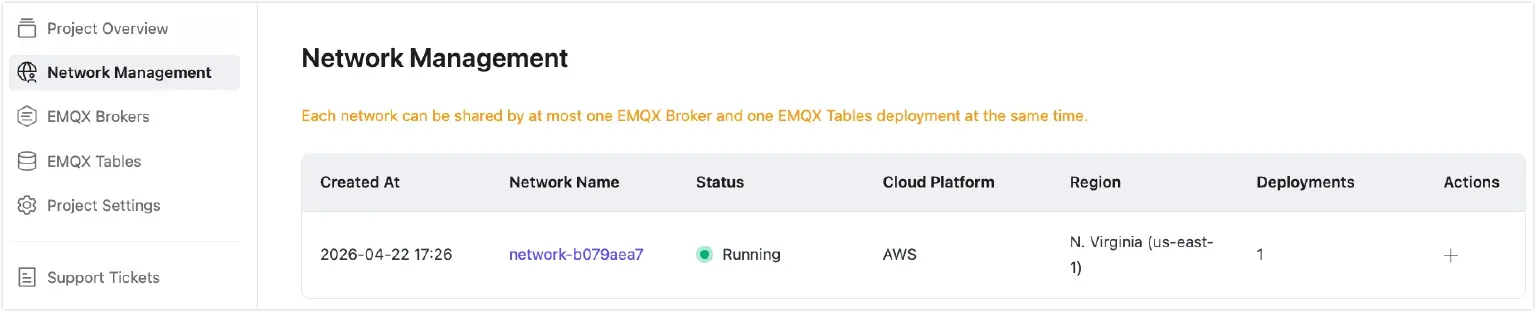
From this view, you can also create a new deployment pre-associated with an existing network using the + action, useful when you want to pair a Broker with a Tables instance without going through the full creation flow.
Ready to Explore?
Log in to the EMQX Cloud console to start using these features.
- Custom Domain configuration and network association are available directly in the console.
- To explore EMQX Tables on Azure, select Azure when choosing your cloud provider during Tables deployment creation.
If you have questions or want guidance on setting up private network connectivity, submit a support ticket and our team will assist you.