Zigbee2MQTT in 2026: Local Smart-Home Control over MQTT

If you want local control of your Zigbee bulbs, sensors, and switches without a vendor hub or cloud account, Zigbee2MQTT is still one of the most practical ways to get it in 2026. This guide runs it with Docker and EMQX, covers what changed in the 2.x releases, shows where Matter fits, and explains what a full MQTT broker adds as your setup grows.
TL;DR
- Zigbee2MQTT gives you local control of Zigbee devices over MQTT, with support for 5,473 devices and no vendor cloud.
- This guide uses EMQX as the broker; if you only need bare local pub/sub, Mosquitto works too.
- EMQX adds a dashboard, authentication, rules, data export, and bridging once you grow past one local network.
- Matter is complementary: good for new cross-ecosystem devices, not a wholesale replacement for an existing Zigbee network.
This is part of a series of articles about MQTT.
What Is Zigbee?
Zigbee is a low-power wireless protocol for short-range device communication, approved as an IEEE standard in 2004. It is widely used in home automation, smart energy, and building control. Zigbee uses a mesh topology: mains-powered devices act as routers and relay traffic for each other, so the network extends as you add devices and battery-powered end devices can stay asleep most of the time. That mesh design is also why Zigbee end devices run for a year or more on a coin cell.
What Is Zigbee2MQTT?
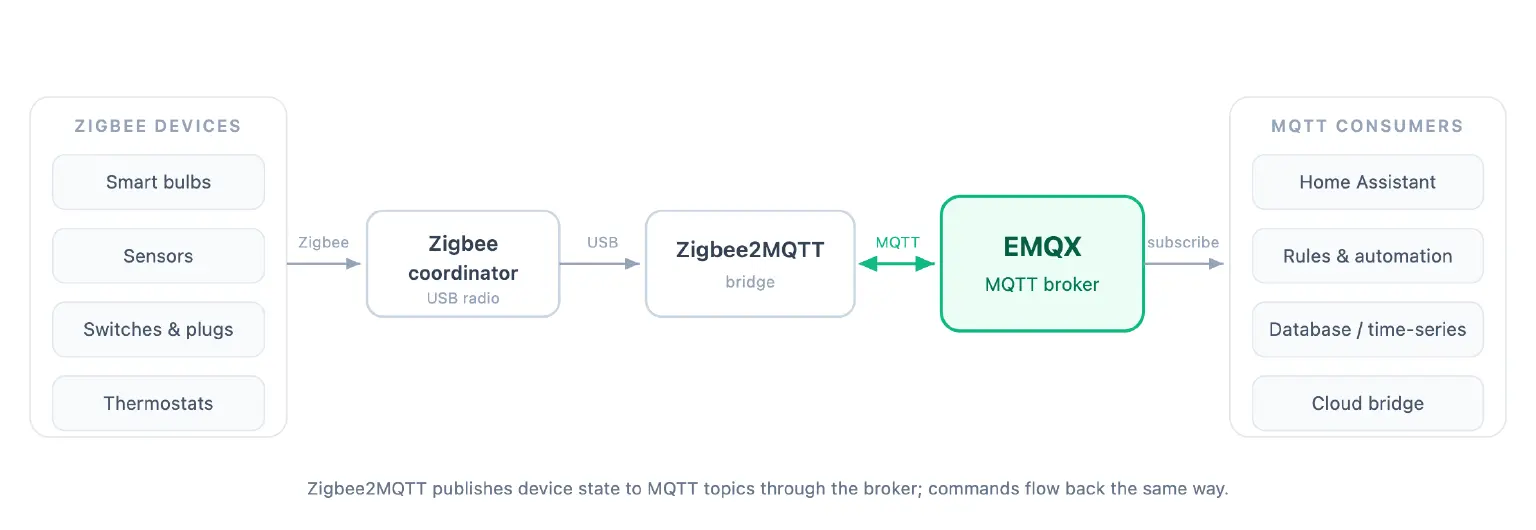
Zigbee2MQTT is open-source software that bridges Zigbee devices to MQTT. It talks to a Zigbee coordinator (a USB or network radio), then publishes device state to an MQTT broker and accepts commands back. Your automation platform speaks plain MQTT and never needs to know a device is Zigbee underneath.
The point is independence. You do not need the manufacturer's hub or cloud. A generic coordinator radio plus Zigbee2MQTT controls devices from many vendors through one interface, and every message stays on your own network.
Zigbee vs Matter in 2026
If you are starting a smart home in 2026, the obvious question is whether to skip Zigbee and go straight to Matter. Before comparing them, it's worth clarifying how Zigbee, Thread, and Matter relate to one another, since these terms are often confused.
Thread is a low-power wireless mesh, the same family of radio Zigbee uses. On its own, it only moves data between devices; it cannot control them. Matter is the application standard that sits on top and does the controlling, and it lets devices work across the Apple, Google, Amazon, and Samsung ecosystems. Matter runs over Thread or over ordinary Wi-Fi and Ethernet, so not every Matter device uses Thread.
In other words, when people compare "Zigbee vs Matter," they are often mixing different layers of the technology stack. A more direct protocol comparison is Zigbee versus Thread, while Matter provides the interoperability layer that Zigbee achieves through Zigbee2MQTT and its extensive device database.
Here is how the two stack up for a 2026 build:
| Zigbee (via Zigbee2MQTT) | Matter | |
|---|---|---|
| Device availability | 5,473 supported devices from 577 vendors | Growing fast, still narrower; first sensors and security devices arriving |
| Network | Zigbee mesh, separate radio | Thread mesh, or Wi-Fi / Ethernet |
| Local control | Full, over MQTT, no cloud | Local-capable, varies by ecosystem |
| Battery devices | Mature, coin-cell devices last 1–2 years | Good on Thread; Wi-Fi Matter is not for battery devices |
| Best for | Broadest device choice, full local automation, budget devices | New cross-ecosystem purchases, cross-vendor interop |
Matter's catalog is growing, but Zigbee still has the larger supported-device list and a longer track record with low-power sensors. For most builders, the two are complementary: use Matter for new cross-ecosystem gear, and keep Zigbee2MQTT for device breadth and full MQTT-level control.
Why Zigbee2MQTT
Zigbee2MQTT has a few practical advantages over a proprietary hub:
- Your data stays local. Many Zigbee products route control through a vendor cloud, which limits you and raises privacy questions. With Zigbee2MQTT, every message stays on your own network.
- You are not locked to one brand. It supports 5,473 devices from 577 vendors (see the official list), so you pick hardware on price and features.
- Everything is MQTT. You can wire devices into any automation engine, write your own rules, and integrate with other systems without proprietary glue.
Related reading: MQTT security.
What Changed in Zigbee2MQTT 2.0
If you last used Zigbee2MQTT a couple of years ago, note that 2.0 was a breaking release, and the current version is 2.12.0 (June 2026). For a new install, the changes worth knowing are:
- Legacy behavior changed. The legacy API and legacy availability payloads were removed, and legacy action sensors are off by default, so older integrations built on them need updating.
- Config migration is automatic. On first start, 2.0 migrates your
configuration.yamland records what it changed inmigration-1-to-2.login your data directory. - Pairing moved out of the config file. You no longer set
permit_joininconfiguration.yaml. Enable joining from the web frontend (the join button opens the network for 254 seconds) or by publishing tozigbee2mqtt/bridge/request/permit_join, and leave joining off in normal operation so stray devices cannot pair. - The web frontend is the main control surface. An alternative frontend,
windfront, can manage several Zigbee2MQTT instances from one UI if you run more than one network.
Set Up Zigbee2MQTT with Docker and EMQX
This walkthrough uses Docker and Docker Compose.
Find your Zigbee adapter
USB adapter:
Plug it in, then list the stable by-id path. Use this rather than /dev/ttyUSB0, which can change across reboots:
$ ls -l /dev/serial/by-id/
You will see a symlink such as /dev/serial/by-id/usb-Texas_Instruments_TI_CC2531_USB_CDC___0X00124B-if00 pointing at /dev/ttyACM0 or /dev/ttyUSB0. Note the by-id path; you map it into the container. Most current coordinators are Silicon Labs (EmberZNet) or Texas Instruments (zStack) based.
Network adapter:
Zigbee2MQTT auto-discovers network coordinators that support mDNS, so you usually do not need to find their IP by hand. For adapters without mDNS, set serial.port to the adapter's socket URL (for example tcp://192.168.1.50:6638) in configuration.yaml.
Run Zigbee2MQTT with EMQX
Create a project folder and a docker-compose.yml. This runs EMQX as the broker alongside Zigbee2MQTT:
services:
  emqx:
    image: emqx/emqx-enterprise:6.2.1
    restart: unless-stopped
    ports:
      - "1883:1883"      # MQTT
      - "18083:18083"    # dashboard
    volumes:
      - ./emqx-data:/opt/emqx/data

  zigbee2mqtt:
    container_name: zigbee2mqtt
    restart: unless-stopped
    image: ghcr.io/koenkk/zigbee2mqtt
    volumes:
      - ./zigbee2mqtt-data:/app/data
      - /run/udev:/run/udev:ro
    ports:
      - "8080:8080"
    environment:
      - TZ=Europe/Berlin
    devices:
      # replace with your own /dev/serial/by-id/... path from the step above
      - /dev/serial/by-id/usb-Texas_Instruments_TI_CC2531_USB_CDC___0X00124B-if00:/dev/ttyACM0
Adjust the device path and timezone for your machine. The Zigbee2MQTT image is published at ghcr.io/koenkk/zigbee2mqtt, and modern Compose files no longer use the version: key.
Bring the stack up with docker compose up -d, then open <http://<host>>:8080. On first start, Zigbee2MQTT 2.x runs a web onboarding wizard: it auto-detects the adapter you mapped in and asks for your MQTT server. Enter mqtt://emqx:1883 (the EMQX service, addressed by its Compose name). A fresh EMQX has no authentication configured, so Zigbee2MQTT connects without a username or password; add authentication from the dashboard once everything works.
If you would rather configure it up front and skip the wizard, create zigbee2mqtt-data/configuration.yaml before the first start:
version: 5
mqtt:
  server: mqtt://emqx:1883
serial:
  port: /dev/ttyACM0
frontend:
  enabled: true
  port: 8080
serial.port is the in-container path from the devices: mapping, not the host by-id path. Zigbee2MQTT generates its network keys on first start.
Prefer a minimal broker with nothing else attached? eclipse-mosquitto:2.0 is a drop-in replacement for the emqx service. You lose the dashboard, rule engine, and bridging covered below, which is fine if all you want is local message passing.
Pair a device
Find your device in the supported devices list and follow its pairing steps; if none are listed, a factory reset usually triggers pairing. Enable joining first, either with the frontend join button (it opens the network for 254 seconds) or by publishing a request to the zigbee2mqtt/bridge/request/permit_join topic, then trigger pairing on the device. A successful join shows up in the log:
Zigbee2MQTT:info Successfully interviewed '0x00158d0001dc126a', device has successfully been paired
Turn joining off again once your devices are added.
What EMQX Adds Beyond Message Passing
With EMQX as the broker, you get more than a place for Zigbee2MQTT to publish.
The dashboard at <http://<host>>:18083 (default login admin / public, which it prompts you to change) shows connected clients, subscriptions, topics, and message rates, so you can watch your Zigbee traffic instead of guessing at it.
The rule engine can filter and transform device payloads and forward them to a time-series database, a data warehouse, or Kafka without bolting on extra services. See building an IoT time-series application with MQTT and InfluxDB for a Zigbee-friendly pattern.
When one home grows into several sites, EMQX clustering links nodes into a single logical broker and MQTT bridging connects them to each other or up to the cloud. That is the path from a Raspberry Pi in one house to a fleet on the broker you already started with. If you would rather not run that upstream broker yourself, EMQX Cloud is the managed option. Learn more on the EMQX website.
A Lighter EMQX for Small Gateways (Coming in 6.3.0)
A full broker asks more of a Raspberry Pi than a minimal one does, which is the usual reason people run Mosquitto on small gateways. EMQX 6.2.1 runs on Pi-class hardware, and the upcoming 6.3.0 release adds an essential mode that trims the footprint further for resource-constrained devices.
Setting EMQX_FEATURES=ESSENTIAL selects a slim feature set aimed at edge and gateway deployments. Early testing puts the broker around 100 MB of RAM in this mode, light enough to sit next to Zigbee2MQTT on the same small device while keeping the dashboard, rules, and bridging. The exact figure is still settling ahead of release, so treat 100 MB as an early number rather than a guarantee.
Once 6.3.0 ships, switch the emqx image to the new release and add one environment variable; the rest of the service stays the same:
  emqx:
    image: emqx/emqx-enterprise:6.3.0
    environment:
      - EMQX_FEATURES=ESSENTIAL
    # ports and volumes unchanged
Zigbee2MQTT FAQ
Does Zigbee2MQTT need an MQTT broker?
Yes. Zigbee2MQTT publishes Zigbee device state to an MQTT broker and receives commands through MQTT topics. For a single local setup, a minimal broker like Mosquitto can be enough. For visibility, authentication, rules, data export, or bridging, a fuller broker such as EMQX helps.
Is Zigbee2MQTT local?
Yes. Zigbee2MQTT runs entirely on your local network with a Zigbee coordinator, Zigbee2MQTT, and an MQTT broker. Any cloud connection is optional and depends on what you wire up downstream.
Zigbee2MQTT vs Matter: which should I use?
Use Zigbee2MQTT for broad support of existing Zigbee devices and MQTT-level automation. Use Matter for new cross-ecosystem devices. Many smart-home setups run both.
Can I use EMQX with Zigbee2MQTT?
Yes. EMQX runs as the MQTT broker for Zigbee2MQTT, and adds a dashboard, authentication, rules, data export, and bridging when a setup grows beyond local pub/sub.
Related resources
- Home Assistant and MQTT: 4 Things You Could Build
- MQTT with openHAB: A Step-by-Step Tutorial
- A Developer's Journey with ESP32 and MQTT Broker