

At 2 a.m., a spindle on line 3 crosses its vibration threshold. At 7 a.m., a maintenance engineer sits down to figure out why, and needs the readings, the repair history, and the manual in one place. What happens in those five hours can give maintenance a head start before the engineer even arrives.
Anthropic made the 7 a.m. part a lot easier when it launched Claude for Manufacturing on November 12, a plugin with 17 skills for the work a plant runs on: quoting a new job, writing up a nonconformance, working through an 8D, diagnosing a breakdown, sourcing from another supplier, and building the morning production report. It connects to Autodesk Fusion, Infor, Microsoft 365, and Oracle NetSuite, and every skill that would change something stops for a person's approval first. In a 2025 Manufacturing Leadership Council survey cited in the launch, 79% of manufacturers said they still enter data manually, so there's a lot of time to win back.
What it can't do on its own is notice the spindle at 2 a.m., because that depends on the data underneath and on whatever is listening to it.
How Claude for Manufacturing gets plant data today
The plugin's README is unusually candid about this. Its launch connectors cover ERP, CAD, and Microsoft 365. For systems without a connector, which in most plants includes the historian, the MES, and the maintenance system, scheduled exports are the path in: "Scheduled exports are the designed path, not a fallback." A folder of CSVs is enough to run eleven of the plugin's twelve core skills, and a custom-connector skill helps teams connect more systems over time.
That's a smart way to launch, since almost every plant can produce a scheduled export and teams can get started without an integration project. It also shapes how the skills behave, and the README is clear about where:
- Breakdown diagnosis reads "the sensor window before the failure" from exported sensor data.
- Root cause analysis builds one timeline from sensor history, inspection results, and maintenance records "after checking that the clocks in those systems actually agree, and refusing to draw a correlation when they don't."
- "Freshness is a headline." If an export stopped running three weeks ago, the report says so at the top.
- The morning report can run unattended, but "a plugin cannot wake itself up," so someone has to schedule it.
Desk time and event time
Claude for Manufacturing is built for desk time. Whether someone asks for the work or schedules it, Claude gathers the evidence and prepares it for a person to review and approve, which is exactly the right design for a quote, an NCR, or a corrective action report.
A plant also runs on event time, when a spindle runs hot or a robot arm stops reporting halfway through second shift. Those moments don't arrive on a schedule, and without something listening for them, the evidence often doesn't get pulled together until hours later.
EMQX Agents covers those moments. It's a managed service on EMQX Cloud for building and running AI agents that react to MQTT events: you describe what the agent should do in plain language, review the instructions it generates, and deploy it, and from then on each message on its trigger topic starts a run. The agent can query EMQX Tables with SQL for recent history, publish results back to the broker, and reach tools like Microsoft Teams and Outlook through connectors. It can also watch for silence, like a device that misses its heartbeat. Each run has a timeline showing the tools it called, the responses it got, and the outcome, so your team can review what it did.
Used together, an agent catches the event and prepares the evidence, and Claude for Manufacturing picks it up when the engineer starts the investigation.
The 2 a.m. handoff
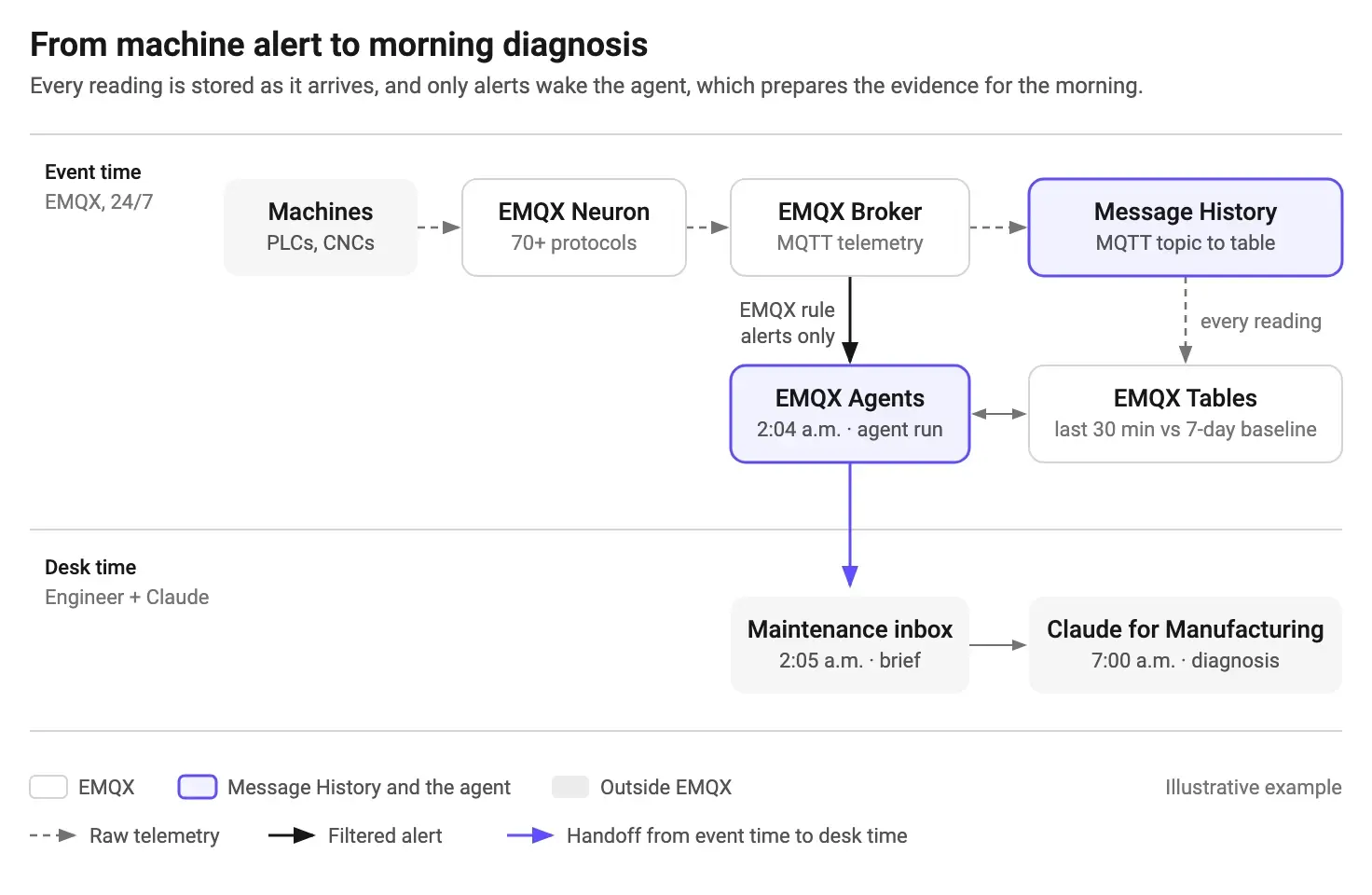
Here's an illustrative example for a line where the signals, the alert threshold, and the connectors are already set up.
- 2:04 a.m. EMQX Neuron, which connects plant equipment such as PLCs and CNCs across 70+ industrial protocols, publishes the spindle's vibration reading to the plant's MQTT broker. Message History has been writing every reading on that topic into EMQX Tables all along, so the raw telemetry is already stored. This reading crosses its threshold, so an EMQX rule also publishes an alert to the agent's trigger topic.
- 2:04 a.m. An EMQX agent subscribed to that topic starts a run. It queries EMQX Tables for the last 30 minutes of vibration, temperature, and load on that machine and compares them with a baseline from the past week.
- 2:05 a.m. The agent emails a short brief to the maintenance inbox: what crossed, when, the readings around it, and how they differ from the baseline. It publishes a status message to the broker so the line dashboard shows it, too.
- 7:00 a.m. The maintenance engineer asks Claude to diagnose the machine. Claude for Manufacturing reads mail through its Microsoft 365 connector, so the overnight brief is part of the evidence from the start, alongside the repair history and the manual.
There's no custom integration code in that chain, because the handoff runs through an inbox both tools already use. The brief informs the engineer's decision, and the machine's own protections stay exactly where they were.
We built a version of this on a demo line with generated data. The brief landed 40 seconds after an over-threshold reading, with temperature 7.2 standard deviations above its 7-day average.
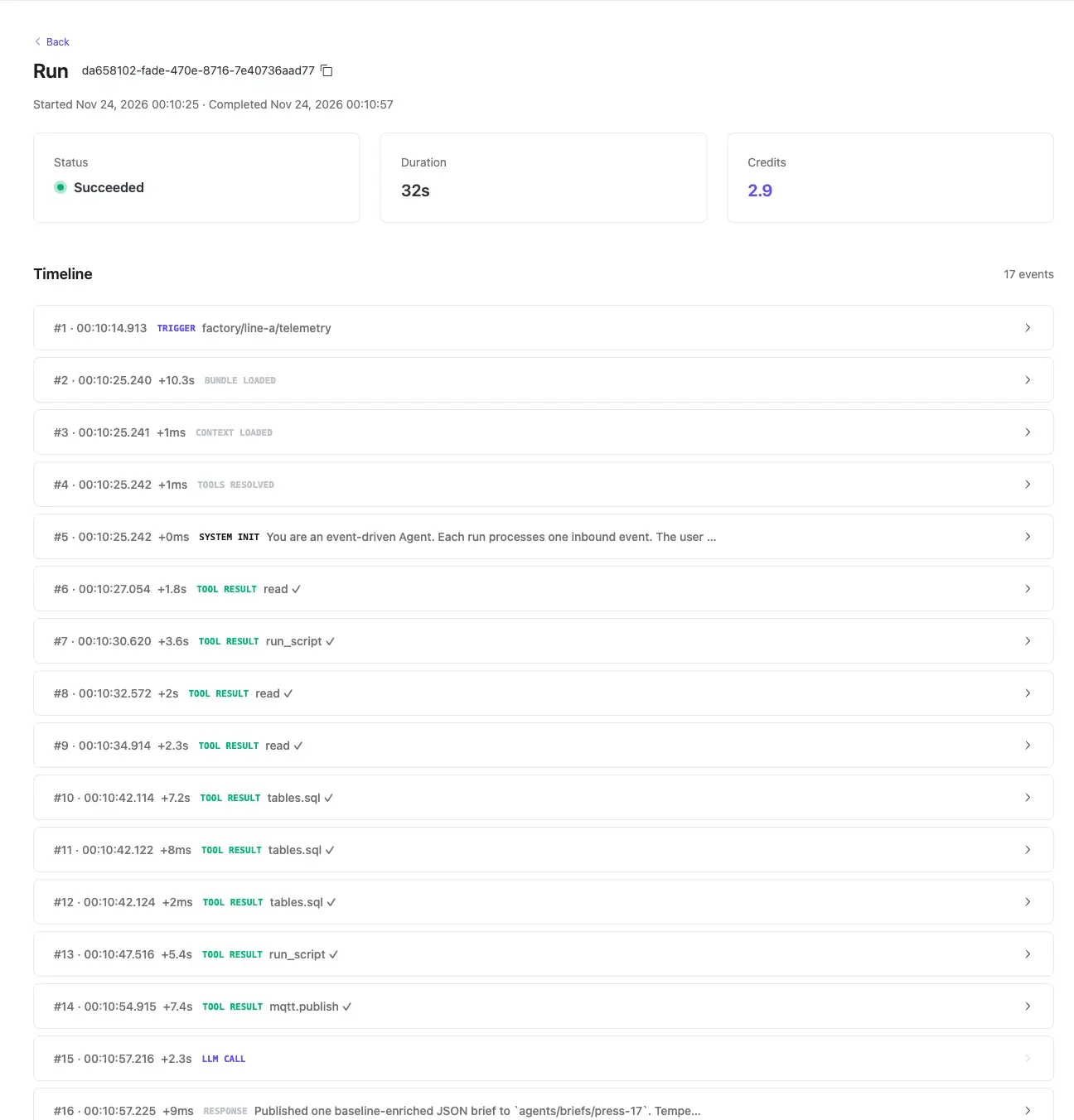
A test run in EMQX Agents on generated demo data: one MQTT trigger, three EMQX Tables queries, and one publish back to the broker.
Not every telemetry message needs an AI agent. EMQX's rule engine can filter high-volume telemetry and send only the relevant events to the agent's trigger topic, which is the job it does in step 1. By reserving AI reasoning for events that need investigation, teams avoid unnecessary agent runs and keep execution focused and cost-effective.
Bringing Agent Skills to event-driven industrial AI
EMQX Agents and Claude both use the SKILL.md convention for packaging reusable instructions and supporting resources. In our test, EMQX Agents accepted a skill written in Claude's format as is, and the agent builder used it when preparing the agent definition.
That gives teams a starting point for reusing domain knowledge in event-driven workflows, because the manufacturing expertise, investigation procedures, and operating practices they capture as skills can shape agents that respond to machine events automatically. Individual skills may still need adapting for differences in tools, data access, permissions, and execution environment.
Three manufacturing workflows that could benefit from fresher industrial data
Beyond the handoff, live data under the plugin's own skills helps in three places the README describes.
Breakdown diagnosis. An export only holds what was captured when it ran, but when EMQX Neuron is collecting the right signals and EMQX Tables is retaining them, the most recent window is a SQL query away, without waiting for the next export.
Root cause and corrective action. The skill won't correlate data from systems whose clocks disagree, and it's right not to. Putting readings from across the line into one time-series database makes them far easier to line up and query together. Teams still need to check source timestamps and clock sync, and the skill's caution is the right habit to keep.
The morning production report. The README says it assembles work that would otherwise take a supervisor 60 to 90 minutes by hand. If production data is already flowing into EMQX Tables, the report works from current readings instead of last night's file. A live pipeline can stall too, so freshness checks still belong at the top of the page.
Getting that data to Claude follows the plugin's own advice, since its custom-connector skill checks whether a vendor already ships an MCP server before it suggests building anything. Two already cover this stack: the EMQX Cloud MCP Server lets Claude work with EMQX Cloud deployments, clients, and data integration rules, and because EMQX Tables is built on GreptimeDB, the GreptimeDB MCP Server lets Claude query the stored telemetry with SQL.
Let the agent advise before it acts
Anthropic is clear that Claude for Manufacturing doesn't operate equipment, and most plants will be glad for that caution. The same instinct makes sense for event-time agents.
In the spindle example, the agent's job is to gather evidence and notify people. If a team later lets an agent publish commands, EMQX Agents limits it to the MQTT topics you've allowed through its Broker connector, and you review its instructions before deployment. The product's own Telemetry Threshold Alert template is written the same way: its instructions end with "Never send device control commands." Topic permissions are only one layer, though, and command limits, equipment interlocks, approval steps, and confirmation that a command actually ran belong in the wider control design, the same way they do for any automation on the floor.
Where to start
Claude for Manufacturing is a strong sign that AI is moving into the actual work of a plant. How much it can do depends on what it can see, and on what's watching the line when nobody's at a desk.
Start with one recurring equipment alert, and list the evidence a maintenance engineer needs to investigate it. The Telemetry Threshold Alert template in EMQX Agents is a good starting point: it watches a telemetry topic, flags readings outside a set range, and publishes alerts only to the topics you allow. Shape it to assemble that brief the moment the alert fires, then bring the brief into your Claude for Manufacturing workflow.
Try EMQX Agents, free for the first month on the Starter plan.
To see the architecture first, read how EMQX connects real-time data to AI agents, or talk to an expert.