GreptimeDB vs. InfluxDB 3: What the Benchmark Means for EMQX Tables

As IoT deployments grow, so does the volume of time-series data their devices generate. Storing that data efficiently is only part of the job. Teams also need to ingest continuous streams of telemetry and query large datasets without sacrificing performance.
EMQX Tables is the fully managed time-series database built into EMQX Cloud. Powered by GreptimeDB, it lets you store, query, and analyze MQTT data without running a separate database. In an earlier article, we explained why EMQX Tables chose GreptimeDB as its engine.
So how does that engine compare with other leading time-series databases?
On October 14, 2026, the Greptime team published a benchmark of GreptimeDB v1.2.0 against InfluxDB 3.11.1 Core and Enterprise. It measured ingestion throughput, query performance, and storage footprint using the Time Series Benchmark Suite (TSBS). The results show where GreptimeDB leads, where InfluxDB keeps an advantage, and what that means for IoT applications built on EMQX Tables.
Key Findings
- 31% higher ingestion throughput than InfluxDB Enterprise: GreptimeDB reached 295,424 rows per second, compared with 224,894 for InfluxDB Enterprise and 197,941 for InfluxDB Core.
- Faster fleet-wide queries: GreptimeDB beat InfluxDB Enterprise on most queries spanning all 4,000 simulated hosts, including group-by aggregations, ordered aggregations, and last-point queries.
- Up to 9.9× faster on selected queries: After manual compaction, GreptimeDB ran the last-point query in about 947 milliseconds. InfluxDB Enterprise took 9,347.
- InfluxDB Enterprise leads on small queries: Enterprise was faster on all nine query types involving one or eight hosts, though both databases finished them within tens of milliseconds.
- Compact columnar storage: After a flush, GreptimeDB held more than 1 billion individual metrics in about 860 MB of Apache Parquet files, excluding its write-ahead log.
These results reflect specific benchmark configurations, not guaranteed performance for every deployment. The tests ran standalone database engines on local storage, not the managed EMQX Tables service.
Benchmark Methodology
The Greptime team used the Time Series Benchmark Suite (TSBS) to compare GreptimeDB v1.2.0, InfluxDB 3.11.1 Core, and InfluxDB 3.11.1 Enterprise. Each database ran independently on identical infrastructure against the same generated dataset.
| Component | Configuration |
|---|---|
| Cloud instance | AWS c5d.2xlarge |
| CPU and memory | 8 vCPU, 16 GB RAM |
| Operating system | Ubuntu 24.04 LTS |
| Storage | 300 GB gp3 |
| Benchmark workload | TSBS cpu-only |
| Simulated hosts | 4,000 |
| Sampling interval | 10 seconds |
| Data collection period | 3 days |
| Total dataset | 103.68 million rows, 1.0368 billion metrics |
Table 1. Benchmark environment and workload.
Understanding the Dataset
The benchmark simulated CPU telemetry from 4,000 hosts, each reporting 10 metrics every 10 seconds for three days. Every record also carried 10 metadata tags, such as hostname, region, and service.
The dataset describes infrastructure monitoring, but its structure resembles many IoT telemetry workloads. Swap hosts for connected devices, CPU measurements for sensor readings, and infrastructure tags for device metadata, and you have thousands of devices continuously reporting measurements that need to be stored and queried.
The benchmark ran 15 query types, from single-host lookups to aggregations across the full dataset.
For ingestion, GreptimeDB used batches of 3,000 rows with six concurrent workers. InfluxDB used batches of 25,000 rows with 16 workers to reach higher throughput under its durable write settings. The throughput figures therefore compare different batch sizes and concurrency levels. The original GreptimeDB benchmark report has the full setup and reproduction steps.
Ingestion Performance: GreptimeDB Takes the Lead
For IoT applications collecting continuous telemetry, ingestion throughput sets how fast incoming measurements reach the database.
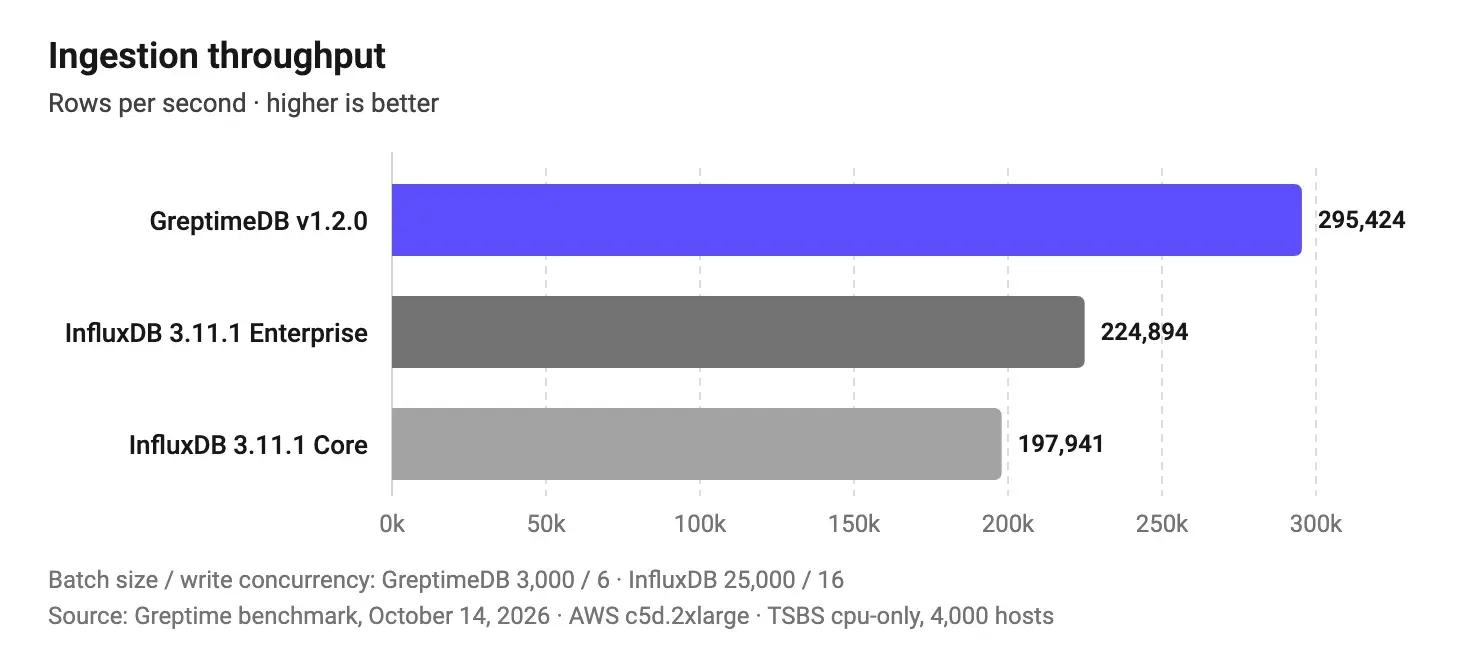
Figure 1. Ingestion throughput in rows per second. Higher is better. Source: Greptime, October 2026.
GreptimeDB delivered 1.31× the ingestion throughput of InfluxDB Enterprise and 1.49× that of InfluxDB Core, despite using smaller write batches and fewer workers.
InfluxDB's results were measured with durable write acknowledgment enabled. With GreptimeDB's batch size and concurrency, the Greptime team reported that InfluxDB reached about 18,000 rows per second. The larger batches and extra workers are what brought it to the figures above.
Why This Matters for IoT
Picture an industrial deployment with thousands of sensors reporting temperature, pressure, vibration, and equipment status around the clock. As device counts and reporting rates grow, the database has to keep up. Higher sustained ingestion throughput can provide more capacity on the same hardware.
Query Performance: Different Strengths for Different Workloads
Fast ingestion is half the job. IoT applications also query historical measurements, check current device conditions, and spot trends across large fleets.
The benchmark ran all 15 query types with a single query worker and measured average execution time over repeated runs. The results split clearly between queries that target a few hosts and queries that scan the whole dataset.
Large-Scale Aggregations Favor GreptimeDB
GreptimeDB did especially well on queries involving all 4,000 hosts: hourly aggregations grouped by host, aggregations with ordering, and retrieving the latest measurement for every host. On these, it was 1.8× to 3.6× faster than InfluxDB Enterprise before manual compaction, and 3.0× to 9.9× faster after. (Compaction reorganizes stored data for faster reads; more on it below.)
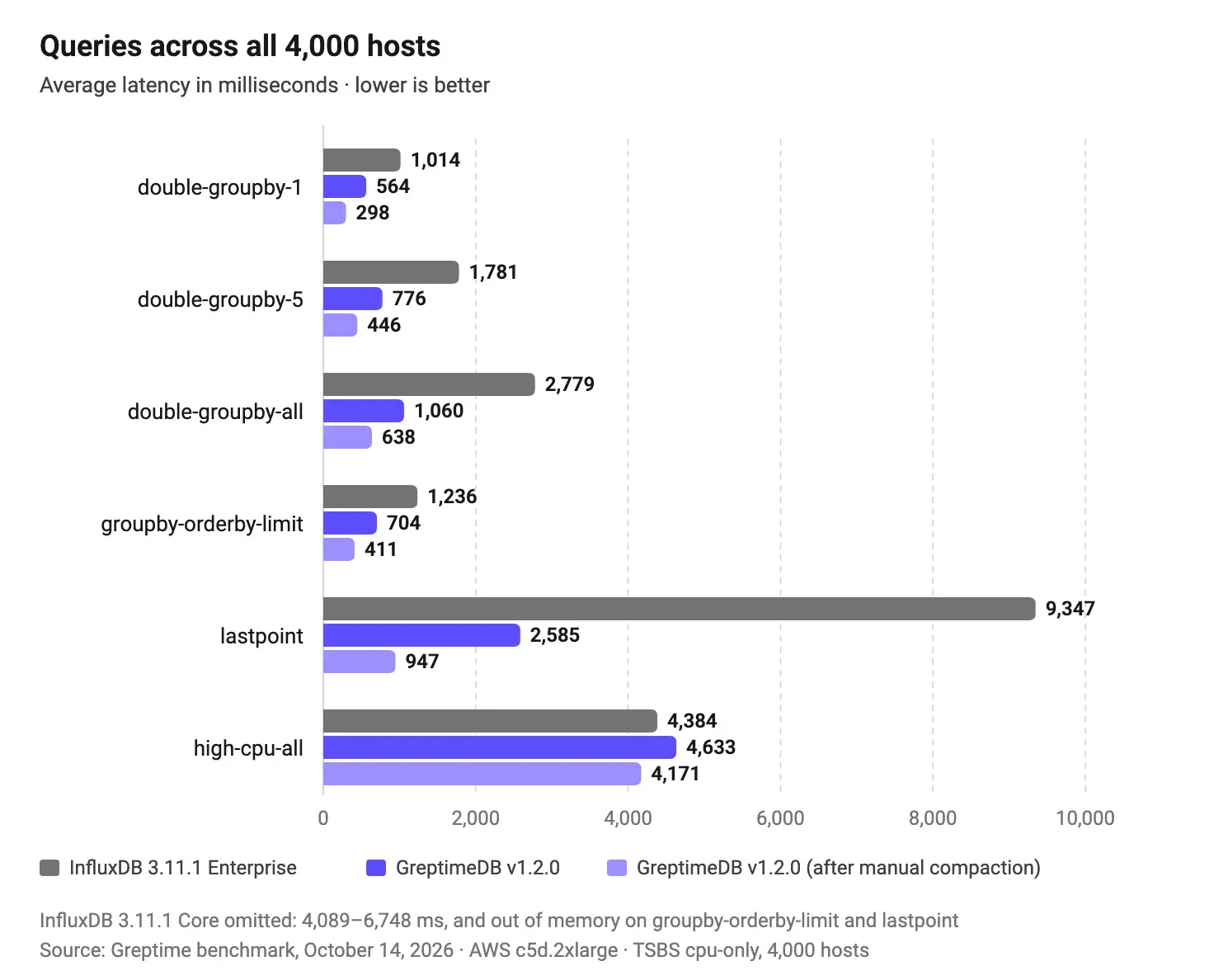
Figure 2. Query latency across all 4,000 simulated hosts, in milliseconds. Lower is better. Source: Greptime, October 2026.
The largest gap came on lastpoint, which returns the most recent measurement for each host. After compaction, GreptimeDB finished it in about 947 milliseconds, against 9,347 for InfluxDB Enterprise: 9.9× faster in this test. That query maps directly to fleet monitoring, where a dashboard showing the latest reported status of thousands of devices needs the most recent reading from every one.
Not every large-scale query went GreptimeDB's way. On high-cpu-all, which finds readings above a threshold across all hosts, InfluxDB Enterprise was slightly faster before compaction. After compaction, GreptimeDB held a small lead.
InfluxDB Enterprise Leads on Smaller Queries
InfluxDB Enterprise was faster on all nine query types involving one or eight hosts: 1.8× to 4.4× faster than GreptimeDB before compaction.
The absolute differences, though, were small. After GreptimeDB's manual compaction, InfluxDB Enterprise answered these queries in 3.6 to 19.9 milliseconds and GreptimeDB in 5.9 to 31.8. Both are low-latency results.
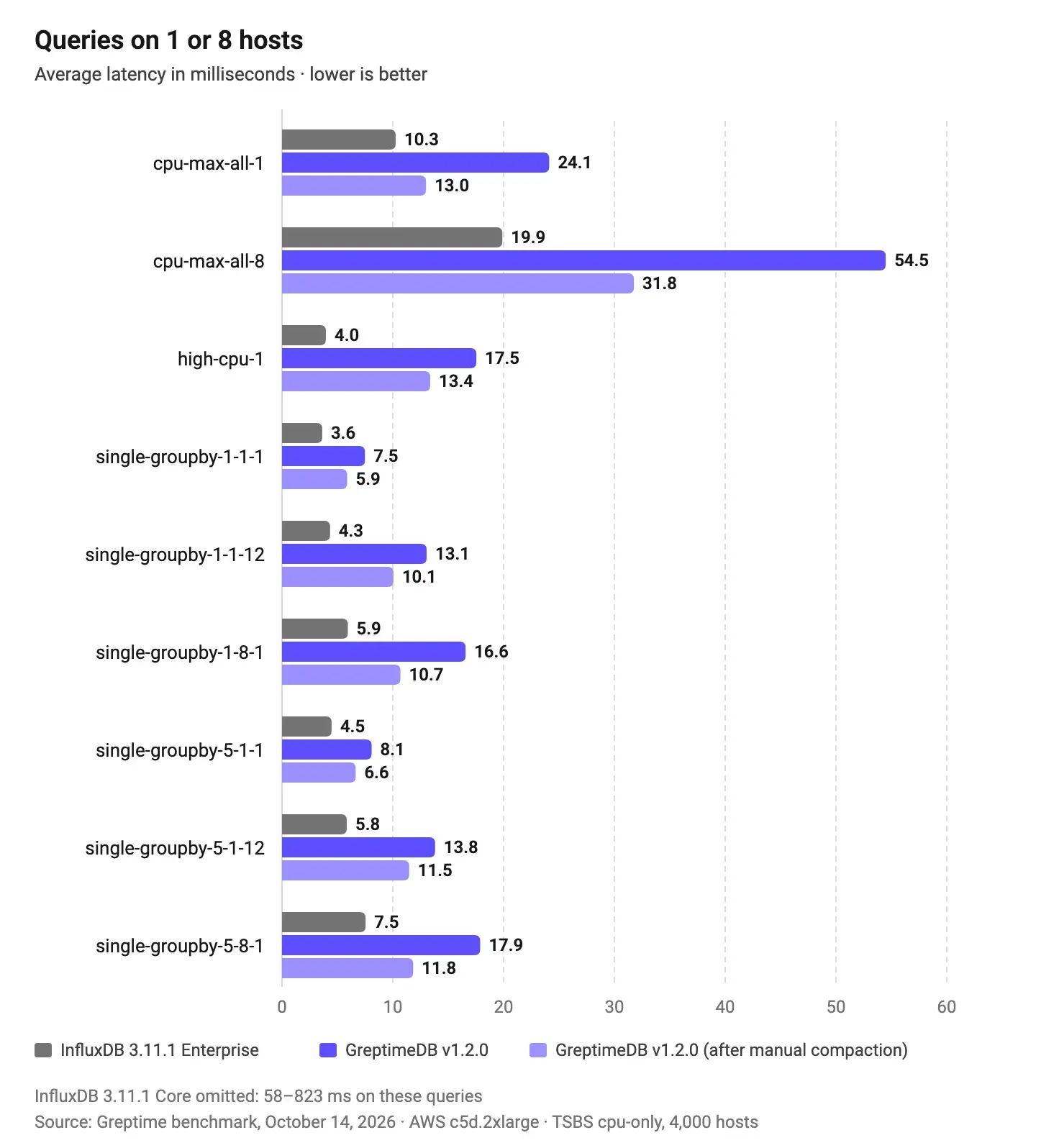
Figure 3. Query latency for workloads involving one or eight hosts, in milliseconds. Lower is better. Source: Greptime, October 2026.
Different query patterns favor different architectures. An application built around individual device lookups has different needs from one that aggregates across an entire fleet.
InfluxDB Core Falls Behind
The open-source InfluxDB 3 Core edition was 1.5× to 54× slower than GreptimeDB on 13 query types before compaction. It ran out of memory on the other two, groupby-orderby-limit and lastpoint.
GreptimeDB and InfluxDB Core both persist data as Apache Parquet, but a shared storage format doesn't mean similar query performance. Execution engines, indexing, caching, and data layout shape how fast a database answers.
For more context on how GreptimeDB compares with other time-series databases, see our earlier analysis, The Secret to Faster IoT Queries: GreptimeDB, TimescaleDB, and InfluxDB Benchmarked.
How Compaction Affects Query Performance
Compaction reorganizes stored data so it reads faster. Here, the Greptime team used the Strict Window Compaction Strategy (SWCS) with a two-hour data window.
After compaction, latency improved by 10% to 63% across all 15 query types. The biggest gain was on lastpoint, which dropped from about 2.6 seconds to under one second.
These gains were measured after ingestion finished and a manual compaction ran. They don't represent sustained query performance during continuous ingestion.
Storage Footprint
Long-term telemetry retention can be a significant cost for IoT deployments. Industrial monitoring systems and connected vehicles often keep large volumes of telemetry for historical analysis, troubleshooting, and reporting. The benchmark compared each database's storage footprint after ingesting the same dataset.
| Database | Reported disk usage |
|---|---|
| GreptimeDB | ~850 MB SST files + 1.5 GB WAL |
| InfluxDB Enterprise | ~1.3 GB total |
| InfluxDB Core | Primarily ~12 GB WAL |
Table 2. Reported disk usage after ingestion. Storage categories differ between databases, so these are not directly equivalent measures of total storage cost.
The WAL (write-ahead log) records incoming changes before they're persisted to long-term storage. SST files hold that persisted data; GreptimeDB writes them as Apache Parquet.
After an additional flush, which writes buffered data out to storage, GreptimeDB stored the full dataset in about 860 MB of Apache Parquet SST files: more than 1 billion metric values in under 1 GB of columnar data, excluding the WAL. That compactness comes from a columnar design built to organize and compress time-series data. For more on the technology, see how GreptimeDB's cloud-native storage engine reduces IoT storage costs.
Don't read these numbers as a direct comparison of total storage cost, though. GreptimeDB's SST files and WAL were measured separately, InfluxDB Enterprise reported one combined figure, and InfluxDB Core's usage was mostly WAL. Comparing total cost would take further testing under equivalent production conditions.
What These Results Mean for EMQX Tables
EMQX Tables combines GreptimeDB with managed operations in EMQX Cloud, so teams can store and analyze MQTT telemetry in the same platform that connects their devices.
A typical MQTT data architecture has three moving parts: a broker that receives device messages, a pipeline that processes and routes them, and a time-series database that stores them for analysis. Each one adds configuration, integration work, and ongoing maintenance.
EMQX Tables simplifies this by putting time-series storage inside EMQX Cloud. You ingest MQTT telemetry through the EMQX Rule Engine, store it in EMQX Tables, and query it with SQL. Our step-by-step ingestion guide walks through the pipeline, and our Grafana tutorial shows how to visualize the data.
Here's how the benchmark results connect to that setup.
High-Volume Telemetry Ingestion
GreptimeDB's ingestion throughput matters most for applications collecting measurements from large device fleets, whether that's industrial equipment, connected vehicles, or distributed infrastructure, where the incoming data keeps growing with the fleet.
Fleet-Wide Monitoring and Analytics
GreptimeDB's strength on large-scale aggregations and last-point queries fits applications that analyze many devices at once: pulling the most recent reading from every device, tracking trends across industrial assets, or flagging unusual conditions anywhere in a fleet.
Efficient Historical Data Storage
GreptimeDB's Parquet-based storage keeps large volumes of time-series measurements compact, which helps when you retain telemetry for historical analysis.
Simplified Database Operations
With EMQX Tables, users manage MQTT connectivity and time-series storage within EMQX Cloud, reducing the need to operate separate database infrastructure.
See the EMQX Tables documentation for supported capabilities and configuration.
The benchmark tested standalone GreptimeDB, not EMQX Tables itself, so its throughput, latency, and storage figures aren't performance guarantees for EMQX Tables Starter or Pro.
Conclusion
GreptimeDB delivered 31% higher ingestion throughput than InfluxDB Enterprise and led on selected large-scale aggregation and last-point queries. InfluxDB Enterprise kept the edge on small, targeted queries, and the storage results showed real differences in how each database persists data.
The takeaway for IoT teams: database performance depends on the workload. Ingestion rates, query patterns, and storage behavior all belong in the evaluation when you choose a time-series database.
Powered by GreptimeDB, EMQX Tables combines MQTT connectivity, data processing, storage, and analytics in a fully managed experience within EMQX Cloud.
Explore EMQX Tables to see how it simplifies IoT data storage and analytics.
References
- GreptimeDB v1.2 vs. InfluxDB 3.11: Read/Write Performance and Storage Footprint
- Time Series Benchmark Suite (TSBS)
- Why EMQX Tables Chose GreptimeDB
- The Secret to Faster IoT Queries: GreptimeDB, TimescaleDB, and InfluxDB Benchmarked
- Cloud-Native Storage Engine: How GreptimeDB Cuts IoT Storage Costs by 10×
- EMQX Tables Documentation