
MQTT delivers a machine’s telemetry in real time. Teams and applications often need the same data later, after the live message has passed.
EMQX Cloud Message History turns selected MQTT telemetry into queryable history in EMQX Tables, without writing a subscriber service or manually configuring connectors, rules, and actions. This article uses a distributed solar fleet to show how historical telemetry supports troubleshooting, analytics, and applications. The scenario is illustrative, not a customer deployment.
Reference Scenario: Distributed Solar Inverters
Consider a solar operator managing inverters across several distributed sites. Each inverter publishes power output, voltage, and temperature measurements to an MQTT topic such as:
energy/site-12/inverter-04/telemetry
A representative payload looks like this:
{
  "site_id": "site-12",
  "inverter_id": "inverter-04",
  "output_kw": 42.8,
  "dc_voltage": 618.4,
  "temperature": 51.2,
  "recorded_at": 1795507200000
}
Applications subscribe to the topics for real-time monitoring and alerts. The operator also wants to retain selected measurements so that teams can answer questions such as:
- What did inverter-04 report during a specific operating period?
- Is its power output decreasing over time?
- How does its output compare with other inverters at the same site?
- What voltage or temperature readings preceded a change in output?
- Can the same data support historical dashboards, reports, or analytics?
The goal is to retain the identifiers, measurements, and timestamps needed for later analysis, not to archive every MQTT message.
Why Live Telemetry Needs a Historical Layer
Storing timestamped readings in a database lets teams query equipment behavior by device and time. Short windows help investigate a specific change; longer periods reveal trends and differences across equipment.
MQTT delivers live messages, but it does not automatically create this queryable history. Retained messages keep only the latest retained value, while persistent sessions queue messages for eligible offline subscribers. Neither mechanism produces a time series of past payloads for later SQL queries.
To query past telemetry, teams need a reliable way to write selected MQTT data to a database.
The Conventional Persistence Path
A conventional implementation uses a subscriber or integration service between the MQTT broker and the database:
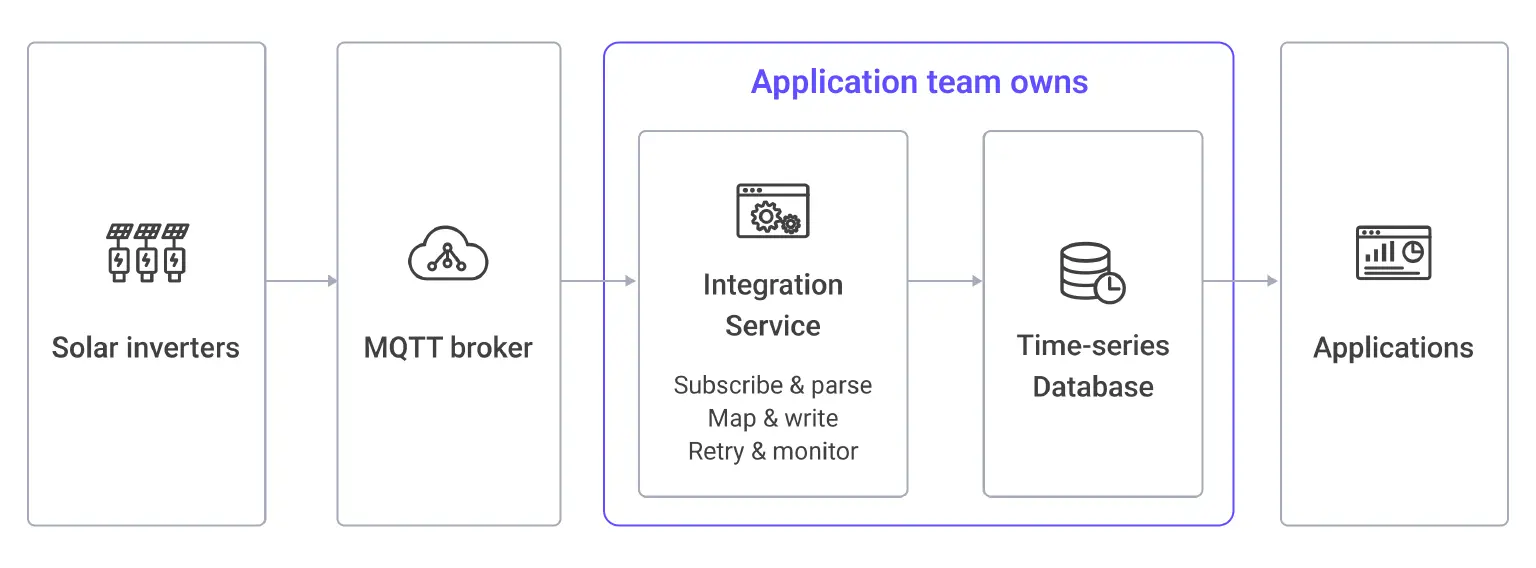
The conventional persistence path
This approach makes sense when a team needs complex transformations, multiple destinations, custom retry logic, or an existing enterprise data platform.
The tradeoff is ownership. The team must build and run the subscriber, schema mapping, database client, credentials, error handling, monitoring, and deployment.
If the goal is simply to keep selected telemetry for later queries, that is a lot of infrastructure to maintain.
The Integrated Message History Path
Message History provides a guided way to map selected MQTT messages from an EMQX Cloud Broker to EMQX Tables. For a full overview of the feature, see the Message History launch article.
For the solar-inverter scenario, an operator creates a mapping that:
- Matches messages published to energy/+/+/telemetry;
- Stores site_id and inverter_id as Tags for filtering and grouping;
- Stores output_kw, dc_voltage, and temperature as Fields;
- Uses recorded_at as the timestamp;
- Writes matching messages to an inverter_history table.
The architecture becomes:
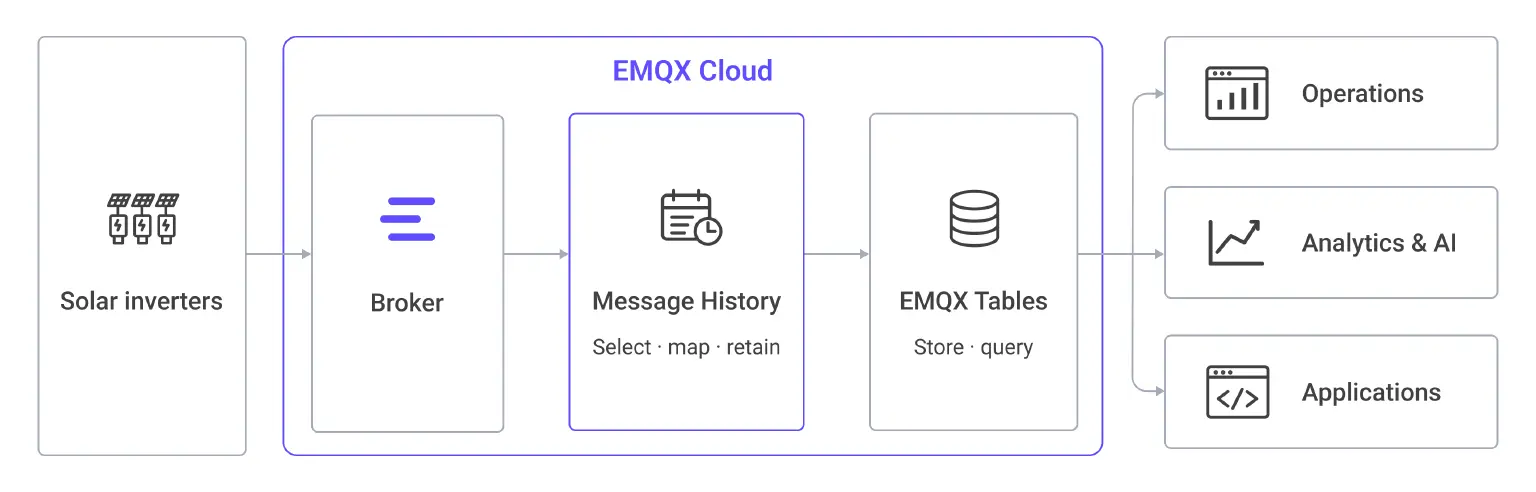
The integrated Message History path
Operators configure and manage storage through a single mapping, with recent records and write metrics available in the Broker Console. EMQX Cloud manages the underlying connector, rule, and action automatically.
Model the Data Around Operational Questions
Assume the Broker and EMQX Tables deployments meet the networking and permission requirements in the Message History documentation.
For the solar-inverter scenario, one mapping matches:
energy/+/+/telemetry
and writes the selected data to an inverter_history table. The + wildcards allow the mapping to cover multiple sites and inverters without creating a separate mapping for every device.
The schema should reflect the questions the operator expects to ask:
| Operational need | Design choice |
|---|---|
| Filter and compare readings by site and inverter | Store site_id and inverter_id as Tags |
| Analyze changing equipment behavior | Store output_kw, dc_voltage, and temperature as Fields |
| Reconstruct when each reading occurred | Use recorded_at as the timestamp |
| Keep enough history for the intended analysis | For a new table, set retention to cover the required comparison period; for an existing table, verify its current TTL. |
Stable identifiers work well as Tags because operators frequently filter and group by them. Measurements belong in Fields because their values change with each reading.
Using the timestamp from the payload preserves when the inverter produced the measurement, even if the device buffered it before publishing. Broker Received Time is more appropriate when the question is when the data entered EMQX Cloud.
Mapping selected payload fields keeps the table focused on the questions the team needs to answer instead of copying every payload field.
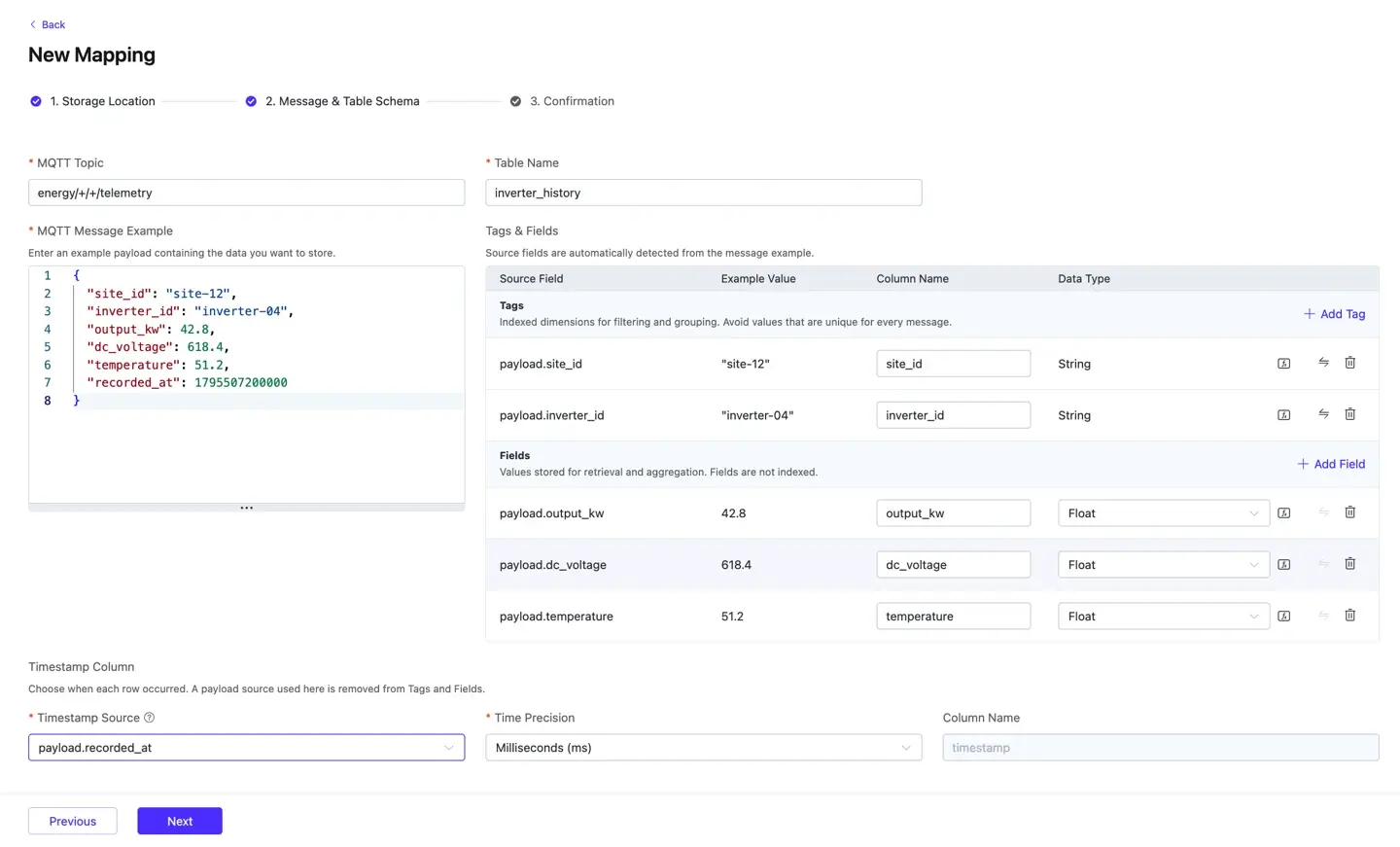
The mapping groups readings by site and inverter, stores power output, DC voltage, and temperature, and uses the device’s timestamp.
Verify That Data Reaches EMQX Tables
Before depending on the table for operational analysis, publish a representative message to a matching topic, such as:
energy/site-12/inverter-04/telemetry
Message History provides two immediate checks in the Broker Console:
- Preview recently stored rows to verify that the selected values were written.
- Inspect success, failed, and dropped execution metrics for the managed write path.
Together, the preview and metrics help confirm that the topic matches the mapping and that records are reaching EMQX Tables. If the expected row does not appear, review the topic filter, payload structure, mapping status, and execution metrics before proceeding to broader queries.
Keep in mind that these metrics count only writes to EMQX Tables. A message that fails earlier, for example because a mapped field is missing or a value can't be converted, appears instead in the rule's statistics under Data Integration > Flow Designer and in Diagnostics > Logs.
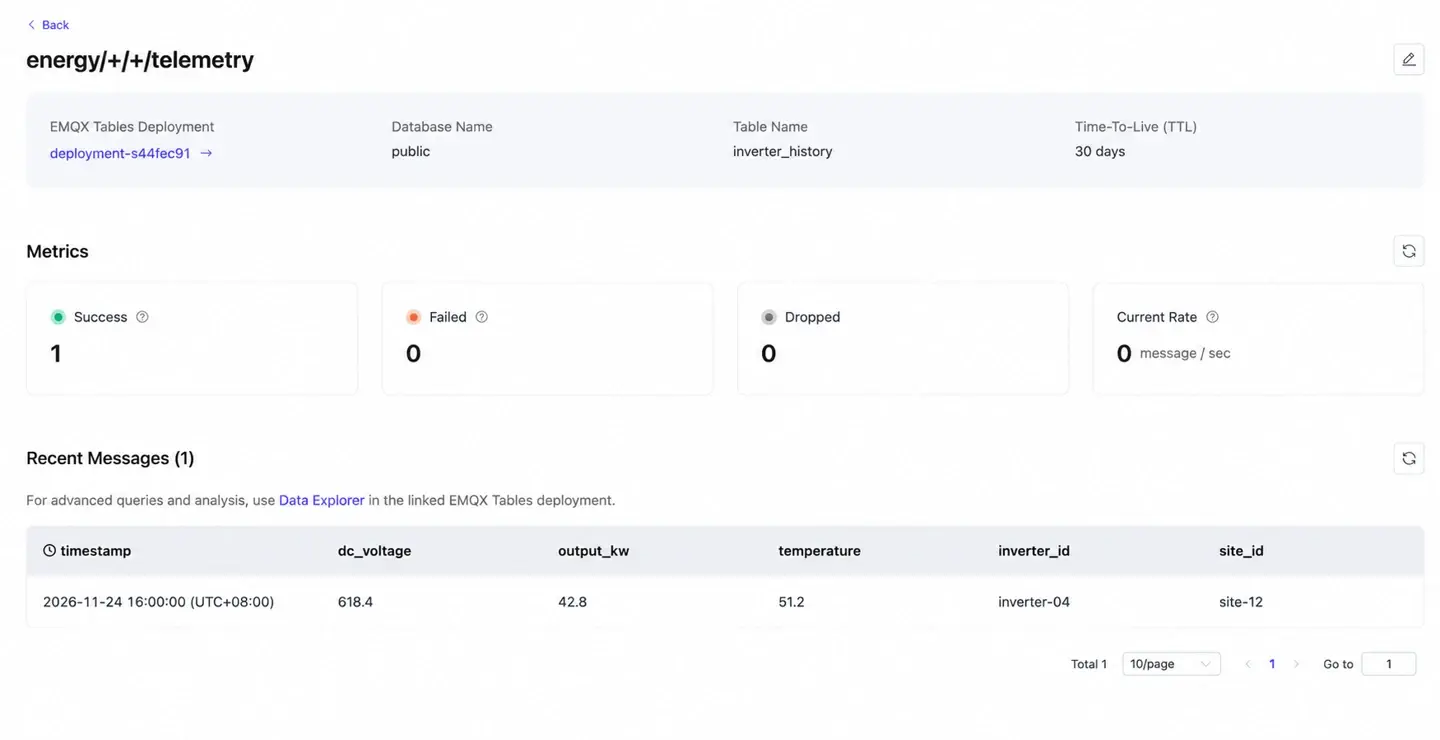
The mapping reports one successful write, and Recent Messages shows the stored reading for inverter-04 at site-12.
Turn Equipment History into Operational Answers
After the preview and execution metrics confirm that records are being written, open Data Explorer in the linked EMQX Tables deployment and query the stored history.
Suppose inverter-04 begins producing less power than other inverters at site-12. The maintenance team needs to determine when its behavior changed and whether voltage or temperature changed at the same time.
A representative query retrieves the relevant measurements for all inverters at the site during the operating window:
SELECT
  "timestamp",
  inverter_id,
  output_kw,
  dc_voltage,
  temperature
FROM public."inverter_history"
WHERE site_id = 'site-12'
  AND "timestamp" >= TIMESTAMPTZ '2026-11-24 08:00:00+00:00'
  AND "timestamp" <  TIMESTAMPTZ '2026-11-24 16:00:00+00:00'
ORDER BY "timestamp", inverter_id;
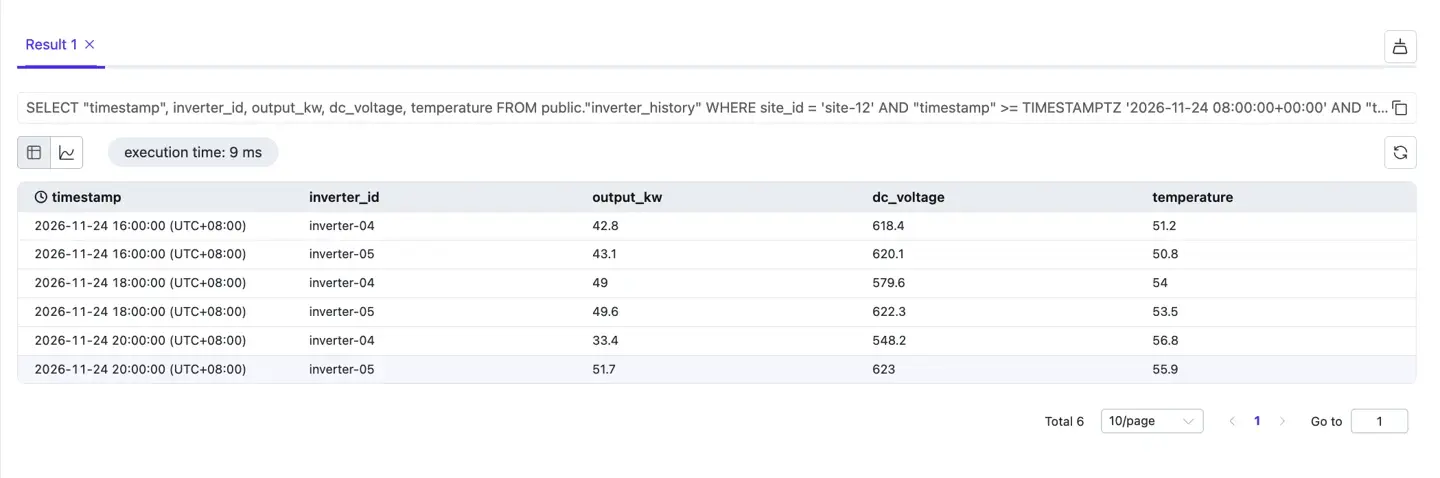
Data Explorer returns six readings for two inverters at site-12. The result table displays timestamps in UTC+08:00.
The result provides a time-ordered history that the team can use to investigate:
- When inverter-04 began to diverge from its peers
- Whether voltage or temperature changed before the output declined
- Whether the change affected one inverter or the entire site
Run the same query for earlier operating windows to determine whether similar behavior occurred before.
The same table can be queried for aggregations and longer-term comparisons, or used as a data source for dashboards.
Interpreting the results: Message History stores the data; it does not decide whether a reading indicates a fault. A stored row means that the message matched the mapping and was written to EMQX Tables. It does not show whether every intended MQTT subscriber received the message. Conversely, a missing row does not prove that MQTT delivery failed, because MQTT routing and database persistence are separate paths.
Use the Same History for Analytics, AI, and Applications
The inverter_history table can serve several consumers.
Provide Historical Context for Analytics and AI
Analytics jobs can query the table to calculate baselines, compare inverters, identify changing patterns, or examine the measurements that preceded a change in power output.
AI agents can also use the stored telemetry as historical context. For example, an agent could retrieve an inverter’s recent readings, compare them with earlier operating periods, and generate a maintenance assessment.
The table is not tied to a specific agent platform. If you use EMQX Agents, the required Broker and Tables connectors let an event-driven agent combine live MQTT events with stored history.
Message History does not perform analytics or anomaly detection itself. It maintains the selected MQTT data that downstream analytics and AI systems can query.
Build Charts and Reports into Your Application
Application teams can query EMQX Tables to add these features to their own applications:
- Inverter performance charts;
- Power-output and operating summaries;
- Comparisons between time periods;
- Downloadable equipment reports.
The application can continue to receive live updates through MQTT while querying EMQX Tables for historical data.
When to Use Message History
Message History is a good fit when:
- You need to store selected MQTT topics and fields continuously in EMQX Tables;
- Messages follow a structure that can be mapped to a stable table schema;
- You want a managed persistence path instead of a separate MQTT subscriber and storage pipeline.
Use Data Integration when the workflow requires advanced Rule SQL, complex transformations, multiple destinations or actions, or independent control over connectors, rules, and failure handling. For high-volume workloads, check the Broker’s data integration TPS capacity and connector limit before creating the mappings.
Message History stores only matching messages received while a mapping is enabled. It does not backfill earlier MQTT traffic or replay stored records to MQTT subscribers.
Message History is currently available for eligible EMQX Cloud Dedicated and Dedicated Flex deployments running EMQX 6.1.4 or later. See the Message History documentation for current availability, prerequisites, and operational considerations.
Apply the Pattern to Other Equipment Fleets
Distributed solar is only one example. The same need appears in industrial machinery, energy-storage systems, charging equipment, HVAC systems, and other connected assets.
The topics, schema, retention period, and queries will change, but the goal is still to keep the telemetry that matters after the live message has passed.
Create an EMQX Tables deployment and set up your first Message History mapping in the EMQX Cloud Console. Demos and details: https://go.emqx.com/mqtt-message-history. Planning a larger fleet? Talk to us.
Want to see it built end to end? Join the Message History webinar on Thursday, December 17. Register for the webinar.