Natural Language Control with LLMs: Your First AI Companion with ESP32 & MCP over MQTT Part 3
| Chapter | Feature | Difficulty |
|---|---|---|
| 1 | Overview: Background + Environment Setup + Device Online | ★ |
| 2 | From "Command-Based" to "Semantic Control": MCP over MQTT Encapsulation of Device Capabilities | ★★ |
| 3 | Integrating LLM for "Natural Language → Device Control" | ★★ |
| 4 | Voice I/O: Microphone Data Upload + Speech Recognition + Speech Synthesis Playback | ★★★ |
| 5 | Persona, Emotion, Memory: From "Controller" to "Companion" | ★★★ |
| 6 | Giving the AI "Eyes": Image Acquisition + Multimodal Understanding | ★★★ |
This is the third piece of our “Building Your AI Companion with ESP32 & MCP over MQTT” series.
Recap: Encapsulating Device Capabilities with MCP over MQTT
In the previous article, we demonstrated how to use the MCP over MQTT protocol to develop, register, and discover ESP32 device capabilities with EMQX.
- We developed an MCP Server, encapsulated a volume control tool, and registered it with EMQX.
- A cloud-based MCP Client application could retrieve the device's registered tool capabilities using a Python SDK.
- This completed the first step: "I know what you can do."
In this article, we will build on that foundation by having a large language model (LLM) take over the control logic, creating a natural language command-and-response loop.
Goal: Enabling "Natural" Device Control with LLMs
This article will show you how to use an LLM to control a device through natural language. For example:
- "The sound is too loud." → The LLM infers the need to call
set_volume(40). - "Turn that volume down a little more." → The LLM supports context and multi-turn conversations.
Our specific goals are to:
- Trigger registered tool functions in MCP using natural language.
- Automatically translate into the corresponding MQTT message through MCP call in LLM
- Build an interactive device control agent with contextual awareness.
Why Integrate an LLM?
Before the advent of LLMs, device control primarily relied on structured input:
- Users had to click preset options or enter fixed commands.
- The logic was rigid and lacked contextual understanding.
- Adding a new feature required updating the UI or code, leading to high development costs.
Even when voice recognition was combined with API calls to achieve "smart control," it would often fail with slight deviations in phrasing or API changes, causing user frustration. In contrast, LLMs have a native ability to understand semantics and maintain context, offering:
- A more intuitive way to interact.
- Greater command fault tolerance.
- Lower development and maintenance costs.
Integrating an LLM significantly boosts the intelligence of device control. It can infer the correct function call from ambiguous language and flexibly adapt to changes from different vendors or hardware upgrades, making the smart device experience feel seamless and intuitive.
Workflow
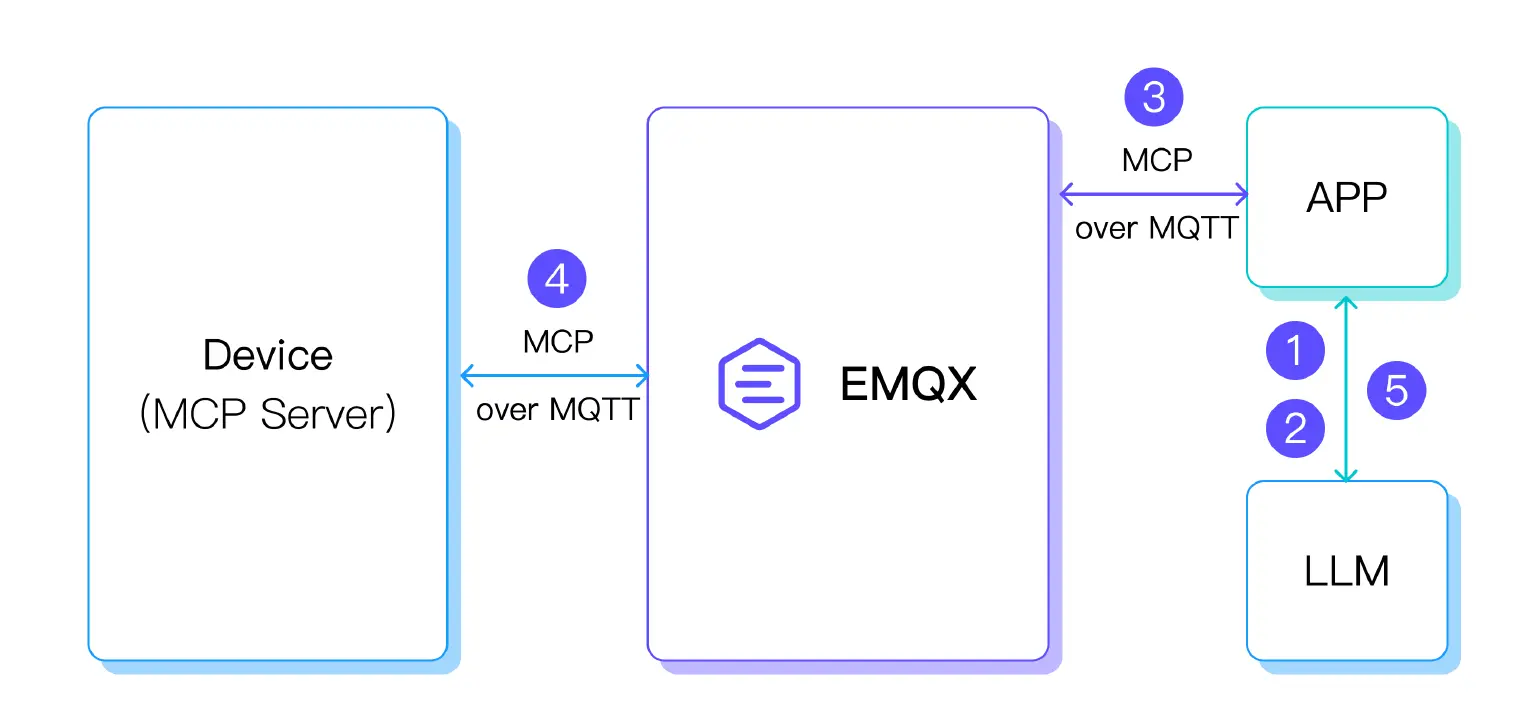
- Natural Language Intent: The LLM is responsible for understanding the user's semantic intent.
- Structured Tool Call: The LLM translates the user's intent into a structured MCP Tool Call, providing the appropriate parameters.
- MQTT Message: The tool call is encapsulated into a standard MQTT message via the MCP protocol and forwarded to the corresponding ESP32 device via EMQX.
- Device Execution: The ESP32 executes the specific control logic.
- User Feedback: The result of the tool call is passed back to the LLM, which formulates a response for the user to be displayed by the application.
This entire pipeline is simple, direct, and features excellent decoupling and scalability, making it easy to quickly integrate various devices.
Natural Language Invocation of MCP Tools
Hardware:
- The hardware list is the same as in the previous article. No changes are needed.
Software:
- LlamaIndex libraries for MCP tool calls.
- MCP over MQTT libraries.
- LLM: We will use DeepSeek R1, a public service provided by SiliconFlow. You can also use other LLM service providers.
Requesting a SiliconFlow API Key
- Go to the SiliconFlow official website: SiliconFlow – AI Infrastructure for LLMs & Multimodal Models.
- Register and log in to your account.
- In the left-hand menu, navigate to Account Management → API Key and create a new key.
ESP32 Volume Control MCP Service
#include <math.h>
#include <stdio.h>
#include "freertos/FreeRTOS.h"
#include "esp_log.h"
#include "esp_system.h"
#include "nvs_flash.h"
#include "mcp.h"
#include "mcp_server.h"
#include "radio.h"
#include "wifi.h"
const char *set_volume(int n_args, property_t *args)
{
    if (n_args < 1) {
        return "At least one argument is required";
    }
    if (args[0].type != PROPERTY_INTEGER) {
        return "Volume argument must be an integer";
    }
    int volume = (int) args[0].value.integer_value;
    if (volume < 0 || volume > 100) {
        return "Volume must be between 0 and 100";
    }
    esp_err_t ret = max98357_set_volume_percent((uint8_t) volume);
    if (ret != ESP_OK) {
        return "Failed to set volume";
    }
    ESP_LOGI("mcp server", "Setting volume to: %d%%", volume);
    return "Volume set successfully";
}
void app_main(void)
{
    esp_err_t ret = nvs_flash_init();
    if (ret == ESP_ERR_NVS_NO_FREE_PAGES ||
        ret == ESP_ERR_NVS_NEW_VERSION_FOUND) {
        ESP_ERROR_CHECK(nvs_flash_erase());
        ret = nvs_flash_init();
    }
    ESP_ERROR_CHECK(ret);
    ret = max98357_init();
    if (ret != ESP_OK) {
        ESP_LOGE("main", "MAX98357 init error: %s", esp_err_to_name(ret));
    }
    max98357_set_volume_percent(50);
    wifi_station_init("wifi_ssid", "wifi_password");
    vTaskDelay(pdMS_TO_TICKS(1000));
    mcp_server_t *server = mcp_server_init(
        "ESP32 Demo Server", "A demo server for ESP32 using MCP over MQTT",
        "mqtt://broker.emqx.io", "esp32-demo-server-client", NULL, NULL, NULL);
    mcp_tool_t tools[] = {
        { .name           = "set_volume",
          .description    = "Set the volume of the device, range 0 to 100",
          .property_count = 1,
          .properties =
              (property_t[]) {
                  { .name                = "volume",
                    .description         = "Volume level (0-100)",
                    .type                = PROPERTY_INTEGER,
                    .value.integer_value = 50 },
              },
          .call = set_volume },
    };
    mcp_server_register_tool(server, sizeof(tools) / sizeof(mcp_tool_t), tools);
    mcp_server_run(server);
}
This code uses the MCP over MQTT Component to register the volume adjustment tool and initialize the MCP Server and audio playback module. Remember to modify the MCP Server parameters to connect to Serverless and to change the Wi-Fi SSID and password. For more detailed code, please refer to ESP32 Demo.
Cloud-Side MCP Client Interfacing with LLM to Call MCP Tools - agent.py
import asyncio
import anyio
import logging
import os
from typing import List, Optional, Union, cast
from dataclasses import dataclass
import mcp.client.mqtt as mcp_mqtt
from mcp.shared.mqtt import configure_logging
import mcp.types as types
from llama_index.llms.siliconflow import SiliconFlow
from llama_index.core.llms import ChatMessage, MessageRole
from llama_index.core.agent import AgentRunner
from llama_index.core.tools import BaseTool, FunctionTool
from llama_index.core.settings import Settings
configure_logging(level="DEBUG")
logger = logging.getLogger(__name__)
async def on_mcp_server_discovered(client: mcp_mqtt.MqttTransportClient, server_name):
    logger.info(f"Discovered {server_name}, connecting ...")
    await client.initialize_mcp_server(server_name)
async def on_mcp_connect(client, server_name, connect_result):
    capabilities = client.get_session(server_name).server_info.capabilities
    logger.info(f"Capabilities of {server_name}: {capabilities}")
    if capabilities.prompts:
        prompts = await client.list_prompts(server_name)
        logger.info(f"Prompts of {server_name}: {prompts}")
    if capabilities.resources:
        resources = await client.list_resources(server_name)
        logger.info(f"Resources of {server_name}: {resources}")
        resource_templates = await client.list_resource_templates(server_name)
        logger.info(f"Resources templates of {server_name}: {resource_templates}")
    if capabilities.tools:
        toolsResult = await client.list_tools(server_name)
        tools = toolsResult.tools
        logger.info(f"Tools of {server_name}: {tools}")
async def on_mcp_disconnect(client, server_name):
    logger.info(f"Disconnected from {server_name}")
client = None
api_key = "sk-***"
async def get_mcp_tools(mcp_client: mcp_mqtt.MqttTransportClient) -> List[BaseTool]:
    all_tools = []
    try:
        try:
            tools_result = await mcp_client.list_tools("ESP32 Demo Server")
            if tools_result is False:
                return all_tools
            list_tools_result = cast(types.ListToolsResult, tools_result)
            tools = list_tools_result.tools
            for tool in tools:
                logger.info(f"tool: {tool.name} - {tool.description}")
                def create_mcp_tool_wrapper(client_ref, server_name, tool_name):
                    async def mcp_tool_wrapper(**kwargs):
                        try:
                            result = await client_ref.call_tool(server_name, tool_name, kwargs)
                            if result is False:
                                return f"call {tool_name} failed"
                            call_result = cast(types.CallToolResult, result)
                            if hasattr(call_result, 'content') and call_result.content:
                                content_parts = []
                                for content_item in call_result.content:
                                    if hasattr(content_item, 'type'):
                                        if content_item.type == 'text':
                                            text_content = cast(types.TextContent, content_item)
                                            content_parts.append(text_content.text)
                                        elif content_item.type == 'image':
                                            image_content = cast(types.ImageContent, content_item)
                                            content_parts.append(f"[image: {image_content.mimeType}]")
                                        elif content_item.type == 'resource':
                                            resource_content = cast(types.EmbeddedResource, content_item)
                                            content_parts.append(f"[resource: {resource_content.resource}]")
                                        else:
                                            content_parts.append(str(content_item))
                                    else:
                                        content_parts.append(str(content_item))
                                result_text = '\n'.join(content_parts)
                                if hasattr(call_result, 'isError') and call_result.isError:
                                    return f"tool return error: {result_text}"
                                else:
                                    return result_text
                            else:
                                return str(call_result)
                        except Exception as e:
                            error_msg = f"call {tool_name} error: {e}"
                            logger.error(error_msg)
                            return error_msg
                    return mcp_tool_wrapper
                wrapper_func = create_mcp_tool_wrapper(mcp_client, "ESP32 Demo Server", tool.name)
                try:
                    llamaindex_tool = FunctionTool.from_defaults(
                        fn=wrapper_func,
                        name=f"mcp_{tool.name}",
                        description=tool.description or f"MCP tool: {tool.name}",
                        async_fn=wrapper_func
                    )
                    all_tools.append(llamaindex_tool)
                    logger.info(f"call tool success: mcp_{tool.name}")
                except Exception as e:
                    logger.error(f"create tool {tool.name} error: {e}")
        except Exception as e:
            logger.error(f"Get tool list error: {e}")
    except Exception as e:
        logger.error(f"Get tool list error: {e}")
    return all_tools
class ConversationalAgent:
    def __init__(self, mcp_client: Optional[mcp_mqtt.MqttTransportClient] = None):
        self.llm = SiliconFlow(api_key=api_key, model="deepseek-ai/DeepSeek-R1", temperature=0.6, max_tokens=4000, timeout=180)
        Settings.llm = self.llm
        self.mcp_client = mcp_client
        self.tools = []
        self.agent = AgentRunner.from_llm(
            llm=self.llm,
            tools=self.tools,
            verbose=True
        )
        self.mcp_tools_loaded = False
    async def load_mcp_tools(self):
        if not self.mcp_tools_loaded and self.mcp_client:
            try:
                mcp_tools = await get_mcp_tools(self.mcp_client)
                if mcp_tools:
                    self.tools.extend(mcp_tools)
                    self.agent = AgentRunner.from_llm(
                        llm=self.llm,
                        tools=self.tools,
                        verbose=True
                    )
                    logger.info(f"load {len(mcp_tools)} tools")
                    self.mcp_tools_loaded = True
            except Exception as e:
                logger.error(f"load tool error: {e}")
    async def chat(self, message: str) -> str:
        try:
            if not self.mcp_tools_loaded:
                await self.load_mcp_tools()
            logger.info(f"user input: {message}")
            user_message = ChatMessage(role=MessageRole.USER, content=message)
            response = await self.agent.achat(message)
            logger.info(f"Agent response: {response}")
            return str(response)
        except Exception as e:
            error_msg = f"error: {e}"
            logger.error(error_msg)
            return error_msg
async def main():
    try:
        async with mcp_mqtt.MqttTransportClient(
            "test_client",
            auto_connect_to_mcp_server=True,
            on_mcp_server_discovered=on_mcp_server_discovered,
            on_mcp_connect=on_mcp_connect,
            on_mcp_disconnect=on_mcp_disconnect,
            mqtt_options=mcp_mqtt.MqttOptions(
                host="broker.emqx.io",
            )
        ) as mcp_client:
            await mcp_client.start()
            await anyio.sleep(3)
            agent = ConversationalAgent(mcp_client)
            print("input 'exit' or 'quit' exit")
            print("input 'tools' show available tools")
            print("="*50)
            while True:
                try:
                    user_input = input("\nuser: ").strip()
                    if user_input.lower() in ['exit', 'quit']:
                        break
                    if user_input.lower() == 'tools':
                        print(f"available tools: {len(agent.tools)}")
                        for tool in agent.tools:
                            tool_name = getattr(tool.metadata, 'name', str(tool))
                            tool_desc = getattr(tool.metadata, 'description', 'No description')
                            print(f"- {tool_name}: {tool_desc}")
                        continue
                    if not user_input:
                        continue
                    response = await agent.chat(user_input)
                    print(f"\nAgent: {response}")
                except KeyboardInterrupt:
                    break
                except Exception as e:
                    print(f"error: {e}")
    except Exception as e:
        print(f"agent init error: {e}")
if __name__ == "__main__":
    anyio.run(main)
The code above is implemented using the MCP over MQTT Python SDK.
First, initialize the MCP Client and connect to the MQTT Broker (please replace the Broker address with your EMQX Serverless instance address). The client will automatically discover and connect to the registered MCP Server.
Next, the code encapsulates the tools registered in the MCP Server into callable function interfaces for LlamaIndex to use with the LLM. It also implements a simple conversational example to demonstrate the list of available tools and the LLM's reasoning and calling process.
Remember to replace api_key with the API key you requested from the SiliconFlow website.
LlamaIndex already has many large model integrations. Refer to the LlamaIndex Supported LLMs documentation for more information.
ESP32 Program Run and Deployment
# Compile and flash the ESP32 program
$ idf.py build & idf.flash
# Monitor the ESP32 device output
$ idf.py monitor
# Run the Agent code using uv
$ uv run agent.py
Cloud MCP Client Displaying Available MCP Tools
# After running agent.py, first enter any content to trigger the Agent to update its connected MCP Server information.
2025-08-06 02:29:39,958 - Agent response: Hello! How can I assist you today?
Agent: Hello! How can I assist you today?
user: tools
available tools: 1
- mcp_set_volume: Set the volume of the device, range 0 to 100
As shown above, we found one tool: the device volume adjustment tool provided by the ESP32.
Sample Conversation 1: Ambiguous Control
User: The device sound is too low.
LLM: Calls
set_volume(80).ESP32: Volume adjusted.
Agent-side log output: The agent identifies the user's intent and calls set_volume to adjust the volume to 80.
user: The device sound is too low
2025-08-06 02:37:29,134 - user input: The device sound is too low
> Running step 0701ab58-6c7e-41be-8a2e-210eab9b870f. Step input: The device sound is too low
Thought: The current language of the user is Chinese. I need to use a tool to adjust device volume since they reported it's too low.
Action: mcp_set_volume
Action Input: {'kwargs': AttributedDict([('volume', 80)])}
2025-08-06 02:38:24,926 - Got msg from session for server_id: esp32-demo-server-client, msg: root=JSONRPCRequest(method='tools/call', params={'name': 'set_volume', 'arguments': {'kwargs': {'volume': 80}}}, jsonrpc='2.0', id=3)
2025-08-06 02:38:25,076 - Received message on topic $mcp-rpc/4d75d589169a41849fb86b51953110e3/esp32-demo-server-client/ESP32 Demo Server: {"jsonrpc":"2.0","id":3,"result":{"content":[{"type":"text","text":"Volume set successfully"}]}}
2025-08-06 02:38:25,079 - Sending msg to session for server_id: esp32-demo-server-client, msg: root=JSONRPCResponse(jsonrpc='2.0', id=3, result={'content': [{'type': 'text', 'text': 'Volume set successfully'}]})
Observation: Volume set successfully
> Running step 71688059-5007-4087-84e1-a98993000ff7. Step input: None
Thought: The user reported that the device sound is too low. I've successfully increased the volume to 80. Now I can respond directly in English without further tools.
Answer: The device volume has been successfully adjusted to 80. Please let me know if you need further adjustments.
ESP32-side log output: The ESP32 receives the set_volume tool call and adjusts the volume to 80
I (503477) mcp_server: MCP client initialized: 4d75d589169a41849fb86b51953110e3
I (503487) mcp_server: MCP client initialized: 4d75d589169a41849fb86b51953110e3
I (503747) mcp_server: tools/list request received from $mcp-rpc/4d75d589169a41849fb86b51953110e3/esp32-demo-server-client/ESP32 Demo Server
I (508897) mcp_server: tools/list request received from $mcp-rpc/4d75d589169a41849fb86b51953110e3/esp32-demo-server-client/ESP32 Demo Server
I (585187) mcp_server: tools/call request received from $mcp-rpc/4d75d589169a41849fb86b51953110e3/esp32-demo-server-client/ESP32 Demo Server
I (585187) MAX98357: Set volume to 80%, 0
I (585197) mcp server: Setting volume to: 80%
Sample Conversation 2: Multi-turn Dialogue
To support ambiguous commands like "The sound is a bit loud," the LLM needs to maintain conversational context and set the correct parameters for adjustment.
- The framework remembers that the last adjusted volume was 80.
- The current semantics are inferred to be an adjustment of -15.
- The final call is
set_volume(65).
Agent output: The agent identifies the user's intent, infers a new volume of 65, and calls set_volume to adjust it.
user: The sound is a bit loud
2025-08-06 02:38:58,092 - user input: The sound is a bit loud
> Running step be73cc62-e732-4209-8421-2bccdd09cd70. Step input: The sound is a bit loud
Thought: The current language of the user is Chinese. I need to adjust the volume lower since the user mentioned it's a bit loud. I'll decrease it from the previous setting (80) to a more comfortable level.
Action: mcp_set_volume
Action Input: {'kwargs': AttributedDict([('volume', 65)])}
2025-08-06 02:39:40,075 - Got msg from session for server_id: esp32-demo-server-client, msg: root=JSONRPCRequest(method='tools/call', params={'name': 'set_volume', 'arguments': {'kwargs': {'volume': 65}}}, jsonrpc='2.0', id=4)
2025-08-06 02:39:40,236 - Received message on topic $mcp-rpc/4d75d589169a41849fb86b51953110e3/esp32-demo-server-client/ESP32 Demo Server: {"jsonrpc":"2.0","id":4,"result":{"content":[{"type":"text","text":"Volume set successfully"}]}}
2025-08-06 02:39:40,237 - Sending msg to session for server_id: esp32-demo-server-client, msg: root=JSONRPCResponse(jsonrpc='2.0', id=4, result={'content': [{'type': 'text', 'text': 'Volume set successfully'}]})
Observation: Volume set successfully
ESP32-side log output: The ESP32 device receives the set_volume call and adjusts the volume to 65.
I (660347) mcp_server: tools/call request received from $mcp-rpc/4d75d589169a41849fb86b51953110e3/esp32-demo-server-client/ESP32 Demo Server
I (660357) MAX98357: Set volume to 65%, 0
I (660357) mcp server: Setting volume to: 65%
You can also try other ambiguous conversational styles to better understand the LLM's ability to interpret natural language and translate it into tool calls.
Congratulations! You've completed this task: using an LLM to control a device with natural language.
Coming Up Next
In this article, we established a complete pipeline for natural language control. An LLM understands and calls an MCP tool deployed on an ESP32 device. MCP converts the call into an MQTT command, which is sent to the hardware. The smart device then responds and executes the corresponding instruction.
In the next article, we'll introduce voice capabilities to the smart hardware. By integrating third-party services for ASR (speech recognition) and TTS (speech synthesis), we'll explore how to achieve a truly natural voice conversation on the ESP32.
Resources
- SiliconFlow: SiliconFlow – AI Infrastructure for LLMs & Multimodal Models
- Source code for this article: esp32-mcp-mqtt-tutorial/samples/blog_3 at main · mqtt-ai/esp32-mcp-mqtt-tutorial