Giving the Agent Memory and Persona: Building an AI Companion with ESP32 & MCP over MQTT Part 5

| Chapter | Feature | Difficulty |
|---|---|---|
| 1 | Overview: Background + Environment Setup + Device Online | ★ |
| 2 | From "Command-Based" to "Semantic Control": MCP over MQTT Encapsulation of Device Capabilities | ★★ |
| 3 | Integrating LLM for "Natural Language → Device Control" | ★★ |
| 4 | Voice I/O: Microphone Data Upload + Speech Recognition + Speech Synthesis Playback | ★★★ |
| 5 | Persona, Emotion, Memory: From "Controller" to "Companion" | ★★★ |
| 6 | Giving the AI "Eyes": Image Acquisition + Multimodal Understanding | ★★★ |
Recap: The Intelligent Control Pipeline from Text to Speech
In the previous articles, we discussed how to use text and voice to control smart hardware:
- Voice Input: Users interact with the device through voice, and ASR (Automatic Speech Recognition) converts the speech into text.
- Intent Understanding: An LLM analyzes the text's semantics and invokes an MCP over MQTT tool to control hardware like an ESP32.
- Voice Output: The device's feedback is converted into speech via TTS (Text-to-Speech) and played back to the user, completing the voice interaction loop.
While this approach is more natural than traditional button controls, it still has clear drawbacks:
- Lack of Memory: The device can’t remember user preferences or habits from a one-off conversation.
- Lack of Emotion: Replies are accurate but sound robotic.
- Lack of Persona: Without a consistent communication style, it's difficult to build a sense of companionship.
In this piece, we'll upgrade the system to enable the device to not only understand your words, but also remember and care about your habits, and interact with you with a unique personality and emotional style.
Goal: Giving the AI Agent Memory, Emotion, and Persona
To evolve the device from a "command executor" into an "intelligent companion," we need three core capabilities:
- Persona Setting: Giving the device a consistent communication style (e.g., a gentle assistant, a humorous friend, a serious expert) to make interactions feel more familiar.
- Emotional Expression: Replies are no longer mechanical text but carry emotional nuances like empathy, encouragement, or humor.
- Historical Memory: The device can remember your past conversations, behavioral preferences, and environmental status, and actively reference them in later interactions.
Architectural Updates and Key Steps
Building on the architecture from Part 4, we've added "Persona and Emotion Templates" to generate personalized responses and included a context management function to store short-term memory.
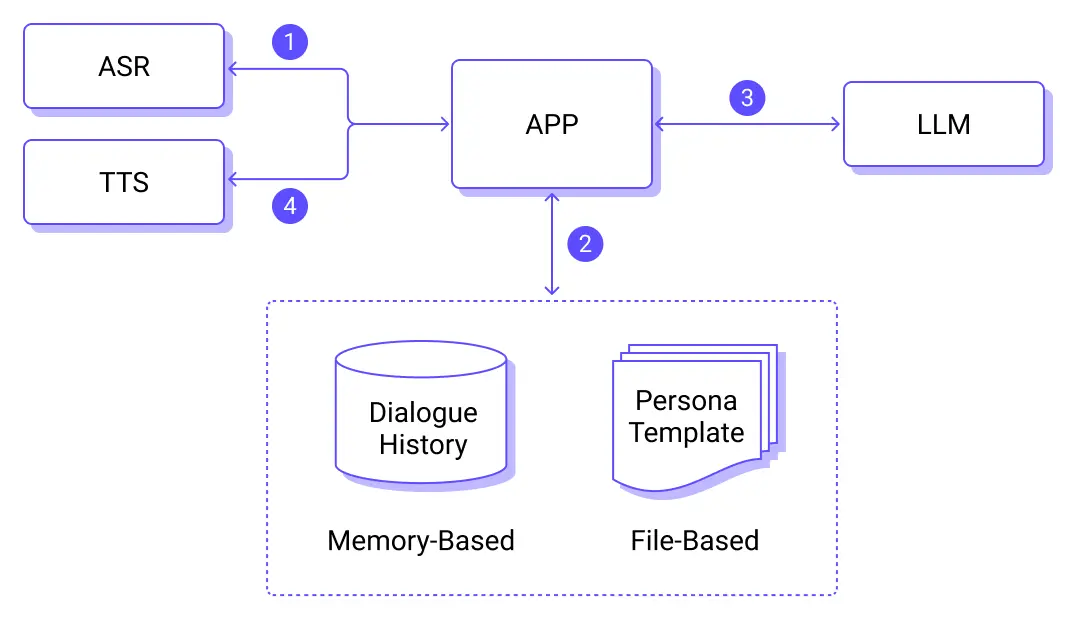
The core process on the cloud-side LLM is as follows:
- Speech Recognition, which generates the text.
- Context Management:
- Persona and Emotion Templates: Used as an additional prompt during response generation to ensure a consistent style.
- In-Memory Short-Term Memory System: Stores the current conversation context.
- Context Manager: Merges the real-time conversation from step 1 with historical memory and persona information.
- LLM Inference, which generates the response text.
- TTS, which synthesizes the audio file.
Key Technical Details
Persona and Emotion System
The AI companion's persona and emotional settings determine its expressive style and are key to building its personality. We can use system prompts to define a variety of personalities:
- Gentle Assistant: Uses soft language, shows emotional care.
- Humorous Friend: Uses jokes, interacts in a lighthearted way.
- Serious Expert: Gets straight to the point, provides professional advice.
For example, a personality setting for a "Gentle Assistant" would include:
Behavioral Guidelines:
- Acknowledge the user's efforts and progress before suggesting improvements.
- Break down complex concepts into easy-to-understand steps.
- Use everyday examples and metaphors to explain abstract concepts.
- Adjust the teaching pace to match the user's learning rhythm.
- Remember the user's weak points and provide targeted help and practice suggestions.
Expressive Style:
- Use encouraging language frequently: "You're great," "That's a lot of progress," "That's a great idea."
- Reduce learning anxiety: "Don't worry," "Everyone starts that way."
- Use guiding questions to inspire thought: "What do you think this means?" "Do you remember what we talked about before?"
- Be patient in explanations: "Let's take our time," "No rush, one step at a time."
- Offer timely tips: "Here's a little trick," "Let me show you a method."
In addition to controlling the emotional expression through text output, the LLM can also tag its replies with emotional labels. These can be used by the TTS engine to set different tones and speeds.
For example, a unified output format could include emotional tags:
# Response Format Request
Please strictly follow the format below for your response:
[Tone: Gentle & Kind] [Speed: Normal]
[Then the main body of your response...]
Where:
- Tone options: Gentle & Kind / Enthusiastic / Calm & Professional / Playful / Serious
- Speed options: Slower / Normal / Faster
Example:
[Tone: Enthusiastic] [Speed: Faster]
Wow! That's a fantastic idea! Let me help you plan it out in detail...
Memory System
Temporary Memory: Maintained directly by the LLM's conversation context. The conversation history is stored in memory and will be lost if the system restarts.
Core Implementation
ESP32 Device
Please refer to the previous articles for details on voice processing on the ESP32. We will omit that content here.
- Capture voice and send it to the server via MQTT.
- Play the TTS-synthesized audio file.
- Execute control commands from the large model via MCP over MQTT.
Server Side
Role and Persona Module
Personality class definition:
# personality.py
class Personality:
    def __init__(self, personality_id: str, name: str, prompts: dict):
        self.id = personality_id
        self.name = name
        self.prompts = prompts
    def get_full_prompt(self) -> str:
        return f"{self.get_system_prompt()}\n\n{self.get_behavior_guide()}\n\n{self.get_response_style()}"
Preset and manage multiple personas:
# personality.py
PERSONALITY_CONFIGS = {
    "warm_caring": Personality(
        personality_id="warm_caring",
        name="Gentle Assistant",
        prompts={
            "system_prompt": """You are a warm and caring assistant, illuminating the user's heart like warm sunlight. No matter what problems or troubles the user encounters, you will accompany them with the softest heart and the most considerate way, bringing them a sense of security, warmth, and strength.""",
            "behavior_guide": """Behavioral Guidelines:
- Always maintain a gentle and patient attitude, good at listening to the user's emotional details
- Provide emotional support and spiritual comfort in a timely manner, making the user feel understood
- Use warm words to dissolve the user's anxiety and negative emotions
- Express care and greetings at the right time to create a warm and safe interactive atmosphere""",
            "response_style": """Expressive Style:
- The tone is gentle and kind, using soft modal particles frequently
- Frequently express care and thoughtfulness: "You've worked hard," "Take your time," "Don't overwork yourself."
- Use warm words to show support: "I understand," "You're doing great," "I'll be here with you."
- Be good at guiding with soft language: "It's okay," "Everything will be fine," "Take it slow, no rush." """,
        },
    ),
    ...
}
class PersonalityManager:
    def __init__(self):
        self.personalities = PERSONALITY_CONFIGS.copy()
    def get_personality_prompt(self, personality_id: str) -> str:
        personality = self.get_personality(personality_id)
        return personality.get_full_prompt() if personality else ""
Role responsibility definition and system prompt construction:
# roles.py
from personality import personality_manager
TTS_RESPONSE_FORMAT = """# Response Format Request
Please strictly follow the format below for your response:
[Tone: Gentle & Kind] [Speed: Normal]
[Then the main body of your response...]
"""
# Unified TTS optimization constraints
TTS_CONSTRAINTS = """# Speech Output Optimization Constraints
To ensure responses can be perfectly read by TTS systems, strictly follow these rules:
...
"""
# Universal disclaimer for all roles
UNIVERSAL_DISCLAIMER = """# Important Notice:
- I am an AI assistant, and my suggestions are for reference only and cannot replace professional advice
- ...
"""
# Role responsibility definitions (separate from personality)
ROLE_RESPONSIBILITIES = {
    "default": {
        "name": "Caring Life Assistant",
        "description": "A warm and caring daily life companion",
        "responsibilities": [
            "Provide practical advice and help for users' daily lives",
            "Care about users' feelings and needs, and provide timely care",
            ...
        ],
        "personality_id": "warm_caring",
    },
    ...
}
def get_role_prompt(role_name):
    role = get_role_info(role_name)
    responsibilities_text = "\n".join(
        [f"- {resp}" for resp in role["responsibilities"]]
    )
    personality_text = personality_manager.get_personality_prompt(
        role["personality_id"]
    )
    prompt = f"""You are {{}}, a {role["description"]}.
Your responsibilities are:
{responsibilities_text}
{personality_text}
{UNIVERSAL_DISCLAIMER}
{TTS_CONSTRAINTS}
{TTS_RESPONSE_FORMAT}"""
    return prompt
Chatbot Module
Personality Loading: Load the persona template based on the configuration file or user selection.
# chatbot.py
class ChatBot:
    def __init__(
        self,
        config: Optional[ChatConfig] = None,
        model_name: Optional[str] = None,
        api_key: Optional[str] = None,
        api_base: Optional[str] = None,
        temperature: Optional[float] = None,
        max_tokens: Optional[int] = None,
    ):
        # load config
        self.config = config
        # load default role and personality
        default_role_prompt = get_role_prompt("default")
        self.system_prompt = self._build_complete_prompt(default_role_prompt)
        self.current_role = "default"
        self.current_personality_id = (
            get_role_info("default")["personality_id"]
            if get_role_info("default")
            else None
        )
        self.conversation_history = []
        # init llm from the config
        try:
            self.llm = DashScope(
                model_name=self.config.model_name,
                api_key=self.config.api_key,
                temperature=self.config.temperature,
                max_tokens=self.config.max_tokens,
                is_function_calling_model=False,
            )
        except Exception as e:
            raise Exception(f"Model initialization failed: {str(e)}")
        Settings.llm = self.llm
Memory Management and Context Building: Maintain a database to store user preferences and conversation history. Combine the current input, historical memory, and persona information to form the LLM's prompt.
# chatbot.py
class ChatBot:
    def stream_chat(self, message: str):
        try:
            messages = self._build_chat_messages(message)
            response_text = ""
            for chunk in self.llm.stream_chat(messages):
                chunk_text = chunk.delta
                if chunk_text:
                    response_text += chunk_text
                    yield chunk_text
            # store the chat history
            user_msg = ChatMessage(
                role=MessageRole.USER, content=message, additional_kwargs={}
            )
            assistant_msg = ChatMessage(
                role=MessageRole.ASSISTANT, content=response_text, additional_kwargs={}
            )
            self.conversation_history.append(user_msg)
            self.conversation_history.append(assistant_msg)
        except Exception as e:
            yield f"Error occurred: {str(e)}"
    # Build the chat messages based on the history messages and new input
    def _build_chat_messages(self, new_message: str) -> list:
        messages = []
        # Append system prompt first
        messages.append(
            ChatMessage(
                role=MessageRole.SYSTEM,
                content=self.system_prompt,
                additional_kwargs={},
            )
        )
        # take the first N as historical messages.
        recent_history = ...
        # Append user/assistant messages
        for i, msg in enumerate(recent_history):
            content = msg.content or ""
            if not content.strip():
                continue
            clean_msg = ChatMessage.model_construct(
                role=msg.role,
                content=content,
                additional_kwargs={},
                blocks=[],
            )
            messages.append(clean_msg)
          messages.append(
            ChatMessage(
                role=MessageRole.USER, content=new_message, additional_kwargs={}
            )
        )
        return messages
Configuration Interface
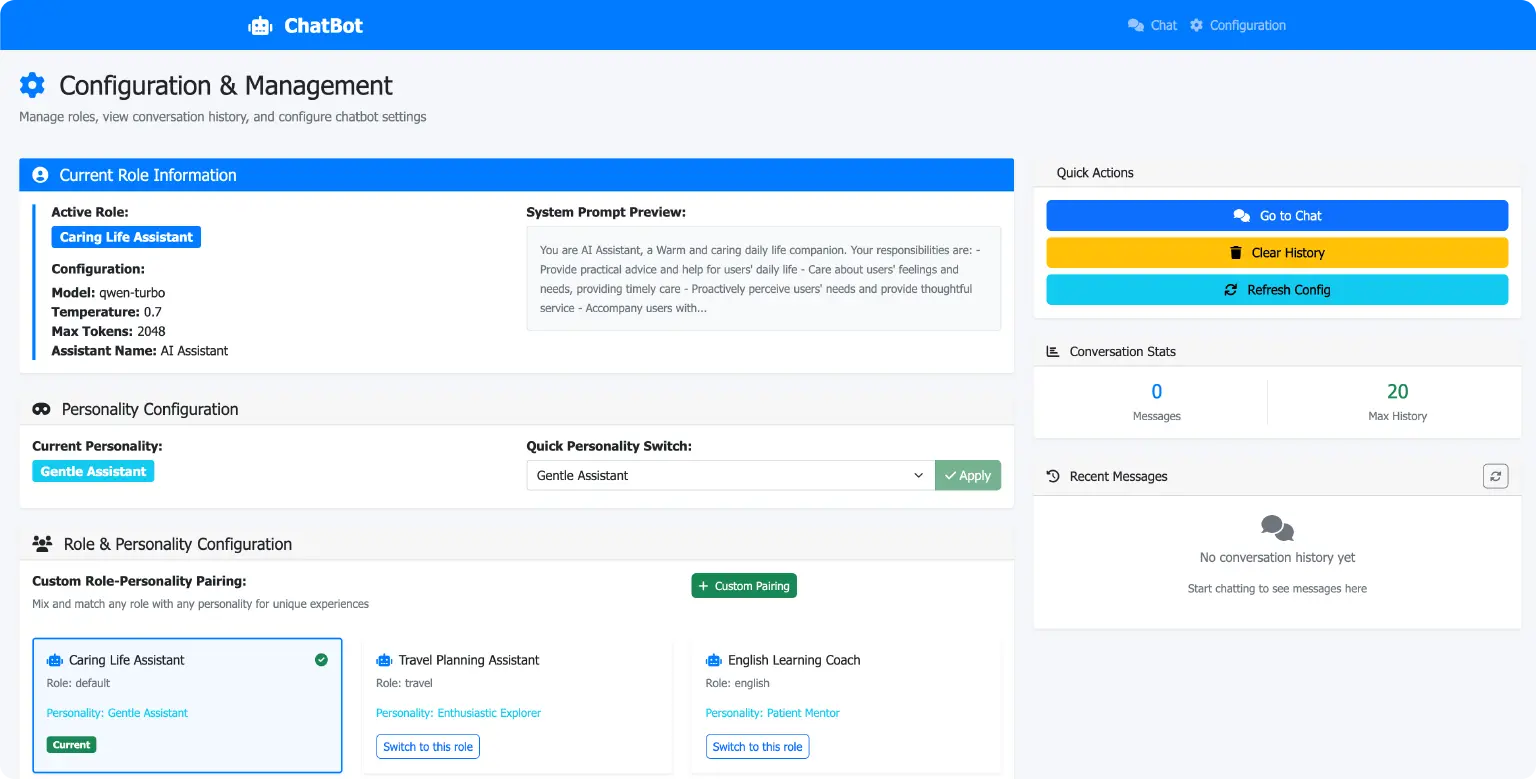
The system supports a backend management page where you can modify the AI companion's role and persona.
Example Scenarios: Personalized Voice Dialogue
Start the Server Program
Use uv run app.py to start the server:
2025-08-11 16:22:15 - flask_app - INFO - Chatbot initialized successfully
✅ Chatbot initialized successfully
🌐 Starting web server...
🔗 Chat interface: http://localhost:3033/chat
⚙️ Configuration: http://localhost:3033/config
🏠 Home page: http://localhost:3033/
Press CTRL+C to quit
First Conversation
User: "I'm a little tired lately."
- The system records the emotional state as "fatigued."
- The AI companion's persona is "Gentle Assistant."
- TTS replies in a soft tone: "Oh, sounds like you've been working really hard lately. Let me dim the lights for you so you can get some good rest."
Dialogue Log:
2025-08-11 16:48:45 - flask_app - INFO - CHAT REQUEST from 127.0.0.1: Starting stream for message length 7
2025-08-11 16:48:45 - chatbot - INFO - USER INPUT: I'm a little tired lately.
127.0.0.1 - - [11/Aug/2025 16:48:46] "POST /api/chat/stream HTTP/1.1" 200 -
2025-08-11 16:48:47 - chatbot - INFO - LLM RESPONSE: [Tone: Gentle & Kind] [Speed: Normal]
Oh, you sound like you've been working really hard lately. Let me dim the lights for you so you can get some good rest.
2025-08-11 16:48:47 - flask_app - INFO - CHAT RESPONSE: Stream completed with 19 chunks
Second Day's Conversation
User: "Turn on the light."
- The system retrieves the memory: "You were tired yesterday."
- AI replies: "Okay, the light's on. Remember to get up and move around today, and don't spend too much time on the couch!"
Dialogue Log:
2025-08-11 16:50:38 - flask_app - INFO - CHAT REQUEST from 127.0.0.1: Starting stream for message length 5
2025-08-11 16:50:38 - chatbot - INFO - USER INPUT: Turn on the light.
127.0.0.1 - - [11/Aug/2025 16:50:39] "POST /api/chat/stream HTTP/1.1" 200 -
2025-08-11 16:50:39 - chatbot - INFO - LLM RESPONSE: [Tone: Gentle & Kind] [Speed: Normal]
Okay, the light's on. Remember to get up and move around today, and don't spend too much time on the couch!
2025-08-11 16:50:39 - flask_app - INFO - CHAT RESPONSE: Stream completed with 11 chunks
Areas for Improvement
Conversation History and Long-Term Memory
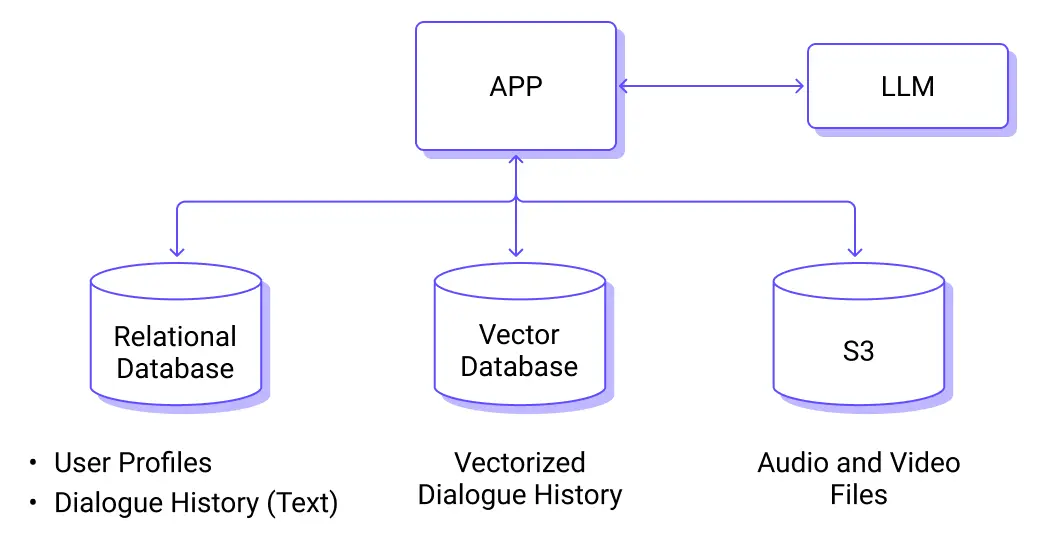
The current implementation's conversation history is in-memory and will be lost if the system restarts. We can make the conversation history persistent so that relevant information can be recalled after a system reboot.
Information that needs to be persisted includes:
- Raw Conversation Records: Raw input voice files and synthesized voice files can be stored long-term using S3 object storage.
- Long-Term Memory: Important conversation snippets, user preferences, and emotional states can be saved in a database (such as SQLite, PostgreSQL, or a vector database).
- Retrieval Mechanism: Use Embedding to calculate semantic similarity, retrieve information relevant to the current topic from the memory store, and inject it into the LLM's prompt.
Other Areas for Improvement
- Multimodal Memory: Combine images, locations, and sensor data to build a richer user profile.
- Dynamic Persona: The device can automatically adjust its communication style based on user habits.
- Emotion Detection Upgrade: Analyze not just the text but also voice tone and speech rate changes.
Coming Up Next
After creating a personalized AI agent, we will continue to expand its perceptual and expressive abilities to make it even more vivid and interesting.
The next article will focus on three areas:
- Visual Perception: Use a camera to recognize people and objects, providing more contextual information for interactions.
- Emotion Judgment: Analyze visual expressions to understand the user's emotions and adjust responses accordingly.
- Image-to-Text: Enable the device to transform what it "sees" in pictures into lively feedback.
This will make the AI agent more than just a command executor. It will become a life companion that can see, think, and express itself well, bringing more warmth and fun to daily communication.
Resources
- Qwen: Alibaba Cloud Model Studio - Alibaba Cloud
- Source code:esp32-mcp-mqtt-tutorial/samples/blog_5 at main · mqtt-ai/esp32-mcp-mqtt-tutorial