Building Your AI Companion with ESP32 & MCP over MQTT – Part 4: Enabling Voice Interaction
| Chapter | Feature | Difficulty |
|---|---|---|
| 1 | Overview: Background + Environment Setup + Device Online | ★ |
| 2 | From "Command-Based" to "Semantic Control": MCP over MQTT Encapsulation of Device Capabilities | ★★ |
| 3 | Integrating LLM for "Natural Language → Device Control" | ★★ |
| 4 | Voice I/O: Microphone Data Upload + Speech Recognition + Speech Synthesis Playback | ★★★ |
| 5 | Persona, Emotion, Memory: From "Controller" to "Companion" | ★★★ |
| 6 | Giving the AI "Eyes": Image Acquisition + Multimodal Understanding | ★★★ |
This is the fourth piece of our “Building Your AI Companion with ESP32 & MCP over MQTT” series.
Recap: Integrating LLMs for Natural Language to Device Control
In the previous article, we built a complete pipeline for device control from a natural language text prompt. By integrating an LLM with the MCP over MQTT, we created a prototype of a smart device agent. This agent could "understand" user text, then generate a function call based on that input to control a real device. However, a purely text-based interaction still has limitations and doesn't feel intuitive or natural for the user.
In this blog, we will fully upgrade our interaction method. By integrating ASR (Automatic Speech Recognition) and TTS (Text-to-Speech) components, we will build a complete voice-enabled agent that allows users to communicate directly with the device using their voice.
Goal: Giving the Agent the Ability to "Listen" and "Speak"
We aim to create a scenario like this:
- You say to your AI companion, "I'm a bit tired today."
- The ESP32 captures your voice and uploads it to the cloud.
- The AI understands your emotion and generates an empathetic response.
- The AI companion replies in a gentle voice, "That sounds exhausting. Would you like me to play some soft music for you?"
To achieve this, we will add ASR and TTS components to our existing architecture, giving the agent the ability to "listen" and "speak."
Architectural Upgrade and Implementation
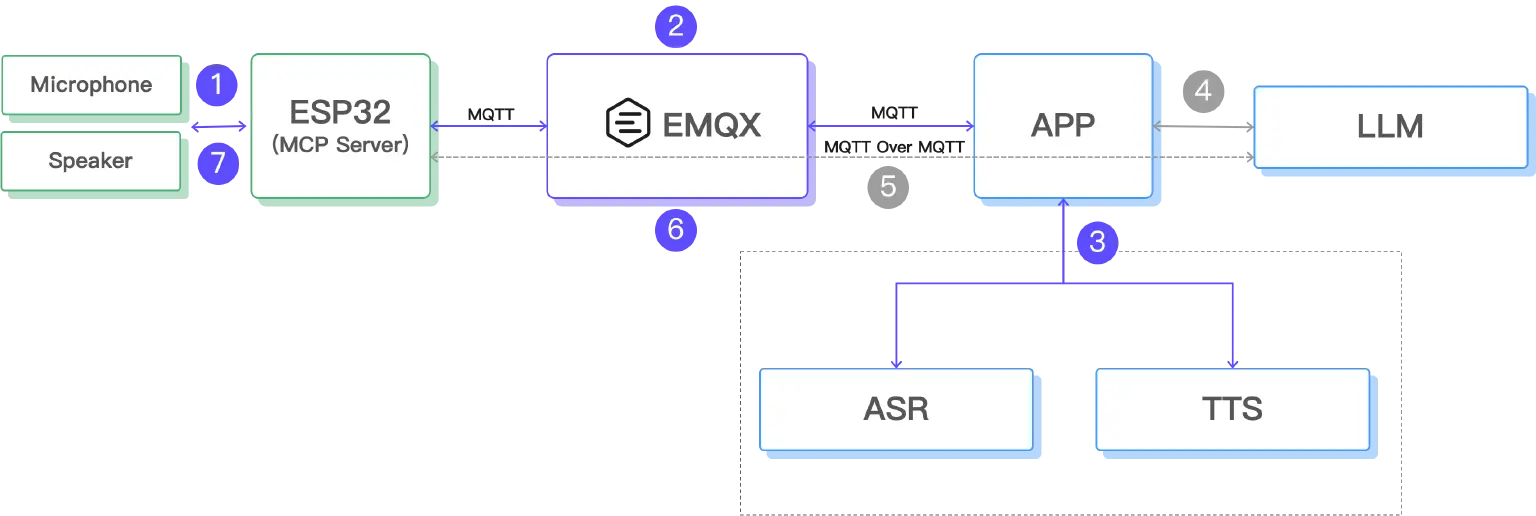
- The ESP32 uses a microphone module to record user voice, generating a local audio file.
- The ESP32 uploads the audio data to the cloud via the MQTT protocol, where EMQX bridges the data to a WebHook, then processed by an App.
- The App sends the audio file to ASR and TTS services to generate a spoken reply.
- The recognized text is transmitted to the LLM.
- The LLM understands the contextual semantics and invokes tools deployed on the ESP32 via MCP over MQTT to control the device.
- The App compresses the generated speech into MP3 format, encodes it as Base64, and then sends the file back to the ESP32 via MQTT.
- The ESP32 plays the audio file, completing the full voice interaction loop.
This architecture fully leverages MQTT's advantages for lightweight communication in IoT scenarios, while utilizing the powerful LLM, ASR, and TTS capabilities of the cloud. This provides a natural, context-aware voice interaction experience for edge devices. The ESP32 remains lightweight, focusing solely on audio acquisition and playback, with core processing tasks handled by the cloud, thereby optimizing both performance and cost.
Since the ability to control edge devices via the MCP protocol (steps 4 and 5 in the architecture diagram above) was already implemented in the previous article, our primary focus in this article will be on audio processing.
ESP32: Smart Voice Capture
Hardware Configuration
We need to configure two I2S interfaces: one for recording and one for playback.
Recording Configuration (I2S_NUM_0):
// Recording pin configuration
#define I2S_REC_BCLK  7    // Clock signal
#define I2S_REC_LRCL  8    // Left/right channel select
#define I2S_REC_DOUT  9    // Data input
// Recording parameters
#define I2S_SAMPLE_RATE   8000    // 8kHz sample rate, suitable for voice
#define I2S_SAMPLE_BITS   16      // 16-bit depth
#define I2S_CHANNEL_NUM   1       // Mono channel
#define RECORD_SECONDS    3       // Record for 3 seconds
Playback Configuration (I2S_NUM_1):
// Playback pin configuration
#define I2S_PLAY_BCLK  2   // Clock signal
#define I2S_PLAY_LRCL  1   // Left/right channel select
#define I2S_PLAY_DOUT  42  // Data input
Smart Voice Detection Algorithm
The key challenge is to make the ESP32 know when to start recording, saving device power while ensuring recording completeness.
Audio Energy Detection
uint32_t calculateAudioEnergy(int16_t *samples, size_t count) {
  uint64_t sum = 0;
  for (size_t i = 0; i < count; i++) {
    int32_t s = samples[i];
    sum += (uint64_t)(s * s);  // Calculate audio energy
  }
  return (uint32_t)(sum / count);
}
False Trigger Prevention Mechanism:
// sliding window majority filter
static uint32_t energyHistory[5] = {0, 0, 0, 0, 0};
static int historyIndex = 0;
// Requires at least 3 samples to exceed the threshold to trigger recording
int highEnergyCount = 0;
for (int i = 0; i < 5; i++) {
  if (energyHistory[i] > ENERGY_THRESHOLD) {
    highEnergyCount++;
  }
}
if (highEnergyCount >= 3 && avgEnergy > ENERGY_THRESHOLD) {
  Serial.println("Voice detected, starting recording!");
  performRecording();
}
State Machine Management
To prevent conflicts between recording and playback, we use a state machine:
enum SystemState {
  STATE_IDLE,           // Idle state (listening for voice)
  STATE_RECORDING,      // Recording
  STATE_PLAYING,        // Playing
  STATE_COOLDOWN        // Cooldown period after playback
};
Echo Prevention Loop:
- Enter a cooldown period (3 seconds) after playing audio.
- Clear the audio buffer to prevent the playback sound from being misinterpreted as a new voice command.
- Limit continuous recording to prevent infinite conversational loops.
Audio Data Upload
After recording, the ESP32 generates a standard WAV file and uploads it via MQTT:
// Build WAV file header
typedef struct WAVHeader {
  char riff_header[4];       // "RIFF"
  uint32_t wav_size;         // File size
  char wave_header[4];       // "WAVE"
  char fmt_header[4];        // "fmt "
  uint32_t fmt_chunk_size;   // Format chunk size
  uint16_t audio_format;     // Audio format (1=PCM)
  uint16_t num_channels;     // Number of channels
  uint32_t sample_rate;      // Sample rate
  uint32_t byte_rate;        // Byte rate
  uint16_t block_align;      // Block align
  uint16_t bits_per_sample;  // Bits per sample
  char data_header[4];       // "data"
  uint32_t data_bytes;       // Data size
} WAVHeader;
// Send audio via MQTT
mqtt_client.publish("emqx/esp32/audio", wav_buffer, wav_size);
Python: AI Emotional Processing
Service Architecture
We built an asynchronous audio processing service using FastAPI:
from fastapi import FastAPI, HTTPException, BackgroundTasks
from openai import AsyncOpenAI
import base64
import lameenc
import numpy as np
app = FastAPI(title="Voice Emotion Assistant API", version="1.0.0")
# Tongyi Qianwen Client
openai_client = AsyncOpenAI(
    api_key="your-dashscope-api-key",
    base_url="https://dashscope.aliyuncs.com/compatible-mode/v1"
)
Emotional Prompt Design
This is key to helping the AI understand emotion:
OPENAI_PROMPT = """
In this conversation, you will act as a simple emotional assistant. Based on the voice I provide, generate a concise reply.
Please ensure the reply does not exceed 20 characters and the content is an emotional analysis or response to the voice content.
"""
Why limit to 20 characters?
- To make responses more precise and avoid verbosity.
- To reduce speech synthesis and transmission time.
- To align with the warm, concise style of an emotional companion.
Multimodal AI Invocation
This is the core of the system: using voice input to generate voice output directly.
async def call_qwen_ai_generate_audio(base64_audio: str) -> bytes:
    completion = await openai_client.chat.completions.create(
        model="qwen-omni-turbo",  # Multimodal model
        messages=[
            {
                "role": "user",
                "content": [
                    {
                        "type": "input_audio",
                        "input_audio": {
                            "data": f"data:;base64,{base64_audio}",
                            "format": "wav",
                        },
                    },
                    {
                        "type": "text",
                        "text": "As an emotional assistant, respond to the user's emotional needs within 20 characters."
                    }
                ],
            }
        ],
        modalities=["text", "audio"],        # Output both text and audio
        audio={"voice": "Cherry", "format": "wav"},  # Use Cherry voice
        stream=True,                         # Streaming processing
        stream_options={"include_usage": True}
    )
    # Receive streaming response
    text_string = ""
    audio_string = ""
    async for chunk in completion:
        if not chunk.choices:
            continue
        if hasattr(chunk.choices[0].delta, "audio"):
            audio_string += chunk.choices[0].delta.audio["data"]
        elif hasattr(chunk.choices[0].delta, "content"):
            text_string += chunk.choices[0].delta.content
    # Return audio data
    decoded_audio = base64.b64decode(audio_string)
    return decoded_audio
Advantages of this approach:
- End-to-end processing: Direct voice-to-voice interaction, ensuring emotional consistency.
- More accurate understanding: The AI can detect tone and emotion, not just text content.
- More natural responses: Generated speech carries an appropriate emotional tone.
Audio Format Optimization
The AI generates a large WAV file, so we convert it to a compressed MP3 format.
def convert_audio_to_mp3(decoded_audio: bytes, output_file: str):
    audio_np = np.frombuffer(decoded_audio, dtype=np.int16)
    encoder = lameenc.Encoder()
    encoder.set_bit_rate(32)        # Low bitrate to reduce transmission size
    encoder.set_in_sample_rate(24000)
    encoder.set_channels(1)
    encoder.set_quality(7)          # Balance quality and size
    mp3_data = encoder.encode(audio_np.tobytes())
    mp3_data += encoder.flush()
    # Save file and return Base64
    with open(output_file, 'wb') as f:
        f.write(mp3_data)
    return base64.b64encode(mp3_data).decode()
Asynchronous Processing Flow
To avoid blocking API responses, we use background tasks for processing.
@app.post("/process_audio")
async def process_audio(request: AudioRequest, background_tasks: BackgroundTasks):
    task_id = str(uuid.uuid4())
    # Add background task
    background_tasks.add_task(
        process_audio_task,
        request.audio,
        task_id
    )
    return AudioResponse(
        success=True,
        message="Audio processing task initiated"
    )
async def process_audio_task(base64_audio: str, task_id: str):
    try:
        # 1. Call AI to generate voice response
        decoded_audio = await call_qwen_ai_generate_audio(base64_audio)
        # 2. Convert to MP3 format
        output_file = f"audio_response_{task_id}.mp3"
        base64_mp3_audio = convert_audio_to_mp3(decoded_audio, output_file)
        # 3. Send to ESP32 via MQTT
        await publish_to_mqtt(base64_mp3_audio)
    except Exception as e:
        logger.error(f"Error processing audio task: {e}")
EMQX: Message Broker
Topic Design
emqx/esp32/audio      → ESP32 uploads recordings
emqx/esp32/playaudio  → ESP32 receives audio for playback.
Webhook Configuration
Configure a Webhook rule in the EMQX console to automatically forward the received audio message to the Python service:
{
  "url": "http://your-server:5005/process_audio",
  "method": "POST",
  "headers": {
    "Content-Type": "application/json"
  },
  "body": {
    "audio": "${payload}"
  }
}
System Deployment and Configuration
Environment Setup
Python Dependencies:
pip install fastapi uvicorn httpx lameenc numpy openai pydantic
ESP32 Library Dependencies:
- WiFi: Network connectivity
- PubSubClient: MQTT client
- SPIFFS: File system (for temporary audio storage)
- ESP32Audio: Audio codec library
Configuration Steps
- Get a Tongyi Qianwen API Key:
- Log in to the Alibaba Cloud console.
- Activate the DashScope service.
- Get your API key.
- Configure EMQX:
- Create device authentication credentials.
- Configure the Webhook rule.
- Set up message routing.
- ESP32 Configuration:
// WiFi Configuration const char *ssid = "your-wifi-name"; const char *password = "your-wifi-password"; // MQTT Configuration const char *mqtt_broker = "broker.emqx.io"; const char *mqtt_username = "emqx"; const char *mqtt_password = "public"; - Python Service Configuration
# API Configuration
openai_client = AsyncOpenAI(
    api_key="your-dashscope-api-key",
    base_url="https://dashscope.aliyuncs.com/compatible-mode/v1"
)
# EMQX Configuration
EMQX_HTTP_API_URL = "http://127.0.0.1:18083"
EMQX_USERNAME = "your-username"
EMQX_PASSWORD = "your-password"
Real-World Performance and Results
Sample Conversation Scenarios
Scenario 1: Emotional Comfort
- User (in a tired tone): "I'm so tired from work today..."
- AI Response (gently): "Sounds like you've had a tough day. You should get some rest."
Scenario 2: Casual Conversation
- User (happily): "The weather is so nice today!"
- AI Response (cheerfully): "It sure is! It really lifts your spirits."
Scenario 3: Seeking Advice
- User (hesitantly): "I don't know what to do..."
- AI Response (encouragingly): "Don't worry, we'll figure it out together."
Performance Metrics
Response Time:
- Voice detection: Real-time (<100ms)
- AI processing: 1-2 seconds
- Audio download: < 500ms
- Total Latency: The entire interaction completes in about 3 seconds.
Audio Quality:
- The "Cherry" voice sounds natural and warm.
- MP3 at 32kbps provides clear audio quality.
- The system supports emotional tone changes.
Existing Issues and Solutions
During testing, we encountered several typical issues:
- Echo Loop: The ESP32 would record its own playback, creating an infinite echo. We solved this by adding a 3-second cooldown period after playback, clearing the I2S buffer, and limiting the number of consecutive recordings.
- False Triggers: Environmental noise or air conditioner sounds would frequently trigger recording. We effectively reduced false triggers by raising the energy threshold, implementing a sliding window majority filter, and using a multi-sample confirmation mechanism.
- Network Disruption: Unstable Wi-Fi would cause MQTT connection drops. To ensure system stability, we implemented an automatic reconnection mechanism, heartbeat detection, and connection status monitoring.
Limitations and Optimizations for Voice Interaction
Limitations
While this solution is clearly structured, easy to deploy, and fully utilizes MQTT's stable transmission capabilities, it still has several notable limitations due to its batch processing nature:
- High Latency: Voice capture, LLM inference, TTS synthesis, and audio playback must all happen in sequence. The user has to wait for the entire process to finish. The longer voice inputs and complex semantic parsing also significantly increase interaction latency.
- Lack of Streaming: ASR requires a full recording before starting transcription, and TTS must wait for the complete text before generating audio. The audio is transmitted as a single, full file, not a stream.
- Limited Recording Length: The 3-second duration can cut off long sentences and cause unnecessary waiting for short ones, reducing interaction efficiency.
These factors limit the practical usability of the solution in a production environment, falling short of the "speaking while listening, synthesizing while playing" experience found in modern smart voice assistants.
Optimization Directions
To improve speed and naturalness, we can optimize in several ways:
- Dynamic Recording: Automatically stop recording when a user's voice ends using VAD (Voice Activity Detection) for more accurate endpoint detection.
- Audio Quality: Implement pre-processing like noise reduction and enhancement.
- Streaming ASR and TTS: Use real-time speech recognition (streaming transcription) and audio synthesis (generate while playing).
- Hybrid Protocol: MQTT can handle reliable commands and status updates, while protocols like RTP can be used for rapid audio streaming, making the agent feel more like a real-time conversational partner.
Coming Up Next
In this article, we completed the loop from natural language recognition to device speech playback. However, a truly "smart" agent goes beyond mere responsiveness; it should understand, remember, and accompany you.
In the next article, we will explore:
- How to introduce "emotional" and "persona" mechanisms: transforming the device from a cold command executor into one that expresses warmth, style, and emotion.
- How to enable the device to "have memory": retaining user context, preferences, and habits to achieve personalized long-term memory.
- How to combine LLMs to build personalized AI agents: gradually evolving into a "partner who understands you" through long-term interaction.
Additionally, we will discuss different types of persona design, such as a quiet assistant, an enthusiastic companion, or a serious expert, and analyze how personas influence the interaction experience and suitability for various applications. This will be a pivotal step from a "device control agent" to a "personalized AI companion." Stay tuned.
Resource
- Source code: esp32-mcp-mqtt-tutorial/samples/blog_4 at main · mqtt-ai/esp32-mcp-mqtt-tutorial , including:
- Full ESP32 project files
- Python backend service source code
- EMQX configuration guide
- Deployment and operational documentation
- Qwen: Alibaba Cloud Model Studio - Alibaba Cloud