Building Your AI Companion with ESP32 & MCP over MQTT from Scratch 1: Getting Online

AI + IoT Embodied: A Truly "Understanding" Emotional Companion AI
The development of smart hardware has progressed through several stages: from the initial "network-enabled" to "voice-activated," and now, we envision devices that not only understand your words but also respond, and even offer companionship. Imagine the following scenarios:
- Returning home from work, it proactively greets you: "You look a bit tired today. Would you like me to dim the lights and play some soft music?"
- When your child chats with it, it can narrate stories using different character voices.
- You open the camera, it observes your outfit, and humorously responds: "That's a very stylish look today!"
This isn't just sci-fi; it's the inevitable trend resulting from the convergence of Large Language Models (LLM), Multimodal AI, and IoT technologies.
Traditional IoT devices primarily rely on "command-based control," where the system controls devices through hardcoded logic or pre-set rules, lacking the ability to intelligently perceive changes in device status. Future devices, however, will move towards semantic interaction and emotional companionship. The emotional companion AI is precisely a microcosm of this trend.
Who Is This Series For?
If you identify with any of the following, this series is for you:
- Smart Hardware Developers: Looking to explore how AI can empower IoT.
- Embedded/IoT Developers: Integrating AI services to enable voice and visual interaction.
- Hardware Enthusiasts/Makers: Wanting to DIY a "soulful" smart assistant.
- AI Application Developers: Hoping to transition from cloud-based AI to hardware, achieving an end-to-end experience.
If you've previously worked on smart home, robotics, or AI assistant projects, this series will help you elevate to an entirely new level of interaction.
Background Knowledge Required
Don't worry, you don't need to be a full-stack guru, but the following knowledge will make your journey smoother:
- Hardware Development Basics: Ability to flash ESP32 programs (ESP-IDF).
- Network Communication Basics: Understanding the fundamental concepts of the MQTT protocol (publish/subscribe).
- Python Basics: Python SDKs will be used for LLMs and cloud applications later on.
- AI Application Concepts (Optional): Knowing what LLMs, ASR (Automatic Speech Recognition), and TTS (Text-to-Speech) are.
It's okay if you don't have all this knowledge; the series will explain everything step-by-step and provide out-of-the-box examples.
Why Build Your Own?
- Commercial products are often closed and not customizable. We aim to build a powerful emotional companion AI using the most economical and straightforward methods.
- By leveraging open-source hardware (ESP32) and cloud-based AI interfaces, individual developers can create smart AI experiences comparable to commercial products.
- This process will not only allow you to experiment with cool AI hardware but also gain a deep understanding of AI + IoT architecture design and practical implementation.
Goals of This Tutorial Series
Through a progressive tutorial approach, we will guide you from scratch to build an emotional companion AI that will possess:
- Voice Interaction: Understand your speech and respond with a natural tone.
- Device Control: Adjust screen brightness, volume, etc., via semantic commands.
- Personalized Persona: Set personality and preferences, with some memory capabilities.
- Visual Understanding: Identify image content and generate fun feedback.
Ultimately, you will achieve experiences like:
- "Hey, dim the screen a bit." → "Got it, dimmed! Is that more comfortable?"
- "Take a look at me, how do I look?" → The AI takes a photo and uploads it → "Well hello there, gorgeous! You're really turning heads today!"
Roadmap
| Chapter | Feature | Difficulty |
|---|---|---|
| 1 | Overview: Background + Environment Setup + Device Online | ★ |
| 2 | From "Command-Based" to "Semantic Control": MCP over MQTT Encapsulation of Device Capabilities | ★★ |
| 3 | Integrating LLM for "Natural Language → Device Control" | ★★ |
| 4 | Voice I/O: Microphone Data Upload + Speech Recognition + Speech Synthesis Playback | ★★★ |
| 5 | Persona, Emotion, Memory: From "Controller" to "Companion" | ★★★ |
| 6 | Giving the AI "Eyes": Image Acquisition + Multimodal Understanding | ★★★ |
Tech Stack at a Glance
- ESP32: This is our go-to for smart hardware projects due to its low cost, built-in Wi-Fi/Bluetooth, and rich peripheral set.
- MQTT Protocol: A lightweight, real-time, and cross-platform messaging protocol—an IoT standard.
- MCP (Model Context Protocol) Over MQTT: This allows LLMs to directly control hardware through "tool calling." Device services register their "capabilities," making AI calls natural and standardized.
- AI Capabilities:
- LLM: Handles natural language and control intent.
- ASR/TTS: For voice recognition and synthesis.
- VLM (Multimodal Large Model): Enables visual understanding and generates engaging descriptions.
- Cloud Services:
- EMQX Serverless: Or a locally installed EMQX instance.
- Open-Source AI Frameworks: LangChain / LangFlow / LlamaIndex. For this series, we're using LlamaIndex.
In a nutshell, our architecture can be summarized as: ESP32 acts as the "hardware executor," cloud AI serves as the "brain," and MQTT + MCP form the "neural pathways."
Hardware List
To complete all the functionalities in this tutorial, we recommend the following hardware:
- ESP32-S3-DevKitC: (Experienced developers can choose other models.)
- INMP441 Microphone Module
- MAX98357A Audio Amplifier
- 2-3W Speaker
- IIC Interface LCD Display
- OV2640 Camera Module
- 400-point Breadboard and Jumper Wires
Overall System Architecture Design
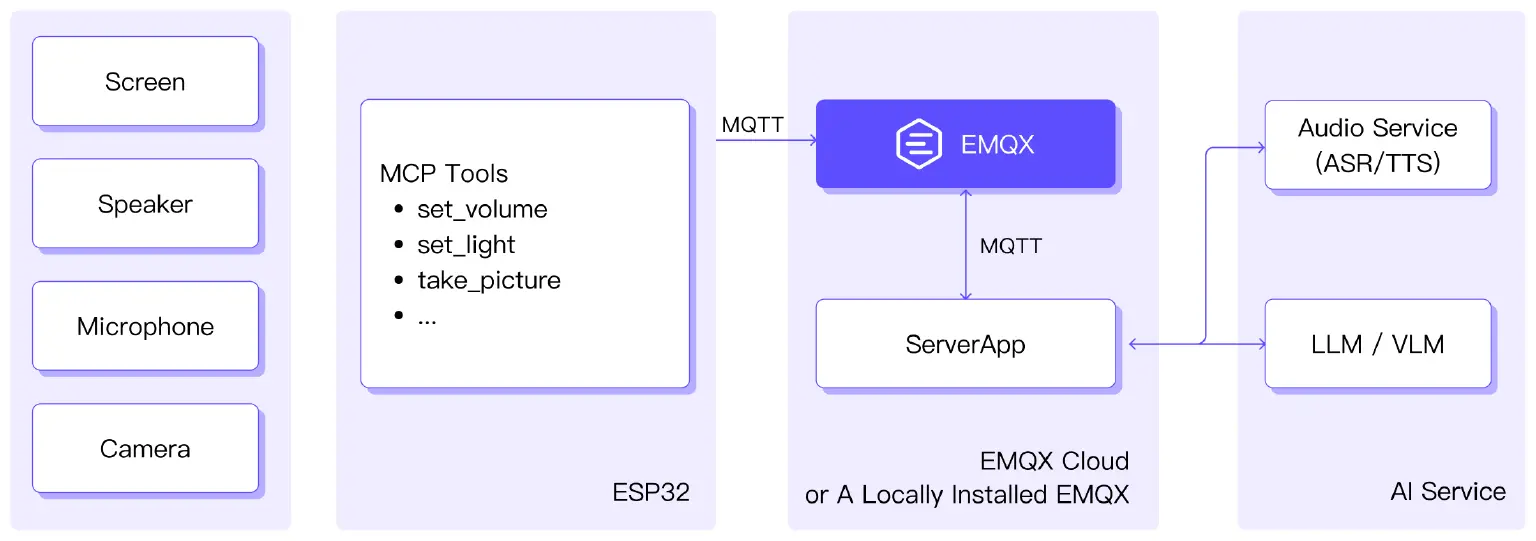
- Hardware Layer: ESP32 + Microphone + Speaker + Camera + Screen.
- Connectivity Layer: MQTT Broker (EMQX) + MCP Protocol.
- AI Service Layer: Natural language processing, speech synthesis, visual recognition, and persona logic.
For AI services, this article utilizes Alibaba Cloud's services for speech recognition, speech synthesis, large language models, and multimodal large models.
Goal One: Getting Your Device Online
This first step focuses on connecting your ESP32 device to a server and sending messages.

Here's the setup, as illustrated:
- Your ESP32 connects to the EMQX Serverless service.
- MQTTX (acting as a client application) also connects to EMQX Serverless and subscribes to the topic
emqx/esp32. - The ESP32 publishes the message
Hi EMQX I'm ESP32 ^^to theemqx/esp32topic. - MQTTX then receives this message.
Hardware You'll Need
- ESP32 Development Board: The DevKitC is recommended as it includes a USB-to-serial converter.
- USB Data Cable: Make sure it supports data transfer, not just charging.
Software Requirements
- ESP-IDF:
- Install ESP-IDF itself.
- Install ESP-IDF dependencies (refer to the official documentation).
- VS Code:
- Install VS Code.
- Install the ESP-IDF extension within VS Code.
- Refer to the development environment configuration guide for setup.
- MQTT Client Test Tool: You can download MQTTX from MQTTX: Your All-in-one MQTT Client Toolbox .
Driver Notes
- Windows users might need to install CP210x or CH340 serial port drivers.
- macOS/Linux systems are usually plug-and-play.
Register for EMQX Serverless
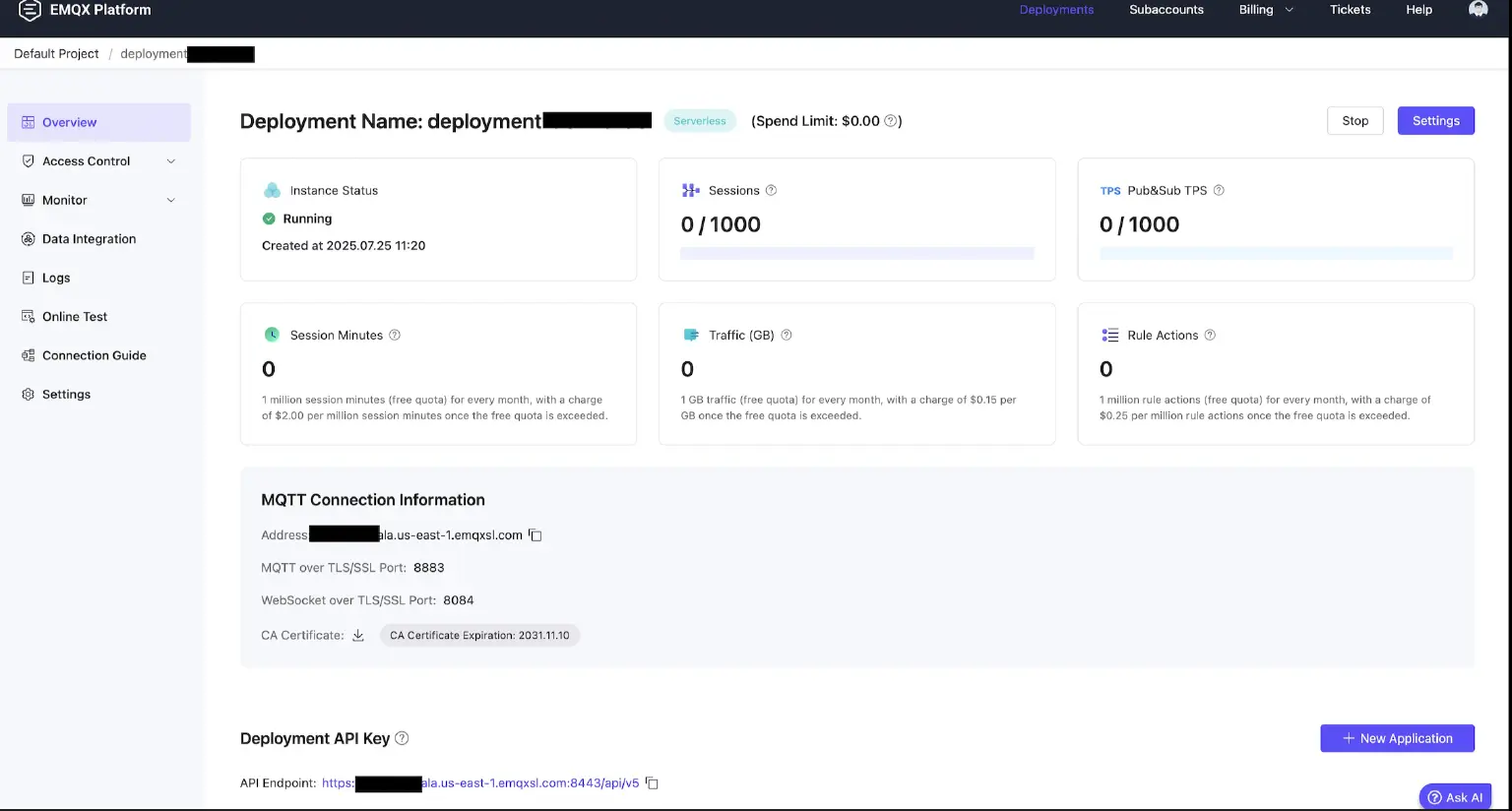
MQTT will be the transport protocol for our intelligent agent and cloud-based large models. All subsequent features, including voice, vision, and AI control, rely on its real-time communication with the cloud. To simplify things and avoid complex local installation and configuration, we recommend using the EMQX MQTT cloud service.
To get started:
- Visit EMQX Serverless: Secure, Scalable, and Serverless MQTT Messaging
- Follow the website's instructions to create an account, set up an MQTT service instance, and retrieve the following essential information:
- Broker Address
- Username / Password
- Port Number (port 8883 is recommended for MQTT over TLS)
Note: If you prefer, you can also deploy an EMQX Broker on your local machine or within your private network. This approach can help reduce network latency between your ESP32 and the remote server. For deployment instructions, refer to: Install EMQX Using Docker | EMQX Docs
Compile & Flash ESP32 Program
Code Directory
| - CMakeLists.txt
| - sdkconfig
| - main
| --- main.c
| --- CMakeLists.txt
CMakeLists.txt
# The following lines of boilerplate have to be in your project's
# CMakeLists in this exact order for cmake to work correctly
cmake_minimum_required(VERSION 3.16)
set(CMAKE_EXPORT_COMPILE_COMMANDS ON)
include($ENV{IDF_PATH}/tools/cmake/project.cmake)
project(main)
sdkconfig
CONFIG_MQTT_PROTOCOL_5=y
CONFIG_ESP_WIFI_SOFTAP_SUPPORT=n
main/main.c
#include <stdio.h>
#include "freertos/FreeRTOS.h"
#include "freertos/event_groups.h"
#include "freertos/task.h"
#include "esp_log.h"
#include "esp_mac.h"
#include "esp_system.h"
#include "esp_wifi.h"
#include "mqtt_client.h"
#include "nvs_flash.h"
#define PIN_NUM_SCLK 21
#define PIN_NUM_MOSI 47
#define PIN_NUM_MISO -1
#define LCD_H_RES 240
static EventGroupHandle_t s_wifi_event_group;
static int                s_retry_num = 0;
static esp_mqtt_client_handle_t client;
static const char *WIFI_SSID     = "wifi_ssid";
static const char *WIFI_PASSWORD = "wifi_password";
static const char *MQTT_BROKER =
    "mqtts://xxyyzzz:8883";
static const char *username = "user";
static const char *password = "password";
static const char *cert =
    "-----BEGIN CERTIFICATE-----\n"
    "MIIDrzCCApegAwIBAgIQCDvgVpBCRrGhdWrJWZHHSjANBgkqhkiG9w0BAQUFADBh\n"
    "MQswCQYDVQQGEwJVUzEVMBMGA1UEChMMRGlnaUNlcnQgSW5jMRkwFwYDVQQLExB3\n"
    "d3cuZGlnaWNlcnQuY29tMSAwHgYDVQQDExdEaWdpQ2VydCBHbG9iYWwgUm9vdCBD\n"
    "QTAeFw0wNjExMTAwMDAwMDBaFw0zMTExMTAwMDAwMDBaMGExCzAJBgNVBAYTAlVT\n"
    "MRUwEwYDVQQKEwxEaWdpQ2VydCBJbmMxGTAXBgNVBAsTEHd3dy5kaWdpY2VydC5j\n"
    "b20xIDAeBgNVBAMTF0RpZ2lDZXJ0IEdsb2JhbCBSb290IENBMIIBIjANBgkqhkiG\n"
    "9w0BAQEFAAOCAQ8AMIIBCgKCAQEA4jvhEXLeqKTTo1eqUKKPC3eQyaKl7hLOllsB\n"
    "CSDMAZOnTjC3U/dDxGkAV53ijSLdhwZAAIEJzs4bg7/fzTtxRuLWZscFs3YnFo97\n"
    "nh6Vfe63SKMI2tavegw5BmV/Sl0fvBf4q77uKNd0f3p4mVmFaG5cIzJLv07A6Fpt\n"
    "43C/dxC//AH2hdmoRBBYMql1GNXRor5H4idq9Joz+EkIYIvUX7Q6hL+hqkpMfT7P\n"
    "T19sdl6gSzeRntwi5m3OFBqOasv+zbMUZBfHWymeMr/y7vrTC0LUq7dBMtoM1O/4\n"
    "gdW7jVg/tRvoSSiicNoxBN33shbyTApOB6jtSj1etX+jkMOvJwIDAQABo2MwYTAO\n"
    "BgNVHQ8BAf8EBAMCAYYwDwYDVR0TAQH/BAUwAwEB/zAdBgNVHQ4EFgQUA95QNVbR\n"
    "TLtm8KPiGxvDl7I90VUwHwYDVR0jBBgwFoAUA95QNVbRTLtm8KPiGxvDl7I90VUw\n"
    "DQYJKoZIhvcNAQEFBQADggEBAMucN6pIExIK+t1EnE9SsPTfrgT1eXkIoyQY/Esr\n"
    "hMAtudXH/vTBH1jLuG2cenTnmCmrEbXjcKChzUyImZOMkXDiqw8cvpOp/2PV5Adg\n"
    "06O/nVsJ8dWO41P0jmP6P6fbtGbfYmbW0W5BjfIttep3Sp+dWOIrWcBAI+0tKIJF\n"
    "PnlUkiaY4IBIqDfv8NZ5YBberOgOzW6sRBc4L0na4UU+Krk2U886UAb3LujEV0ls\n"
    "YSEY1QSteDwsOoBrp+uvFRTp2InBuThs4pFsiv9kuXclVzDAGySj4dzp30d8tbQk\n"
    "CAUw7C29C79Fv1C5qfPrmAESrciIxpg0X40KPMbp1ZWVbd4=\n"
    "-----END CERTIFICATE-----";
static void event_handler(void *arg, esp_event_base_t event_base,
                          int32_t event_id, void *event_data)
{
    if (event_base == WIFI_EVENT && event_id == WIFI_EVENT_STA_START) {
        esp_wifi_connect();
    } else if (event_base == WIFI_EVENT &&
               event_id == WIFI_EVENT_STA_DISCONNECTED) {
        if (s_retry_num < 5) {
            esp_wifi_connect();
            s_retry_num++;
            ESP_LOGI("wifi sta", "retry to connect to the AP");
        } else {
            xEventGroupSetBits(s_wifi_event_group, BIT1);
        }
        ESP_LOGI("wifi sta", "connect to the AP fail");
    } else if (event_base == IP_EVENT && event_id == IP_EVENT_STA_GOT_IP) {
        ip_event_got_ip_t *event = (ip_event_got_ip_t *) event_data;
        ESP_LOGI("wifi sta", "ip: " IPSTR ", mask: " IPSTR ", gateway: " IPSTR,
                 IP2STR(&event->ip_info.ip), IP2STR(&event->ip_info.netmask),
                 IP2STR(&event->ip_info.gw));
        s_retry_num = 0;
        xEventGroupSetBits(s_wifi_event_group, BIT0);
    }
}
int wifi_init_sta(void)
{
    s_wifi_event_group = xEventGroupCreate();
    ESP_ERROR_CHECK(esp_netif_init());
    ESP_ERROR_CHECK(esp_event_loop_create_default());
    esp_netif_create_default_wifi_sta();
    wifi_init_config_t cfg = WIFI_INIT_CONFIG_DEFAULT();
    ESP_ERROR_CHECK(esp_wifi_init(&cfg));
    esp_event_handler_instance_t instance_any_id;
    esp_event_handler_instance_t instance_got_ip;
    ESP_ERROR_CHECK(esp_event_handler_instance_register(
        WIFI_EVENT, ESP_EVENT_ANY_ID, &event_handler, NULL, &instance_any_id));
    ESP_ERROR_CHECK(esp_event_handler_instance_register(
        IP_EVENT, IP_EVENT_STA_GOT_IP, &event_handler, NULL, &instance_got_ip));
    wifi_config_t wifi_config = {
        .sta = {
            .threshold.authmode = WIFI_AUTH_WPA2_PSK,
            .sae_pwe_h2e = WPA3_SAE_PWE_BOTH,
            .sae_h2e_identifier = "",
        },
    };
    strcpy((char *) wifi_config.sta.ssid, WIFI_SSID);
    strcpy((char *) wifi_config.sta.password, WIFI_PASSWORD);
    ESP_ERROR_CHECK(esp_wifi_set_mode(WIFI_MODE_STA));
    ESP_ERROR_CHECK(esp_wifi_set_config(WIFI_IF_STA, &wifi_config));
    ESP_ERROR_CHECK(esp_wifi_start());
    ESP_LOGI("wifi sta", "wifi init finished.");
    EventBits_t bits = xEventGroupWaitBits(s_wifi_event_group, BIT0 | BIT1,
                                           pdFALSE, pdFALSE, portMAX_DELAY);
    if (bits & BIT0) {
        ESP_LOGI("wifi sta", "connected to ap SSID: %s", CONFIG_WIFI_SSID);
    } else if (bits & BIT1) {
        ESP_LOGI("wifi sta", "Failed to connect to SSID: %s", CONFIG_WIFI_SSID);
    } else {
        ESP_LOGE("wifi sta", "UNEXPECTED EVENT");
    }
    return 0;
}
static void mqtt5_event_handler(void *handler_args, esp_event_base_t base,
                                int32_t event_id, void *event_data)
{
    char *TAG = "mqtt5";
    ESP_LOGD(TAG, "Event dispatched from event loop base=%s, event_id=%" PRIi32,
             base, event_id);
    esp_mqtt_event_handle_t  event  = event_data;
    esp_mqtt_client_handle_t client = event->client;
    int                      msg_id;
    ESP_LOGD(TAG, "free heap size is %" PRIu32 ", minimum %" PRIu32,
             esp_get_free_heap_size(), esp_get_minimum_free_heap_size());
    ESP_LOGI(TAG, "event_id=%" PRIi32, event_id);
    switch ((esp_mqtt_event_id_t) event_id) {
    case MQTT_EVENT_CONNECTED:
        msg_id = esp_mqtt_client_publish(client, "emqx/esp32",
                                         "Hi EMQX I'm ESP32 ^^", 0, 1, 0);
        ESP_LOGI(TAG, "sent publish successful, msg_id=%d", msg_id);
        break;
    case MQTT_EVENT_DISCONNECTED:
    case MQTT_EVENT_SUBSCRIBED:
    case MQTT_EVENT_PUBLISHED:
    case MQTT_EVENT_DATA:
        break;
    case MQTT_EVENT_UNSUBSCRIBED:
        esp_mqtt_client_disconnect(client);
        break;
    case MQTT_EVENT_ERROR:
        ESP_LOGI(TAG, "MQTT5 return code is %d",
                 event->error_handle->connect_return_code);
        if (event->error_handle->error_type == MQTT_ERROR_TYPE_TCP_TRANSPORT) {
            ESP_LOGI(TAG, "Last errno string (%s)",
                     strerror(event->error_handle->esp_transport_sock_errno));
        }
        break;
    default:
        ESP_LOGI(TAG, "Other event id:%d", event->event_id);
        break;
    }
}
int mqtt_init(void)
{
    esp_mqtt_client_config_t mqtt5_cfg = {
        .broker.address.uri                  = MQTT_BROKER,
        .session.protocol_ver                = MQTT_PROTOCOL_V_5,
        .network.disable_auto_reconnect      = true,
        .credentials.username                = username,
        .credentials.authentication.password = password,
        .broker.verification.certificate     = cert,
    };
    client = esp_mqtt_client_init(&mqtt5_cfg);
    esp_mqtt_client_register_event(client, ESP_EVENT_ANY_ID,
                                   mqtt5_event_handler, NULL);
    esp_mqtt_client_start(client);
    return 0;
}
void app_main(void)
{
    esp_err_t ret = nvs_flash_init();
    if (ret == ESP_ERR_NVS_NO_FREE_PAGES ||
        ret == ESP_ERR_NVS_NEW_VERSION_FOUND) {
        ESP_ERROR_CHECK(nvs_flash_erase());
        ret = nvs_flash_init();
    }
    ESP_ERROR_CHECK(ret);
    wifi_init_sta();
    mqtt_init();
    while (1) {
        vTaskDelay(pdMS_TO_TICKS(3000));
        int msg_id = esp_mqtt_client_publish(client, "emqx/esp32",
                                             "Hi EMQX I'm ESP32 ^^", 0, 1, 0);
        ESP_LOGI("mqtt", "sent publish successful, msg_id=%d", msg_id);
    }
}
main/CMakeLists.txt
idf_component_register(SRCS "main.c"
                    PRIV_REQUIRES mqtt esp_wifi nvs_flash
                    INCLUDE_DIRS ".")
You'll need to modify the Wi-Fi and MQTT service configurations in main/main.c. Replace the placeholder information with your own settings:
- Wi-Fi name and password
- Broker address, username, and password obtained from EMQX Serverless
static const char *WIFI_SSID     = "wifi_ssid";
static const char *WIFI_PASSWORD = "wifi_password";
static const char *MQTT_BROKER =
    "mqtts://xxyyzzz:8883";
static const char *username = "user";
static const char *password = "password";
Compile the code and flash it to the ESP32.
idf.py build
idf.py flash monitor
Once flashed, the ESP32 will send Hi EMQX I'm ESP32 ^^ to the emqx/esp32 topic every 3 seconds.
Verification
Open MQTTX and configure your MQTT connection as shown in the image below.
- In Host, enter the service address you obtained from EMQX Serverless.
- Enter your connection Username and Password in the respective fields.
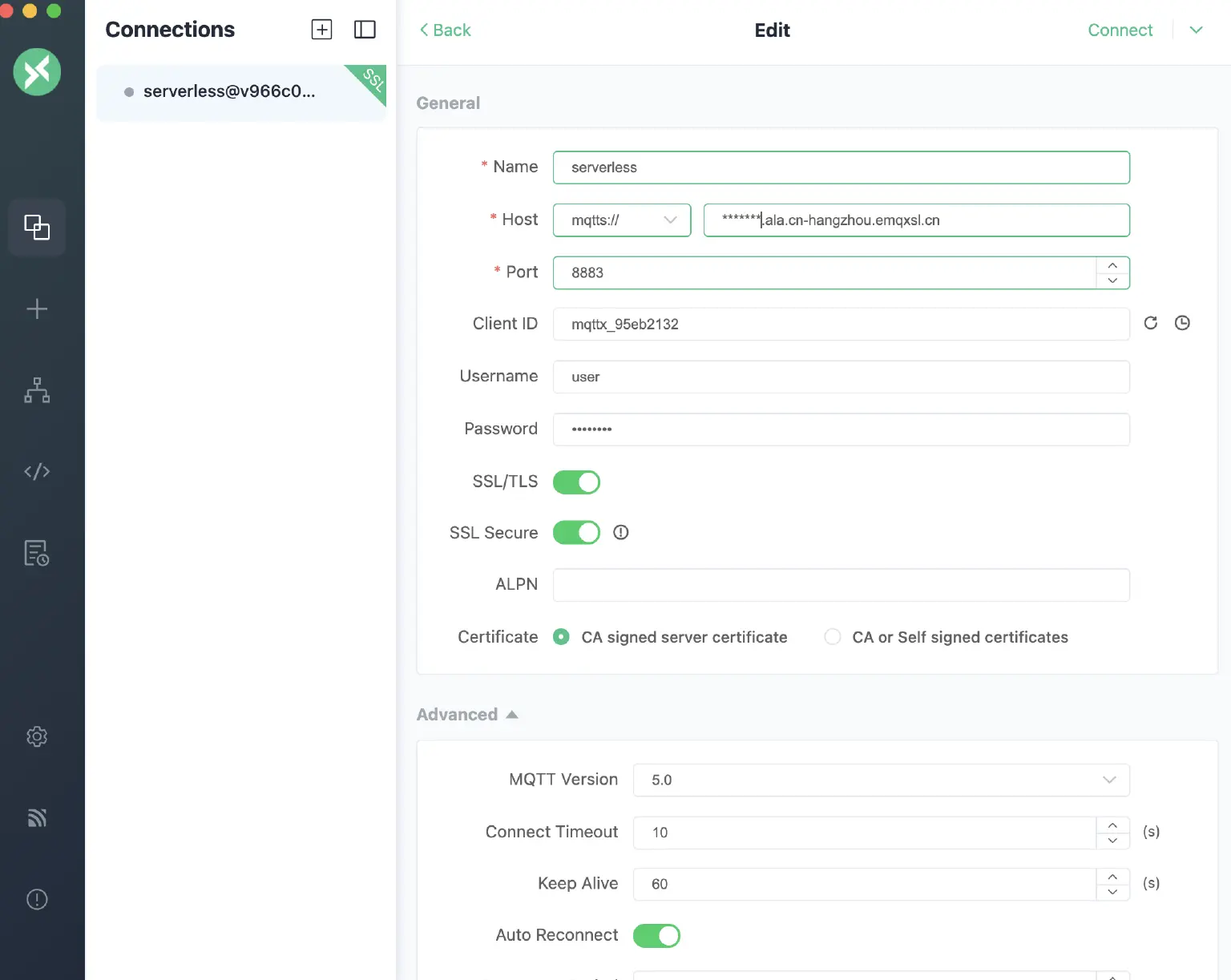
Once connected, add a new subscription. In the Topic field, type emqx/esp32. If you see the following content:
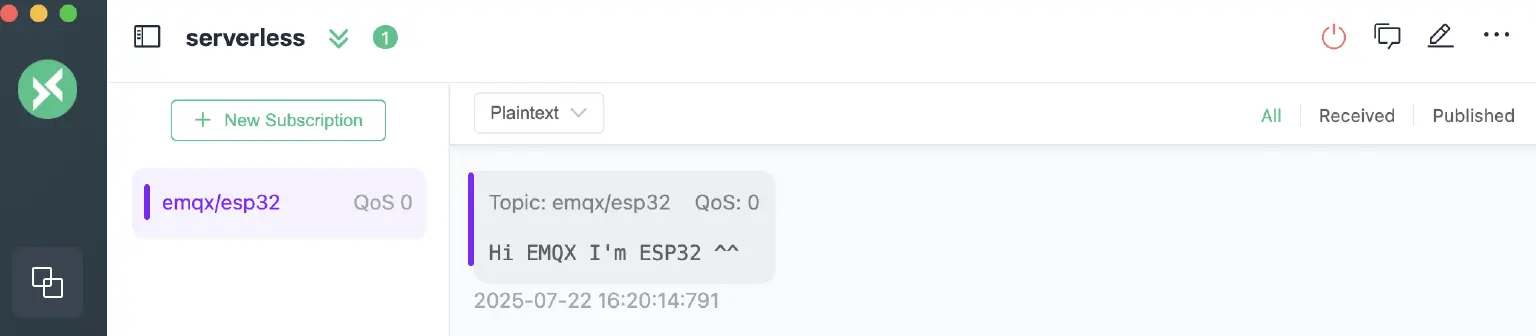
Congratulations! Your device has successfully connected to MQTT.
Troubleshooting: What if I'm Not Receiving Messages?
If you're not seeing messages come through, here's a quick diagnostic guide:
First, log in to your EMQX Serverless dashboard and check if your ESP32 device is listed as connected.
- If your device is NOT listed:
This likely indicates an issue on your device's end.- Double-check the address, username, and password specified in your source code.
- Verify your network status and Wi-Fi information.
- If your device IS listed:
The problem is probably with your MQTTX connection or the topic you've subscribed to.- Re-verify the address, username, and password you've entered in MQTTX.
Coming up Next
In the next blog post, we'll dive into how the ESP32 can "expose" its control capabilities. We'll use the MCP protocol to register interfaces for brightness and volume adjustment. This will allow a Python client application using MCP to access and list all the tools installed on your ESP32.
Resources
- Learn more about the MQTT protocol:Developer Guide | EMQX Docs
- Register EMQX Serverless for free - Secure, Scalable, and Serverless MQTT Messaging
- MQTT client tool:MQTTX: Your All-in-one MQTT Client Toolbox
- ESP32 official website:ESP32 Wi-Fi & Bluetooth SoC | Espressif Systems