From Voice to Vision: The Final Step in Building Your AI Agent with ESP32 and MCP over MQTT
| Chapter | Feature | Difficulty |
|---|---|---|
| 1 | Overview: Background + Environment Setup + Device Online | ★ |
| 2 | From "Command-Based" to "Semantic Control": MCP over MQTT Encapsulation of Device Capabilities | ★★ |
| 3 | Integrating LLM for "Natural Language → Device Control" | ★★ |
| 4 | Voice I/O: Microphone Data Upload + Speech Recognition + Speech Synthesis Playback | ★★★ |
| 5 | Persona, Emotion, Memory: From "Controller" to "Companion" | ★★★ |
| 6 | Giving the AI "Eyes": Image Acquisition + Multimodal Understanding | ★★★ |
Recap: The Intelligent Control Pipeline from Text to Voice
Through the operations in the previous articles of this series, we have endowed smart devices with persona, emotion, and memory, evolving them from simple "command executors" into genuine "emotional companions" that truly understand you.
By setting a unique communication style for the large language model(LLM), incorporating emotional expression mechanisms, and integrating persistent user preferences and conversation history, we built an AI agent capable of understanding context and expressing emotional warmth. With support for voice interaction and MCP over MQTT control, the agent delivers a more natural and considerate interactive experience.
This Article's Goal: Giving the Agent Visual Perception
Building on the foundation of hearing, persona, and memory, in this article, we will give our agent "eyes." This will allow it to perceive and understand images of the real world, leading to more natural and vivid interactions. We will primarily implement the following capabilities:
- Real-time Image Acquisition: The agent analyzes a user's command and calls the ESP32 camera to capture an image and upload it to a cloud-based multimodal LLM.
- Multimodal Understanding & Human-like Feedback: The multimodal LLM analyzes the image content and combines it with emotional expression to generate a human-like response, enabling the agent to not only understand what it sees but also express itself vividly.
- Voice Output: A TTS service synthesizes the agent's response into natural speech, which is then played back by the ESP32, creating an immersive, "what you see is what you hear" interactive experience.
Visual Perception Workflow
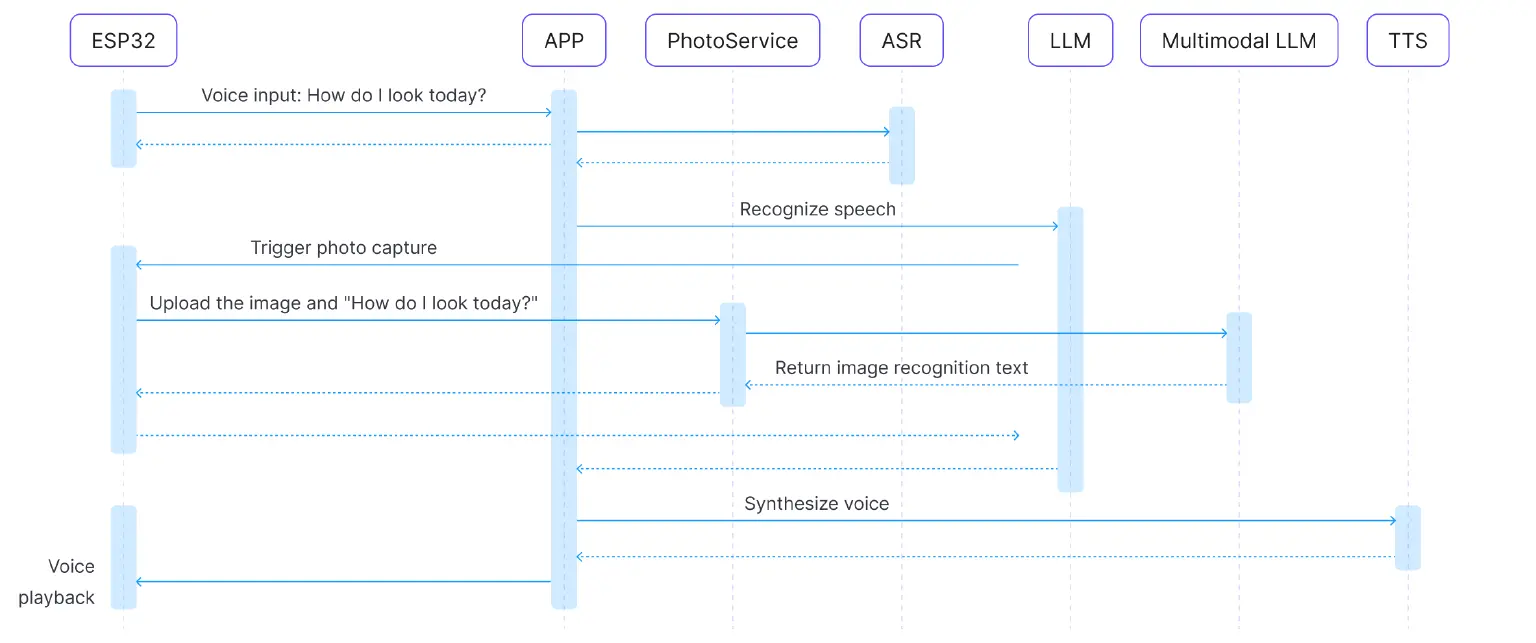
- User Inquiry: Record the audio and upload it to the cloud.
- Speech Recognition + LLM Orchestration: ASR recognizes the speech, and the LLM orchestrates a camera tool deployed on the device via MCP.
- Trigger Photo Capture: The MCP over MQTT call triggers the ESP32 camera to take a picture.
- Image Upload: The captured image is uploaded to the multimodal model service.
- Multimodal Understanding: The model combines the user's question with the image to analyze it.
- Emotional Feedback: A human-like response is generated, such as a compliment or suggestion.
- Voice Synthesis + Transmission: The response is converted into audio and sent back to the ESP32 device.
- Playback Output: The ESP32 plays the voice response.
Key Technical Details
Image Acquisition and Upload
We use MCP over MQTT to orchestrate a tool deployed on the ESP32. Based on the tool's description provided by MCP, the LLM can recognize a wide range of vague scenarios that require a photo, making the agent smarter and more flexible than one limited to passive, pre-defined commands. For example:
- "What do you think of my outfit today?"
- "How do I look today?"
- "Can you take a look at this and tell me what it is?"
The ESP32-CAM module is used to support JPEG compression for upload. The ESP32 handles the image upload.
Multimodal Understanding
We use a large language model with both image and text input capabilities. The inputs include the user's speech recognition result and the captured image. The output is an emotional, natural language response.
Emotional Feedback
- Responses can be tailored to a specific persona (e.g., gentle, humorous).
- The system automatically adjusts the tone to be either encouraging or suggestive, based on the recognition results.
For details on audio processing, please refer to our previous article. We will not elaborate on it here.
Implementation Steps
ESP32 Device Side
The ESP32 device implements audio recording and MQTT uploading, camera capture and image data stream uploading, and synthetic voice playback through a speaker.
The following is a snippet of the code for sending the captured image to the image recognition service:
char *http_send_image(char* vision_explain_address, char* question) {
    const size_t image_len = image_jpg_end - image_jpg_start;
    size_t b64_len;
    mbedtls_base64_encode(NULL, 0, &b64_len, (const unsigned char *)image_jpg_start, image_len);
    unsigned char *b64_buf = malloc(b64_len);
    if (b64_buf == NULL) {
        ESP_LOGE(TAG, "Failed to allocate memory for base64 buffer");
        return NULL;
    }
    mbedtls_base64_encode(b64_buf, b64_len, &b64_len, (const unsigned char *)image_jpg_start, image_len);
    cJSON *root = cJSON_CreateObject();
    cJSON_AddStringToObject(root, "role", "user");
    cJSON *content_array = cJSON_AddArrayToObject(root, "content");
    // First content item: image
    cJSON *content_item = cJSON_CreateObject();
    cJSON_AddStringToObject(content_item, "type", "image_url");
    cJSON *image_url_obj = cJSON_CreateObject();
    char *image_url_str;
    const char *prefix = "data:image/jpg;base64,";
    image_url_str = malloc(strlen(prefix) + b64_len + 1);
    strcpy(image_url_str, prefix);
    strcat(image_url_str, (char *)b64_buf);
    cJSON_AddStringToObject(image_url_obj, "url", image_url_str);
    cJSON_AddItemToObject(content_item, "image_url", image_url_obj);
    cJSON_AddItemToArray(content_array, content_item);
    // Second content item: text question
    cJSON *text_content_item = cJSON_CreateObject();
    cJSON_AddStringToObject(text_content_item, "type", "text");
    cJSON_AddStringToObject(text_content_item, "text", question);
    cJSON_AddItemToArray(content_array, text_content_item);
    char *post_data = cJSON_Print(root);
    char local_response_buffer[MAX_HTTP_OUTPUT_BUFFER] = {0};
    esp_http_client_config_t config = {
        .url = vision_explain_address,
        .event_handler = _http_event_handler,
        .user_data = local_response_buffer,
    };
    esp_http_client_handle_t client = esp_http_client_init(&config);
    esp_http_client_set_method(client, HTTP_METHOD_POST);
    esp_http_client_set_header(client, "Content-Type", "application/json");
    esp_http_client_set_post_field(client, post_data, strlen(post_data));
    char *response_string = NULL;
    esp_err_t err = esp_http_client_perform(client);
    if (err == ESP_OK) {
        ESP_LOGI(TAG, "HTTP POST Status = %d, content_length = %lld",
                 esp_http_client_get_status_code(client),
                 esp_http_client_get_content_length(client));
        ESP_LOGI(TAG, "Response: %s", local_response_buffer);
        cJSON *response_json = cJSON_Parse(local_response_buffer);
        if (response_json != NULL) {
            cJSON *response_item = cJSON_GetObjectItem(response_json, "response");
            if (cJSON_IsString(response_item) && (response_item->valuestring != NULL)) {
                response_string = strdup(response_item->valuestring);
            }
            cJSON_Delete(response_json);
        } else {
            ESP_LOGE(TAG, "Failed to parse response JSON");
        }
    } else {
        ESP_LOGE(TAG, "HTTP POST request failed: %s", esp_err_to_name(err));
    }
    esp_http_client_cleanup(client);
    cJSON_Delete(root);
    free(post_data);
    free(b64_buf);
    free(image_url_str);
    return response_string;
}
Server Side
The LLM identifies the user's intent and uses MCP over MQTT to call the photo-taking tool. This section also covers calling ASR, the multimodal model, and TTS.
The following is a code snippet showing how the LLM loads MCP tools and responds to the user's question:
self.system_prompt = """
                In this conversation, you will act as an emotional assistant.
                You have visual capabilities. When asked visual-related questions like "How do I look today?" or "What brand is this piece of clothing?", you can call the "explain_photo" tool.
                This tool can take a photo for the owner, provide a review of it, and return the review to you.
                Based on the question I provide, generate a warm response. Note: keep it under 50 characters.
                """
if not self.mcp_tools_loaded:
    await self.load_mcp_tools()
query_info = AgentWorkflow.from_tools_or_functions(
    tools_or_functions=self.tools,
    llm=self.llm,
    system_prompt=self.system_prompt,
    verbose=False,
    timeout=180,
)
message = self._build_chat_messages(message)
handler = query_info.run(chat_history=message)
output = None
async for event in handler.stream_events():
    if isinstance(event, AgentOutput):
        output = event.response
    response = process_tool_output(output)
logger.info(f"Agent response: {response}")
return str(response)
The following is the code snippet for the multimodal LLM recognizing the captured image:
def get_response(request: VisionRequest) -> VisionResponse:
    client = OpenAI(
        api_key=os.getenv("DASHSCOPE_API_KEY"),
        base_url="https://dashscope.aliyuncs.com/compatible-mode/v1",
    )
    completion = client.chat.completions.create(
        model="qwen-vl-plus",
        messages=[request],
    )
    # Extract the message.content field of the first choice
    content = ""
    if completion.choices and hasattr(completion.choices[0], "message"):
        content = completion.choices[0].message.content
    return VisionResponse(response=content)
Example Scenario: Outfit Review
User: "How do I look today?"
Agent: "You look so energetic today, and your figure is great! So radiant and confident."
user: How do I look today?
2025-08-25 17:02:24,453 - Got msg from session for server_id: acdead460b63434182901639c72ba065, msg: root=JSONRPCRequest(method='tools/call', params={'name': 'explain_photo', 'arguments': {'question': 'How do I look today?'}}, jsonrpc='2.0', id=6)
2025-08-25 17:02:26,818 - Received message on topic $mcp-rpc/d002adf805fb4b70bb23d3f2fa0355be/acdead460b63434182901639c72ba065/ESP32 Demo Server: {"jsonrpc":"2.0","id":6,"result":{"content":[{"type":"text","text":"You look so energetic today, and your figure is great! So radiant and confident."}],"isError":false}}
2025-08-25 17:02:30,771 - Agent response: You look so energetic today, and your figure is great! So radiant and confident.
Areas for Improvement
Enhance memory and retain conversation history, allowing the LLM to provide more meaningful responses based on past interactions.
Final Words: Towards Commercially Viable Agent Services
After exploring this series of six articles, we've journeyed from device onboarding and MQTT communication to EMQX MCP device tool invocation, gradually implementing features like voice interaction, emotional feedback, and multimodal perception. A simple "command executor" has grown into an intelligent agent with understanding and personality. This process not only validates the feasibility of technical integration but also lays the foundation for building real, usable products.
Next, we will progressively refine these capabilities into a commercially viable service:
- Voice Optimization and Real-time Response: By introducing a streaming voice service based on MQTT control and WebRTC, we can achieve real-time speech recognition, synthesis, and playback. This will significantly reduce interaction latency and provide a smoother, more natural experience.
- Large-scale Device Onboarding and Global Deployment: Relying on EMQX's high-concurrency, low-latency MQTT service and global regional deployment capabilities, we can enable massive devices to connect efficiently from nearby locations. This provides stable support for large-scale user and device scenarios.
- Data Compliance Assurance: For products with high privacy and security requirements, such as emotional companion agents, we provide secure device authentication, encrypted storage for sensitive data, and data access solutions for large models that comply with international standards like EU GDPR and SOC2. EMQ's rich experience will ensure the smooth deployment of agent services worldwide.
EMQ will collaborate with ecosystem partners in hardware, large models, OTA, and more to jointly promote the launch of more mature and reliable agent products and services. We will continue to release more solutions and insightful articles on these topics, so please stay tuned!
Resources
- Source code for this article: esp32-mcp-mqtt-tutorial/samples/blog_6 at main · mqtt-ai/esp32-mcp-mqtt-tutorial
- Alibaba Multimodal API Documentation: https://www.alibabacloud.com/en/product/modelstudio